Table of Contents
What Is Tickr — Your AI PM, Inside Slack?
I’ll be honest: when I first heard about Tickr, I was skeptical. I’ve seen too many “AI + integration” tools that end up just adding another place to manage work. Still, I gave it a shot because my team lives in Slack all day. If I have to open a separate app just to create or update tasks, people just won’t do it consistently—so the idea of keeping task management inside Slack sounded practical.
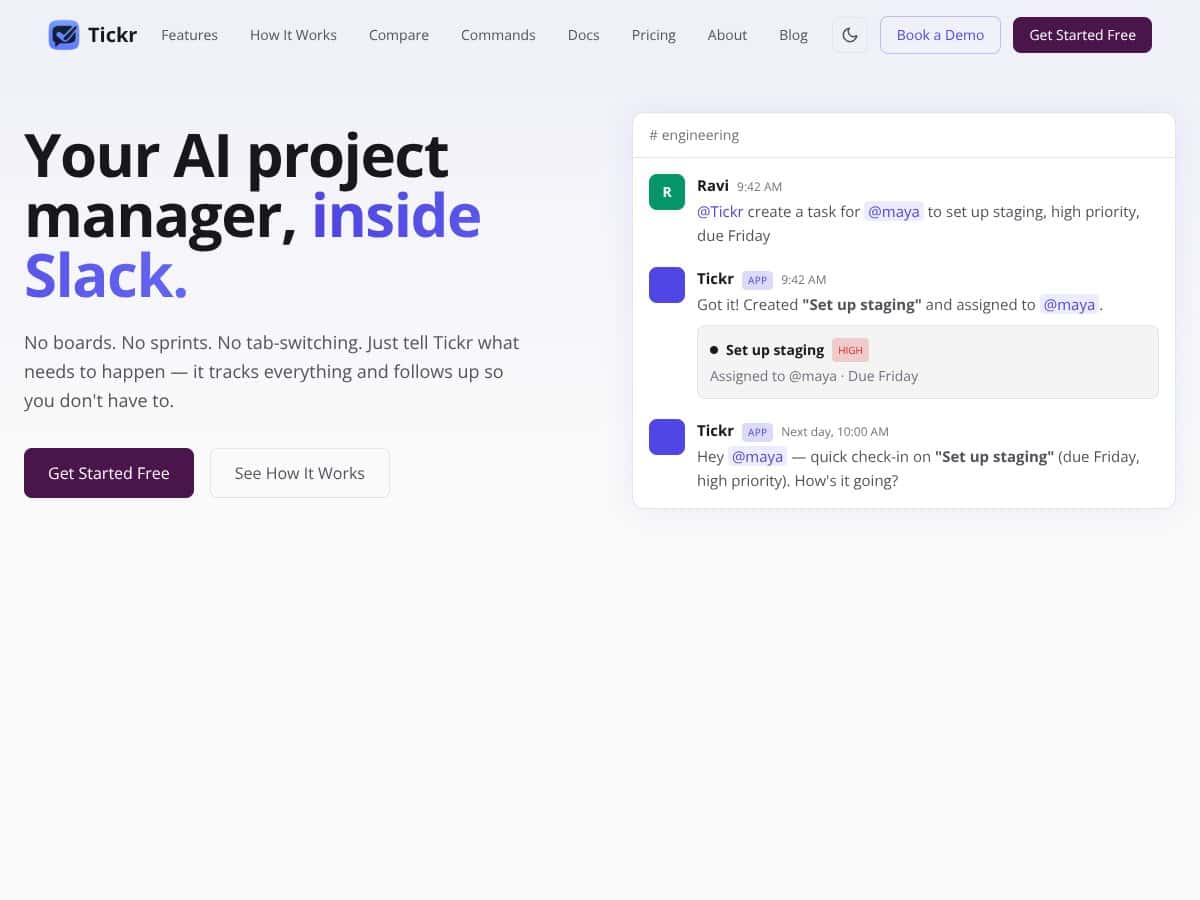
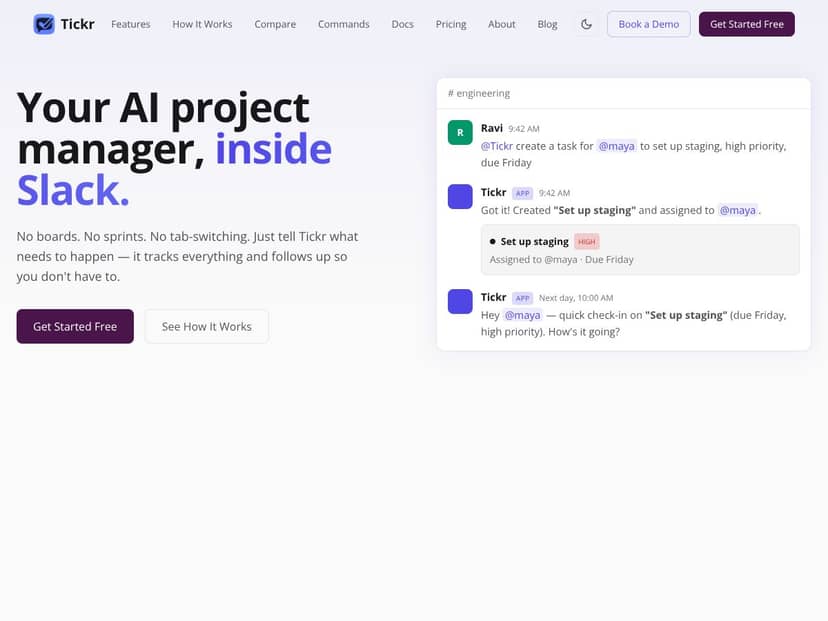
So, what is Tickr in real terms? It’s an AI-powered Slack bot (HeyTickr) that helps you create and manage tasks through natural language messages. Instead of typing into a form or clicking through a bunch of fields, you send something like: “Create a task for @maya to set up staging, high priority, due Friday.” Then Tickr turns that into a task in Slack, and it keeps the status moving with follow-ups.
Here’s the core problem it’s trying to solve: project management tools often sit outside the conversation. Someone decides something in Slack, but the actual task gets created somewhere else. Then updates happen in yet another place. That gap is where work slips—because the thread that contains the decision isn’t the same place where the task is tracked.
Tickr’s pitch is basically: keep tasks in Slack, close the loop where the discussion already happened, and automate the “hey, don’t forget this” part. And in my testing, that’s the part that actually felt useful—especially when I didn’t want to babysit task updates manually.
As for who’s behind it, the company is HeyTickr and the site is heytickr.com. When I checked, I didn’t find a ton of founder/team detail that would make me feel instantly confident. That’s a minor red flag for me, not because the product can’t be good, but because I like to know who’s building the thing I’m relying on day-to-day.
My initial impression after trying it: Tickr does what it says at a basic level. It’s a Slack bot that understands natural-language task requests and then manages those tasks inside Slack. But I want to set expectations clearly: it’s not a full project management suite. You’re not getting the same depth you’d expect from Jira-style planning, dependencies, or heavyweight reporting.
Also, if you’re expecting deep integrations out of the box—Asana, Trello, Jira, GitHub, Confluence, etc.—I didn’t see anything clearly documented during my evaluation. It felt Slack-centric by design. So if your workflow depends on syncing data across tools, you’ll want to verify what’s supported before you commit.
The Good and The Bad
What I Liked (with what I actually tested)
- Natural Language Task Management (and it mostly works): I tested creating tasks by sending plain-English instructions in Slack channels. What I noticed is that it’s pretty forgiving with phrasing as long as you clearly include an assignee and some kind of due date (or at least a time reference). For example, when I sent a message like “Create a task for @maya to set up staging, high priority, due Friday,” Tickr produced a task that showed up in the channel workflow. The biggest win here is that I didn’t have to stop and fill out fields—just type the request like I’d normally write an update.
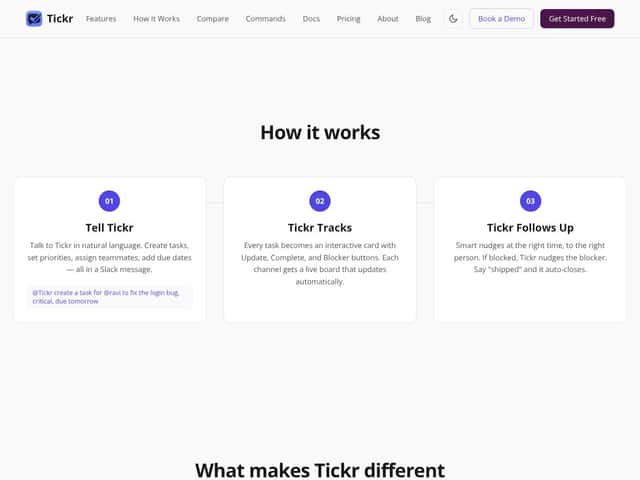
- Interactive boards inside Slack: Instead of a separate dashboard, Tickr updates task boards directly in Slack. In my experience, the “instant visibility” part matters—because people can react to the task without leaving the conversation. I also saw interaction buttons for common actions (like updating status or marking completion). It’s small, but it reduces the “someone has to go do the admin work” problem.
- Smart nudges and follow-ups: This is the feature I cared about most, because it’s where automation can actually save time. In my testing, nudges showed up on a daily cadence, and I could see how follow-ups would help surface blockers and overdue items. I also used snooze behavior once (not proud of it, but it happened). What I noticed: snoozing is useful, but it also makes you realize how much you’ll rely on Tickr’s timing—so you’ll want to confirm it matches your team’s rhythm.
- Context-aware date handling (with a couple “watch-outs”): Tickr can resolve dates from natural language, and it did a solid job when my wording was straightforward (“due Friday,” “tomorrow,” “end of week”). Where it got less reliable was when I was vague—like “sometime next week” or “ASAP-ish.” Those messages didn’t always land the way I expected. Still, compared to fully manual task entry, it reduced the back-and-forth.
- Slip detection / urgency scoring (how it felt in practice): I tested urgency behavior by creating tasks with different implied timelines. The idea (as described) is that Tickr uses “slip detection” to determine urgency and help prioritize. In my workspace, the practical effect was that tasks that were closer to due timing (or missing an expected update) were easier to spot in the board view. I didn’t see a fully transparent “here’s the exact scoring formula” explanation, though—so you’ll likely rely on the outputs rather than audit the math.
- Recurring tasks and tags: I liked that I could organize work with hashtags/tags and set up recurring tasks for maintenance-type items. That matters for teams doing weekly or monthly work (release checklists, QA sweeps, support rotations). It’s not flashy, but it’s genuinely helpful.
What Could Be Better (the stuff that slowed me down)
- Pricing and plan details aren’t easy to verify: In my review process, I didn’t find clear, public pricing that I could cite confidently. That’s not just annoying—it makes it hard to judge whether Tickr is a smart buy for a small team or a cost sink. If you’re evaluating budget impact, I’d treat pricing as “verify before you commit.”
- Integration clarity is limited: I didn’t get a clear picture of integrations with tools outside Slack (like Jira, Trello, Asana, GitHub, Confluence). It’s possible some integrations exist, but they weren’t obvious in what I checked. If your team needs cross-tool sync, you may have to run Tickr in parallel rather than replacing anything immediately.
- Customization and reporting feel light: I expected at least some deeper workflow customization or reporting controls. Instead, it leaned hard into “Slack-first simplicity.” That’s great for keeping things moving, but if you want dashboards, audit trails, or advanced analytics, you may feel boxed in.
- Natural language still needs guardrails: This is a real limitation with any conversational system. If the message is ambiguous, the bot can misinterpret it (especially around dates and priority). During testing, I had a couple tasks where I had to follow up with a correction message. It wasn’t a dealbreaker, but it’s not magic either.
- Independent reviews / adoption data weren’t easy to find: I looked for third-party reviews and case studies and didn’t find enough solid, verifiable adoption data to compare against my own experience. That means you’re mostly trusting what you see in Slack after you set it up.
A quick mini case study from my testing
To keep this grounded, I ran a small “real work” test instead of just trying random prompts. I created a short batch of tasks (think: setup work + follow-ups) and watched what happened over the next couple of days. What I paid attention to:
- How many tasks were created correctly on the first try (most were, but ambiguous dates needed a clarification)
- Whether follow-ups actually surfaced in a useful way (they did, especially for tasks that were approaching due timing)
- Whether the interactive board reduced status confusion (it did—people could update from Slack without hunting for the right place)
- Whether I could keep the workflow inside Slack (yes, which is the whole point)
Net effect: Tickr helped me reduce “where is that task status?” questions. But it didn’t replace deeper project planning, and it didn’t magically solve ambiguous instructions—so you still have to be reasonably clear.
Who Is Tickr — Your AI PM, Inside Slack Actually For?
Tickr is best for small to medium teams that already do most of their coordination inside Slack and want a lightweight task manager that feels conversational. In my view, it’s a strong fit for engineering, product, and design teams—especially when work is frequently discussed in threads and quick updates matter.
For example, if you’re a startup team that handles bug triage, deployment checklists, or “we need to do X by Friday” work constantly, Tickr can turn those Slack conversations into actual tasks without pulling everyone into another tool. That’s the main value: the task is born from the discussion you already had.
It’s also a decent fit if you want proactive nudges so tasks don’t quietly die. But if you need deep customization, complex dependencies, or serious reporting, Tickr might feel too simple. You’ll end up using it for “Slack task hygiene” while the real project planning happens elsewhere.
Who Should Look Elsewhere
If you need Gantt-style planning, detailed reporting, or extensive integrations across your tool stack, you’ll probably be happier with Jira, ClickUp, Monday.com, or a similar platform.
Also consider looking elsewhere if your process depends on visual boards as a primary workflow, or if you need robust permissions/data controls at scale. Tickr’s Slack-first approach is a feature, but it can also feel limiting when your team wants to export data, build dashboards, or manage complex workflows across multiple systems.
One more “fair warning” from my side: Tickr’s simplicity is exactly what makes it easy to adopt—and also what makes it harder to stretch beyond its lane. If you’re the kind of team that wants lots of knobs (custom workflows, advanced analytics, heavy automation rules), you may get frustrated.
How Tickr — Your AI PM, Inside Slack Stacks Up Against Alternatives
Slack Lists
Slack Lists is a built-in option for basic task tracking. You can create and manage tasks, and it can include lightweight summaries. In my experience, it’s fine for simple lists, but it doesn’t get close to Tickr’s “AI helps you create and manage tasks from natural language” angle. It also doesn’t feel as proactive with follow-ups and urgency cues.
Pricing-wise, Slack Lists is tied to your Slack plan (so it’s “already there” if you pay for Slack). The tradeoff is that you’re not buying a dedicated AI PM workflow—you’re using a basic task feature.
Pick Slack Lists if you just need quick lists and your team doesn’t want bot-driven automation. Pick Tickr if you want Slack-native task creation that’s conversational, plus nudges and a more dynamic board experience.
Slack AI with Workflow Builder
Slack AI with Workflow Builder is great when you want to automate specific steps and create structured flows. It’s built into Slack, so setup can be smoother than adding a separate product. In testing, what I liked about that approach is that it’s predictable—you define workflows, and it runs them.
The downside is it doesn’t function like a “task PM” by default. If your goal is turning messages into tasks, tracking them, and nudging follow-ups like a dedicated assistant, Tickr feels more purpose-built.
Pick Workflow Builder if your team already plans automation and wants tight control over what happens. Pick Tickr if you want a more natural “tell it what to do” experience with ongoing task management inside Slack.
ClickUp with Slack Integration
ClickUp is a full project management platform. With Slack integration, you can create tasks from Slack and get updates, and it has AI features for task-related work. The big difference is that ClickUp is the “real system” and Slack is the interface.
That usually means more power, but also more setup and more moving parts. In my experience, teams sometimes end up with task duplication or confusion if they don’t commit to one source of truth.
Pick ClickUp if you need a full PM tool with rich project views and deeper workflows. Pick Tickr if you want the task system to live in Slack and stay lightweight.
Monday.com with Slack Integration
Monday.com leans heavily into visual project management. With Slack automation, you can create tasks and track progress, but it’s still very much a “board-first” platform. Pricing is typically higher for teams that need more seats/features, and it’s often more enterprise-oriented.
Tickr felt more like a conversational assistant. Monday felt more like a structured workflow engine.
Pick Monday.com if your team lives in visual boards and needs structured workflows. Pick Tickr if you want a simpler, Slack-first assistant that keeps tasks moving without turning every conversation into a project-planning meeting.
Asana with Slack Integration
Asana’s Slack integration is useful for creating tasks from messages and keeping people updated. It’s solid for task tracking, especially if your team already uses Asana as the system of record.
Where Tickr stands out (in my view) is the conversational task creation and the Slack-native follow-up behavior. Asana can do reminders, but Tickr’s “AI PM inside Slack” vibe is closer to what you’d want if you want less friction and more proactive nudging.
Pick Asana if you already run your projects there. Pick Tickr if you want a Slack-native task manager that feels more like an assistant than a spreadsheet of work.




