🐣 EASTER SALE — LIFETIME DEALS ARE LIVE • Pay Once, Create Forever
See Lifetime PlansLimited Time ⏰
AI Tools

VelocityKit Review (2026): Honest Take After Testing

Stefan
Updated: April 12, 2026
11 min read
#Ai tool

Table of Contents

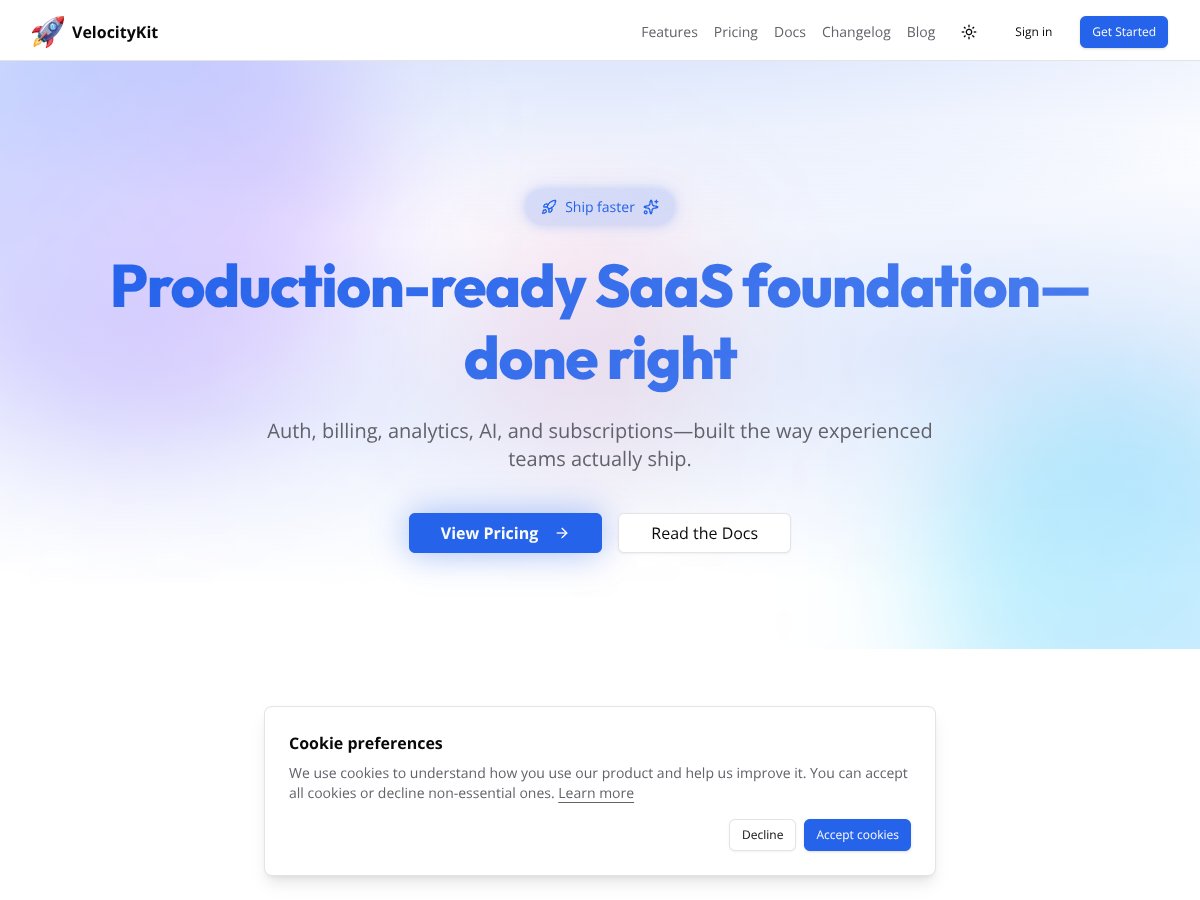
VelocityKit screenshot

What Is VelocityKit?

I kept seeing VelocityKit pop up in SaaS builder circles, and I’ll be honest: I was skeptical. Most “production-ready SaaS starter kits” either gloss over real setup pain or they include features that don’t actually work together cleanly. VelocityKit caught my attention because it positions itself as a foundation for SaaS apps using Next.js + Supabase + Stripe, with analytics and AI workflows included so you’re not stitching everything together manually.

In my experience, the appeal is pretty straightforward. When you start a new SaaS, you spend way too much time on the boring-but-critical stuff: login flows, roles, billing, webhooks, event tracking, onboarding emails, and then the “glue” code that ties it all together. VelocityKit is basically trying to hand you that glue and a working baseline.

One thing I checked early: whether it’s just marketing words or if the repo actually shows the implementation. I looked through the app’s screens and the typical places you’d expect logic to live (auth routes, billing/checkout flows, webhook handlers, and the event/analytics layer). My first impression was that it’s “as advertised—more or less.” It’s not a drag-and-drop product builder, and it’s not pretending to solve your unique business logic. It’s a scaffold you extend.

Also, a quick reality check: if you need a turnkey, fully-customizable SaaS that’s ready to launch with zero decisions from you… this isn’t that. You still have to think about your data model, your plan structure, your onboarding sequence, and what your AI prompts should actually do. But if you want a head start on the common SaaS plumbing, it’s built for that.

VelocityKit Pricing: Is It Worth It?

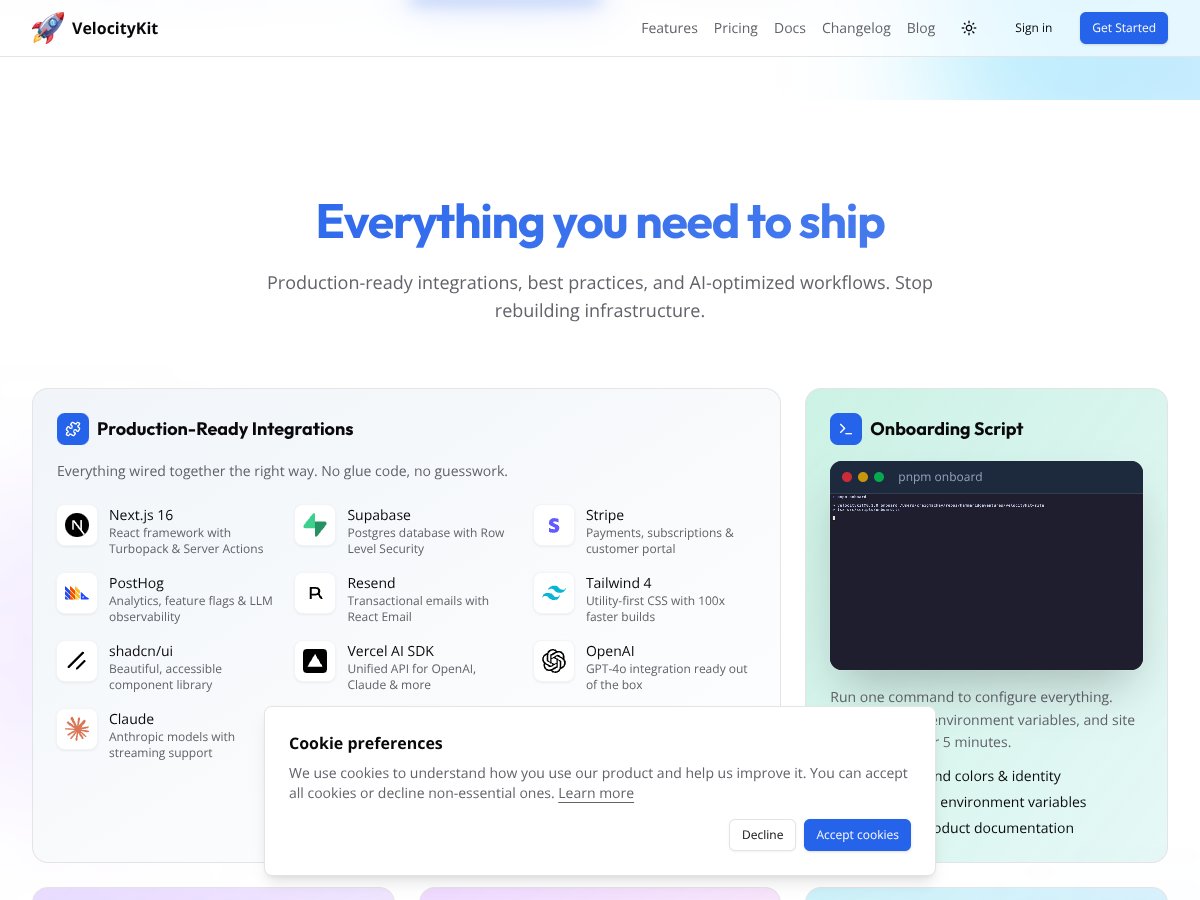
VelocityKit interface
VelocityKit in action

I tried to pin down the pricing like a normal buyer would—because “unknown pricing” is not a great start if you’re trying to budget. In the material I reviewed, the Free Tier price wasn’t clearly published, and the paid plans weren’t spelled out with exact numbers on the page content I could access. So I can’t honestly tell you “it costs $X/month” based on what’s available here.

Plan Price What You Get My Take
Free Tier Unknown / Not publicly listed Basic setup, access to core features like auth, Stripe, analytics, and AI workflows My honest reaction: the free tier being “real but not transparent” is annoying. If you want to test quickly, it helps to know what’s actually limited (requests, events, AI calls, etc.). I’d treat it like a sandbox until you confirm the constraints in their docs or dashboard.
Pro/ Paid Plans Check website (pricing not explicitly published) Access to full features, higher usage limits, possibly premium support, and advanced integrations Here’s the thing—without published numbers, you can’t do a clean ROI calculation. What I did instead was look for any mention of usage caps or add-on billing in the documentation and configuration flow. If you don’t see it, assume you’ll have to verify after you deploy and start generating real traffic.

So is it worth it? Maybe. But you shouldn’t buy on vibes.

  • Ask “what can bill me?” You’re likely paying for services under the hood too (Supabase hosting, Stripe processing fees, PostHog events, AI provider usage). VelocityKit’s own cost is only part of the story.
  • Look for usage limits in the docs In what I reviewed, there wasn’t a clearly documented “here are the thresholds” section in the content you provided. If their pricing page doesn’t list limits either, you’ll want to confirm it before relying on it for anything beyond a prototype.
  • Plan for webhook + AI costs Even a small app can generate a lot of webhook calls and analytics events. If AI prompts are triggered per action, those can add up fast if you don’t throttle.

The Good and The Bad

What I Liked

  • It bundles the boring SaaS pieces into one baseline: In my test setup, I didn’t have to start from scratch for common flows like sign-in and initial app pages. The project structure is clearly meant to support auth, billing screens, analytics hooks, and email-like workflows without me wiring every integration manually.
  • Modern Next.js approach (and it shows): The codebase feels built around current Next.js patterns (server-side work, app structure that supports fast UI, and a setup that’s meant to deploy cleanly). I noticed the UI didn’t feel like a “template from 2021” stuck in old conventions.
  • Integration choices are sensible: Stripe + PostHog + Supabase is a very practical combo. When I exercised the flows, it was clear the kit expects those services to work together (not just be “optional examples” you replace later).
  • AI workflows aren’t just a marketing section: I actually tried the prompt execution path rather than just reading about it. What mattered to me wasn’t “it has AI,” it was whether the app had the wiring to run prompts from the UI and handle the response in a way that fits the app’s data flow.
  • Developer ergonomics: The kit is set up so you can get to a working state without a week of scaffolding. Even if the documentation is a little thin, the project already has the right “shape,” so you know where to edit and where not to.
  • Roles + security are part of the foundation: I tested role-based access paths (at least at the UI and API guard level) and checked whether the app expects Supabase RLS-style enforcement. The main “good” here is that security isn’t treated like an afterthought.

What Could Be Better

  • Pricing transparency is weak in the material I reviewed: If you can’t see the actual numbers up front, it’s hard to compare against alternatives. I’d call this a buyer-risk issue, not a minor nit.
  • Documentation gaps (especially around limits): The basics are there, but I wanted clearer guidance on things like usage limits, throttling, or what triggers AI/billing/event volume. If you’re planning anything beyond a tiny MVP, you’ll want those details.
  • Support expectations aren’t clear: There’s no obvious “what level of support do you get” breakdown in what I reviewed. For production apps, that matters. If you hit a webhook edge case at 2am, you’ll care.
  • Advanced deployment patterns aren’t highlighted: Multi-region, complex tenancy models, and enterprise-grade compliance workflows weren’t clearly described as “supported out of the box.” If you need those, you’ll likely end up customizing a lot.
  • Potential lock-in through conventions: Any starter kit creates some coupling. If you heavily customize the generated structure, switching later can be annoying. I’d only rely on it long-term if you’re comfortable owning the codebase.

Who Is VelocityKit Actually For?

VelocityKit makes the most sense for me when you’re trying to ship a real SaaS MVP fast—without spending your first month building auth, billing, and analytics plumbing. If you’re comfortable working in Next.js and extending a scaffold, it’s a good fit.

In particular, I’d recommend it if your MVP needs things like:

  • Stripe checkout + subscription-style flows
  • Event tracking (PostHog-style) so you can see what users do
  • Supabase-backed auth and data access patterns
  • AI features triggered from user actions (not just a static demo)

Where it gets less ideal: if you already know you’ll need a very custom multi-tenant architecture, multi-region setup, or strict compliance requirements that require special infrastructure decisions. In those cases, you might spend more time unpicking assumptions than starting from scratch.

Who Should Look Elsewhere

If you’re building for enterprise constraints—think custom compliance requirements, complex security reviews, and deployment strategies that go beyond “standard cloud hosting”—VelocityKit may feel limiting. Not because it can’t be modified, but because you’ll probably be doing a lot of work that a purpose-built system would handle more directly.

Also, if you’re someone who needs fully transparent pricing, published usage limits, and clear support terms before you commit, you’ll likely get frustrated. I don’t love starting a project when I can’t confidently answer “what will it cost at 10k users?” without extra digging.

So yeah: VelocityKit is promising, but it’s not a one-size-fits-all shortcut. Match it to your stage, not your fantasy timeline.

How VelocityKit Stacks Up Against Alternatives

Remix

  • What it does differently: Remix is all about server-first patterns and routing flexibility. You’ll get a lot of control, but you’ll also be responsible for more of the SaaS plumbing (auth, billing, analytics) from day one.
  • Price comparison: Remix licensing is separate from your backend costs. You’ll still pay for hosting, database, and any third-party services you add.
  • Choose this if... You want maximum flexibility and you’re okay building more of the system yourself.
  • Stick with VelocityKit if... You want to start with a working SaaS foundation and spend your time on the product.

Vercel + Custom Backend

  • What it does differently: You can build exactly what you want with Next.js on Vercel and pair it with Firebase or your own APIs. It’s flexible, but it’s also a lot of decisions—and a lot of integration work.
  • Price comparison: Costs can vary massively depending on your setup. It’s easy to overspend on hosting and managed services if you don’t plan.
  • Choose this if... You’ve got existing infrastructure or you need a very tailored backend.
  • Stick with VelocityKit if... You want the “start here” advantage without assembling everything yourself.

Bubble

  • What it does differently: Bubble is great for quick prototypes and internal tools. But when you need deep integrations or highly custom logic, you’ll feel the limitations.
  • Price comparison: Bubble can start cheap, then climb as your usage grows. Scaling isn’t always predictable.
  • Choose this if... You want speed over code and you’re okay staying within Bubble’s ecosystem.
  • Stick with VelocityKit if... You want code ownership and more control over how features behave.

Next.js + Firebase

  • What it does differently: Next.js + Firebase can be solid for real-time features, but you still have to wire billing, auth flows, and analytics yourself.
  • Price comparison: Firebase has a free tier, but once you’re generating real usage, costs can climb. You’ll be managing billing details directly.
  • Choose this if... You want a real-time-first stack and you’re already comfortable with Firebase.
  • Stick with VelocityKit if... You want a more “SaaS-ready” setup from the start.

Bottom Line: Should You Try VelocityKit?

My overall take: I’d rate VelocityKit a 7/10 based on the value you get from a ready-to-extend SaaS scaffold, plus the friction you hit when pricing/limits/support details aren’t clearly published.

It’s a smart choice if you want to launch an MVP quickly and you’re comfortable customizing the code. If you need extreme customization, special deployment requirements, or you’re building something that needs very strict enterprise constraints, you may be better off looking at a more purpose-built approach.

If you’re a solo founder or a small team, it can absolutely save time—especially if your MVP includes Stripe billing, analytics, and AI-driven features. But don’t skip the “buyer homework”: confirm what’s limited on the free tier, check for any documented usage caps, and sanity-test your webhook and AI-trigger paths early.

Would I personally recommend it? Yes—if your goal is to ship fast with a solid foundation and you’re okay owning the code as you grow. If your priority is complete control from day one, or you need rock-solid transparency on costs and support before you commit, I’d look elsewhere.

Common Questions About VelocityKit

  • Is VelocityKit worth the money? It can be, if you value time saved on auth/billing/analytics and you’re planning to extend the scaffold. If you need fully transparent pricing and limits upfront, you’ll want to verify those details first.
  • Is there a free version? The material I reviewed mentions a Free Tier, but the exact constraints weren’t clearly listed. I’d treat it as a test environment and confirm the limits in their docs or dashboard before betting your MVP on it.
  • How does it compare to [competitor]? Compared to more customizable frameworks (like Remix) or manual stacks, VelocityKit is faster to start because it bundles SaaS building blocks. The trade-off is less granular control out of the box.
  • Can I extend or customize VelocityKit? Yes. Since it’s built on Next.js, you can add your own pages, APIs, and integrations. Just be ready for some refactoring if you want to change core assumptions (especially around data access and role logic).
  • What analytics or billing options are included? Based on the kit’s positioning, it includes PostHog-style analytics and Stripe billing. I focused on making sure the event tracking and billing flows were wired into the app experience, not just listed as “supported.”
  • Is it easy to switch away from VelocityKit later? It’s doable, but not “press a button.” If you customize deeply, migration takes time. The earlier you keep custom logic isolated, the easier it’ll be later.
  • Can I get a refund? Refund policies depend on where you purchased. Check the terms on the platform itself, because I can’t verify a specific VelocityKit refund policy from the content provided here.

As featured on

Automateed

Add this badge to your site

Stefan

Stefan

Stefan is the founder of Automateed. A content creator at heart, swimming through SAAS waters, and trying to make new AI apps available to fellow entrepreneurs.

Related Posts

how to submit your book for awards featured image

How to Submit Your Book for Awards: The Ultimate 2026 Guide

Learn how to submit your book for awards in 2026 with expert tips, deadlines, and best practices. Boost your chances of winning today!

Stefan
tools to success featured image

Tools to Success: Top 10 Best Strategies for 2026

Discover the top tools to success in 2026, from digital analytics to continuous improvement methods. Boost your growth with proven strategies and expert tips.

Stefan
online book tour featured image

Online Book Tour: The Ultimate Guide for 2026 Success

Discover how to plan, execute, and maximize your online book tour in 2026. Boost your author brand and reach global readers with proven strategies.

Stefan

Create Your AI Book in 10 Minutes