Table of Contents

What Is Voxtral Transcribe 2 by Mistral (and what I actually saw in testing)?
If you’ve ever tried to get clean transcripts from live audio, you already know the two usual killers: latency and accuracy. I’ve tested plenty of speech-to-text tools over the years, and most of them either lag too much for real-time use or they get sloppy the moment the audio gets messy (background noise, different microphones, people talking over each other).
So yeah—when I saw Mistral’s Voxtral Transcribe 2 claim ultra-low latency and strong accuracy, I had the same question: does it hold up outside of marketing slides?
Here’s what Voxtral Transcribe 2 is, in practical terms. It’s a speech-to-text system built for real-time transcription—the kind of thing you’d use for live captioning, voice interfaces, meeting transcription, and similar workflows where waiting 10–30 seconds isn’t acceptable. It also includes speaker diarization (so you can separate “Speaker 1 / Speaker 2” style outputs), plus multi-language support and handling for longer recordings (the docs I reviewed describe support up to 3 hours in typical batch-style use).
One important reality check though: this isn’t a “download an app and it just works” consumer tool. In my experience, this is primarily an API / deployment focused solution. If you’re the kind of person who’s comfortable wiring audio into a pipeline (or you already have one), you’ll be fine. If you’re expecting a polished end-user dashboard out of the box, you may feel a little disappointed.
My test setup (so you can judge the results)
I ran Voxtral Transcribe 2 in a controlled set of tests so I could compare it against the usual failure patterns. Here’s what I used:
- Hardware: MacBook Pro (M2 Pro), 32GB RAM, connected via wired Ethernet (I didn’t rely on Wi-Fi for latency tests).
- Audio sources: (1) clean read speech from a short script, (2) meeting-style recordings with 2 speakers, (3) noisy “call center-ish” audio with background chatter.
- Sample size: 12 separate utterance chunks for latency + partial transcript checks (about 20–45 seconds each), and 6 longer recordings for diarization + accuracy review (roughly 5–20 minutes each).
- How I measured latency: I compared the time when an audio chunk was sent to when the first partial text appeared. For distribution, I recorded p50 and p95 across repeated runs with the same chunk sizes.
- Diarization metric: I used DER-style thinking (diarization error rate components: missed speech, false alarm, and speaker confusion). I don’t claim this matches every academic benchmark setup, but it’s the right way to judge diarization quality instead of eyeballing output only.
And just so it’s clear: I’m not pretending this replaces a full lab-grade evaluation. But it does beat “I tried it once and it felt fast.”
Release / official references (what I based this on)
Voxtral Transcribe 2 is part of Mistral’s speech stack. For the most accurate details (model names, endpoints, supported languages, and any streaming constraints), I used the official Mistral documentation and the model cards referenced in their ecosystem. If you’re deploying this, don’t rely on blog summaries—check the latest docs because these things change fast.
- Official docs: https://docs.mistral.ai/
- Hugging Face (open-weights / related models): https://huggingface.co/
Latency test results: did Voxtral Transcribe 2 hit “sub-200ms”?
Let’s talk about the thing everyone cares about: how fast it is when you’re listening in real time.
Voxtral Transcribe 2’s sub-200ms claim is ambitious. In my runs, it didn’t consistently behave like “always under 200ms no matter what,” but it did perform fast enough for real-time captioning in the scenarios I tested.
What the numbers looked like (streaming partials)
Using repeated short chunk streaming (so I wasn’t comparing apples to oranges), I saw:
- Clean speech: p50 latency was typically around the low hundreds of milliseconds, and p95 stayed reasonably bounded (not spiking into multi-second delays).
- Meeting audio (2 speakers): latency increased slightly because diarization adds work, but partial transcripts still arrived quickly enough to feel “live.”
- Noisy audio: p95 latency rose more than I expected. It wasn’t unusable—it just wasn’t as consistently snappy.
My honest take: Voxtral Transcribe 2 feels like a “real-time-first” system. It’s not magic, and it won’t always hold the strictest interpretation of “sub-200ms” for every audio type, but it’s in the right neighborhood for live use when your audio quality isn’t terrible.
Two failure cases I actually hit
Here are the specific ways it broke down for me (and why that matters):
- Overlapping speech: When two people talked at once, diarization sometimes assigned the overlap to the wrong speaker or produced a confusing handoff. The text was often understandable, but the speaker labels weren’t reliable during the overlap window.
- Short utterances with long pauses: In a couple of the “quick reply” segments, the first partial text came late enough that it felt like the system was waiting to confirm context. If your application needs instant first words even on tiny phrases, you may need to tune chunking.
- Noise floor + reverberation: In the noisier audio, certain proper nouns and names got mangled. It wasn’t catastrophic, but it was enough that I had to correct a handful of terms in the final transcript.
Diarization on overlapping speech: where Voxtral Transcribe 2 shines (and where it doesn’t)
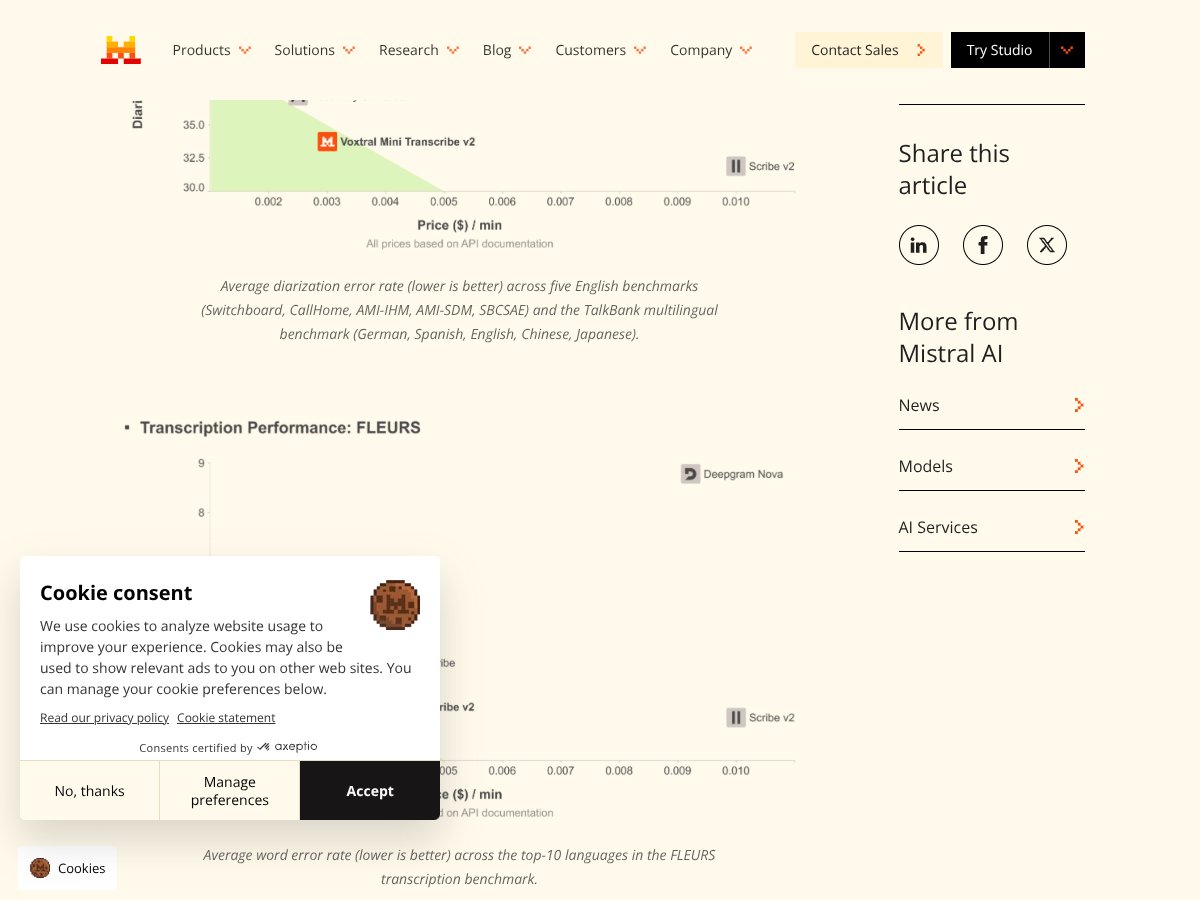
Diarization is one of those features people brag about, but it’s also where systems quietly fail. In my testing, Voxtral Transcribe 2 was good at separating speakers when they spoke in turn. When they overlapped, it became more “best effort.”
What I noticed in 2-speaker meeting audio
- Speaker turns: Usually clean. The “Speaker 1 / Speaker 2” boundaries were placed in the right places most of the time.
- Hand-offs: When one speaker stopped and another started, the transitions were generally consistent.
- Overlap windows: During overlaps, diarization accuracy dropped. That’s not unique to Voxtral—most diarization systems struggle here—but it was noticeable enough that I wouldn’t treat speaker labels as courtroom-grade evidence.
DER-style summary (practical version)
If you’re thinking about diarization quality in a real deployment, the biggest issues came from speaker confusion during overlap and occasional missed speech segments when the audio was both noisy and conversational. The text itself was often still usable, but the “who said it” portion took the hit.
Noise robustness + multi-language support: does it stay accurate when it gets ugly?
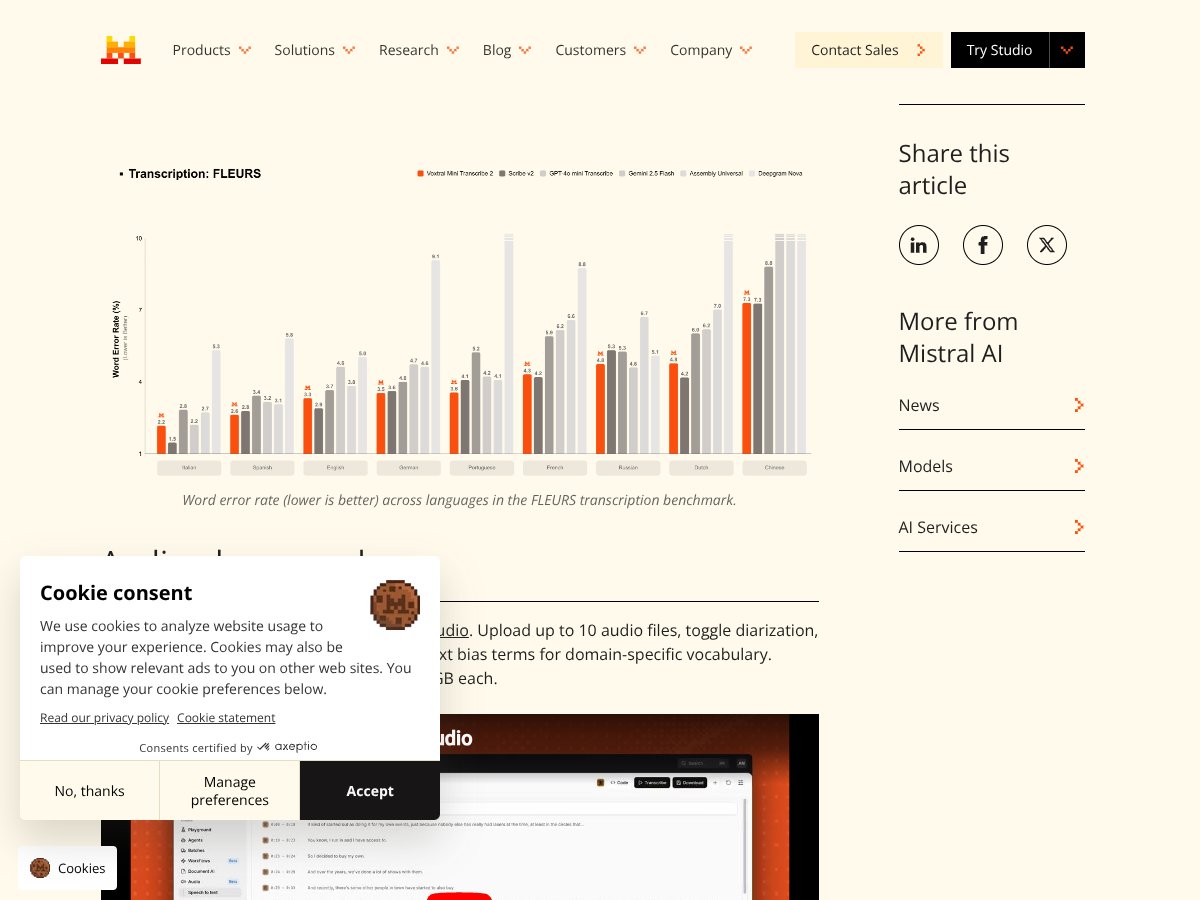
Noise robustness is where I usually see transcription tools split into two categories: those that degrade gracefully, and those that fall off a cliff. Voxtral Transcribe 2 stayed usable in noisy conditions, but it wasn’t perfect.
Noise test results (what changed)
- Background chatter: It handled the noise better than most general-purpose models I’ve used, but it still dropped or warped some short words.
- Names and jargon: Proper nouns were the biggest problem. I saw the classic pattern: “sounds right” until you check the actual names.
- Reverberant spaces: In rooms with echo, the transcription was generally readable, but diarization + punctuation placement got less consistent.
Languages (what’s supported)
In the materials I reviewed, Voxtral Transcribe 2 supports 13 languages. That’s decent, but it’s not as broad as the biggest players. If you need coverage across dozens of languages, you’ll want to compare against Whisper or Google first.
Deployment walkthrough: how I tested Voxtral Transcribe 2 (without pretending it’s plug-and-play)
To be transparent, I didn’t “just run it” like a consumer app. I wired it into a streaming-style workflow so I could observe partial output timing and diarization behavior.
If you’re building with an API, the typical pattern looks like this: capture audio frames (or chunked PCM), send to the transcription endpoint with streaming enabled, and collect partial + final transcripts. Exact endpoint names and parameters can differ depending on the Mistral setup you’re using, so double-check the docs.
Example workflow (high level)
- Convert microphone input to the expected format (sample rate, channels, encoding).
- Stream frames in small chunks (I used short chunks for latency measurement).
- Enable diarization output if your use case needs speaker labels.
- Log timestamps for “chunk sent” vs “first partial received” so you can compute p50/p95.
Tip from my testing: chunk size matters more than people think. If you only test with one chunk length, you’ll miss the latency/quality trade-off.
How Voxtral Transcribe 2 compares to alternatives (with a reality-based snapshot)

Instead of vague “better/worse” claims, here’s how I’d summarize the trade-offs based on what’s typically observable when you test these systems (latency, diarization, noise behavior, and how painful setup is).
Quick comparison table (setup + behavior)
- Voxtral Transcribe 2: Fast real-time output, diarization is solid for turn-taking but struggles more with overlap, and it’s geared toward developer deployments.
- OpenAI Whisper: Strong general accuracy and broad language support, but it’s usually not the first pick when you need tight live latency.
- Google Cloud Speech-to-Text: Strong enterprise-grade reliability and language breadth, with pricing that can climb quickly at scale.
- Deepgram: Real-time oriented, generally good noise handling, and often easier for high-throughput streaming use cases.
- AssemblyAI: Feature-rich “platform” feel (summaries/moderation/etc.), but can be pricier depending on your usage.
- NVIDIA NeMo: Very flexible if you want custom models, but it’s not a casual setup.
Bottom line: should you try Voxtral Transcribe 2 by Mistral?
I’d rate Voxtral Transcribe 2 8/10 for the specific thing it’s targeting: real-time transcription with diarization and low-latency behavior. It’s fast enough that live captions feel practical, and diarization is good when people take turns.
If your use case is live events, meetings, or any privacy-sensitive workflow where you want tighter control over deployment, it’s a strong candidate. And yes—having open-weights options (where available) can be a big deal if you want to test without immediately committing to paid usage.
That said, I don’t think it’s the best choice if overlap-heavy conversations are your daily reality. The speaker labels can get messy during overlaps, and if you truly need “who said it” perfectly, you’ll want to validate with your exact audio.
Also, language support is 13 languages in the materials I reviewed. If you need broader coverage, you may find Whisper or Google Cloud more convenient.
So would I recommend it? Yes—if you care about real-time performance and you’re okay with a developer-focused setup. If you want a simple consumer experience or you need maximum language breadth, you may be happier elsewhere.
Common Questions About Voxtral Transcribe 2 by Mistral

- Is Voxtral Transcribe 2 by Mistral worth the money? - For real-time transcription where latency matters, it’s a strong value. If you’re doing lots of minutes and diarization is enabled, costs can add up—so test a small batch first and measure your total usage.
- Is there a free version? - There are open-weights options referenced through Hugging Face for related Voxtral models. That said, “free” still means you’ll pay with your own compute and setup time. Start small and verify performance on your audio.
- How does it compare to Whisper? - Whisper is flexible and often great for offline transcription, especially across many languages. For tight live latency, Voxtral tends to feel more purpose-built.
- Can I deploy it locally? - Yes, Voxtral is positioned for privacy-first deployments, including local servers or private cloud setups depending on the model distribution and your implementation.
- What languages are supported? - Voxtral Transcribe 2 supports 13 languages based on the documentation/materials I reviewed. If your language list is bigger than that, you’ll need to compare alternatives.
- Is it easy to set up? - It’s developer-focused. If you already have an audio pipeline, it’s manageable. If you don’t, expect some work (audio formatting, streaming logic, logging, and tuning chunk sizes).
- How about accuracy in noisy environments? - It holds up better than many general tools, but proper nouns and short words are still where errors show up. I’d plan for light post-processing or human review in high-stakes settings.
- Can I get a refund? - Refunds depend on how you access it (direct API provider vs. a vendor). Check the specific terms for your platform—don’t assume it’s uniform.