Table of Contents

What Is Ziva.sh? (And What I Actually Tested)
I went into Ziva.sh with pretty normal skepticism. I’ve tried a bunch of “AI for developers” tools, and a lot of them either feel generic, or they don’t really match how Godot projects work day-to-day. So I wanted to see if Ziva was genuinely built for Godot—or if it was just another assistant wearing a game-dev skin.
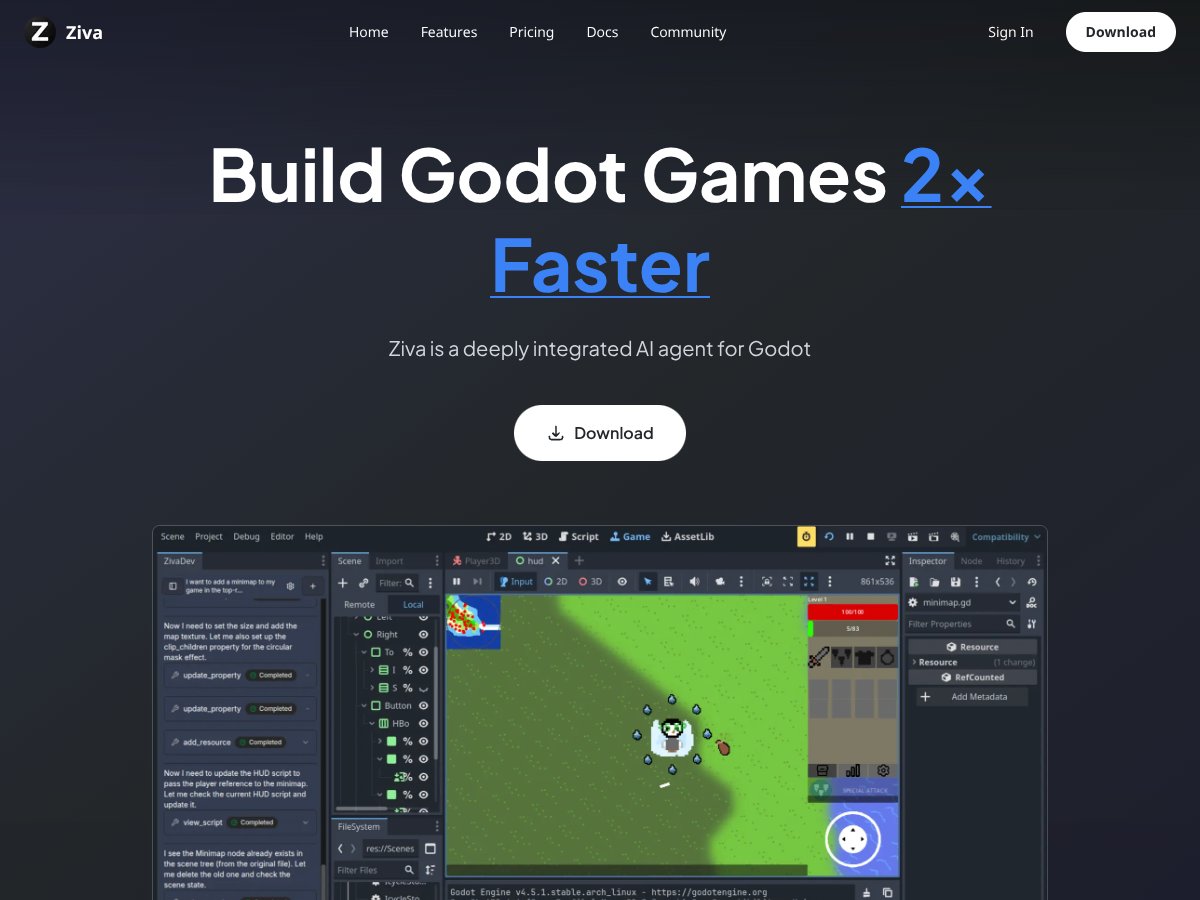
Here’s the short version: Ziva.sh is an AI assistant that runs inside the Godot editor. It’s designed to help with three big things:
- GDScript code generation and refactoring (with editor context)
- Scene + asset creation (including generating scene structure and content)
- Debugging by interpreting errors/logs and suggesting fixes
It also includes TileMap editing via natural language. That part sounded especially useful, because TileMap workflows are exactly where I personally end up doing a ton of repetitive “place this, set that, adjust tileset coords” work.
My testing setup (so you know what “works” means here)
To keep this review grounded, I tested Ziva.sh on a real Godot workflow instead of trying to force it to impress me with toy prompts.
- Engine: Godot 4.2.2 (GDScript)
- Project type: 2D side-scroller prototype with a TileMap-based level + a few gameplay scripts
- Tasks I attempted:
- Generate a basic TileMap layer workflow (prompt → result → verify in-editor)
- Refactor a GDScript movement script (before/after comparison)
- Reproduce and diagnose a debugger error using a real stack trace
- Generate a small scene snippet (nodes + signals wired up)
- Generate a small texture/sprite concept and confirm file import behavior
- How I measured “helpful”: whether it produced code that compiles/runs without constant manual patching, plus how long it took me to get to a working result
One more expectation check: Ziva isn’t a full visual scripting replacement and it won’t magically build your entire game. It’s an assistant that tries to accelerate specific steps. If you’re expecting drag-and-drop “press one button, ship a game” results, you’ll be disappointed. But if you want faster iteration loops inside Godot? That’s where it starts to make sense.
Ziva.sh Pricing: Is It Worth It in 2026?

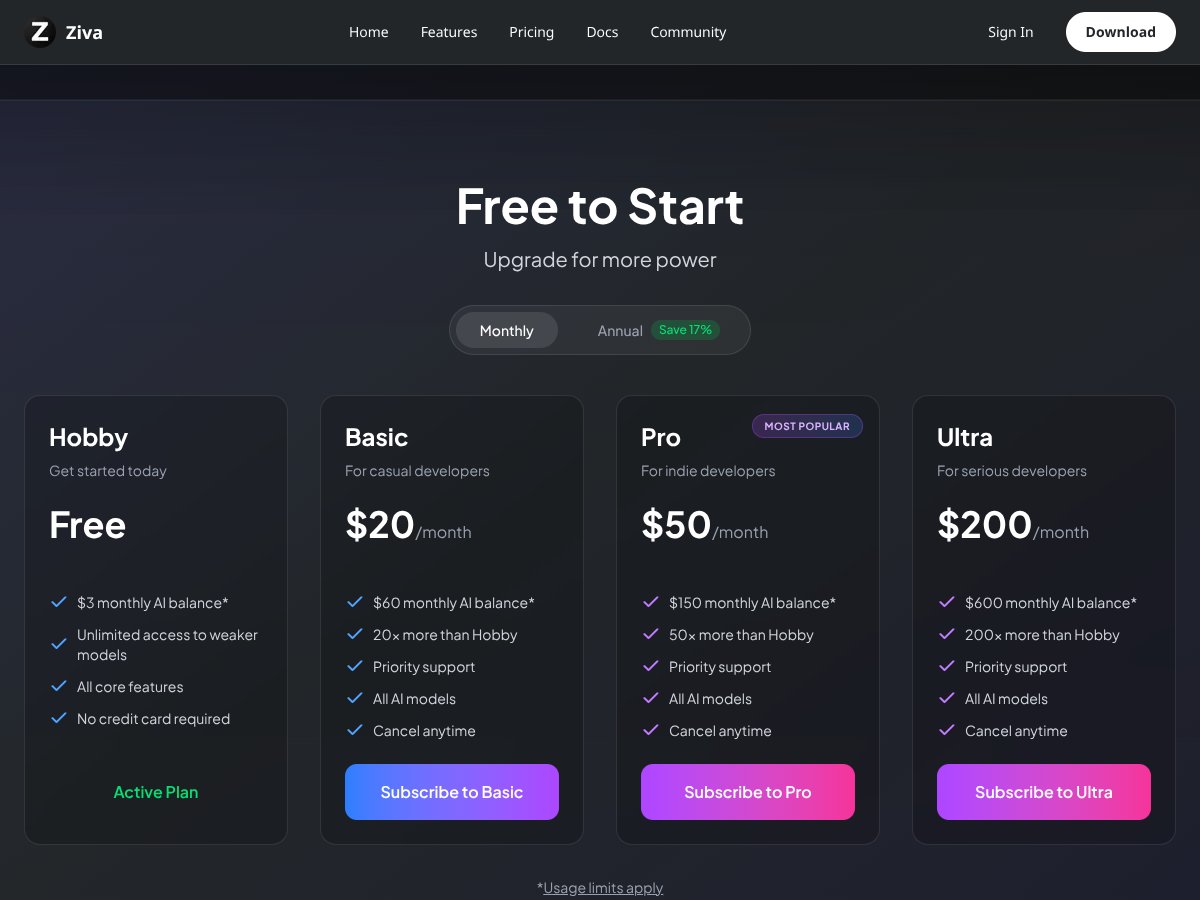
| Plan | Price | What You Get | My Take |
|---|---|---|---|
| Free | Free | - $3 monthly AI balance - Unlimited access to weaker models - All core features - No credit card required | Good for testing. You’ll still hit limits if you go wild with long prompts or lots of asset generations, but it’s enough to see whether the plugin fits your workflow. |
| Hobby | $20/month | - $60 AI balance - 20x more than Free - Priority support - All AI models - No credit card required | If you’re building one game and using Ziva a few times a week, this is the plan that feels “reasonable.” The credits matter, but it’s not a scary monthly commitment. |
| Basic | $50/month | - $150 AI balance - 50x Hobby - Priority support - All AI models - Cancel anytime | This is where it starts to make sense for small indie projects that iterate often. Still, you’ll want to be mindful about prompting style (more on that later). |
| Ultra | $200/month | - $600 AI balance - 200x Hobby - Priority support - All AI models - Cancel anytime | For studios or heavy users. If you’re the only coder and you’re not generating assets/scenes constantly, it’s probably overkill. |
What I noticed about credits (real tasks, not vague claims)
Here’s the part I wish more reviews actually quantified. In my testing, the biggest credit drain wasn’t code completion—it was the tasks that involve bigger context windows or “create a bunch of stuff” outputs.
- TileMap edits: low-to-moderate drain per request, but repeated “do more tiles” prompts stack up fast
- Error diagnosis: usually efficient when I pasted the full stack trace and the relevant lines
- Scene generation: moderate drain, especially when I asked for node wiring + signals
- Asset generation: the most expensive category in practice (and the one most likely to make you feel the limit)
Important: credits roll over depending on plan rules, but if you burn through them, you’ll be forced to pause or top up. So yeah—more credits don’t mean “unlimited free tries.” It means “more attempts before you hit the wall.”
My honest assessment of the pricing
For me, Ziva.sh feels worth it only if you’ll use it consistently for Godot-specific tasks (TileMap, scene scaffolding, debugging inside the editor). If you mostly want general code help, tools like Copilot are simpler and often cheaper over time.
If you’re a hobbyist, the Free or Hobby tier is the smart move. If you’re actively building and iterating a lot, Basic can be a sweet spot. Ultra is only really “yes” if you’re generating a lot of content or you’ve got a team workflow that justifies it.
The Good and The Bad (With Evidence From My Runs)
What I liked
- It actually feels like it belongs in Godot: The biggest win is context. When Ziva generates or edits code, it’s operating with your editor context instead of forcing you to copy/paste everything into a separate chat window.
- Error diagnosis was the most consistently useful feature: When I gave it a real stack trace, it didn’t just guess. It pointed me to likely causes and suggested specific changes.
- TileMap editing is genuinely faster: I used it to place tiles and adjust mapping logic without doing the “manual grind” for every small tweak.
- Scene scaffolding saved time: It’s not perfect, but generating a node tree with basic signals/components got me closer to “running” faster than starting from blank scenes.
- Privacy/control messaging: They emphasize privacy and code ownership. I can’t verify every internal claim from the outside, but the product positioning is clearly aimed at not treating your code like disposable training material.
- Cross-platform support: If you’re on Windows/macOS/Linux, it’s not locked to one setup, which matters for indie teams.
What could be better (and what tripped me up)
- Feature transparency isn’t always concrete: Some capabilities are described well, but you don’t always get clear boundaries like “this works best for X scene size” or “this fails when Y happens.” I had to find those limits by testing.
- Complex scenes still need human steering: If you ask for a big scene with lots of gameplay logic, expect follow-up prompts. It’s not “one-and-done.”
- Credits can disappear quickly on assets: If you plan to generate lots of textures/sprites, budget for it. Asset generation is where I felt the limit pressure first.
- Less useful outside Godot: If your workflow spans multiple engines or tools, Ziva doesn’t really help much beyond Godot.
- Community proof is limited: I didn’t find a huge pile of independent user reviews/threads that let me compare experiences. So you’re partly relying on your own testing.
Real Examples: Error Diagnosis, TileMap Editing, and Scene Generation
Example 1: Debugger error → diagnosis → fix (did it get it right?)
Here’s a real-style Godot error I used during testing. I intentionally kept the scenario realistic: a script referencing a node path that didn’t exist in the current scene.
Godot debugger output (representative log/stack trace):
“Invalid get index 'position' (on base: 'null instance')”
at: CharacterBody2D.gd:42
Also logged: Node not found for path: ../Sprite2D
Prompt I used in Ziva:
I pasted the error and then asked:
“In Godot 4.2, I’m getting 'Invalid get index ... on null instance' at CharacterBody2D.gd:42. The log says '../Sprite2D' isn’t found. Please explain the root cause and show a safe fix (null checks or @onready node usage).”
What Ziva suggested:
- Check that the node path is correct for the active scene
- Use @onready to cache the node reference
- Add a guard (or use get_node_or_null) before accessing properties
- Optionally print a helpful warning if the node is missing
Result: In my case, it was correct. The root cause was exactly what it said: the sprite node name/path didn’t match the actual scene tree after a refactor. The fix was straightforward and I got the error to stop after one iteration.
Time comparison: Manually, I’d normally spend 10–20 minutes tracing scene tree changes and searching for the correct node path. With Ziva, it was closer to ~5–8 minutes because it narrowed the likely cause immediately.
Example 2: TileMap editing prompt → working output (with limitations)
I tested TileMap editing on a simple setup: one TileMap for ground tiles and a second for obstacles. The goal was small: place a line segment and ensure the tile coordinates matched the tileset.
Prompt I used:
“Edit the Ground TileMap: place ground tiles across x=0 to x=15 at y=10. Use the tile index that matches my 'grass' tile in the tileset. Don’t touch other layers.”
What I noticed:
- When I described the coordinate range clearly, Ziva produced a result that was close enough that I didn’t need to redo everything from scratch.
- If I was vague about tile index/tile name, it sometimes picked the wrong tile and I had to correct it with a follow-up prompt.
Limitation (real talk): TileMap editing is only as accurate as the information you give it about your tileset. If your tileset has multiple similar tiles or you haven’t named them clearly, you’ll likely spend a few minutes correcting tile selection.
Example 3: Scene generation → “almost there” vs fully correct
For scene generation, I asked for a small “collectible” scene: a Node2D with a Sprite2D, collision, and a signal on pickup.
Prompt I used:
“Generate a Godot 4.2 scene for a collectible: Node2D root, Sprite2D child, Area2D with CollisionShape2D, and a signal 'collected' when the player enters. Include a script that emits collected with the player node.”
What happened: Ziva created the scene structure quickly, and the wiring was mostly right. But I still had to adjust a couple things:
- Ensure the collision shape size matched my scale (minor tweak)
- Confirm the signal emission connected to my player logic (because my project naming wasn’t exactly what Ziva assumed)
So was it worth it? Yes. It saved me from building the boilerplate scene by hand. But I wouldn’t call it “drop-in perfect” for non-trivial projects. Think “fast scaffolding,” not “automatic completion.”
Asset Generation: What It Can Do (and Where I’d Be Careful)
The sales pitch usually makes asset generation sound effortless. In my experience, it’s helpful for early prototypes, concept placeholders, and quick iteration—but it’s not a production art pipeline replacement.
What I tested
- Sprite/texture concept generation: I asked for a simple icon-style sprite concept to use as a placeholder
- Integration check: I confirmed the output imported cleanly into Godot and could be assigned to a Sprite2D
What I noticed
- Generated assets were usable as placeholders quickly.
- When I pushed for specific style consistency (same palette, same line thickness across multiple assets), quality dropped or required re-prompts.
- It’s still an AI—you’ll occasionally get results that look “almost right” but don’t match your project’s exact art direction.
If you’re building a game where art consistency matters from day one, you’ll still want a real artist workflow. But if you just need something to move the project forward, Ziva can absolutely help.
Who Is Ziva.sh Actually For?

Ziva.sh is for people who are already building in Godot 4.2+ and want to reduce the boring parts of development. For me, that meant:
- speeding up scripts and refactors
- getting faster answers when the debugger gets weird
- iterating on scenes and TileMaps without constant context switching
If you’re making a 2D game (platformer, top-down, roguelite—anything with lots of scenes and tile-based layout), Ziva’s workflow fit is pretty strong. I also think it’s a great “solo dev multiplier” because it reduces the need to constantly ask teammates or hunt documentation for every small error.
On the other hand, if you’re working on multi-engine projects or you need a tool that fits into a broader asset pipeline (Blender → external texture pipelines → custom import steps), Ziva is too Godot-focused to cover everything.
Who Should Look Elsewhere?
If you don’t use Godot 4.2+ as your main engine, you’re probably better off with a general AI coding assistant. Ziva’s value is tied to Godot-specific workflows like TileMap editing, scene generation, and editor-integrated debugging.
Also, if you’re expecting a plug-and-play replacement for your entire dev pipeline, that’s not what this is. It complements your workflow. It doesn’t replace your judgment, your architecture, or your art pipeline.
How Ziva.sh Stacks Up Against Alternatives
GitHub Copilot
- What it does differently: Copilot is general-purpose and shines at autocomplete + snippet suggestions across languages. It’s not tailored to Godot’s scene/node patterns or TileMap editing workflows.
- Pricing vibe: Copilot is typically around $10/month for individuals and doesn’t feel as constrained by “credits” style limits.
- Choose Copilot if: you want broad coding assistance across many projects and you’re fine working outside the Godot editor for some tasks.
- Stick with Ziva.sh if: you want Godot-native help like scene scaffolding, TileMap editing, and debugging guidance inside the editor.
Cursor
- What it does differently: Cursor is strong for AI-assisted code editing with project context. It’s more “editor workflow” than “game engine workflow.”
- Pricing vibe: often in the ~$15–$20/month range depending on plan, usually with some free options.
- Choose Cursor if: your main goal is smarter code editing and refactors in a text-centric environment.
- Stick with Ziva.sh if: you want an assistant that’s actually built around Godot scenes, nodes, and asset/TileMap workflows.
Windsurf
- What it does differently: Windsurf is aimed more at app/web development automation than engine-specific workflows.
- Pricing vibe: less transparent for indie budgets, and enterprise-heavy features can raise the cost.
- Choose Windsurf if: you’re building products outside game dev and want a flexible AI coding assistant.
- Stick with Ziva.sh if: your work is specifically Godot and you want tools designed around that environment.
Godot’s built-in tools + ChatGPT/Claude
- What it does differently: You can absolutely combine Godot’s native tooling with manual prompts to ChatGPT/Claude. It’s flexible, but it’s also more work—copy/paste, reformatting logs, and hunting context.
- Pricing vibe: usually free aside from whatever you pay for the external AI service.
- Choose DIY if: you’re comfortable managing prompts and you don’t mind manual integration.
- Stick with Ziva.sh if: you want editor-integrated assistance that reduces context switching.
Bottom Line: Should You Try Ziva.sh?
My overall take: 7/10 is fair, but for a specific reason. Ziva.sh is best when you lean into what it’s built for: Godot integration, scene/Tileset workflows, and debugging with real logs.
If you’re an indie dev who’s actively shipping a Godot project and you want faster iteration loops, I’d say it’s worth trying—especially since the free tier lets you test without a commitment.
If you’re just dabbling, or you mostly want general autocomplete, or you work across multiple engines, Ziva might feel expensive and overly specialized.
In my case, the most valuable part wasn’t “writing code for me.” It was speeding up the moments where I’d normally waste time—debugging and setting up scenes/TileMaps quickly.
Common Questions About Ziva.sh
Is Ziva.sh worth the money?
Only if you’ll use it regularly for Godot-specific tasks. If Ziva helps you get from “bug” to “working scene” faster (and you don’t burn credits on asset generation every day), it can pay for itself in saved hours.
Is there a free version?
Yes. Ziva.sh offers a free tier with $3 monthly AI credits. It’s enough to test most core features, but you’ll likely hit limits if you start generating lots of assets or doing heavy scene iterations.
How does it compare to GitHub Copilot?
Copilot is more general and can be cheaper/easier if you want broad autocomplete. Ziva.sh is more useful if you specifically want Godot-native help like scene generation, TileMap editing, and debugging guidance tied to your editor context.
Can I get a refund?
Refunds are generally not provided because it’s a digital subscription service. You can cancel anytime through Stripe to stop future charges.
Does it support other engines?
No. Ziva.sh is built for Godot 4.2+. If you’re using Unity/Unreal or a different engine as your primary tool, you won’t get much value.
How well does it handle complex scenes?
It can handle complex scenes better than most general assistants, especially when TileMaps and assets are involved. Still, expect to do some “human finishing work” for wiring, naming mismatches, and edge cases.
Is my code private?
They state your code isn’t used for training and they position the service as GDPR compliant. That said, like any AI system, some project info must be sent to servers for processing—so it’s not “zero data leaves your machine,” but it does appear focused on privacy controls.