Table of Contents
If you’re an anime fan like me, you’ve probably had that thought: “I wish I could make my own characters move.” The good news? You don’t need an animation degree to start. MakeMyAnime is built for exactly that—turning character ideas into short anime-style clips without making you wrestle with complicated software.
In my experience, the biggest win here is how quickly you can go from “blank canvas” to “okay, that actually looks like an anime scene.” The platform leans hard on AI-assisted tools so you’re not starting from scratch, and you can get something watchable in minutes instead of days.
That said, it’s not magic. Some tools feel more polished than others, and you’ll want to pay attention to how credits work if you plan to make a lot of animations. So let’s talk through the real features, what I liked, and the downsides you should know before you spend time (or credits).

MakeMyAnime Review
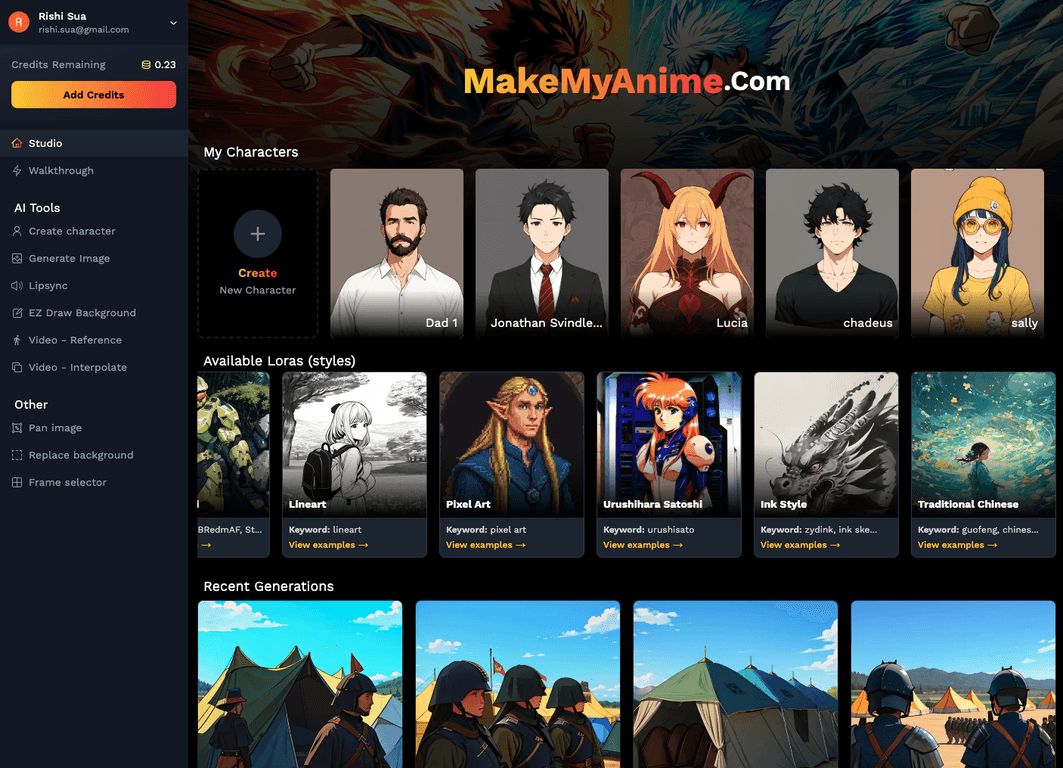
MakeMyAnime is basically a “start creating right now” platform for aspiring animators. You can build a character, place them into a scene, and then animate without needing to learn a bunch of technical tools first. And honestly, that’s what makes it appealing—less friction, more making.
Here are the parts that stood out to me:
- Character creation: You can design anime-style characters without starting from a blank template. I found it easy to get something recognizable quickly, and tweaking features feels straightforward.
- Background drawer: Instead of hunting for a perfect background, you can customize the scene around your character. It’s great for experimenting with different moods (bright, darker, more “stage-like,” etc.).
- Interpolation animation: This is the feature that helps your transitions look smoother. When you set keyframes and let interpolation do the in-between work, the motion looks more “intentional” instead of jumpy.
- Lipsync: If you add audio, the lipsync tool helps match mouth movements to the track. I noticed it’s especially useful for short clips where speech timing matters.
- Reference animation: This one’s underrated. Having reference examples means you’re not guessing how to approach a motion or scene—you can study what works and then build from there.
They’ve also mentioned a feature called Motion Brush that’s still in development. I’m excited about it because motion brush tools usually make it easier to add expressive movement without doing everything manually. If you’re the type who wants more dynamic effects, that’s one to watch.
One more thing: MakeMyAnime emphasizes customer support (they mention 24/7). When you’re trying to learn a new creative workflow, it matters. You don’t want to get stuck for hours because of something small.
Key Features
- Character Creation Tool for designing anime characters
- Background Drawer for building custom scenes
- Interpolation Animation for smoother transitions between keyframes
- Reference Animation to guide your creative process
- Lipsync tool to sync lip movements with audio
- Motion Brush (coming soon) for enhanced motion effects
- 24/7 Support for help when you need it
- Pay-as-you-go credits so you don’t have to commit to a big plan
Pros and Cons
Pros
- Beginner-friendly: I didn’t feel like I needed a tutorial just to make a first attempt. The workflow is pretty intuitive.
- Fast results: You can put together a basic animation quickly—good for experimenting and iterating.
- Lots of creative knobs: Character, background, motion, and audio tools all work together, so you’re not stuck doing only one type of animation.
- Free credits for new users: This is helpful when you want to test the platform before committing.
- Support is part of the pitch: If you run into an issue, it’s reassuring that help is available.
Cons
- Some tools feel less explained than others: A few areas don’t give you much detail, so you may need trial-and-error.
- Not everything is fully live yet: Motion Brush (and possibly other updates) is still in development, which can be frustrating if you’re waiting for a specific effect.
- Credits can add up: If you’re planning to generate lots of variations, you’ll want to keep an eye on how many credits you’re using.
Pricing Plans
MakeMyAnime uses a pay-as-you-go model with credits. In other words, you buy credits based on what you need and then spend them as you create. There are also free credits for new users, which is a solid way to test the platform without immediately paying.
What I like about this setup is that it doesn’t pressure you into a monthly subscription if you’re only making occasional animations. But if you’re the type who wants to generate dozens of test clips, you’ll probably end up purchasing more credits sooner than you expect—so it helps to plan your sessions (make a few drafts, then refine the best one).
Wrap up
MakeMyAnime is a practical option if you want to create anime-style animations without getting buried in complex editing tools. The character builder, background drawer, interpolation animation, and lipsync are the core pieces that make it feel like a real creative studio—not just a gimmick.
Just go in with realistic expectations: some features are still in development, and credits are something you’ll want to track if you’re producing a lot. Still, if you’re craving a faster way to bring your ideas to life, it’s one of the more approachable platforms I’ve seen.
Promote MakeMyAnime