🌸 SPRING SALE — Fresh Start, Fresh Savings
Spring Into SavingsSpring Pricing 🌼
AI Tools

SHURU Review (2026): Honest Take After Testing

Stefan
10 min read
#Ai tool

Table of Contents

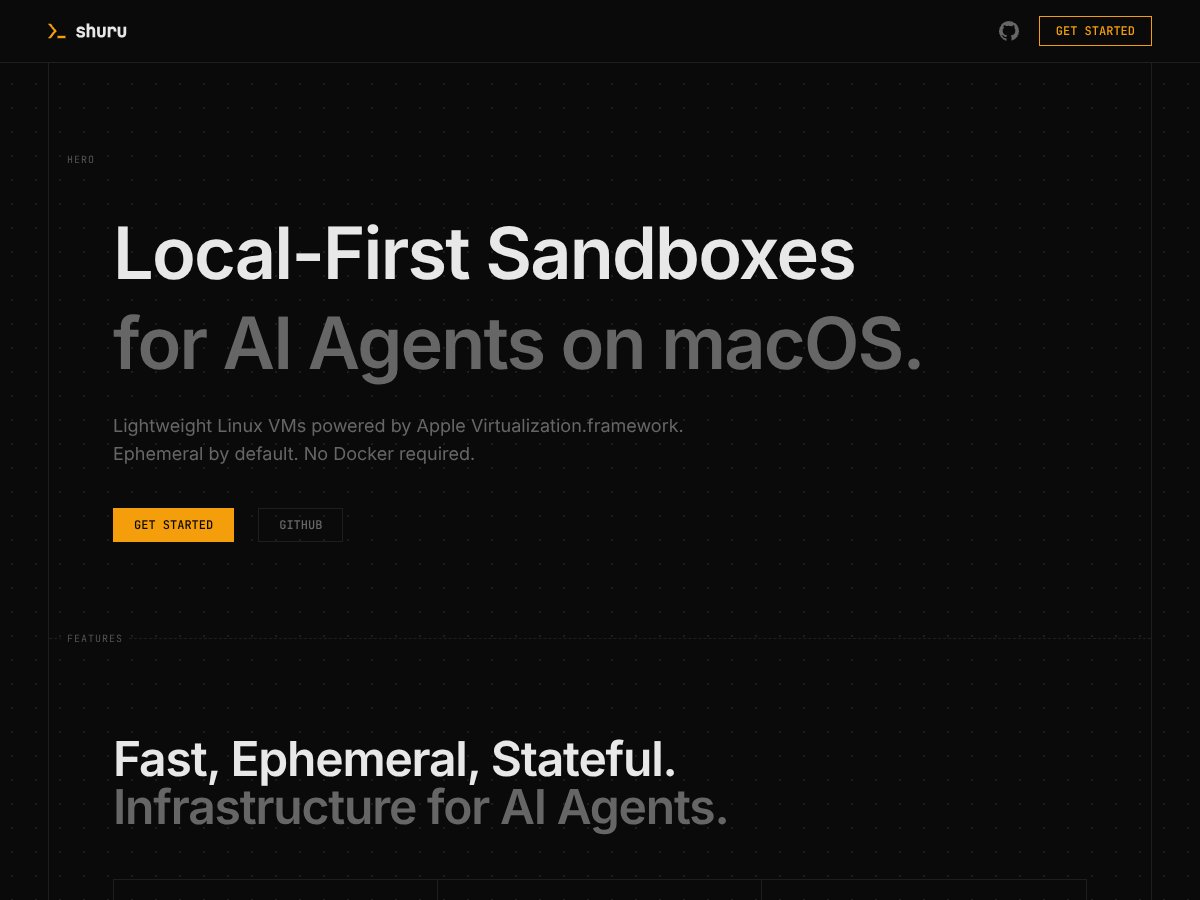
SHURU screenshot

What Is SHURU?

Honestly, when I first heard about SHURU, I was curious because I’ve dealt with a lot of sandboxing tools—mostly Docker—and found them either too heavy or overly complicated for quick AI experiments. So naturally, I wanted to see if this lightweight Linux VM solution could actually make my life easier. What I noticed right away is that SHURU claims to give you a simple, ephemeral Linux environment on macOS that’s optimized for AI workflows, without the usual Docker overhead and emulation layers. It promises near-native performance on Apple Silicon Macs, which is a big deal if you’re tired of sluggish containers or messing around with emulators.

In plain English, SHURU creates tiny, clean Linux environments that you can run, check, and discard as easily as flipping a switch. Think of it like a fresh virtual machine that resets every time you start it—perfect for testing untrusted code or running isolated AI tasks without cluttering your main system. Its main goal seems to be to streamline the process of spinning up these environments, especially if you're working with AI agents that need safe, quick, disposable compute space.

As for who’s behind it—well, the website and GitHub repo are managed by a team associated with superhq-ai. They don’t shout a lot about their team or backing, but the project looks fairly technical, and the code is openly available, which adds some credibility. That said, I couldn't find much in the way of user testimonials or third-party reviews; it feels like a pretty niche, early-stage tool.

My initial impression? It’s as advertised—lightweight, fast, macOS-native on Apple Silicon, and focused on ephemeral environments for AI agents. But I also want to be clear about what it’s NOT: this isn’t a general-purpose VM manager like VirtualBox or UTM, nor is it a full-blown container orchestration platform. It’s very specific—designed for running quick, disposable Linux environments for AI work. So, if you’re expecting a GUI or a broad ecosystem, you’ll be disappointed. It’s CLI-only, at least for now.

The Good and The Bad

SHURU interface
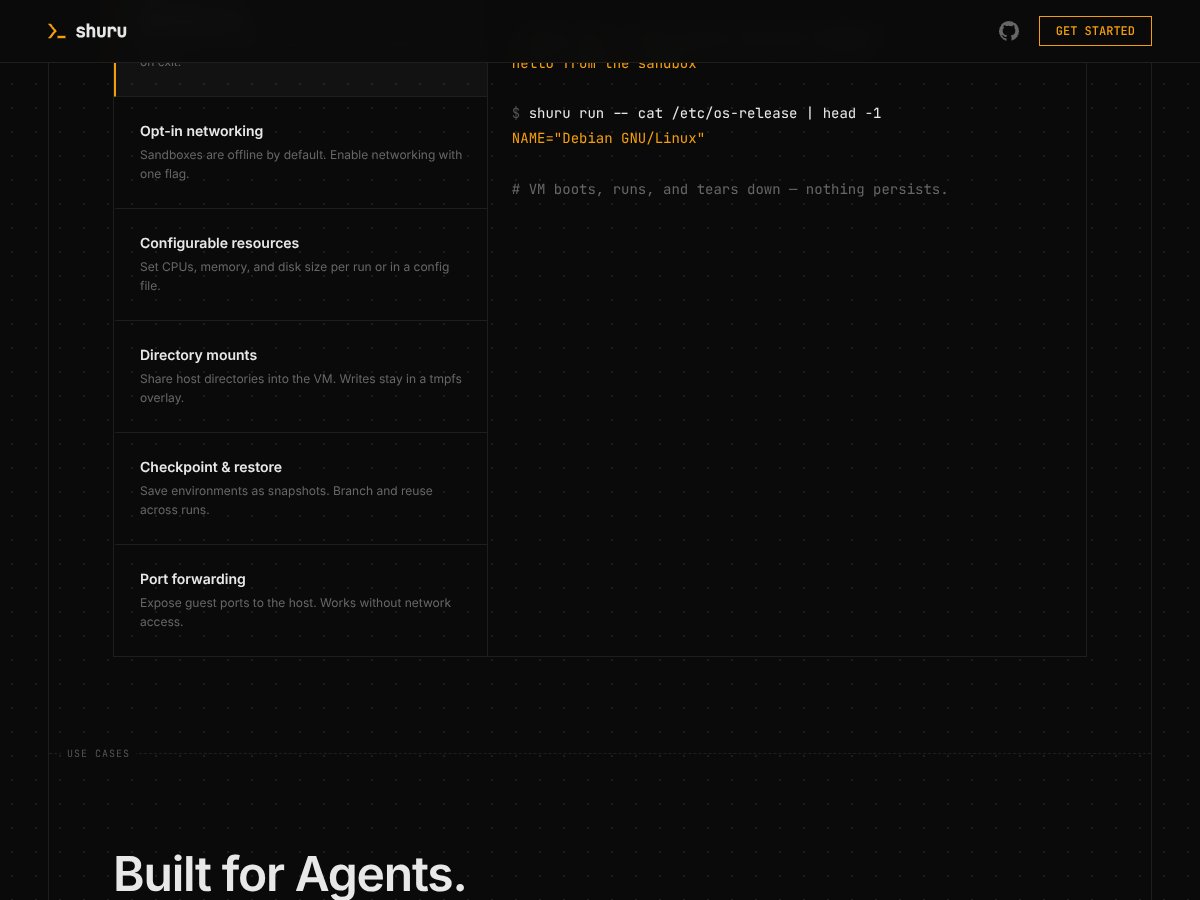
SHURU in action

What I Liked

  • Speed and efficiency: Using Apple Virtualization.framework means near-native performance on Apple Silicon, which is a huge plus compared to traditional Docker containers or full-blown VMs. I was honestly expecting some slowdown, but it’s surprisingly snappy — perfect for quick tests.
  • Ephemeral by default: Every run starts fresh, which is great for security and avoiding environment clutter. The snapshot feature is a real time-saver, akin to git commits for environments, making branching and iteration straightforward.
  • Integration with AI tools: The fact that it ships as an agent skill and auto-integrates with tools like Claude, Copilot, and Cursor is a big win. It just works when you need sandboxed environments without extra configuration.
  • Simple CLI: Being able to spin up a sandbox with a single command is convenient. No complex setup, just run and go. This lowers the barrier for developers and AI practitioners who want quick isolated environments.
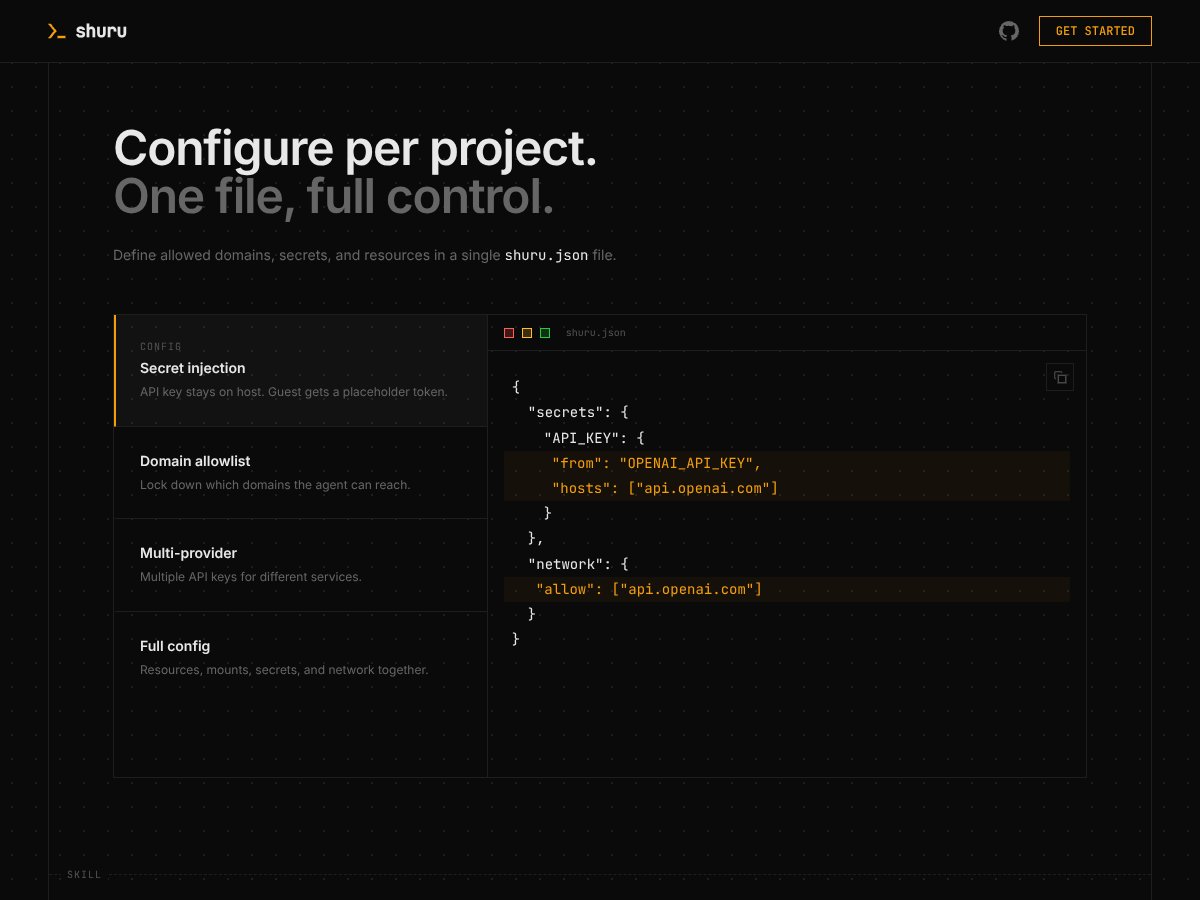
  • Resource configurability: You can customize CPU, memory, and disk per run or configuration file. Plus, directory mounts make it flexible for testing code with local files.
  • macOS-native on Apple Silicon: Unlike some virtualization tools that rely on emulation, Shuru leverages Virtualization.framework for near-native performance, which is a game-changer for Mac users.

What Could Be Better

  • Limited documentation and community support: As an early-stage tool, there isn’t much in terms of tutorials, community forums, or extensive docs. This can make onboarding tricky for newcomers.
  • No GUI: For users who prefer graphical interfaces, this CLI-only approach might be a dealbreaker. It’s powerful but not very beginner-friendly if you’re not comfortable with terminal commands.
  • Pricing ambiguity: The absence of clear pricing or plans could be a concern. While it seems free or open-source, without concrete info, it’s hard to gauge long-term costs or support options.
  • Feature set is still evolving: Missing features like persistent storage by default, advanced networking options, or integrations beyond basic CLI could limit some workflows. Also, no built-in monitoring or dashboards.
  • Platform restriction: It’s only available on macOS with Apple Silicon, so users on other platforms or Intel Macs are out of luck. This limits its audience.

Who Is SHURU Actually For?

If you’re a developer or AI researcher working primarily on macOS, especially Apple Silicon, and need quick, disposable Linux environments for code execution, testing, or AI agent development, Shuru could be a good fit. It’s ideal for those who want lightweight sandboxes that start instantly and don’t require heavy virtualization or Docker overhead. Think of solo AI developers, prototyping teams, or those running parallel evaluations of models or code snippets in isolated environments. If you’re managing multiple experiments where clean environments matter, Shuru’s snapshot and restore features make iteration straightforward.

For example, if you’re building an AI assistant that needs to run untrusted code snippets safely, Shuru provides a quick and secure sandbox without the hassle of setting up full containers. Or if you’re testing different package versions without polluting your main system, it’s perfect.

Who Should Look Elsewhere

SHURU interface
SHURU in action

If you need persistent environments that retain state between sessions without manual checkpointing, or if you require a GUI interface, Shuru isn’t for you. Also, if you’re not on macOS or don’t use Apple Silicon, this tool simply won’t work. Those looking for a more mature ecosystem with extensive community support, integrations, or enterprise features might find alternatives like Docker, Lima, or Multipass more suitable. And if your workflow depends heavily on networked containers or complex orchestration, Shuru’s offline and ephemeral focus might be a limitation.

How SHURU Stacks Up Against Alternatives

Docker

  • Docker is the most widely used containerization platform, offering extensive ecosystem support and compatibility across various platforms. Unlike SHURU, which is lightweight and macOS-specific, Docker can run on multiple OSes but often requires more resources and setup complexity, especially on Apple Silicon.
  • Pricing-wise, Docker Desktop has a free tier for personal use, but larger teams or enterprise users may need to pay for Docker Pro or Business plans, which start at around $5/month per user. In contrast, SHURU appears to be open-source and free, making it more accessible for individual developers.
  • Choose Docker if you need a mature, widely supported platform with a vast array of images and community resources. Stick with SHURU if you prefer a faster, more integrated solution on macOS that leverages Apple Virtualization for near-native speed.

Podman

  • Podman is a rootless container engine that offers Docker-compatible commands but emphasizes security and simplicity. It doesn’t require a daemon and can run containers directly as a user, but it’s primarily Linux-focused. On macOS, it often relies on virtualization layers like Lima, which can introduce overhead.
  • Podman is free and open-source, with no paid tiers. However, setting it up on macOS can be more involved compared to SHURU’s straightforward CLI, especially if you want isolated Linux environments.
  • Choose Podman if you value rootless operation and enhanced security, and are comfortable with Linux-based workflows. If you want a simple, native macOS experience with minimal fuss, SHURU might be better.

UTM

  • UTM is a virtualization app for macOS that uses QEMU under the hood, allowing you to run full virtual machines. It’s more flexible for running different OSes but comes with higher resource requirements and a more complex setup process.
  • UTM is free and open-source. Since it runs full VMs, performance can be slower compared to SHURU’s microVM approach, especially on resource-constrained systems.
  • Choose UTM if you need to run full OS environments or need more control over VM configurations. Stick with SHURU if you want lightweight, ephemeral Linux sandboxes optimized for AI workloads on Apple Silicon.

Multipass

  • Multipass provides lightweight Ubuntu VMs for development on macOS and Windows, with simple commands and minimal setup. It’s good for quick Linux environments but isn’t optimized for ephemeral, sandboxed AI code execution.
  • Multipass is free and open-source, but it’s more geared toward persistent development environments rather than temporary, isolated testbeds.
  • Choose Multipass if you need a persistent, full Linux environment for development. If your main goal is secure, ephemeral sandboxes for AI code, SHURU likely wins on speed and simplicity.

Final Verdict: Should You Try SHURU?

Overall, I’d rate SHURU around 7/10. It’s a solid tool for developers working on AI projects on macOS, especially if you value speed, security, and seamless integration. Its lightweight design and native performance make it a standout for specific workflows, but it’s still early-stage with a limited community, so some features or support might be lacking.

If you’re a developer experimenting with AI agents or need quick, disposable Linux environments on Apple Silicon, definitely give SHURU a shot. Its ephemeral, sandboxed approach is perfect for safe testing without resource bloat.

However, if you require persistent containers, complex networking, or cross-platform support, you might want to consider Docker or other alternatives first.

For free, SHURU’s open-source nature makes it worth trying out, and if you find it fits your workflow, a paid or more mature solution could be worth exploring later. Personally, I recommend it for niche use cases where speed and security are top priorities, but it’s not quite ready to replace more established tools for general containerization.

If your main need is quick, isolated environments for AI testing on Mac, give SHURU a chance. If you need a robust, multi-platform container ecosystem, your money’s better spent on Docker or similar platforms.

Common Questions About SHURU

Is SHURU worth the money?

SHURU is free and open-source, so it’s definitely worth trying without any cost. Its value depends on whether it meets your specific needs for lightweight, ephemeral Linux environments.

Is there a free version?

Yes, SHURU is free to install and use. Being open-source, you can run it without paying, though some advanced features or support might depend on community contributions.

How does it compare to Docker?

SHURU offers near-native performance on Apple Silicon and is more lightweight, but Docker provides a broader ecosystem and more mature features. If speed and simplicity are your priority, SHURU wins; for extensive container support, Docker is better.

Can I use SHURU for persistent environments?

By default, SHURU creates ephemeral VMs, but it supports snapshots, allowing you to save states and restart from them. For fully persistent setups, additional manual management is needed.

Is it easy to set up?

Yes, SHURU’s CLI is straightforward, designed for quick commands. No complex configuration is necessary, especially for basic use cases.

Does it support networking?

Yes, it offers configurable networking options, including NAT and bridged modes, but advanced network setups may require manual tweaks.

Can I run AI agents automatically?

Yes, SHURU integrates with AI agent frameworks like Claude and Copilot, allowing auto-used skills without extra prompting.

What about community support?

It’s still early-stage with limited user feedback, so community resources and documentation are somewhat scarce compared to mature tools like Docker.

As featured on

Automateed

Add this badge to your site

Stefan

Stefan

Stefan is the founder of Automateed. A content creator at heart, swimming through SAAS waters, and trying to make new AI apps available to fellow entrepreneurs.

Related Posts

FaceSymmetryTest Review – Honest Look at Free AI Tool

FaceSymmetryTest Review – Honest Look at Free AI Tool

FaceSymmetryTest is a fun online tool

Stefan
Sweep Review – An AI Assistant for JetBrains IDEs

Sweep Review – An AI Assistant for JetBrains IDEs

Sweep enhances productivity in JetBrains IDEs

Stefan
AI Song Maker Review – Simple & Creative Music Generation

AI Song Maker Review – Simple & Creative Music Generation

easy way to create music with AI

Stefan

Create Your AI Book in 10 Minutes