Table of Contents
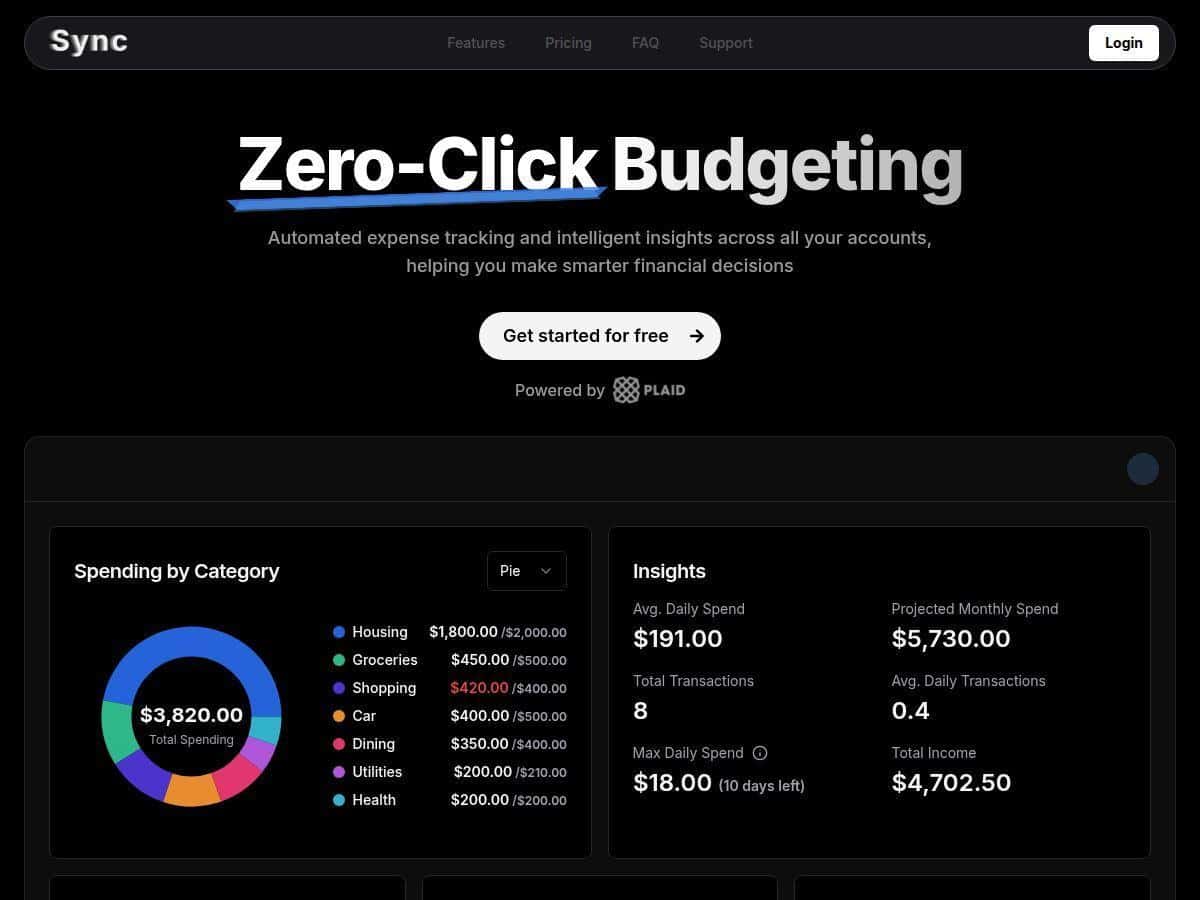
If you’ve ever tried to track expenses manually, you already know how fast it turns into a chore. I wanted something that would actually keep up with my spending without me babysitting it. Sync caught my eye because it focuses on automated transaction tracking plus charts and budgeting tools.
So I tested it for a few weeks—set it up, connected accounts, watched how often transactions synced, and checked how accurate the categorization felt. Here’s what I liked, what annoyed me, and who I think Sync is a good fit for.
Sync Review: What Actually Happens After You Connect Your Accounts
I’ve been testing Sync for a few weeks, and the experience was pretty consistent: once I connected my accounts, the app started pulling in transactions automatically without me doing anything manual. The setup itself was simple—linking accounts happens through Plaid, and I didn’t run into any weird “extra steps” or long forms.
How setup went (the real workflow I followed)
- Signed up and went straight to the account connection screen.
- Connected my bank account using Plaid (it took me a few minutes to finish the login/verification step).
- After that, I watched for incoming transactions and checked the dashboard a couple of times a day.
Sync frequency (what I noticed)
In my testing, transactions came in twice daily. That’s a nice middle ground—fast enough to stay current, but not so “constant” that the app felt noisy. I’d typically see new items show up during the next sync window rather than instantly the second a card purchase cleared.
Categorization accuracy (where it helped—and where it didn’t)
Sync’s biggest value is that it handles categorization for you. In particular, it did a good job spotting recurring charges like subscriptions and regular bills. For example, I had a couple of monthly services that consistently landed in the right category instead of getting lumped into generic “misc.”
That said, it wasn’t perfect. A few transactions required me to correct the category manually. The most common “oops” I saw was when a merchant name was vague (think: a payment description that doesn’t clearly match what the charge actually was). When that happened, I adjusted the category and moved on—after that, the dashboard became more trustworthy.
Charts and budgeting (how I used them)
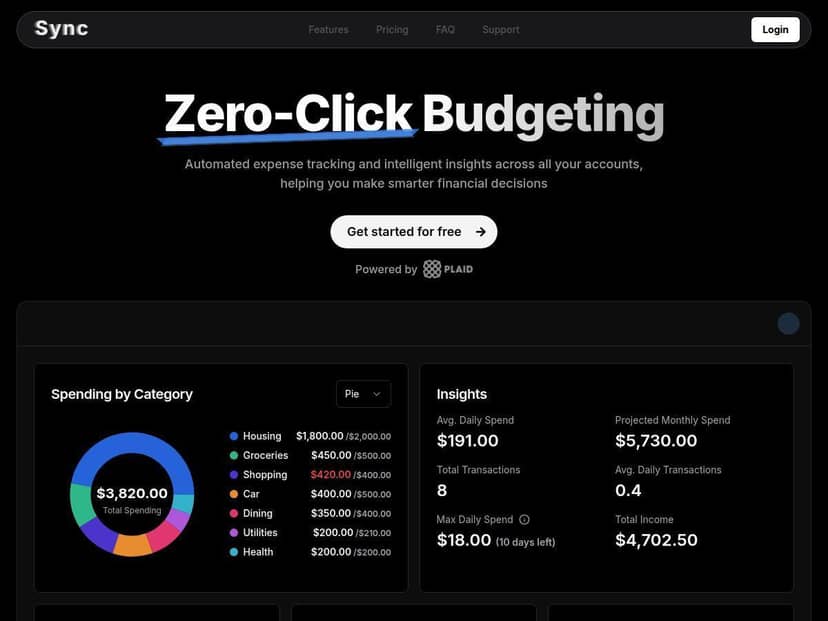
The visual charts were the part I actually checked most. Instead of staring at a long list of transactions, I could see where my money was going at a glance. I used the category breakdown to spot a couple of spending areas I wasn’t paying attention to—then I set tighter budgets for those categories and watched how the next sync reflected the changes.
One thing I appreciated: the UI doesn’t feel cluttered. It’s customizable enough that I didn’t feel stuck with a “one-size-fits-all” dashboard. If you like quick check-ins, this is built for that.
Key Features That Matter (Not Just Buzzwords)
- Automated bank account connection and transaction syncing twice daily
This is the core of the product. In practice, it meant I didn’t have to enter transactions by hand, and new items showed up reliably during the next sync window. - Automatic categorization (including subscriptions and recurring payments)
Recurring charges were one of the smoother parts of my setup. When the merchant names were clear, categories stayed consistent. - Visual charts and trend analysis
I used the charts to spot patterns quickly—especially category totals and how spending shifted over time. - Customizable budgets by category
I like that I could set budgets for specific categories instead of treating everything as one big pile. It made it easier to decide what to cut back on. - Personalized dashboard themes and color options
It’s not “financial strategy,” but it does make the app nicer to use daily.
Pros and Cons From My Testing
Pros
- Easy to get started: The interface is beginner-friendly, and I didn’t feel lost after connecting accounts.
- Automation saves time: Twice-daily syncing meant fewer manual entries and fewer “did I forget that purchase?” moments.
- Charts make spending easier to understand: I could quickly identify category trends without digging through every transaction.
- Budgets are flexible: Setting category-specific budgets made it practical, not just theoretical.
Cons
- Connecting accounts is required for the full experience: If you’re not comfortable linking banks, you won’t get the same value.
- Free trial is short: The free trial lasts one week. If you need more time to fully test syncing and categorization accuracy, you’ll feel the limit.
Pricing Plans (What You Actually Get)
Sync includes a free plan for one week, which covers the basics like automated tracking, insights, and custom budgets. After that, the Pro plan costs $7/month when billed annually ($80/year).
What Pro adds (based on what’s described in the product offer)
- Full tracking capabilities (beyond what’s available during the trial period)
- More detailed insights (the extra depth you’d want if you’re actively budgeting every month)
- Priority support (faster help when something goes wrong with syncing or categorization)
If you’re the type who checks your spending weekly and actually wants to adjust budgets based on what the charts show, Pro starts to make sense fast. If you just want to “try it and see,” the one-week trial might be enough—just don’t expect to test long-term trends in that window.
Who I Think Sync Is Best For
In my experience, Sync fits best when you have ongoing expenses you don’t want to track manually. For example:
- Freelancers or side-hustlers with subscriptions/tools and recurring software charges—automatic categorization helps keep your numbers clean.
- People who want budgeting without spreadsheets: charts + category budgets are easier to maintain than a manual system.
- Couples or roommates splitting bills (even if you’re not using it for “splits” directly): you can at least keep a clearer view of shared categories like groceries, utilities, and dining.
If you’re hoping for a fully hands-off tool that never needs any corrections, that’s not how it worked for me. But if you’re okay spending a minute fixing a miscategorized transaction when it happens, Sync becomes genuinely useful.
Wrap up
Sync is a practical expense tracker built around automation—connect your accounts, let it sync twice daily, and use the charts to adjust budgets. The free trial is short, and you’ll likely need to correct a few categories along the way, but the overall workflow felt smooth and consistent in my testing. If you want less manual tracking and more “quick insight → quick decision,” Sync is worth a look.