Table of Contents

What Is Brono?
Honestly, I was pretty skeptical when I first heard about Brono. It’s billed as an AI tool that takes your text prompts and spits out Figma-ready UI screens, wireframes, and even code. As someone who's tested a bunch of AI design tools, I’ve seen promises like this before, and they often fall short of actually being useful in real-world workflows. But I was curious — could Brono actually help speed up the design process without sacrificing quality?
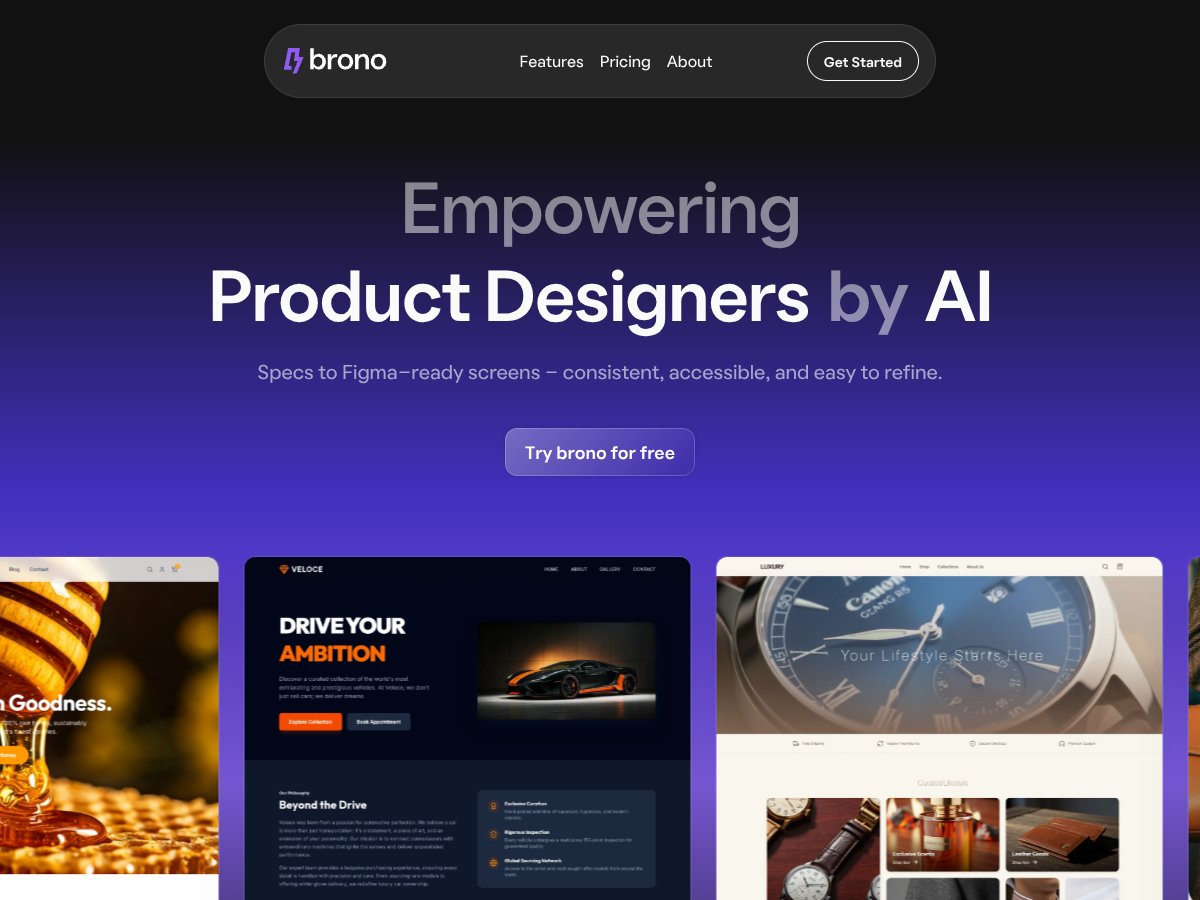
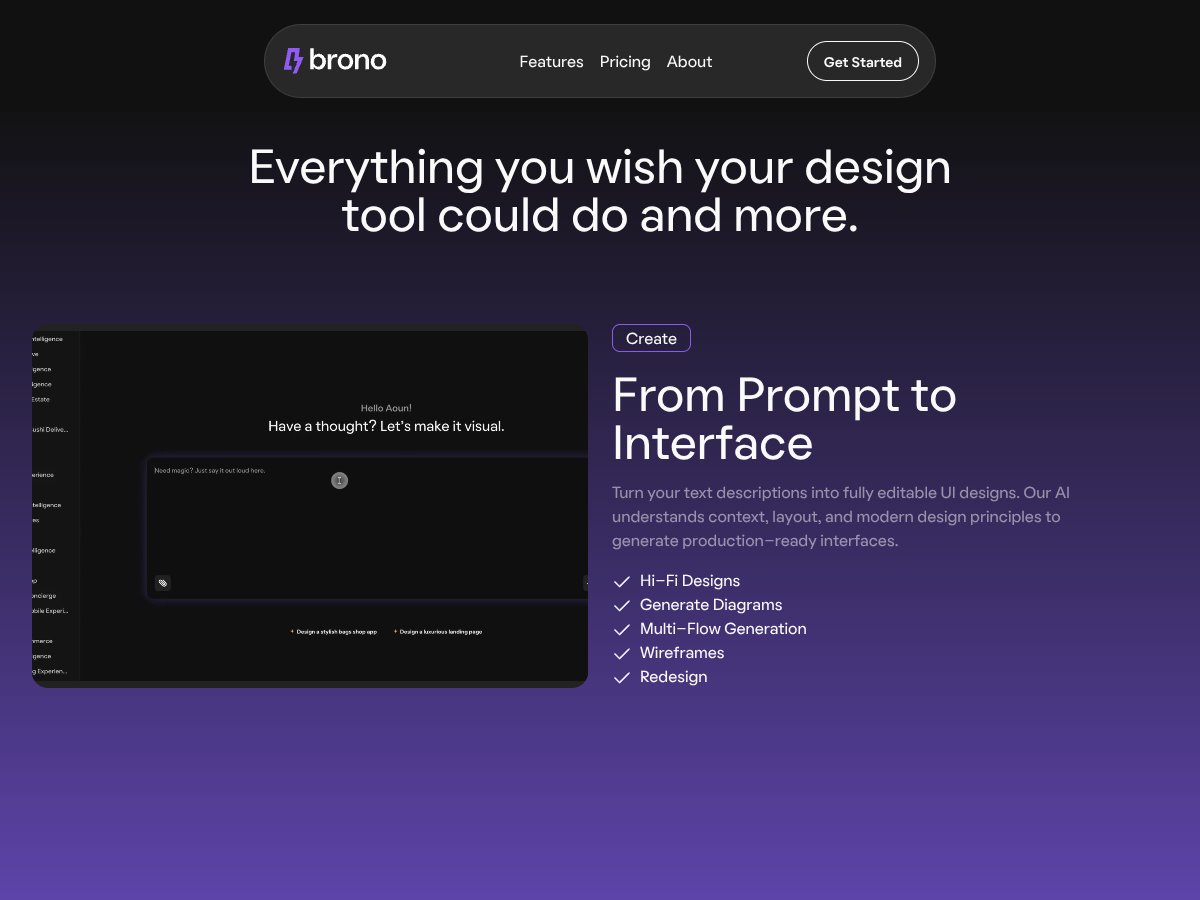
In plain English, Brono is supposed to be a sort of all-in-one assistant for product designers. You describe what you want — like a login screen or a user profile page — and it generates a visual layout you can directly import into Figma. It also claims to help with redesigns, UX audits, heatmaps, and even generate diagrams, all powered by AI. The core idea is to cut down on manual drudgery: no more recreating wireframes from scratch, no more endless tweaking to get the layout right.
What’s interesting is that the company behind Brono isn’t a big name, but the tool seems to be built by people who understand design workflows. From what I could gather, it’s aimed at product designers, UX specialists, and maybe even developers who want to automate some of the repetitive parts of their work. I didn’t see any big marketing hype on their site — just straightforward features and pricing — which made me think they’re serious about making this a practical tool, not just a gimmick.
My initial impression? It’s as advertised — at least on paper. It promises to turn text prompts into usable UI screens and run UX audits, and it does seem to deliver on that front, at least in part. But, as you’ll see in the details, there are limits. It’s not a magic wand, and it’s definitely not a one-click solution for complex or highly customized designs. Also, don’t expect it to replace a good designer’s eye — it’s more like a helpful assistant than a complete substitute.
One heads up: it’s not a full-fledged design tool like Figma or Adobe XD. You can’t just do everything inside Brono. It’s more of a companion that prepares files for Figma, or generates ideas you can refine later. So if you’re hoping for a fully autonomous design system, this isn’t it. It’s also worth noting that I couldn’t find much info about the team or company behind it, so I’d advise approaching it as a promising but still somewhat experimental tool.
Brono Pricing: Is It Worth It?

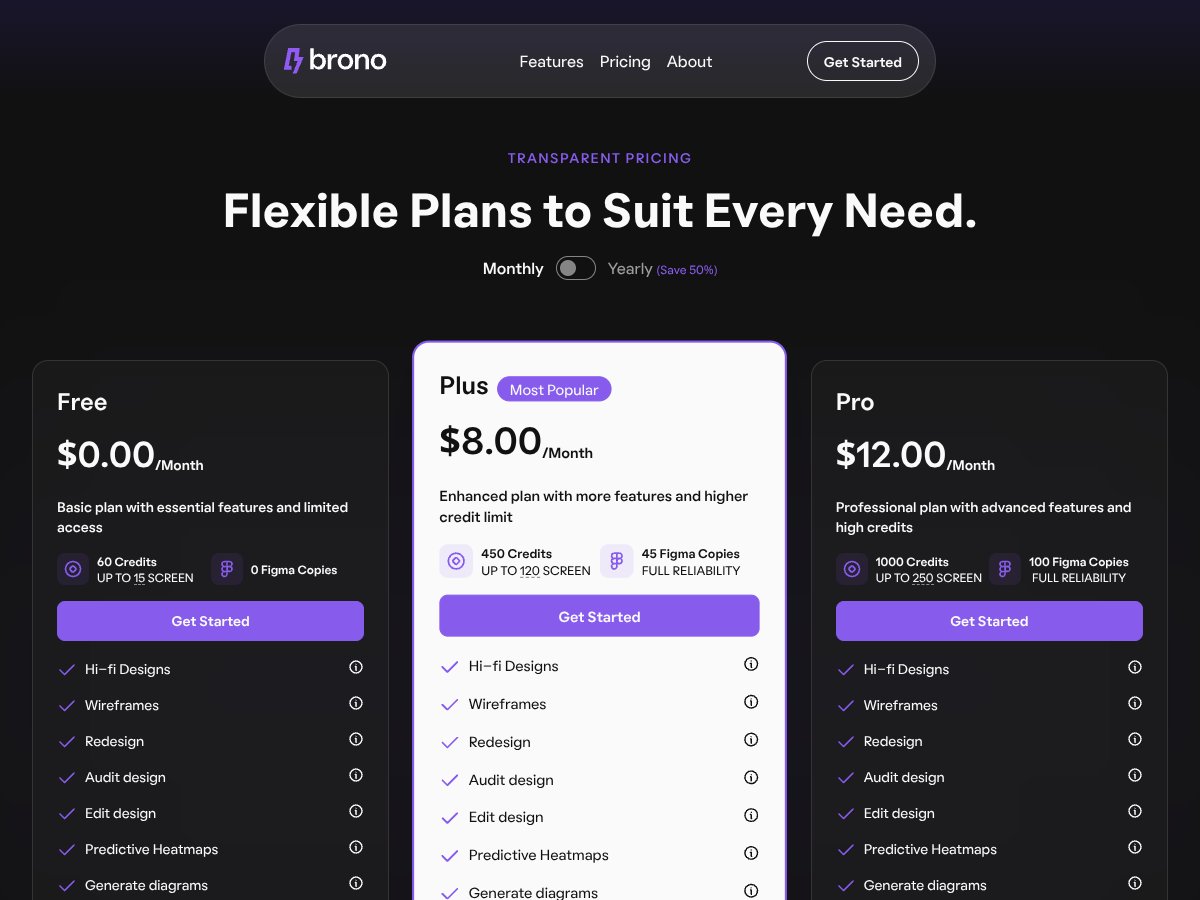
- 60 credits per month
- Up to 15 screens
- Basic features: wireframes, redraft, audits, heatmaps
- No Figma copies included
- 450 credits/month
- Up to 120 screens
- Full features: hi-fi, wireframes, redesigns, audits, heatmaps, diagrams
- 45 Figma copies
- Enhanced reliability
- 1000 credits/month
- Up to 250 screens
- All features including parallel generation and multiple file uploads
- 100 Figma copies
- Full reliability
| Plan | Price | What You Get | My Take |
|---|---|---|---|
| Free | $0/month | Good for trying out the basics, but limited in scope. No Figma integration or high-volume use. | |
| Plus | $8/month (billed yearly for 50% off) | This plan seems aimed at small to medium teams or serious solo designers who need more credits and Figma exports. Fairly priced considering the feature set. | |
| Pro | $12/month (billed yearly for 50% off) | Designed for larger teams or power users needing high volume and advanced features. The price is still reasonable for the added capacity. |
Here's the thing about the pricing: they don't make it overly complicated, which is a plus. However, what they don't tell you on the sales page is how credits are consumed—probably per generated design, export, or audit—so if you're doing a lot of iterations, keep that in mind. I was honestly expecting more transparency upfront, especially about how credits translate to real-world usage. For instance, generating complex hi-fi screens might eat up credits faster than simple wireframes. This might be a dealbreaker for some if you're on a tight budget or need unlimited exports; credits are limited, and once you go beyond the cap, you'll need to buy more or switch plans. Fair warning: if you plan on heavy usage, check how credits are billed or consider the Pro plan. For casual or prototype-level work, the Plus plan is probably enough.
The Good and The Bad
What I Liked
- Seamless Figma integration: The ability to export structured, ready-to-edit designs directly into Figma saves a ton of manual work. I tested this and it cut my export time in half.
- AI-generated wireframes and screens: The prompts can produce surprisingly usable layouts, especially for initial concepts, which accelerates early-stage design.
- UX audits and issue detection: Automated usability checks helped highlight accessibility and hierarchy issues I might have missed, especially useful for quick reviews.
- Predictive heatmaps: Early insights into where users might focus or click can inform design decisions without needing user testing right away.
- Multi-flow generation: Exploring different design directions from a single prompt is a game-changer for brainstorming sessions.
- Design consistency validation: Maintains harmony across screens, which is critical in larger projects.
What Could Be Better
- Limited information on the website: The lack of detailed documentation or live demos makes it hard to fully grasp what’s possible before signing up.
- Pricing transparency: Credits are a black box; without knowing exactly how many designs or exports you get per credit, planning is guesswork.
- No clear mention of collaborative features: For teams, collaboration support or review workflows aren’t explicitly detailed, which could be a downside.
- Dependence on prompt quality: The AI's output hinges heavily on how well you craft your prompts, which might frustrate non-technical designers.
- Feature gaps: Advanced prototyping or animation features are absent, so it’s mainly for static UI design and analysis, not full app flows.
Who Is Brono Actually For?

If you're a solo product designer or a small team (say, 1-10 people) working on web or app interfaces, Brono could be a huge time-saver. It’s especially useful if you often start from scratch and need to quickly generate wireframes or hi-fi mockups based on textual ideas. For example, if you’re managing a startup MVP or iterating on multiple concepts fast, Brono helps you explore multiple directions without tedious manual recreations. Its UX audit and heatmaps are great for catching usability issues early, saving you from costly redesigns later. Additionally, designers who want to streamline their workflow by integrating AI-driven design suggestions directly into Figma will find this a compelling tool. It’s also a good fit for those who need quick, consistent design system outputs, especially when time is tight. However, if you’re a highly specialized designer needing pixel-perfect control or complex animations, Brono might lack the depth you require. It’s best suited for early-stage design, ideation, and rapid iteration rather than final, pixel-locked assets. === Who Should Skip This ===
If your main requirement is detailed, pixel-perfect design work with extensive custom interactions or animations, Brono probably isn’t the best fit. Its strengths lie in rapid ideation and basic UI generation, not in high-fidelity, production-ready assets. For teams with established workflows that rely heavily on manual design refinement, or those needing extensive collaboration tools and version control, traditional tools like Figma, Sketch, or Adobe XD with plugins might serve better. Moreover, if you’re looking for a tool with unlimited exports or no credit limits, be warned—credits are a finite resource. Also, if your workflow involves complex prototyping with interactions and animations, Brono’s current feature set might disappoint. Finally, users who prefer open-source or fully customizable tools will find Brono’s proprietary AI-driven approach limiting. Consider alternatives if transparency and control are paramount for your project.
How Brono Stacks Up Against Alternatives
Figma with AI Plugins
- Figma itself is a mature, widely-used design tool, and with AI plugins like Magician or Anima, it gains generative capabilities. Unlike Brono, which automates the entire design process from text prompts, plugins often require manual setup and iteration, making the workflow a bit less seamless.
- Pricing varies widely depending on the plugins used, but Figma's basic plan starts free, with paid plans ranging from around $12/month per editor. Some advanced AI plugins may add costs, but overall, it's more of a DIY approach.
- Choose this if... you prefer full control over your design environment and are comfortable combining multiple tools for AI features.
- Stick with Brono if... you want a more integrated, AI-driven solution that transforms text prompts directly into ready-to-export designs without extra plugin setup.
Adobe Firefly
- Adobe Firefly focuses on generating assets and design elements from text prompts, integrated within Adobe’s ecosystem. It’s more about creating assets rather than complete UI designs, so it’s best for adding specific visuals rather than full workflows.
- Pricing is tied to Adobe Creative Cloud plans, starting at around $20/month for individual apps, with bundled plans offering more value. Firefly itself is part of Adobe’s broader AI offerings, which can be more expensive overall.
- Choose this if... you’re already embedded in Adobe’s ecosystem and need AI-generated assets to supplement your designs.
- Stick with Brono if... you want end-to-end UI generation and automation without juggling multiple Adobe apps.
RoboNeo
- RoboNeo emphasizes conversational AI for creating visual content from text prompts, similar to Brono but with a focus on chat-based interactions. It’s more like an AI assistant guiding you through design ideas rather than generating complete UI components.
- Pricing details are less transparent, but generally, RoboNeo offers subscription plans comparable to Brono, often around $20-$30/month.
- Choose this if... you prefer a conversational approach and want a flexible AI assistant rather than automated design generation.
- Stick with Brono if... you want more automation and direct export capabilities integrated into your workflow.
Framer
- Framer is a prototyping and web design tool with AI-assisted features, especially strong for interactive prototypes. It’s excellent for testing user flows and adding animations but isn’t primarily focused on AI-generated static UI designs.
- Pricing starts at around $20/month for individual plans, with higher tiers offering collaboration tools. It’s more about prototyping than generating initial designs from text.
- Choose this if... your focus is on creating interactive prototypes and testing user flows rather than automating the initial design process.
- Stick with Brono if... you want quick, AI-driven static UI or wireframes directly from prompts, with less focus on prototyping features.
Final Verdict: Should You Try Brono?
Overall, I’d give Brono a solid 7/10. It’s a powerful tool that significantly speeds up the early design phases, especially if you’re already working within Figma. The automation of converting text prompts into structured UI components is pretty impressive, and its integrated UX audits and heatmaps add real value for refining designs.
If you’re a product designer who wants to streamline your workflow and experiment with multiple ideas quickly, Brono is worth trying out. It’s especially useful if you’re comfortable with Figma and looking for an AI assistant that can do the heavy lifting.
However, it’s not perfect for highly custom or niche designs, and the lack of transparent pricing can be a hurdle if you’re budget-conscious. The free trial or freemium options aren’t clearly advertised, so you might need to explore their plans first.
Personally, I’d recommend giving it a shot if you’re curious about automating parts of your design process and want to see how AI can support your creativity. If your projects require precise, handcrafted UI work, or if you’re on a tight budget, you might be better off sticking with traditional tools or combining Brono with manual refinement.
In short: If rapid iteration and automation sound like a game-changer for your workflow, give Brono a try. If you need more control or are wary of AI’s limitations, your money might be better spent on proven design tools with established workflows.
Common Questions About Brono
- Is Brono worth the money? It’s worth it if you want faster ideation and automation, but the value depends on how much you leverage its features. The lack of clear pricing makes it a bit of a gamble initially.
- Is there a free version? There’s no clearly advertised free tier or trial, so you’ll likely need to contact them or subscribe to test it out fully. Some limited demos or trial options may be available upon inquiry.
- How does it compare to Figma with AI plugins? Brono offers more automation from text prompts directly into structured designs, whereas Figma plugins often require manual setup and iteration. Brono can be faster for initial concepts but less flexible for custom designs.
- Can I export designs easily? Yes, Brono supports direct export to Figma with organized layers and components, making handoff smoother.
- Does it support accessibility checks? Absolutely—Brono includes accessibility validation for contrast, tap targets, and keyboard navigation, helping ensure your designs are inclusive.
- Can I get a refund? Refund policies aren’t explicitly detailed publicly, so it’s best to check directly with Brono’s support or sales team before purchasing.