LIFETIME DEAL — LIMITED TIME
Get Lifetime AccessLimited-time — price increases soon ⏳
AI Tools

Folderr Review – Simplifying AI Solutions for Everyone

Updated: April 20, 2026
4 min read
#Ai tool

Table of Contents

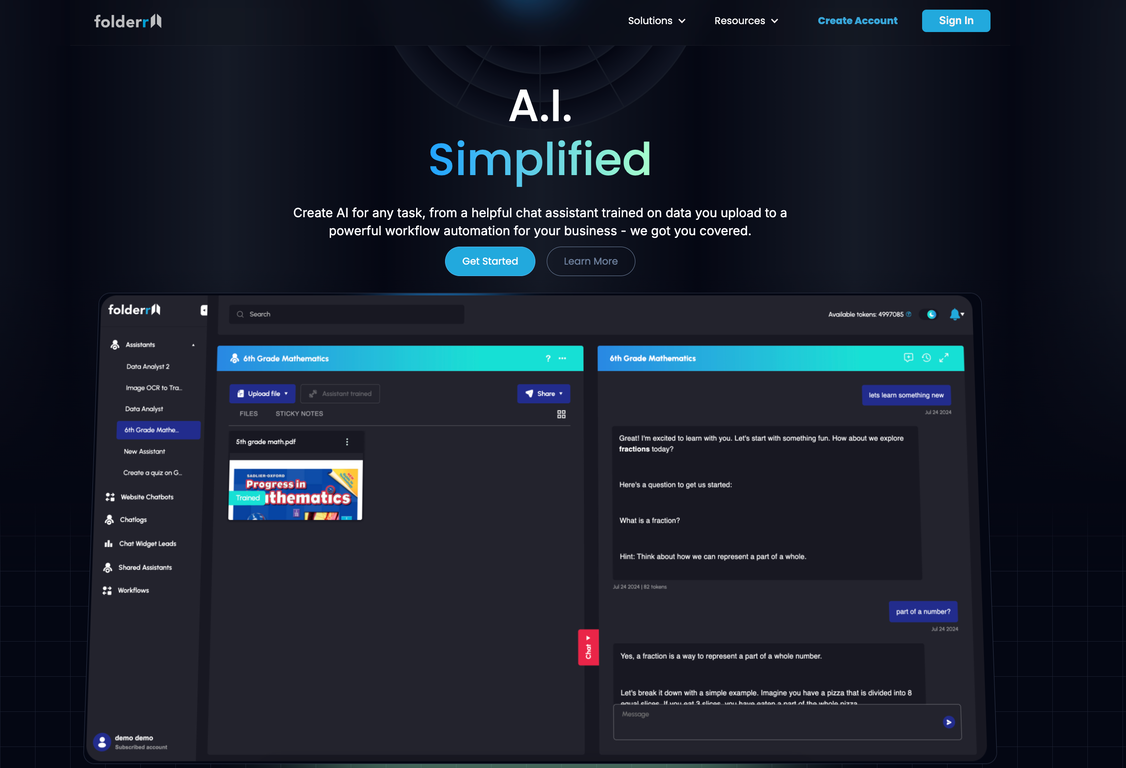
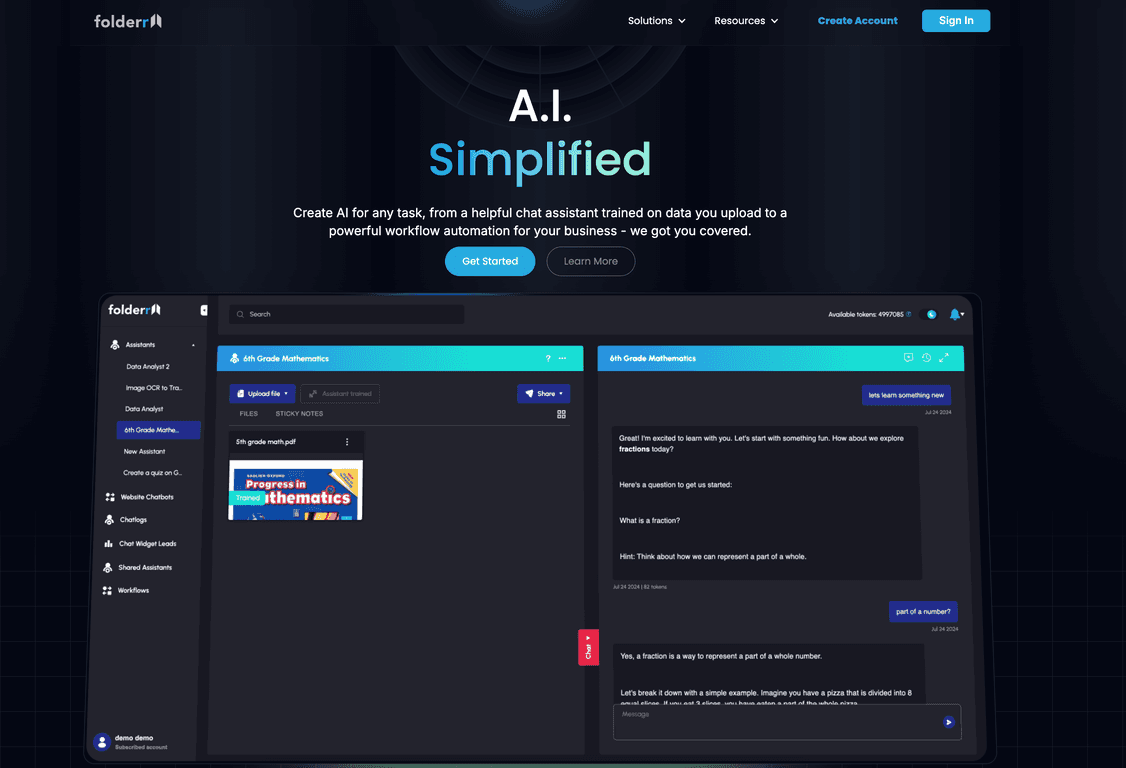
I’ve been testing a lot of “AI for everyone” tools lately, and Folderr is one of the few that doesn’t feel like it’s trying to impress you with buzzwords. The whole pitch is basically: upload your files, ask questions, and set up automations without needing to be a developer. And yeah—when it works, it’s genuinely convenient.

Folderr

Folderr Review

Here’s what I liked right away: Folderr feels built around documents first. Instead of jumping straight into a generic chatbot, you upload files and then chat with them. That matters, because most people don’t want to copy/paste a report into a text box every time they need a summary.

In my tests, I tried a mix of content types (PDFs and spreadsheet-style data). The experience was pretty straightforward—upload, wait for it to index, then ask questions like “What are the key points in this document?” or “Can you pull out the numbers and summarize trends?” The responses weren’t just fluffy either. They were the kind of answers you could actually use as a starting point for work.

That said, I wouldn’t call it magic. If your document formatting is messy (like scanned PDFs or weird tables), you may have to tweak your questions or give clearer instructions. Garbage in, garbage out still applies—AI can only interpret what it can reliably read.

Key Features

  1. Document Chat — Upload files (including PDFs and spreadsheets) and then ask questions about them. I found this works best when you’re looking for summaries, explanations, or extracting specific info from a larger document.
  2. Flexible data upload — You can pull in files from your computer, phones, Google Drive, Dropbox, and more. In practice, this saves time because you don’t have to reorganize everything just to get started.
  3. Generative Chat Tools — Beyond chatting, you can use tools for things like image generation, math solving, and web searches. I used the math angle to sanity-check figures quickly, and the web search option is handy when you don’t want to leave the platform.
  4. Integration capabilities — Folderr supports integrations with a lot of apps and tools. If you already live in tools like Google Workspace, spreadsheets, or other common services, this is where it starts to feel “real” instead of just a standalone AI site.
  5. AI automation (drag-and-drop workflows) — This is the part I’m most interested in for day-to-day use. You can build workflows without writing code. For example, you can set up a workflow that takes a new document, processes it, and then routes the output somewhere useful (like a task, message, or storage location).

Pros and Cons

Pros

  • Easy to get started — The UI is friendly. I didn’t feel like I needed a tutorial to do the basics (upload → chat → ask questions).
  • Works across multiple file formats — Being able to handle PDFs and spreadsheets is a big deal for anyone who deals with reports, invoices, or data exports.
  • Integrations help it fit into real workflows — If you connect the tools you already use, it stops being “one more app” and starts being part of your process.
  • Generative tools expand what you can do — Image generation, math help, and web search are all useful in different scenarios, not just one gimmick.
  • Useful for both personal and business use — I can see it working for studying/summaries at home and also for internal knowledge work at a small team.

Cons

  • Setup can feel a little learning-heavy at first — The platform is user-friendly, but if you’ve never built automations before, you’ll still need a bit of time to understand how workflows are structured.
  • Internet dependency — Like most AI tools, you’re going to need a stable connection. If your connection is spotty, the experience can get frustrating fast.
  • Not every “special” format behaves perfectly — Highly specialized layouts, poorly scanned documents, or complex tables may require extra effort. Sometimes you’ll get better results by asking narrower questions.

Pricing Plans

Folderr offers a 7-day free trial, which is honestly the right move. It gives you enough time to test uploads, run a few document chats, and try at least one automation workflow.

For the latest subscription options and pricing details, check the pricing page on their website.

Wrap up

Overall, I think Folderr is a solid option if you want AI that actually ties back to your documents and your day-to-day tools. It’s not perfect—formatting quirks and the usual “you still need to ask good questions” reality are there—but for anyone trying to reduce manual work, it’s worth a serious look, especially during the free trial.

Stefan

Stefan

Stefan is the founder of Automateed. A content creator at heart, swimming through SAAS waters, and trying to make new AI apps available to fellow entrepreneurs.

Related Posts

indie writers featured image

Indie Writers in 2026: Essential Strategies for Success

Discover how indie writers are thriving in 2026 with direct sales, AI tools, and community strategies. Learn expert tips to boost your indie author journey today!

Stefan
urban publishing companies featured image

Urban Publishing Companies: Top Trends & Self-Publishing Tips for 2026

Discover the latest in urban publishing companies, including top publishers, self-publishing platforms, and industry trends shaping urban fiction in 2026. Learn how to succeed today!

Stefan
general fiction definition featured image

General Fiction Definition: Complete Reading Guide for 2026

Discover the comprehensive definition of general fiction, its genres, examples, and tips for writers and readers in 2026. Unlock the secrets today!

Stefan

Create Your AI Book in 10 Minutes