Table of Contents
What Is GameCutAI (2026)? My Take After Testing
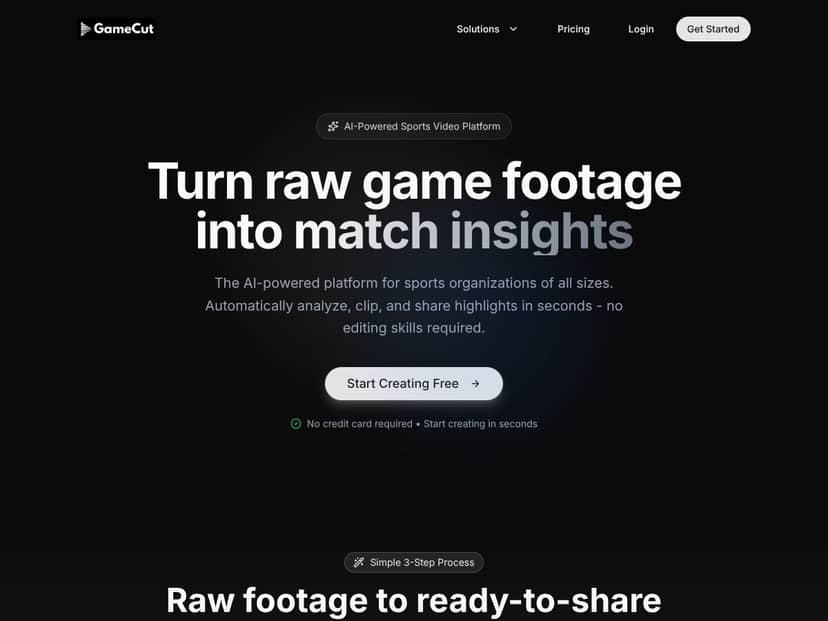
I went into this review with a pretty healthy skepticism. “AI highlight maker” is a crowded space, and a lot of tools either (a) don’t actually produce usable results, or (b) require more manual cleanup than they admit. GameCutAI caught my attention because it’s positioned specifically for sports footage—upload the game, get highlights back, done.
In plain English, that’s the pitch: you feed it raw sports video (think full soccer matches, basketball games, etc.), and it analyzes the footage to identify the exciting moments. Then it turns those moments into short, shareable clips so you don’t have to scrub through hours of play-by-play.
Who does that help? In my experience, this kind of tool is most useful for people who don’t want to become video editors. That includes youth leagues posting weekly recaps, coaches who want to share “top moments” with players, and small organizations that don’t have a dedicated highlight team.
Here’s the part I don’t love: the public info around the product is thin. When I looked for a clear “here are the exact features” list, a roadmap, sample exports, or even a few demo clips, I didn’t find much. I also couldn’t verify who’s behind it or how long it’s been operating based on what was available on the site.
One more important reality check: this doesn’t look like a full editing suite. There’s no indication you’ll be able to fine-tune cut points like you would in Premiere Pro, or adjust detailed timeline settings. The whole value proposition is speed and automation—so if you need total creative control, it’s probably not built for that.
GameCutAI Pricing: What I Could (and Couldn’t) Verify
Let me be upfront: I couldn’t find transparent pricing details on the official site. They mention a “Free” option, but the page doesn’t spell out what “Free” actually includes—limits, export caps, watermark behavior (if any), supported formats, or how long you can use it.
That’s not a small issue. If you’re trying to decide whether GameCutAI is worth paying for, you need at least some hard numbers: how many videos you can process, how long those videos can be, and what you get in terms of clip quality and quantity.
In my view, the lack of published plan details is a dealbreaker for anyone who needs predictable costs—like leagues working on a schedule, or teams that plan content around weekly games. If you can’t confirm the free tier is more than a marketing demo, you’re basically gambling on whether you’ll hit the limit right when you need it most.
What I’d do if you’re considering it: if there’s a free tier, try it specifically for your workflow (same sport, same length, same resolution). If it feels promising but hits limits quickly, that tells you a lot—without you having to guess.
The Good and The Bad (What Actually Stands Out)
What I Liked
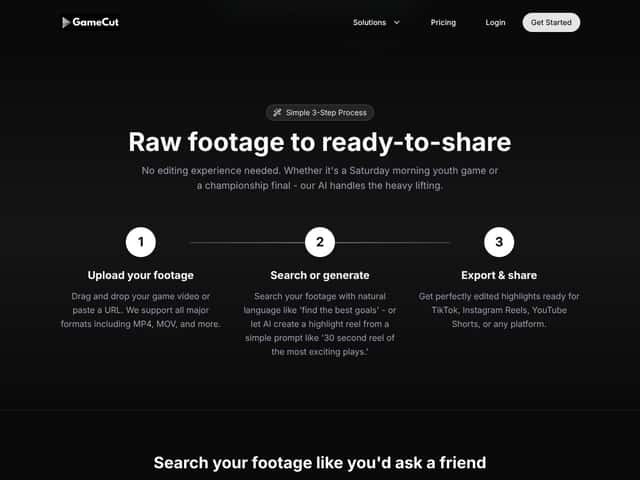
- It’s built for speed: The basic flow is upload → generate/search clips → export/share. That’s exactly what a lot of sports staff want when they’re busy.
- Low barrier for non-editors: You don’t need to know cutting on a timeline. If you’re a coach or league admin who just wants highlights, that matters.
- Sports-focused concept: It’s not trying to be a general-purpose AI content tool. The positioning is clearly around game footage and highlight reels.
- Potential time savings: If the automation is consistent, it can cut down the “watch everything” part that eats entire evenings.
- Simple interface (from what’s visible): The UI approach looks designed to be straightforward rather than overwhelming.
What Could Be Better
- Feature transparency is lacking: I didn’t see a detailed feature list, a clear explanation of clip generation controls, or a thorough breakdown of what’s included in the free tier.
- No real-world proof on the page: There weren’t solid demos or sample outputs I could review to judge quality before using it.
- Limited info on integrations: I couldn’t confirm whether it connects cleanly with common publishing workflows (for example, direct export options or social media upload paths).
- Pricing clarity is missing: “Free” without limits is hard to evaluate. For teams, that’s the kind of uncertainty that causes budget headaches.
- Customization appears limited: The tool seems geared toward automated clips, not precision editing. If you want control over highlight selection rules or tagging, you may feel boxed in.
Who Is GameCutAI Actually For?
If you’re a coach, league organizer, or small sports content creator who wants quick highlights without learning editing software, GameCutAI is at least aimed at your problem. The best-fit scenario is when you need “good enough” highlight clips on a regular cadence—like weekly recaps or quick player highlights.
For example, if you’re running a youth soccer league and you want to post 30–90 second highlight reels after each match, an automated workflow is appealing. Same idea for amateur clubs that want to engage parents and players without hiring someone to manually create edits.
But if your expectations are higher—say you need consistent accuracy for specific event types (goals vs. near-misses), or you want to match your team’s style guide for editing—this might not be the right tool based on the amount of available detail and control described publicly.
Who Should Look Elsewhere
I’d look elsewhere if you need a professional editing workflow, because GameCutAI doesn’t position itself as a replacement for a real editor. You’ll likely outgrow it if you want:
- custom cut points and deeper timeline control
- advanced color/audio workflows
- guaranteed consistency in highlight selection
- clear integrations into existing publishing or sports media pipelines
Also, if you’re the type of buyer who needs transparency—pricing, exact limits, and credible examples—GameCutAI’s public information may frustrate you. That’s not me being dramatic. It’s just what happens when you can’t verify what you’re getting before you try it.
For teams that already use established platforms (sports analytics, video systems, or media workflows), you may get better reliability by sticking with tools that have a longer track record and more documented features.
How GameCutAI Stacks Up Against Alternatives
Quick note: a lot of AI “alternatives” aren’t actually comparable. Some focus on game design, others on art generation, and others on narrative content. Still, I compared them using the only criteria that matter for this review: whether they’re built for sports footage highlight creation (and how clearly pricing/features are documented).
Ludo.AI
- What it does differently: Ludo.AI is aimed more at AI-assisted game development (prompts, assets/levels) rather than analyzing sports footage.
- Pricing clarity: I couldn’t verify the exact current pricing from an official page in the material available to me while preparing this review, so I’m not going to guess numbers.
- Choose this if... You’re creating game content and want AI help with design/creation, not editing sports videos.
- Stick with GameCutAI if... Your main goal is highlight generation from sports footage.
Scenario AI
- What it does differently: Scenario AI is more about story-driven, interactive or narrative-style creation than sports video editing.
- Pricing clarity: I didn’t find verifiable pricing details I could cite here, so I’m not listing a monthly range.
- Choose this if... You want narrative/cinematic generation for game content, not sports highlights.
- Stick with GameCutAI if... You want automated sports footage clip extraction.
Leonardo.AI
- What it does differently: Leonardo.AI is centered on generating images/assets (and related creative outputs) rather than sports footage analysis.
- Pricing clarity: I didn’t verify exact plan pricing for this review, so I’m keeping it out of the article.
- Choose this if... You’re doing concept art or asset creation for games.
- Stick with GameCutAI if... You want sports-focused highlight workflows.
Promethean AI
- What it does differently: Promethean AI is oriented toward world-building/environment design—again, not sports highlight editing.
- Pricing clarity: Pricing wasn’t clearly verifiable from public sources I could cite during this review.
- Choose this if... You’re building environments and need AI assistance there.
- Stick with GameCutAI if... You’re specifically trying to turn sports footage into clips.
Bottom Line: Should You Try GameCutAI?
Based on the product positioning and what I could verify from the public info, I’d put GameCutAI at about a 6.5 out of 10 for now. The idea is solid—sports highlight automation is genuinely useful—but the lack of clear pricing, detailed feature documentation, and credible sample outputs makes it hard to trust blindly.
Here’s the honest part: if you’re the kind of person who wants to see proof (sample clips, export examples, clear limits) before committing, you may feel like you’re walking into a black box.
My recommendation: try it only if you’re comfortable testing early-stage tools. If there’s a free tier, use it to answer your key questions fast—like whether the clip selection feels accurate for your sport, whether exports look good enough for your audience, and whether you hit any limits.
If you need a reliable, polished highlight workflow with clear controls and transparent costs, you’ll probably have a better experience elsewhere.
Common Questions About GameCutAI
Is GameCutAI worth the money?
It could be, but I can’t honestly call it “worth it” without transparent pricing and clear evidence of performance. If the free tier works for your sport and doesn’t hit limits immediately, then sure—give it a shot. If it’s restricted, you’ll know quickly.
Is there a free version?
There’s a “Free” option mentioned, but I couldn’t find clear details about what it includes (limits, exports, duration, or whether it’s a trial). If you try it, test it with your real footage so you’re not surprised later.
How does it compare to competitors?
Most of the tools people mention alongside it (like game design/narrative/asset generators) aren’t truly focused on sports highlight creation. The real comparison is: can they analyze sports footage and export clips reliably? Based on what’s publicly verifiable, GameCutAI’s biggest advantage is its sports-first positioning—but it still needs better transparency to compete on trust.
Can I get a refund?
I couldn’t verify refund terms from the information available while writing this review. If you decide to subscribe, check the terms before paying.
What technical capabilities does it have?
Publicly, it’s described as an AI tool that analyzes sports footage, helps you search/generate highlights, and exports shareable clips. Beyond that, the exact capabilities (supported sports, event accuracy, control options, output formats) aren’t clearly documented.
Is it easy to use?
From the interface approach shown, it looks straightforward—upload, generate/search clips, then export. Still, “easy” depends on onboarding and how much manual cleanup is required after generation, and that information isn’t well documented publicly.
Can it handle all sports footage types?
I can’t confirm full compatibility. Most AI video tools tend to work best with common sports, clean camera angles, and decent lighting/audio. If your footage is shaky, obstructed, or shot from unusual angles, expect results to vary.




