60-second summary
Quick answer
Open Earn with us and copy the Unique Referral Link exactly as shown. Keep the ref parameter intact and test it in a private window before sharing.
Before you start
What you need
- Sign in to the Automateed account that will own the referral attribution.
- Open the affiliate program and generate a referral code if the account has no link yet.
Procedure
Complete the task step by step
- 01
Open Earn with us
Go to the Affiliate Program dashboard.
- 02
Copy the unique link
Use the displayed automateed.com URL with your ref parameter.
Current app screenOpen full size: Current unique Automateed referral link card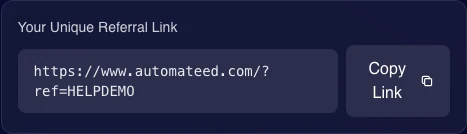
Copy the complete URL exactly as displayed, including its ref parameter. - 03
Do not remove the ref code
The code is required for visit and registration attribution.
- 04
Test in a private window
Confirm the link opens the marketing homepage and retains the ref parameter.
Success check
Confirm that it worked
- Copy Link produces a URL in the form https://www.automateed.com/?ref=CODE.
- Opening the copied homepage URL in a private window preserves the ref query parameter.
Important notes
- Removing or rewriting the ref parameter prevents the shared URL from carrying the intended referral code.
- The homepage version of the generated link should be tested before it is distributed publicly.
Troubleshooting
If it still does not work
No referral link is displayed
Use Generate Link once, then reload the affiliate program if the generated code is not immediately shown.
The copied URL does not include the ref parameter
Return to the affiliate hero, use Copy Link again and verify the full URL before sharing it.