60-second summary
Quick answer
When the displayed available commission reaches $100 and there is no existing pending request, Request payout unlocks. Submit it once; the card then changes to Pending review and the button to Request pending.
Before you start
What you need
- The displayed Available balance must reach the current $100 minimum.
- There must be no existing affiliate payout request in pending review.
Procedure
Complete the task step by step
- 01
Check available commission
The current request flow uses the displayed Available balance after amounts reserved by open payout requests are subtracted.
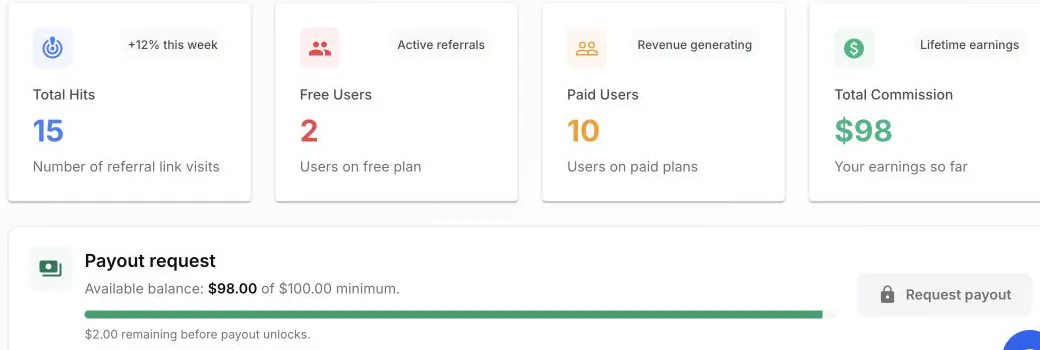
The payout panel shows the available balance, minimum and remaining amount before Request payout unlocks. - 02
Reach the threshold
The current minimum is $100 of available commission. The progress card shows how much remains.
- 03
Check for an existing request
The button is available only when the displayed balance reaches the threshold and no payout request is already pending.
- 04
Click Request payout
The request is sent for administrative review. While it is open, the button changes to Request pending.
Success check
Confirm that it worked
- The payout card changes to Pending review after one successful request.
- The request button changes from Request payout to Request pending while that request is reserved.
Important notes
- The displayed Available balance is authoritative after amounts reserved by pending, approved or paid requests are deducted.
- The referral date filter does not change the all-time payout balance, and the current request flow has no payout-contact-details field.
Troubleshooting
If it still does not work
Request payout remains disabled
Check whether Available balance is below the displayed minimum or whether an earlier request is already pending.
The balance fell after a request was submitted
Review the Pending review state rather than submitting again; the requested amount is reserved while the payout is processed.