60-second summary
Quick answer
Automateed stores the referral on the user profile, so later eligible platform payments can attribute commission to the same affiliate. The dashboard separates account creation from revenue-generating referrals.
Before you start
What you need
- The visitor must arrive through a valid referral link so the account relationship can be recorded.
- The referred user must complete an eligible payment before a paid-user commission can be expected.
Procedure
Complete the task step by step
- 01
Visitor opens your link
The referral code is captured before registration.
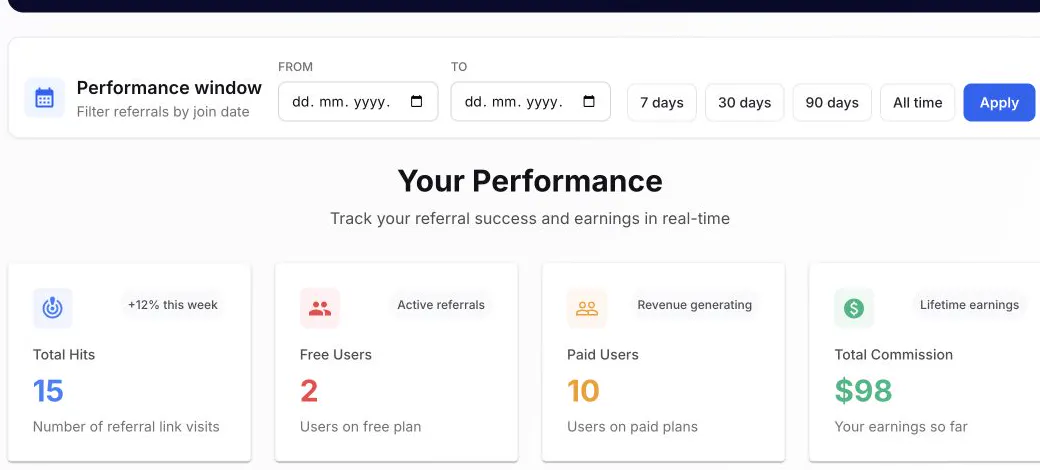
Free Users confirm registration attribution; Paid Users and Total Commission confirm payment attribution. - 02
User creates an account
The code is attached to the new user profile when attribution succeeds.
- 03
User pays later
Eligible platform payments can use the stored referral relationship.
- 04
Dashboard updates
Paid status and commission appear after the eligible payment is recorded.
Success check
Confirm that it worked
- The referred account first appears as a Free User when it joins without a qualifying payment.
- After an eligible payment is processed, the account appears as Paid and the associated commission is reflected in affiliate performance.
Important notes
- The dashboard presents 20% Lifetime Commission; commission appears after an attributed user completes an eligible processed payment.
- Attribution is stored as an account referral relationship rather than relying only on a browser cookie.
Troubleshooting
If it still does not work
A later payment has no corresponding commission
Confirm that the customer is present in Referred Users and that the payment is eligible and processed, then provide the referred user and payment reference for investigation.
The visitor clicked the link but never appears as a referred user
Verify that the full ref URL was used before account creation and distinguish a tracked hit from a completed account registration.