60-second summary
Quick answer
Open Publisher Sites, complete About your website, What will you sell? and Choose a look, build the draft, then use the site tabs to customize and put it online.
Before you start
What you need
- Create the Publisher Profile required by Publisher Sites.
- Use an account with fewer than five existing websites.
- Publish any books or courses that should be sold on the site; building a site without products is allowed.
Procedure
Complete the task step by step
- 01
Open Publisher Sites
If you have no website yet, click Get started. Existing accounts can use New website.
Current app screenOpen full size: Automateed Publisher Sites overview with site controls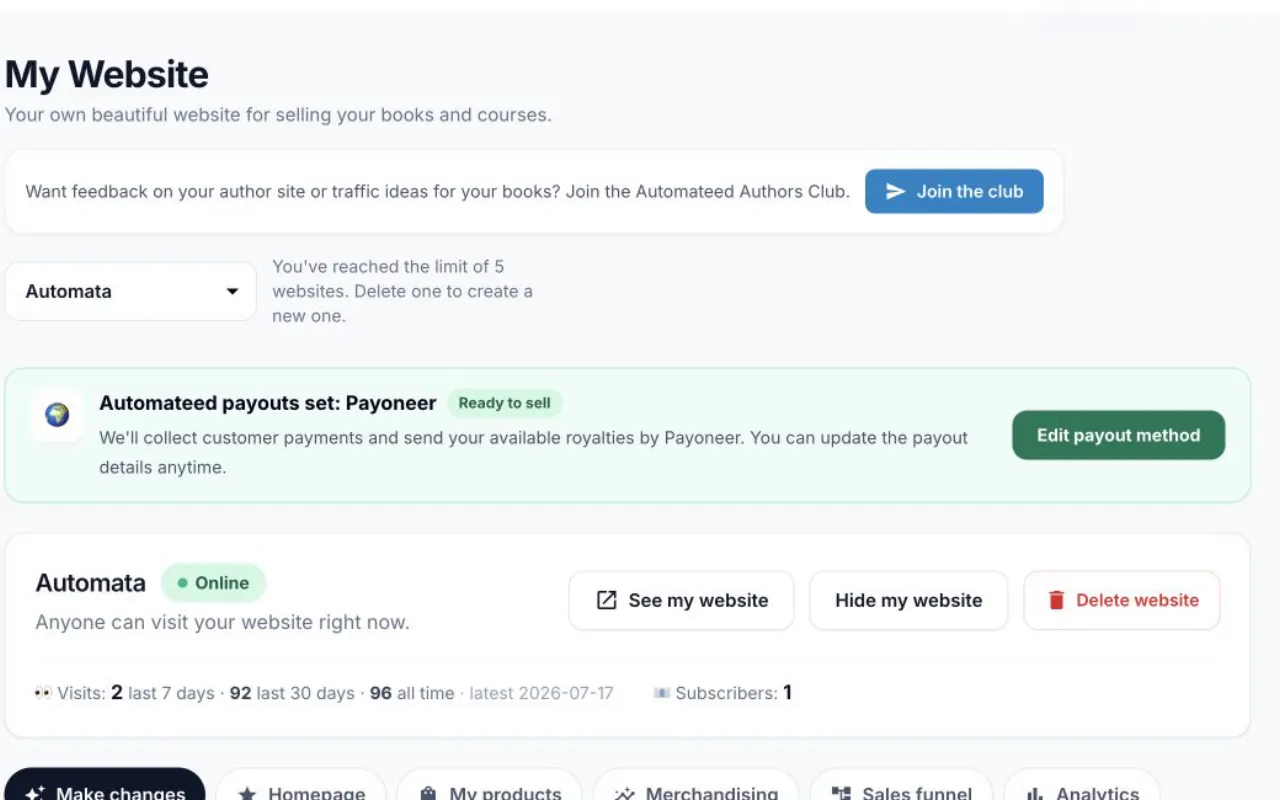
A live site shows Online plus controls for content, products, analytics, domain and advanced pages. - 02
Complete About your website
Enter What should your website be called?, What is your website about? and Your email address, then click Continue.
- 03
Complete What will you sell?
Select already-published books and courses. You can continue without products and add them later.
- 04
Complete Choose a look
Select a design and click Build my website. The build screen writes pages, creates the hero image and places selected products.
- 05
Review and customize
Use Make changes, Homepage, My products, Sales funnel, Web address and Advanced after the first build.
- 06
Put the website online
Click Put my website online and finish any required hosting checkout; the status changes from Not online yet to Online.
Success check
Confirm that it worked
- Build my website creates the draft and opens its Make changes workspace.
- The editor exposes Homepage, My products, Merchandising, Sales funnel, Analytics, Subscribers, Web address and Advanced.
- After Put my website online succeeds, the status changes from Not online yet to Online.
Important notes
- Only published books and courses appear in the product picker.
- The wizard can continue with no products and add them later.
- An unconfigured payment account does not stop site creation, but visitors cannot buy.
- Creating the draft and putting it online are separate actions, and going online can require a website-hosting subscription.
Troubleshooting
If it still does not work
Publisher Sites asks for an author profile
Create and save the Publisher Profile, then return to Publisher Sites.
New website is unavailable
The account has reached the five-site limit; remove an unused site before creating another.
A book or course is missing from the picker
Publish that product first, then reopen What will you sell.
Put my website online opens a paywall
Complete the website-hosting subscription; the successful return publishes the draft.
Related guides
Go deeper