60-second summary
Quick answer
Choose the language before generation and write the brief in that language when possible. Review names, measurements and specialist terms in the preview before exporting.
Before you start
What you need
- Choose the intended language and prepare exact spellings for names, brands, and specialist terms.
- Open Advanced Settings or Additional Settings in the creation form.
Procedure
Complete the task step by step
- 01
Select the language before generation
Use the language control in the selected creation flow.
Current app screenOpen full size: Current language menu in Automateed Advanced Settings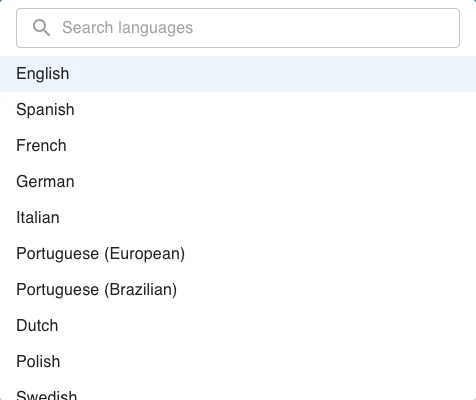
Choose the output language before outline generation, then keep names and specialist terminology consistent in the brief. - 02
Write instructions consistently
Keep the brief and required terminology in the target language when possible.
- 03
Review names and specialist terms
Provide exact spelling for names, brands and terms the model should preserve.
- 04
Inspect the preview
Check headings, chapter text and cover wording before generating or exporting the full project.
Success check
Confirm that it worked
- The Language control shows the intended language before full generation.
- After the outline returns, both the selected language and generated headings have been checked for consistency.
Important notes
- English is the default and the language list includes a “Search languages” field.
- The outline response can auto-detect a language and display “Language detected: …”; translation of an existing completed book is a separate Translate Book workflow.
Troubleshooting
If it still does not work
The Language control is not visible
Expand “Advanced Settings” or “Additional Settings”, open Language, and use “Search languages”.