60-second summary
Quick answer
In Publisher Profile choose Use my own Stripe or Let Automateed pay me. Automateed payouts support PayPal, Wise, Payoneer or bank and become payable after the displayed threshold and hold rules.
Before you start
What you need
- Save the Publisher Profile name and email before starting Stripe.
- Know the country where the receiving bank account is held.
- For Automateed payouts, prepare the PayPal, Wise or Payoneer email, or the requested bank-transfer details.
Procedure
Complete the task step by step
- 01
Open Publisher Profile
Find the How you will get paid section.
Current app screenOpen full size: Use my own Stripe and Let Automateed pay me payout cards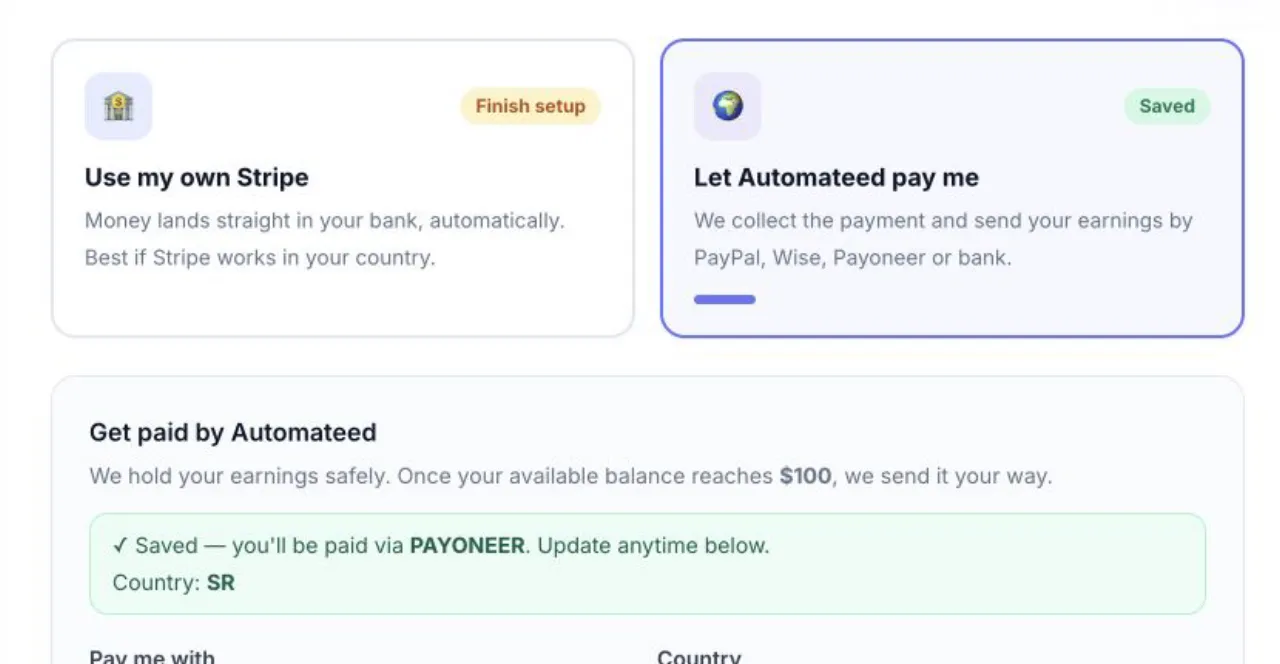
The saved card controls which setup panel appears when the page reloads. - 02
Choose one payout mode
Use your own Stripe where it is available, or let Automateed collect and pay royalties.
- 03
Complete the selected details
For Automateed payouts, add country, method and the requested account identifier.
- 04
Save and reload
Confirm the selected method remains active after refresh.
- 05
Monitor Seller Dashboard
Pending royalties become available after the review and hold period shown in the dashboard.
Success check
Confirm that it worked
- The Stripe card shows Connected or the Automateed card shows Saved.
- After reload, the selected payout card and its saved details remain active.
Important notes
- The current interface states that the publisher keeps 85% of each sale.
- Automateed payouts currently become payable when available balance reaches $100.
- Automateed payout methods are PayPal, Wise, Payoneer and bank transfer; Stripe availability depends on bank country.
Troubleshooting
If it still does not work
Stripe shows Finish setup
Click Finish Stripe setup and complete the remaining Stripe-hosted steps.
Stripe setup will not start
Save the publisher name and email, then choose the country where the bank account is held.
An Automateed payout method will not save
Enter the selected service's account email, or complete Bank details when Bank transfer is selected.