60-second summary
Quick answer
Open the What are you creating? picker and choose the starting structure that matches the reader job: Cookbook for recipes, Workbook for exercises, Illustrated storybook for visual stories, Novel for fiction or Non-fiction ebook for flexibility.
Before you start
What you need
- Decide whether the reader needs a narrative, instruction, exercises, prompts, recipes, illustrations, puzzles, or an imported manuscript.
- Open the current format picker at /create/ebook.
Procedure
Complete the task step by step
- 01
Start from the reader job
Decide whether the reader needs instruction, story, practice, reference or a repeatable log.
- 02
Open the current format picker
Go to Create and use What are you creating? to browse or search the available formats.
Current app screenOpen full size: Current Automateed content-format picker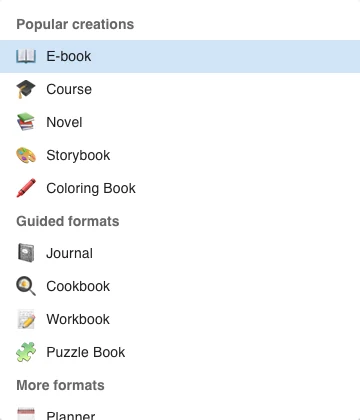
Search or browse the format picker, then choose the workflow whose structure matches the reader task. - 03
Use a specialist workflow
Choose Cookbook, Workbook, Illustrated storybook, Guided journal, Coloring book or Puzzle book when its starting structure matches.
- 04
Use Non-fiction ebook for flexibility
Choose the general nonfiction flow when no specialist structure is required.
- 05
Use Novel for long-form fiction
The novel workflow prioritizes narrative structure, scenes and continuity.
Success check
Confirm that it worked
- The selected format card opens its purpose-built creation route.
- The chosen type matches the project’s starting structure—for example Novel for a narrative arc, Workbook for exercises, or Cookbook for recipes.
Important notes
- The picker states: “The format changes the starting structure, not what you can write.”
- Current options include Non-fiction ebook, Novel, Course book, Workbook, Illustrated storybook, Guided journal, Cookbook, Coloring book, Puzzle book, structured niche formats, and Import a manuscript.
Troubleshooting
If it still does not work
Search shows no matching format
Clear the search or try a simpler word such as “guide”, “journal”, or “kids”, as suggested by the picker.