60-second summary
Quick answer
Open the generated project, edit one chapter at a time, replace broad claims with your examples, remove repeated introductions and save each meaningful change before moving on.
Before you start
What you need
- Open a generated book from Library and go to its detail page.
- Have the examples, claims, or first-hand details you intend to add ready for verification.
Procedure
Complete the task step by step
- 01
Replace broad claims
Add concrete examples, numbers, situations or constraints that you can verify.
Current app screenOpen full size: Automateed chapter and subchapter editing controls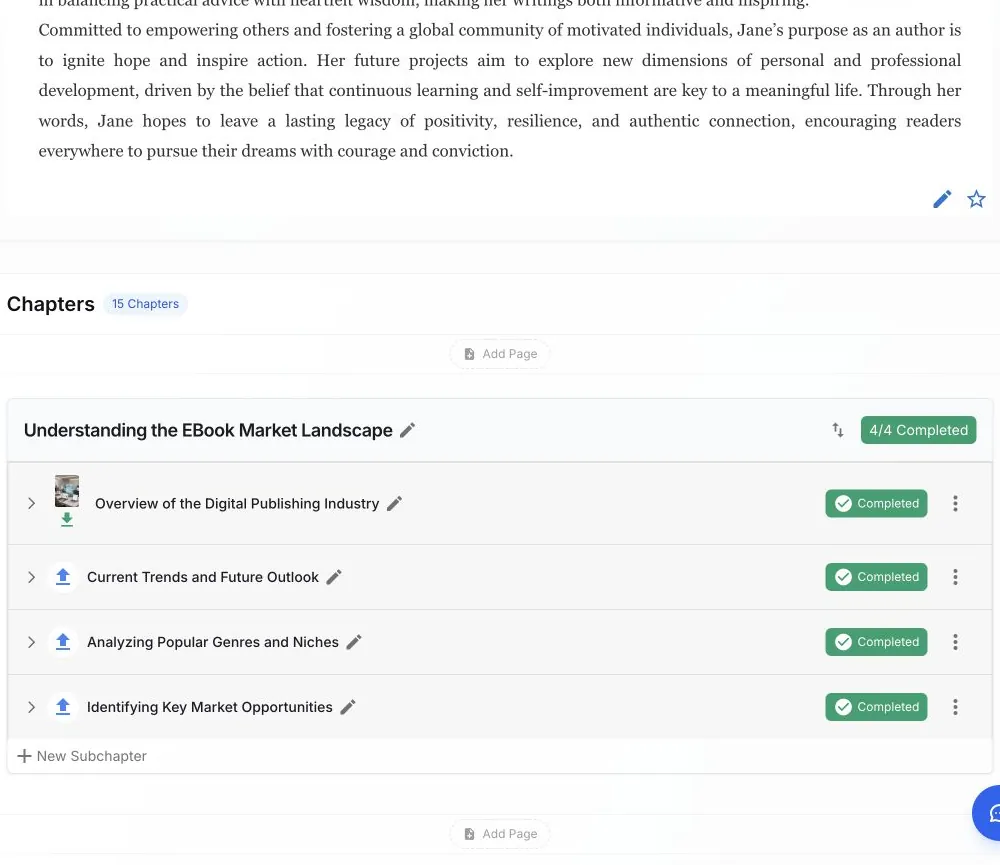
Open one subchapter at a time, replace generic passages and save the revision before continuing. - 02
Add your experience
Insert stories, opinions, methods and language that only you would use.
- 03
Remove repeated framing
Cut repeated introductions, summaries and transition phrases across chapters.
- 04
Strengthen chapter jobs
Each chapter should solve a different reader problem instead of rephrasing the same promise.
- 05
Run a final human edit
Read the book aloud and verify factual, legal, medical and financial statements before publishing.
Success check
Confirm that it worked
- Saving a revision produces “Chapter updated successfully”.
- Reopening the subchapter shows the revised text instead of the previous generated passage.
Important notes
- “Reset” restores the last saved version of the subchapter, not an earlier exported file.
- Saving chapter content marks an existing export as outdated, so a fresh export must be generated after editing.
Troubleshooting
If it still does not work
A downloaded book still contains the old wording
Confirm the chapter save succeeded, reopen Preview & Download, and generate a new file rather than reopening the older local export.