Trim
6 × 9 in
Common trade paperback; use the genre and page count to decide.
Print production field guide
Finalize the interior, lock the page count, calculate the cover, model the print cost and inspect a physical proof in the order print production actually requires.
Quick answer
To publish a paperback, finish the digital manuscript first, export a print-ready interior PDF at a standard trim size such as 6" × 9", prepare a wraparound cover from the final page count, then upload the files to a print-on-demand service like Amazon KDP or sell printed copies through your own author site. Automateed generates the interior file and the Amazon package directly from your book project.
Trim
6 × 9 in
Common trade paperback; use the genre and page count to decide.
Binding
Perfect bound
The gutter must grow as the book becomes thicker.
Interior
Print PDF
Final page count comes before the wraparound cover.
Images
300 DPI
Check at the size the image will physically print.
Actual product workflow
These are the actual buttons and screens in the product, not a generic checklist. You need a finished book project in your Library before you start.
The non-negotiable order is interior → page count → cover → preview → physical proof.
Open the book in the Book Studio editor and complete every text and image change. Page count drives spine width, so the manuscript must be final before you produce print files.
Click the Export button in the editor header, or use the Export book icon on the book card in your Library. The dialog shows the available formats: PDF, KDP, EPUB, DOCX and Audio.
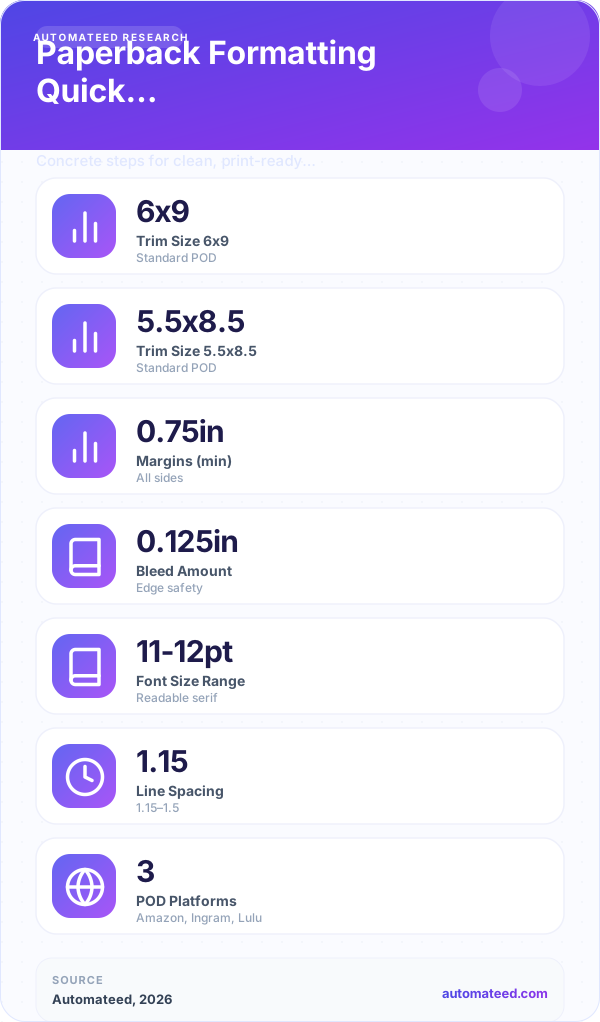
Select PDF, then pick the page size. Trade 6" × 9" is marked as the KDP-standard size; Pocket 5" × 8", Digest 5.5" × 8.5", Workbook 7" × 10", Large 8" × 10" and US Letter 8.5" × 11" are also available for print-oriented layouts.
Enable the table of contents and copyright page options, and the About the author section if your plan includes it, so the printed book opens like a bookstore paperback rather than a bare document.
Click Download PDF and read the exported file page by page: chapter openings, image placement, headers and page numbers. PDF export is available on every plan, so you can iterate freely.
Choose the KDP format (paid plans) or the KDP Package dialog in the book editor. Automateed can draft the KDP metadata with AI — title options, subtitle, description, seven keywords and category suggestions — then bundles PDF, EPUB, DOCX, the cover image and publishing instructions into one ZIP.
The built-in Cover designer saves a 1600 × 2560 px front cover. A paperback additionally needs spine and back panels sized from your final page count, so build the full wrap with KDP’s cover calculator and template, upload both files, run the KDP previewer and order a printed proof before enabling distribution.
Result: You end with a proofed print-interior PDF at a real trim size, a complete Amazon upload package and a checklist of what still happens on KDP’s side: cover wrap, previewer, proof and pricing.
The physical book math
Controls the physical page, page count, shelf signal and part of the print-cost equation.
Protect text from the binding and trim line; minimums increase with page count.
Required when images or color extend to the edge of the cut page.
Calculated from final page count, paper stock and printer specifications.
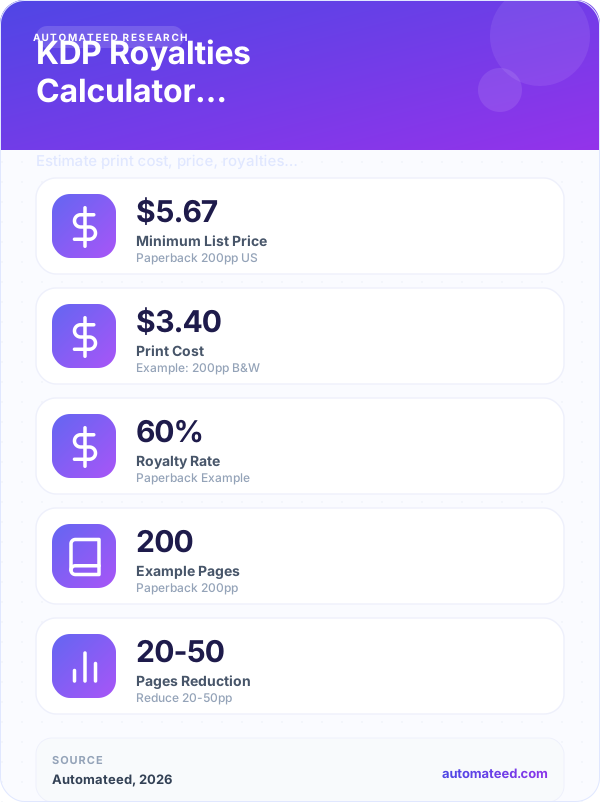
Depends on page count, ink type, marketplace and trim; the retail price must clear this cost.
Catches paper, contrast, gutter and alignment defects that a browser preview cannot reproduce.
Production decisions in depth
01
Trim size is the physical width and height of the printed page, and it is a genre signal before anyone reads a word. 6" × 9" (US Trade) is the default for nonfiction, memoir and most self-published novels; 5" × 8" and 5.5" × 8.5" read as fiction and poetry; 7" × 10" and 8.5" × 11" suit workbooks, cookbooks and teaching material where wide pages carry exercises or tables. Automateed’s export sizes map to these conventions, so choose the trim by shelf expectation first and page-count economics second.
Trim also changes cost. Print-on-demand pricing rises with page count, and a smaller trim spreads the same manuscript across more pages. A 40,000-word book that makes a thin 6" × 9" volume can feel more substantial — and price more naturally — at 5" × 8". Run both scenarios through a print royalty calculator before locking the size.
02
Print interiors need what screens never ask for: an inside gutter wide enough to survive binding, outside margins that keep text off the trim line, and bleed whenever ink must reach the page edge. Amazon KDP publishes exact minimums that scale with page count — the gutter requirement grows as the book gets thicker — so always check the current specification table rather than a copied blog number.
Spine width is pure arithmetic: page count multiplied by the paper-stock thickness factor. That is why the interior must be final before the cover. If you add a chapter after building the wraparound cover, the spine calculation is wrong and the printer will reject or misalign the file. Automateed’s paperback guidance keeps this order deliberately: interior, then page count, then cover.
03
An ebook cover is a single front image — Automateed renders it at 1600 × 2560 px, a 5:8 portrait that stays sharp at retail thumbnail size. A paperback cover is one continuous wraparound file: back panel, spine and front panel plus bleed on all four sides, dimensioned from trim size, page count and paper color. The safest workflow is to design the front in the Cover designer, then place it into the printer’s calculated template so barcode zones and spine text sit exactly where the printer expects them.
Two quality checks matter most: the front panel must remain readable when reduced to a thumbnail, because most buyers still discover the book online; and any spine text needs a spine of roughly a hundred pages or more to be printable without wrapping onto the panels.
04
A digital previewer catches dimension errors; a physical proof catches everything else — muddy image contrast, cramped gutters, paper color that fights your design, and typography that looked fine on screen but sets too small in print. Read the proof like a buyer: cover first, then spine alignment, then a full pass of the interior with a pen.
Only after the proof passes should you set the list price. Work backwards from print cost: the retail price must cover printing plus the marketplace’s cut and still leave a royalty you can live with. If the math fails at a defensible price, revisit trim size, page count or interior ink choices rather than inflating the price.
Before you approve the paperback
Margins survive binding
Images meet print resolution
Page count is final before cover export
Retail price covers print cost
Paperback publishing FAQ
Yes. The Export dialog produces a print-oriented interior PDF at standard trims such as 6" × 9", 5" × 8" and 7" × 10", and the KDP package bundles PDF, EPUB, DOCX, cover image and publishing instructions for Amazon upload. The wraparound print cover is finished with the printer’s own calculator because it depends on final page count.
Use 6" × 9" unless your genre says otherwise. It is the most common self-publishing trim, it is the size Automateed flags for KDP, and it keeps page count — and therefore print cost — moderate for typical nonfiction lengths.
Yes. Spine width is calculated from page count, so any interior change that adds or removes pages invalidates the wraparound cover. Finish and proof the interior, record the page count, then build the cover.
Bleed means printed content extends past the trim line so it reaches the physical page edge after cutting — needed for full-page images. No-bleed interiors keep a white margin around all content, which is standard for text-led books.
Use the KDP print royalty calculator with your trim size, page count, ink type and intended list price. The royalty is what remains after print cost and the marketplace share, so thick color books need careful pricing.
Yes. An Automateed author website can offer print-on-demand copies fulfilled through Lulu: buyers pay at least the live print and shipping cost plus 30%, and anything you price above that floor is your print margin.
Amazon KDP can assign a free ISBN that is limited to its own listing, or you can buy your own ISBN and keep the registration in your name for wide distribution. Your choice affects the barcode block on the back cover, so decide before finalizing the wrap.
Aim for 300 DPI at the printed dimensions. Screen-resolution images that look fine in the ebook can print soft or pixelated, which is exactly the kind of defect a physical proof copy exists to catch.
Printers rasterize exactly what the file contains. Automateed’s exported PDFs carry the template typography with them, which is why the same file proofs identically on your screen and at the printer.
The text should match, but the packaging differs: the print edition needs a copyright page with print ISBN, page numbers, running headers and a gutter-aware layout, while the ebook prioritizes reflow and clickable navigation. Export each from the same project rather than converting one into the other.
Uploading files and passing the previewer can be done in a day, but plan for proof shipping time plus Amazon’s review window before the listing goes live. Treat the proof round-trip as part of the schedule, not an optional extra.
Yes. Automateed offers a Publish My Book service where the team formats the files and handles the Amazon upload within a few business days, useful when you want the paperback live without learning the KDP dashboard.
Start with the digital master
Create and edit the manuscript, then move into print production only when the page count is stable.