🌸 SPRING SALE — Fresh Start, Fresh Savings
Spring Into SavingsSpring Pricing 🌼
AI Tools

Lums Review (2026): Honest Take After Testing

Stefan
8 min read
#Ai tool

Table of Contents

Lums screenshot

What Is Lums?

Honestly, when I first heard about Lums, I was intrigued but also a little skeptical. It promises to help you forecast your bank balance, automatically categorize your transactions, and build a budget—all using AI—supposedly in just a few minutes. The idea is appealing: no more manual data entry, no complicated spreadsheets. Instead, you get a tool that claims to chat with your money, give you predictions, and help you save more. Sounds great in theory, but I wanted to see if it actually lives up to the hype.

In plain English, Lums is a budgeting app that connects to your financial accounts, then uses artificial intelligence to organize your transactions, forecast your future balance, and help you plan your budget. It’s like having a financial assistant that handles the boring stuff while giving you insights on the fly. The problem it’s trying to solve is the hassle of manually tracking expenses, categorizing transactions, and constantly figuring out whether you’re on track to meet your financial goals.

The company behind Lums isn’t widely known—there's limited info on who’s running it or their background. That’s a bit of a red flag for me; I prefer to review tools from teams I can verify or that have some track record. Their website is pretty sparse on details about the team or development roadmap, which makes me wonder how much ongoing support it’ll get.

My initial impression? Well, I’d say it’s as advertised—at least in the broad strokes. It does seem to connect accounts, forecast balances, and give budgeting suggestions. But, honestly, I wasn’t blown away by the interface or the depth of features. It feels a bit simplified, which could be a good thing for some users, but I’d temper expectations about it being a comprehensive financial tool.

What I want to clarify upfront: Lums isn’t a full-fledged financial planner or investment tracker. It’s mainly focused on helping you budget and keep an eye on your cash flow. Don’t go in expecting complex investment analysis or detailed debt management. It’s more about the day-to-day money management basics, with some AI-powered automation thrown in.

Lums Pricing: Is It Worth It?

Lums interface
Lums in action
Plan Price What You Get My Take
Free Tier Free Basic features, limited account connections, some manual categorization, limited predictions Great for trying out the core features without commitment, but probably too limited for serious budgeting or automation needs.
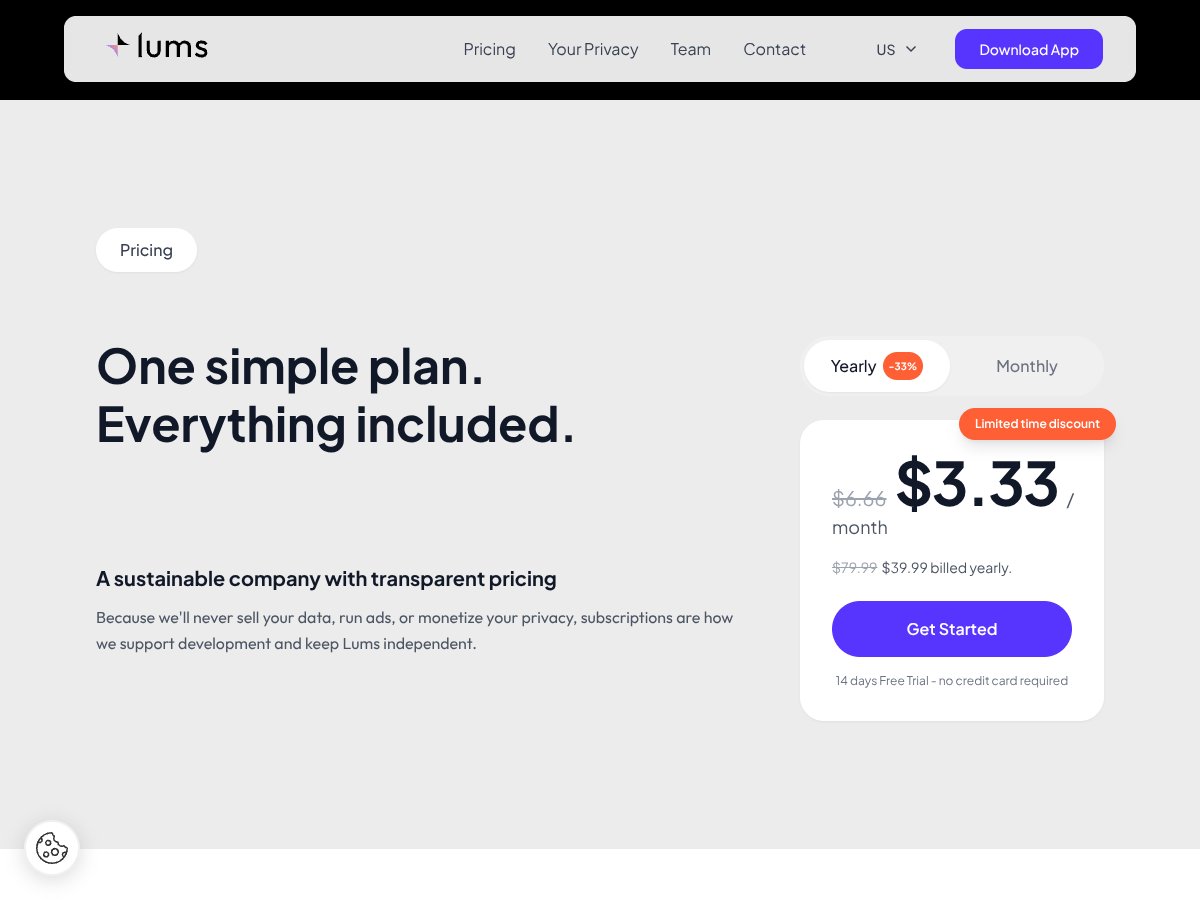
Paid Plan (Yearly) $39.99 billed annually (after discount) All features including unlimited account connections, AI forecasting, auto-categorization, smart alerts, and more Fairly priced if you want the full suite, especially considering the AI-driven automation and predictions. The discount makes it more attractive, but compare it to competitors with similar features.
Monthly Plan $6.66/month (billed monthly) Same as annual, but paid monthly — no discount More flexible if you prefer month-to-month, but at a higher total cost over time. Good for testing or short-term use.

Here’s the thing about the pricing: it seems quite reasonable if you’re serious about AI-assisted budgeting and automation. The yearly plan’s roughly $40 is a decent deal compared to other financial apps that charge more for similar automation features. But what they don’t tell you on the sales page is whether there are any feature gates or usage limits — from what I can tell, it’s mostly all-in, but without detailed docs, it’s hard to be 100% sure. Fair warning: if you’re only looking for a basic budget tracker without AI insights, you might find Lums a bit overkill for your needs. Also, keep in mind that with subscription models, the ongoing cost adds up — so if your budget is tight or you prefer one-time payments, this could be a dealbreaker for some. Which plan makes sense? Honestly, if you’re a casual user who just wants a simple balance and expense overview, the free tier might suffice. But for anyone who wants to automate categorization, predict future balances, and get smart alerts, the paid plan is probably worth it. Nonetheless, I’d recommend trying the free trial first to see if the AI features are actually useful for your specific scenario.

How Lums Stacks Up Against Alternatives

YNAB (You Need A Budget)

  • What it does differently: YNAB focuses heavily on giving every dollar a job, with a strong emphasis on zero-based budgeting and proactive financial planning. It’s more manual and rule-based, encouraging users to assign every expense to a category to prevent overspending.
  • Price comparison: YNAB costs about $14.99/month or $98.99/year. It’s more expensive than Lums, especially considering Lums’s auto-categorization and AI features are likely built-in, whereas YNAB is more traditional.
  • Choose this if... you prefer a manually controlled, highly customizable budgeting process with a proven track record. It’s ideal if you want to learn budgeting fundamentals and don’t mind inputting data yourself.
  • Stick with Lums if... you prefer automation and AI-powered forecasting that reduces the manual effort, especially if you want quick setup and minimal fuss. Lums wins on ease of use and automation.

Mint

  • What it does differently: Mint offers a free, comprehensive overview of all your accounts, with automatic transaction categorization, bill tracking, and credit score monitoring. It’s more of a broad financial dashboard than a dedicated budgeting tool.
  • Price comparison: Free with ads, funded by affiliate offers. Lums likely costs more upfront, but offers AI-powered insights that Mint doesn’t focus on.
  • Choose this if... you want a free, all-in-one financial snapshot that includes credit monitoring and bill reminders, and you don’t mind ads.
  • Stick with Lums if... you want deeper, AI-driven forecasting and automatic budget building that Mint doesn’t provide. Lums is better for proactive savings planning.

PocketGuard

  • What it does differently: PocketGuard simplifies budget tracking by showing how much you can spend after bills and savings, focusing on keeping spending in check. It’s very streamlined and user-friendly.
  • Price comparison: Free tier available, premium features cost around $9.99/month or $34.99/year. Lums might offer more advanced automation and forecasting features at similar or higher prices.
  • Choose this if... you want a straightforward, easy-to-understand app that keeps spending on track without much fuss.
  • Stick with Lums if... you want more sophisticated AI features like balance forecasting and auto-categorization, which PocketGuard doesn’t emphasize.

Simple (by Quicken)

  • What it does differently: Simple is a mobile banking app with integrated budgeting, allowing for direct account management and goal setting, often tied to a checking account. It’s more banking-centric than Lums.
  • Price comparison: Usually bundled with banking services, often free if you have the bank account. Lums has a separate subscription model focused on budgeting.
  • Choose this if... you prefer an all-in-one banking and budgeting experience, especially if you already bank with Simple.
  • Stick with Lums if... you want dedicated budgeting with AI forecasting and automatic transaction categorization, which Simple lacks.

Bottom Line: Should You Try Lums?

Overall, I’d say Lums earns a solid 7/10. It’s a no-nonsense tool that’s great if you want quick, automated budgeting and forecasting without the fuss of manual entry. The interface feels intuitive, and the AI features—if they work as promised—could save you a lot of time and mental effort.

If you’re someone who appreciates automation and doesn’t want to spend ages categorizing transactions or building budgets manually, Lums is definitely worth a shot. It’s especially good for folks who want to see their future balances and plan savings effortlessly.

However, if you’re a budgeting nerd who likes customizing every category or prefers detailed manual control, Lums might feel a bit limited. Also, since no pricing info or user reviews are available, it’s hard to judge value or reliability right now.

For those on a tight budget or who want a free, simple overview, Mint or PocketGuard could be better options. But if Lums’s AI-driven forecasts and auto-budgeting are appealing, go ahead and give it a try—you might find it simplifies your finances more than you thought.

In my personal opinion, I’d recommend giving Lums a shot if you’re tired of manual budget work and want a modern, automated approach. If you prefer more control or are wary of new, unreviewed tools, sticking with established apps might be wiser.

Ultimately, if your main goal is a quick, automated snapshot and future balance forecast, give Lums a shot. If you want detailed control or a proven track record, consider other options first.

Common Questions About Lums

  • Is Lums worth the money? Since there’s no pricing info or user reviews yet, it’s hard to say. It could be worth it if the AI features work smoothly, but proceed with caution.
  • Is there a free version? No clear info on a free tier or trial. You might want to test it out once available before committing.
  • How does it compare to YNAB or Mint? Lums seems more automated and AI-driven, whereas YNAB and Mint are more manual or comprehensive dashboards. It depends if you prefer automation or control.
  • Can I get a refund? No details available. Check their policies once the app is launched or if you sign up.
  • Is it suitable for beginners? Likely yes, if you want a straightforward, automated way to manage your budget without much setup.
  • Does it sync with all bank accounts? No info yet, but most budgeting apps support major banks. Confirm compatibility before committing.
  • How secure is it? No specific info, so ensure you use secure passwords and check their privacy policies once available.
  • What’s the main benefit of Lums? The AI-powered balance forecasting and automatic transaction categorization that could save time and help plan savings better.

As featured on

Automateed

Add this badge to your site

Stefan

Stefan

Stefan is the founder of Automateed. A content creator at heart, swimming through SAAS waters, and trying to make new AI apps available to fellow entrepreneurs.

Related Posts

FaceSymmetryTest Review – Honest Look at Free AI Tool

FaceSymmetryTest Review – Honest Look at Free AI Tool

FaceSymmetryTest is a fun online tool

Stefan
Sweep Review – An AI Assistant for JetBrains IDEs

Sweep Review – An AI Assistant for JetBrains IDEs

Sweep enhances productivity in JetBrains IDEs

Stefan
AI Song Maker Review – Simple & Creative Music Generation

AI Song Maker Review – Simple & Creative Music Generation

easy way to create music with AI

Stefan

Create Your AI Book in 10 Minutes