🐣 EASTER SALE — LIFETIME DEALS ARE LIVE • Pay Once, Create Forever
See Lifetime PlansLimited Time ⏰
AI Tools

ModelRiver Review (2026): Honest Take After Testing

Stefan
11 min read
#Ai tool

Table of Contents

ModelRiver screenshot

What Is ModelRiver?

Honestly, when I first heard about ModelRiver, I was pretty skeptical. The idea of a single API gateway that can route requests to multiple large language model (LLM) providers sounds convenient in theory, but I wondered how well it actually works in practice. So, I decided to give it a try.

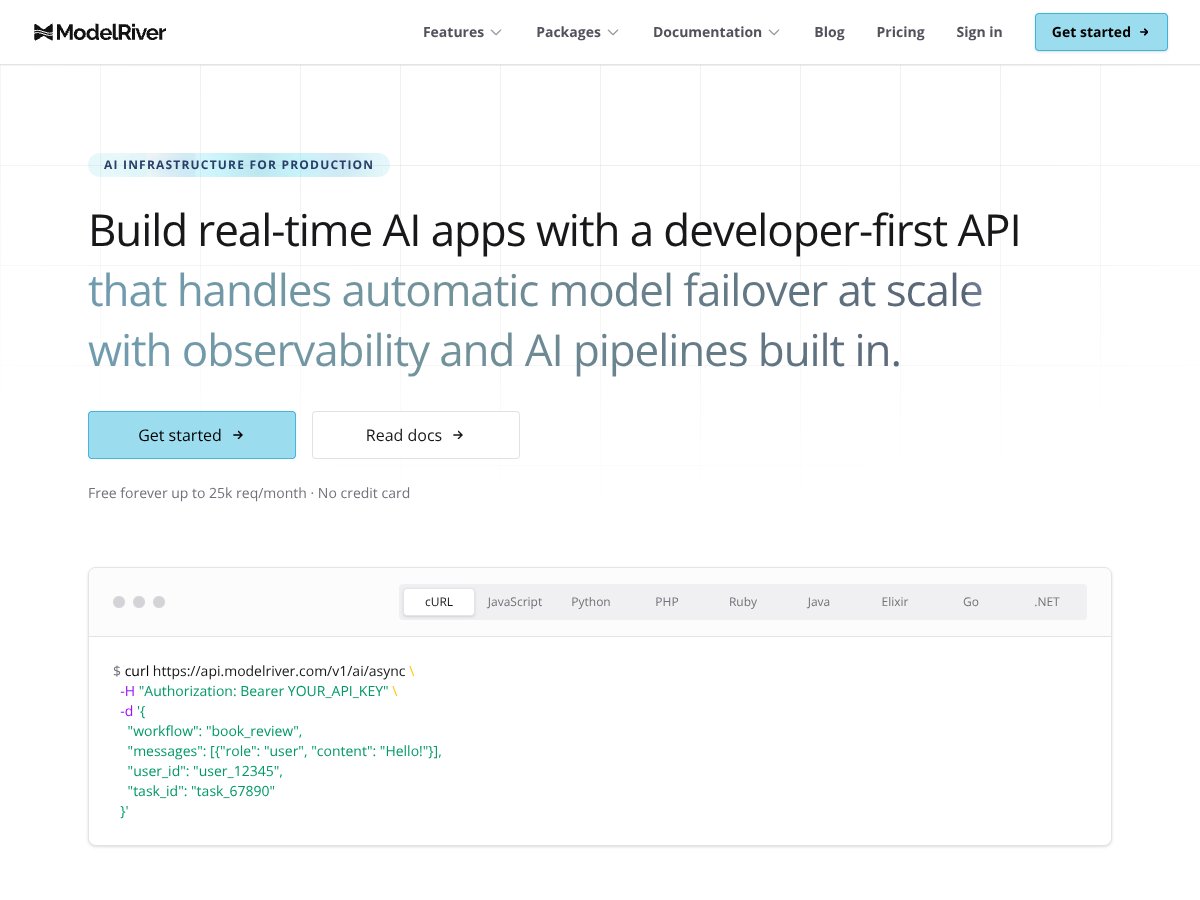
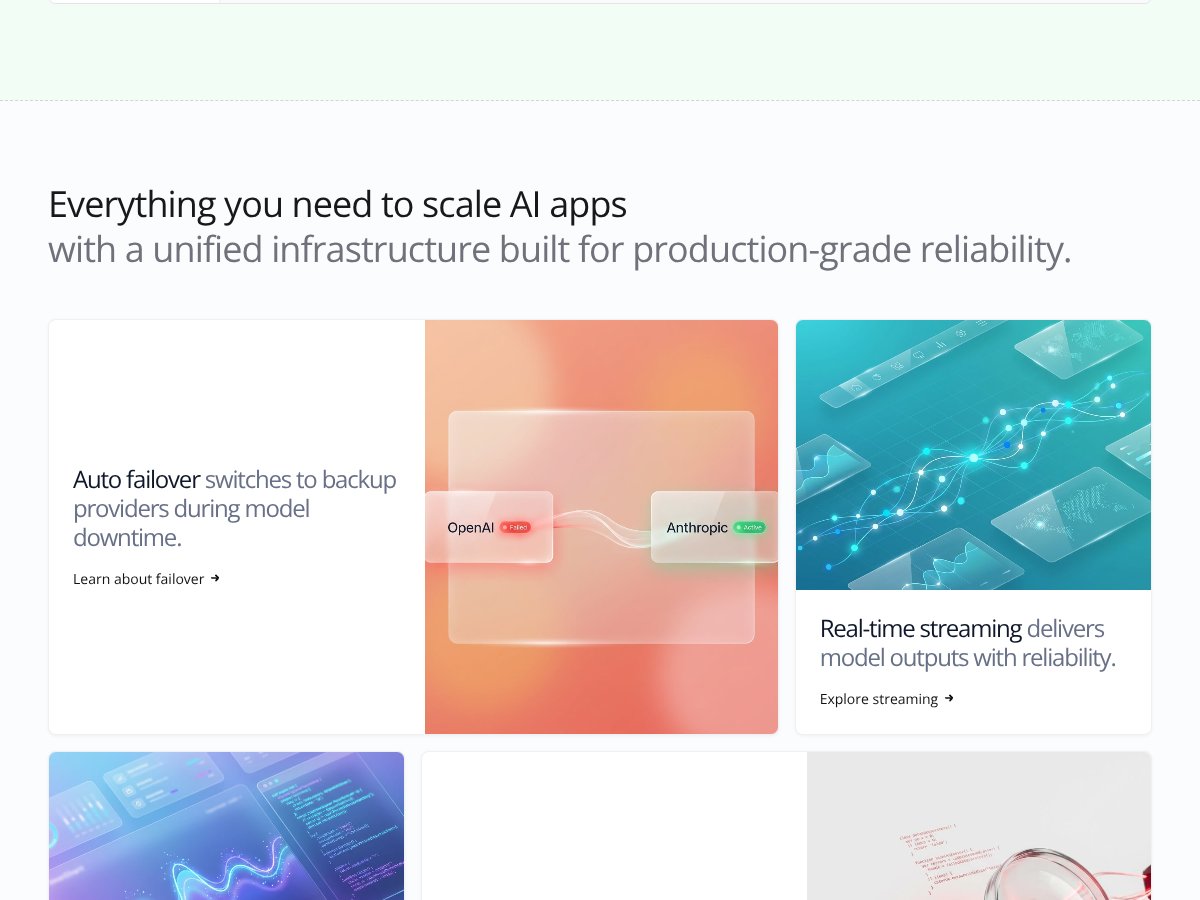
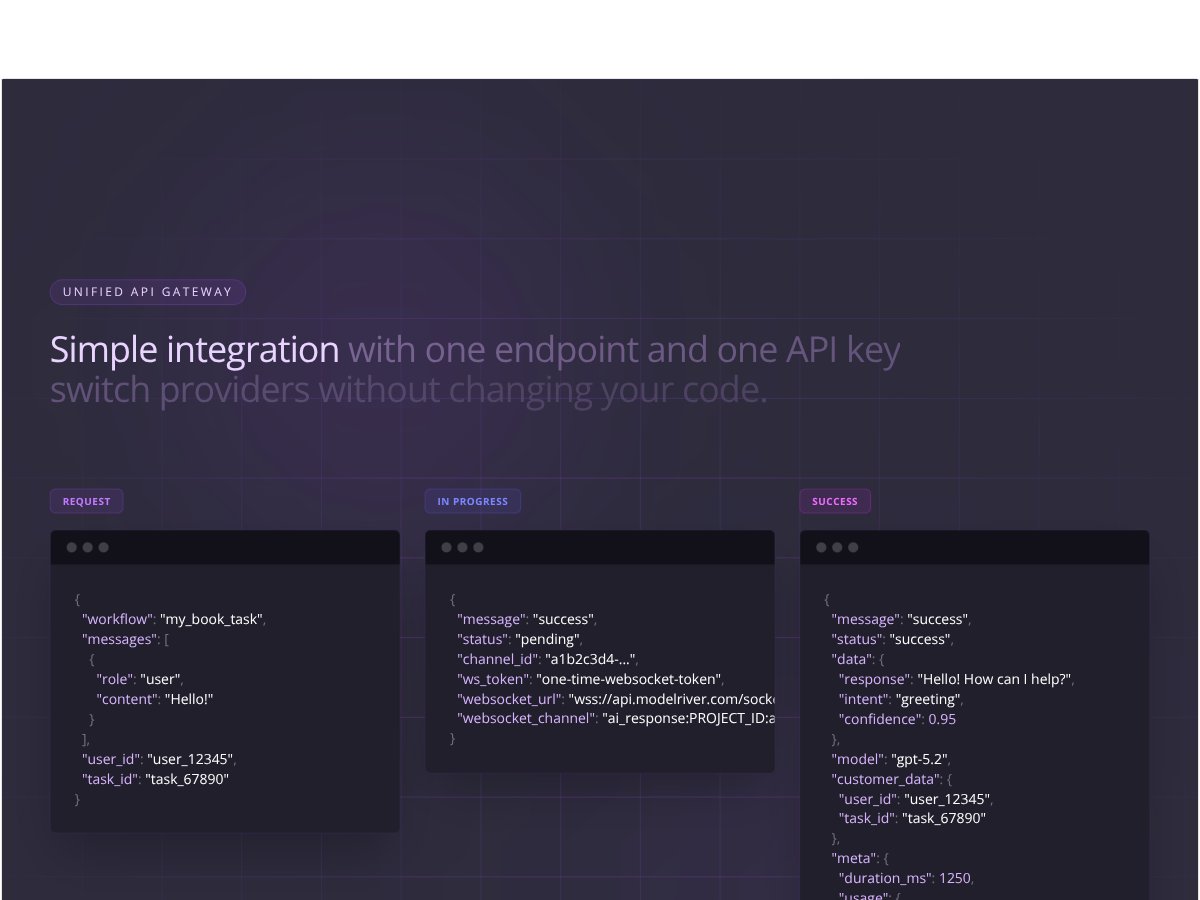
In plain English, ModelRiver is a platform that acts as a middleman between your application and various AI models from different providers—like OpenAI, Anthropic, Google, and others. Instead of coding separate integrations for each provider, you connect to ModelRiver’s one endpoint, and it handles sending your requests to the right provider. What’s nice about it is that it can automatically switch to a backup provider if one goes down—so your app keeps running even during outages. It promises features like real-time streaming outputs, detailed analytics, debugging tools, and workflow orchestration, all bundled into one API.

The problem it’s trying to solve is pretty clear: managing multiple AI providers can be a pain. Different APIs, different formats, and the headache of failover and monitoring. ModelRiver aims to simplify that by offering a unified, scalable, production-ready interface.

As for who’s behind it—unfortunately, I couldn’t find much info about the team or company behind ModelRiver. That always gives me a bit of pause, since transparency is part of trustworthiness in the AI space. But based on the website and the features, it looks like a serious effort to cater to developers building AI-powered apps in production.

My initial impression was that it’s as advertised. The site clearly lists features like failover, streaming, analytics, and structured outputs, which are exactly what I’d expect from a tool aiming to be a reliable AI API gateway. That said, I was aware from the start that it’s not a full AI platform or a model training tool—it's focused on infrastructure and request routing. So, it’s not for building models from scratch, just managing them efficiently.

One thing to keep in mind is that the site and docs are somewhat sparse on details about setup, pricing, and real-world use cases. That’s not unusual for a niche infrastructure tool, but it means you’ll need to spend some time testing it out yourself to see if it fits your needs. Overall, I’d say it’s promising but still somewhat of a black box until you dig deeper.

ModelRiver Pricing: Is It Worth It?

ModelRiver interface
ModelRiver in action
Plan Price What You Get My Take
Free Tier Up to 25,000 requests/month Unlimited testing, basic features, no credit card required Honestly, this is a pretty generous free tier for small projects or experimentation. It lets you get a feel for the platform without any financial commitment. But beware—once you hit the limit, you'll need to upgrade.
Paid Plans Not publicly disclosed Likely includes higher request limits, advanced analytics, enterprise features What they don't tell you on the sales page is the actual pricing. If you're planning to scale or need enterprise features, you'll probably need to contact them or check after signing up. This could be a dealbreaker for some, especially if the costs escalate quickly.

My Honest Take on the Pricing

Here's the thing about the pricing: the free tier looks appealing for small-scale testing, but the lack of transparent paid plan details makes it hard to assess whether it’s cost-effective at scale. If you're a startup or solo developer, the free plan might suffice initially—especially since you get 25k requests a month without a credit card. But if you’re building a production app expecting higher traffic, you'll need to dig deeper into their paid options, which are not clearly outlined. What they don't tell you on the sales page is whether there are additional costs—like charges for premium features, dedicated support, or higher rate limits—and how the billing scales as your usage grows. Fair warning: if you’re planning a large deployment, expect to have to negotiate or get custom quotes. For now, it's a bit of a black box, which might be frustrating for budget-conscious teams or those needing predictable costs. Overall, I’d say it’s fairly priced for the features offered—if they’re available at the paid tiers—and especially for small to medium projects. But without clear plan tiers or pricing, it's a bit of a gamble. Be prepared to ask questions or negotiate as you grow.

The Good and The Bad

ModelRiver interface
ModelRiver in action

What I Liked

  • Unified API endpoint: Simplifies integrations by providing one endpoint for multiple providers. This reduces complexity significantly, especially if you're managing several models across different platforms.
  • Automatic failover: Ensures high availability by switching providers during outages. If uptime is critical for your app, this feature alone might justify considering ModelRiver.
  • Real-time streaming: Delivers model outputs with reliability, useful for chatbots or live applications where latency matters.
  • Built-in analytics: Tracks usage, spend, and latency across providers—saving you time and giving actionable insights without extra setup.
  • Testing playground: The free, unlimited test environment for trying out models before going live is a real plus, especially for teams without dedicated devOps resources.
  • Multi-provider support: Compatibility with OpenAI, Anthropic, Google, xAI, and others offers flexibility and future-proofing—if one provider’s API changes, you can switch seamlessly.

What Could Be Better

  • Pricing transparency: The absence of detailed paid plan pricing makes it hard to budget or compare with competitors. You might get a surprise bill if usage spikes unexpectedly.
  • No user reviews or community feedback: Like many emerging tools, there’s no social proof or case studies to evaluate real-world performance or reliability.
  • Setup complexity: While the platform promises advanced features, the documentation on configuring workflows or custom setups seems limited. New users might find the initial learning curve steep.
  • Security and compliance info: No clear details about data privacy, certifications, or enterprise security—critical for business use cases.
  • Limited user-facing controls: For advanced users, more granular control over routing rules, user quotas, or custom model parameters would be helpful, but isn’t clearly documented.

Who Is ModelRiver Actually For?

If you're a developer or startup looking for a reliable, scalable way to manage multiple LLM providers through a single API, this could be a good fit. Especially if uptime and observability are top priorities, and you want to abstract away the hassle of maintaining multiple integrations. For example, if you’re building a customer support chatbot that needs to switch between providers based on availability or cost, ModelRiver’s failover and analytics features are designed for that scenario.

It’s particularly suited for teams who want to experiment with different models without rewriting their code, thanks to the unified API. Also, if you're deploying AI into production and need robust monitoring, debugging, and orchestration tools, ModelRiver’s features could streamline your workflow.

On the other hand, it’s probably overkill for simple projects or hobbyists who just need a quick API access. If your use case is small-scale or you prefer more transparent pricing and community support, other options might serve you better.

Who Should Look Elsewhere

Fair warning: if your primary concern is budget transparency, detailed enterprise security features, or community feedback, you might want to consider alternatives. For example, if you’re a large enterprise needing compliance certifications or dedicated support, ModelRiver’s lack of information on these fronts could be a dealbreaker. Additionally, if you’re a data scientist or ML engineer needing deep model customization or fine-grained control over prompts and parameters, the platform’s focus on simplicity might limit you. Similarly, if your team relies heavily on specific integrations or custom workflows that aren’t supported out of the box, you might find the setup process cumbersome. Finally, if your project demands strict data privacy or compliance with standards like GDPR, HIPAA, or SOC 2, and ModelRiver doesn’t explicitly advertise these features, it may not be the best fit. In that case, platforms with proven enterprise security and compliance certifications would be preferable.

How ModelRiver Stacks Up Against Alternatives

Cloudera AI

  • Cloudera AI is an enterprise-grade platform that offers extensive governance, compliance, and data management features. It supports traditional ML workflows alongside GenAI, making it suitable for organizations with strict security needs.
  • Pricing is typically custom, often targeting large enterprises, so it can be quite expensive compared to ModelRiver’s free tier and pay-as-you-go options.
  • Choose this if you need enterprise compliance, data governance, and a full-stack AI platform with robust security controls.
  • Stick with ModelRiver if you want a more flexible, developer-friendly tool that’s easier to set up and offers multiple provider integrations without heavy enterprise overhead.

ThinkTrends AI Model Hub

  • This platform focuses on simplifying model deployment and management, with a user-friendly interface that allows building and deploying AI models quickly without deep data science expertise.
  • Pricing tends to be more transparent and affordable, often with tiered plans based on usage, but may lack the deep provider routing capabilities of ModelRiver.
  • Choose this if you want an easy-to-use platform for deploying models without needing extensive multi-provider support.
  • Stick with ModelRiver if your application requires multiple LLM providers, failover, and advanced routing features that this platform doesn’t offer.

LiteLLM

  • LiteLLM is a lightweight, open-source alternative that offers a unified API gateway similar to ModelRiver. It’s aimed at developers who want to host their own multi-provider routing solutions.
  • Being open source, it’s free but requires more technical setup and maintenance, and lacks the polished analytics and built-in reliability features of ModelRiver.
  • Choose this if you want a customizable, self-hosted solution and have the technical resources to manage it.
  • Stick with ModelRiver if you prefer a managed service, with reliable failover, analytics, and a user-friendly interface.

Kong API Gateway

  • Kong is a popular API management platform that can be configured to route requests to various AI providers, but it’s more of a general API gateway than a specialized AI tool.
  • Pricing varies depending on deployment and enterprise features, often requiring additional setup for AI-specific features.
  • Choose Kong if you need a versatile API management layer across many services beyond AI, and are willing to customize your AI routing setup.
  • Stick with ModelRiver if you want a ready-made, AI-focused gateway with built-in provider support, failover, and analytics without extra configuration.

Bottom Line: Should You Try ModelRiver?

If you’re looking for a straightforward way to manage multiple LLM providers with minimal fuss, I’d say ModelRiver is a solid choice — I’d give it a 7/10. It’s particularly useful if you’re experimenting or small to medium projects where the free tier covers your needs. Its unified API, failover, and analytics are real perks that save time and headaches.

Who should definitely give it a shot? Developers or small teams wanting to test multiple AI providers without getting bogged down in integrations. If you’re a large enterprise needing strict compliance, dedicated security, or custom integrations, you might find ModelRiver lacking some enterprise-grade features.

The free tier is definitely worth trying — it’s generous and lets you see if the multi-provider setup fits your workflow. Upgrading to paid plans depends on your scaling needs, but for most small to medium projects, the free tier might be enough.

Would I personally recommend it? If your main goal is multi-provider routing, quick testing, and analytics, yes. If you need enterprise security or deep customization, you might want to look elsewhere. Overall, it’s a promising tool for the right use case — give it a shot if you’re in that camp. Otherwise, your money might be better spent on a more enterprise-focused platform.

Common Questions About ModelRiver

  • Is ModelRiver worth the money? For small projects and testing, the free tier offers good value. Paid plans could be worth it if you need advanced features or higher throughput.
  • Is there a free version? Yes, up to 25,000 requests per month with no credit card required. It’s a great way to test the platform.
  • How does it compare to Cloudera AI? ModelRiver is simpler, more developer-focused, and easier to get started with, while Cloudera offers enterprise features and compliance but at a higher cost.
  • What models are supported? It supports major providers like OpenAI, Anthropic, Google, and others via a unified API.
  • Can I get a refund? Specific refund policies aren’t detailed publicly; usually, subscription refunds depend on the provider’s terms.
  • Is it hard to set up? Not too difficult if you’re familiar with APIs; some configuration is required for workflows and provider routing.
  • Does it handle security and data privacy? Details are limited; it’s mainly focused on routing and analytics, so enterprise security features might need to be added separately.

As featured on

Automateed

Add this badge to your site

Stefan

Stefan

Stefan is the founder of Automateed. A content creator at heart, swimming through SAAS waters, and trying to make new AI apps available to fellow entrepreneurs.

Related Posts

FaceSymmetryTest Review – Honest Look at Free AI Tool

FaceSymmetryTest Review – Honest Look at Free AI Tool

FaceSymmetryTest is a fun online tool

Stefan
Sweep Review – An AI Assistant for JetBrains IDEs

Sweep Review – An AI Assistant for JetBrains IDEs

Sweep enhances productivity in JetBrains IDEs

Stefan
AI Song Maker Review – Simple & Creative Music Generation

AI Song Maker Review – Simple & Creative Music Generation

easy way to create music with AI

Stefan

Create Your AI Book in 10 Minutes