Table of Contents
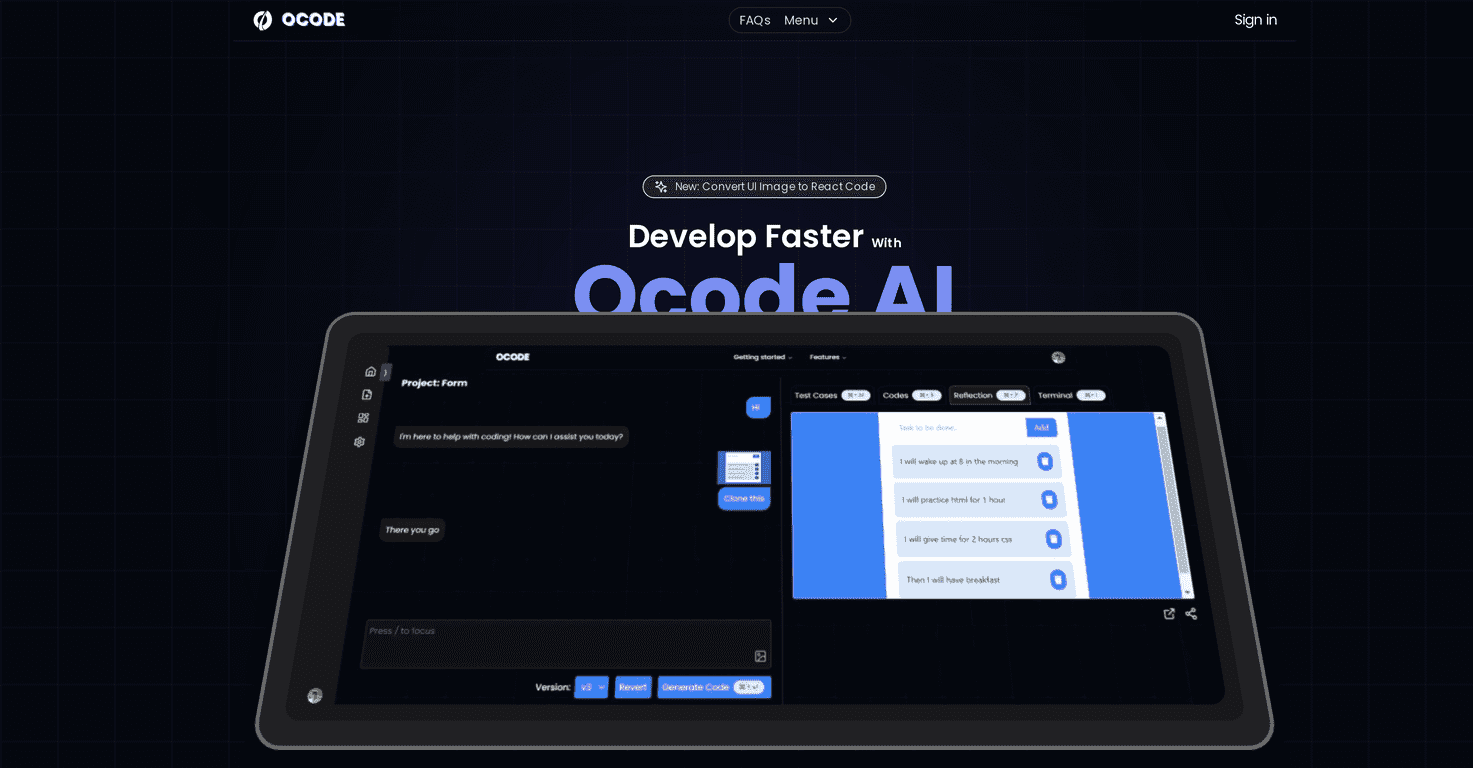
If you’ve ever stared at a blank editor and thought, “I just want this UI to exist already,” OCode might feel like exactly that. I tested OCode as an AI-powered web development tool that turns images and text into usable code. The big promise is speed: generate code quickly, preview it immediately, and then iterate without getting stuck in endless copy/paste loops.
And honestly? The “preview as you go” part is what stood out to me most. Instead of guessing whether the output will match your intent, you can check the result right away and steer it from there. It’s not magic, though. You still need to know what “good” looks like for your project—especially if you care about accessibility, consistent spacing, or matching a real design system.
OCode Review: What It Actually Does (and Where It Shines)
OCode is aimed at developers and designers who want to move faster from idea → code. Instead of starting from scratch, you can generate code from instructions (and, depending on the workflow, from images too). The output is meant to be practical—something you can preview and then refine.
Here’s what I noticed while testing it:
- Real-time preview reduces guesswork. When you’re iterating, being able to see changes immediately is huge. I didn’t have to keep bouncing between “generate → run → check → repeat” as much as I normally do.
- Chat-based modifications are pretty natural. I found it easier to say things like “make the button primary” or “move this section below the hero” instead of rewriting everything from scratch.
- TDD support is the right direction. If you’re already into Test Driven Development, having a workflow that supports tests makes it more than just a UI generator. Still, you’ll want to review tests and adjust them to match your actual app behavior.
Now, let’s be real: AI-generated code can look correct and still have issues under the hood. If you’re working with complex state, strict accessibility requirements, or a specific component library, you’ll likely do some cleanup. But that’s true for most AI coding tools—not just OCode.
Key Features That Matter in Daily Use
- Instant Code Generation with real-time results
- Speed is the point here. You get code quickly enough to stay in “flow” instead of waiting on long back-and-forth cycles. In my experience, this is most useful for scaffolding: layouts, component structure, and initial logic stubs.
- Image-to-Code Conversion (UI image → React code)
- If you have a screenshot or design reference, this can help you skip the blank-canvas stage. I wouldn’t treat it like a perfect pixel-to-pixel recreation every time, but it’s great for getting a working starting point you can refine.
- Output Preview for immediate feedback
- This is the feature I kept coming back to. When you can see the result right away, you iterate faster. You’re not just hoping the next prompt worked—you can actually check.
- Test Driven Development (TDD) support
- OCode’s focus on quality is a plus if you care about reliability. I liked that it’s not only “here’s a UI,” but also “here’s a direction for verification.” Just remember: you’ll still need to make sure the tests match your app’s real requirements.
- Output Driven Modifications with AI assistance
- This is where it feels most practical. Instead of rewriting everything, you can request targeted changes based on what you already generated—like adjusting spacing, swapping components, or changing text hierarchy.
- Free tier option for trial
- Trying tools before you commit matters. The free tier is especially useful if you’re evaluating whether this fits your workflow.
Pros and Cons (My Honest Take)
Pros
- Fast and reliable generation for common UI tasks. For typical web layouts and component scaffolding, it’s quick enough to be genuinely useful.
- Efficiency boost when you’re iterating. The preview + chat modifications combo makes it easier to refine without burning time.
- Good at producing complex UI layouts. Not every layout will be perfect on the first run, but it can handle multi-section pages better than you’d expect.
- Secure handling of API keys (as claimed). They mention encrypted API key storage. I didn’t “break” it to test security (and you shouldn’t do that), but it’s a reassuring detail.
Cons
- Documentation still feels like it’s catching up. I found myself looking for details that weren’t super clear. If you want to go deep fast, you may hit some gaps.
- Some functionality may depend on external integrations. Depending on what you’re building, you might need to connect other services or APIs. That can add setup time.
- AI output still needs review. Even with previews, you’ll want to check for things like responsiveness, component consistency, and any project-specific conventions.
Pricing Plans: Is It Worth Trying?
OCode offers a free tier, and the key detail is that you can use your own API keys to get started. That’s a big deal if you’re a developer who doesn’t want to pay just to test something. It means you can evaluate the workflow first, then decide if paid tiers are actually necessary for your use case.
As of now, paid pricing details aren’t clearly listed in the information I reviewed. So if you’re comparing tools, I’d treat the free tier as your “proof of value” step—run a couple of real projects through it and see whether the time savings are consistent.
Wrap up
Overall, my experience with OCode is pretty positive—especially if you like working fast and iterating with feedback. The instant generation and output preview make it easier to move from idea to working UI without the usual slowdown. And the chat-driven modifications feel practical, not gimmicky.
Just don’t expect it to replace your judgment. You’ll still want to review the code, align it with your design system, and make sure tests (if you’re using TDD) actually cover the behavior you care about. If you’re curious, the free tier makes it easy to try without jumping in blind.
Promote OCode