Table of Contents
I’ve been testing a lot of “AI for developers” tools lately, and most of them feel like the same chat box wearing a new hat. Potpie is different enough that I kept coming back to it—especially when I wanted help that’s tied to my actual codebase instead of generic advice.
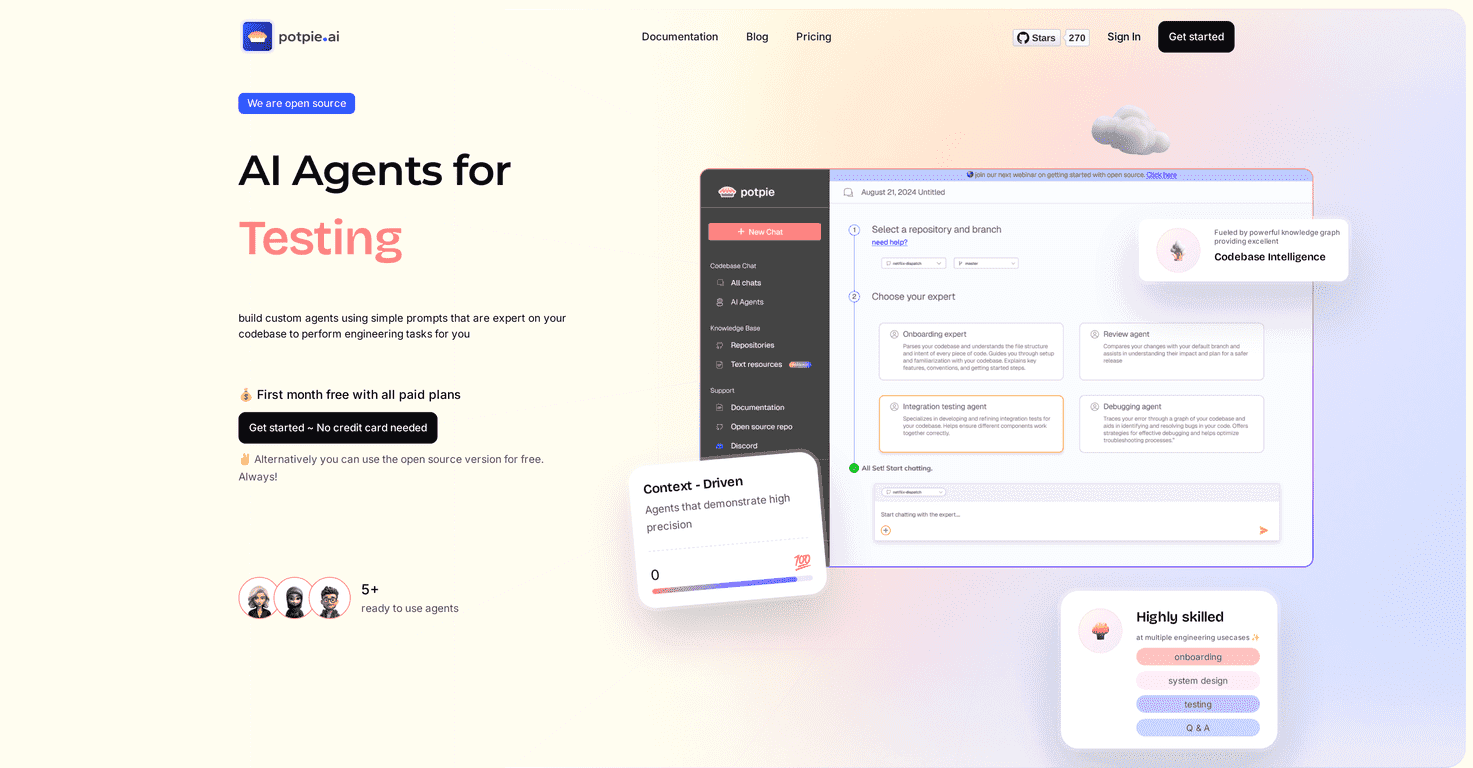
Potpie is built around task-oriented AI agents. You can spin up ready-to-use agents or create your own using prompts, and the agent is supposed to understand your coding context (so it can reference the structure of your project, not just guess). In my experience, that context is the difference between “interesting output” and “useful output.”
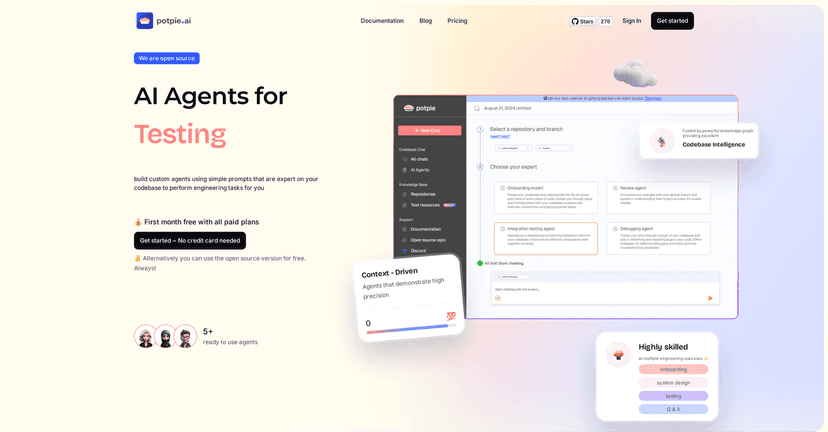
Potpie Review: AI Agents That Actually Know Your Code
Potpie is an AI agent platform from Potpie that focuses on engineering tasks—things like debugging, integration testing, and onboarding. The big promise is that you’re not just chatting with a model; you’re directing an agent that can use your project context to produce more relevant steps and outputs.
What I liked most is how it frames work around tasks. Instead of “rewrite this function” as a one-off, it encourages you to think in terms of workflows: investigate, locate where the behavior is coming from, propose changes, and then verify. That’s the kind of structure that helps when you’re busy and you don’t want to babysit every prompt.
Here’s what I tried (and what stood out):
- Debugging a failing test: I asked the agent to help me trace why an integration test was failing. The useful part wasn’t just the guess—it was the way it pointed me toward likely files and relationships in the codebase, which saved me from doing the usual “ripgrep everything” routine.
- Onboarding-style questions: I had it explain how a feature flows end-to-end (from API entry to the core logic). The output felt closer to a guided map than a wall of text. Still not perfect, but it was the kind of explanation I’d actually send to a new teammate.
- Test setup and verification: I tested whether it could suggest what to check next (fixtures, mocks, edge cases). It did better when I gave it a bit more detail about what I expected to happen.
One more thing: I don’t love tools that claim “context” but don’t show it. Potpie’s approach includes a knowledge graph for navigating and understanding the codebase, and that’s where the practical value comes from. When it works, it feels like the agent understands relationships (modules, references, structure), not just individual files.
Key Features I Actually Look For
- Custom Agents built from simple prompts
You can create agents for specific tasks without turning it into a whole engineering project. I found this especially handy for repeatable work—like “review this PR for potential test gaps” or “trace this request path.” - Contextual understanding for higher-precision engineering tasks
The promise here is that the agent uses your project context. In my tests, that translated into fewer “generic fix” suggestions and more “here’s where this likely lives in your repo.” - Ready-to-use agents
This matters more than people think. When you’re evaluating AI tools, time-to-first-value is huge. Potpie’s ready-to-use agents gave me something useful quickly, then I customized from there. - Knowledge graph for code navigation
A knowledge graph is one of those features that sounds abstract until you’re trying to answer: “Where does this behavior come from?” When the agent can follow relationships, you spend less time hunting. - Open source option
If you prefer more control or want to avoid vendor lock-in, the open source route is a big deal. I always appreciate when companies give developers options.
Pros and Cons (Real Talk)
Pros
- High precision when the codebase is supported well: When I stayed within common patterns and gave clear task goals, the output felt grounded. It wasn’t perfect, but it was meaningfully better than “here’s a random solution.”
- Free trial available: Potpie offers a first month trial without a credit card requirement. That’s how you should evaluate tools like this—you shouldn’t need to commit before you see if it fits your workflow.
- Open source availability: If you want flexibility for internal use, this is a strong plus.
- Works across multiple engineering scenarios: Debugging, integration testing support, and onboarding-style explanations are all places where agents can save real time.
Cons
- There’s a learning curve: You’ll get better results if you learn how to prompt for tasks and provide enough context. If you just throw vague requests at it, you’ll feel the limitations quickly.
- Performance depends on language and setup: The platform notes limited performance outside optimized languages like TypeScript, Python, Java, and JavaScript. If your stack is more niche, you may need extra effort (or accept less reliable results).
- It’s still not “press one button and ship”: You’ll still want to review suggestions, run tests, and sanity-check changes. I wouldn’t treat it like an autonomous coding agent that never needs oversight.
Pricing Plans: What You’ll Pay
Potpie includes a free open-source version, plus paid plans starting at $20 per month. On top of that, they offer a first month free trial so you can test premium features before you decide.
If you’re evaluating it for a team, I’d suggest testing it on one real workflow first—like “write integration tests for this module” or “debug this flaky test.” That way you can estimate whether the time saved is actually bigger than the time spent learning the tool.
Wrap up
Potpie feels like a practical step toward AI agents that work with your actual engineering context—not just generic answers. If you’re in TypeScript, Python, Java, or JavaScript and you want help with things like debugging, integration testing, or onboarding, it’s worth a serious look. The free trial makes it easy to test-drive, and the open source option gives you room to choose how you want to use it.
Promote Potpie