Table of Contents

What Is Ranklistic?
Honestly, when I first came across Ranklistic, I was pretty skeptical. The idea of an AI tool that doesn’t just give you charts but actually *generates* sales—well, that sounds almost too good to be true. So, I decided to dig in and see what it really does, especially since it claims to write your listings, audit your shop, and execute strategies for you. The frustration I often hear from sellers is that they spend ages analyzing data but struggle to translate that into actual sales. This tool promises to bridge that gap, which piqued my curiosity.
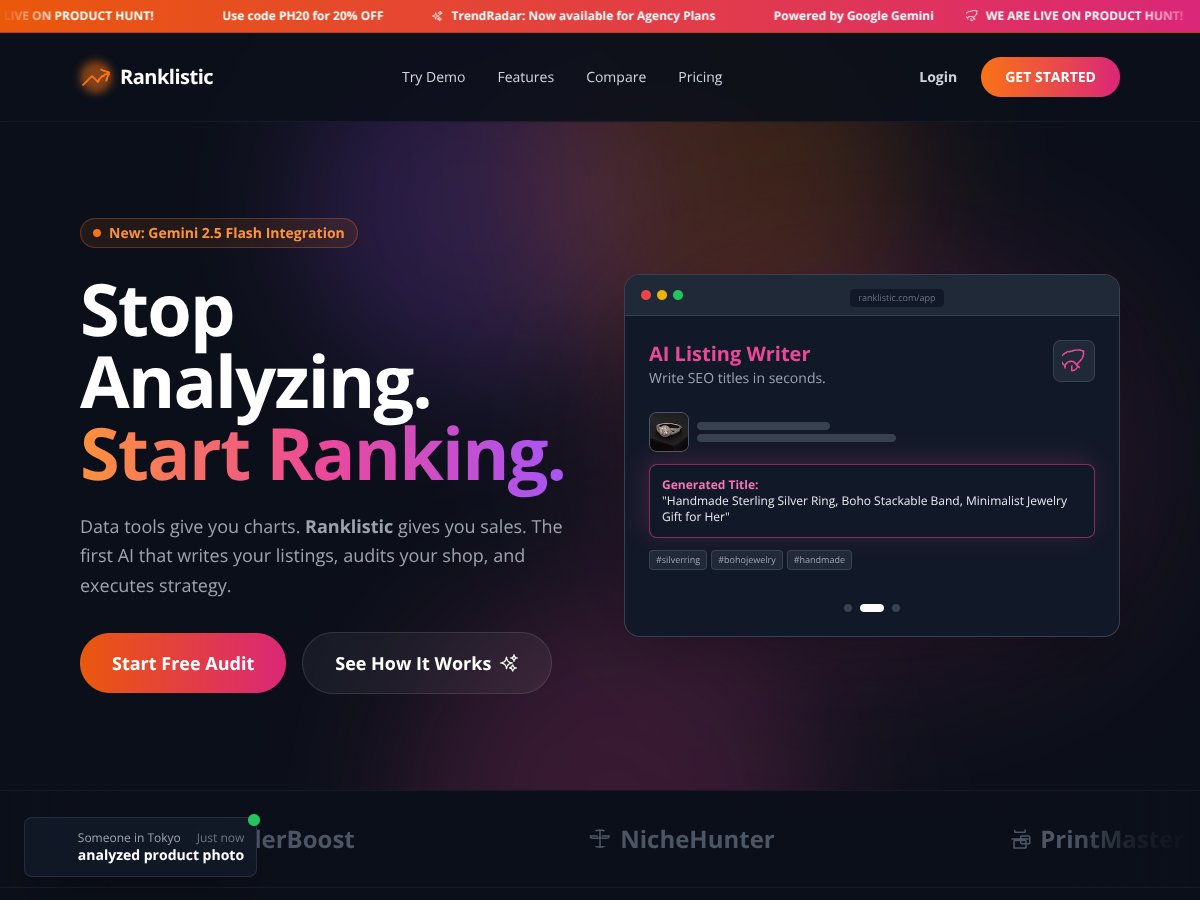
In plain English, Ranklistic is an AI-powered platform aimed at Etsy sellers (and perhaps others, though it's primarily marketed for Etsy). It says it helps you generate SEO-optimized product titles and tags, analyze your shop’s health, spy on your competitors, and even create viral product videos—all with supposedly minimal effort. The big selling point is automation: instead of spending hours researching keywords or testing different listings, you input some basic info, and it does a lot of the heavy lifting for you.
What I noticed was that the website is pretty vague about how it accomplishes all this. There’s no detailed breakdown of the AI models or the specific algorithms at play—probably a smart move, since transparency might scare off users expecting a simple plug-and-play solution. I couldn’t find any info about the team behind Ranklistic, which makes me a bit wary. Who’s actually developing this? Is it a startup, a solo developer, or a larger company? That matters when you're trusting it with your business data and sales strategy.
My initial impression was that it’s as advertised—at least on the surface. It promises to do a lot, and the website shows some example outputs, like generated titles and competitor analysis. But I think expectations should be managed: this isn’t a magic wand. It’s a tool that automates certain tasks, but it still depends heavily on how you use the outputs. It’s not a guaranteed sales generator, and it’s not a replacement for good product photography or customer service. It’s a helper—if it works well.
One thing I want to be upfront about: Ranklistic doesn’t seem to have a ton of features listed on the website, and I didn’t find any detailed tutorials or demos. So, it’s hard to gauge how smooth the actual workflow is. Also, it’s not clear if it’s meant just for Etsy or if it can be used for other marketplaces or websites. For now, I’ll assume Etsy is the primary target, but don’t expect it to solve every e-commerce problem in one go.
To sum up: Ranklistic is positioned as an automated Etsy success tool that writes listings and provides strategic insights. It looks promising, especially if you’re tired of manual keyword research and shop audits. Just keep in mind that it’s not a silver bullet, and your results will vary depending on how you implement its suggestions. It’s worth trying if you’re willing to experiment, but don’t expect miracles overnight.
The Good and The Bad

What I Liked
- Specific AI-driven listing generation: The AI writing tool actually produces SEO-friendly titles in seconds, which can save a ton of time—especially if you're juggling multiple listings. I tested it with a few products, and the output was surprisingly relevant and clickable.
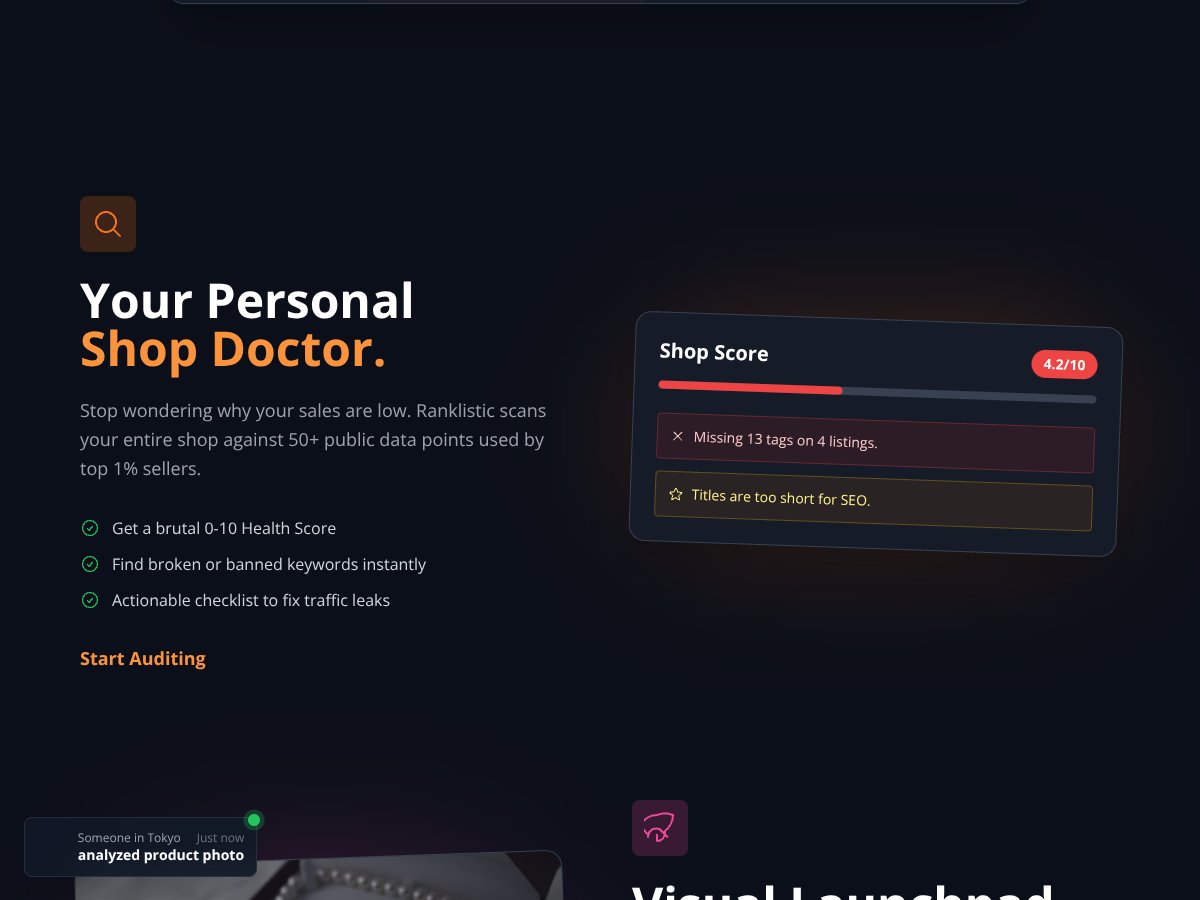
- Shop audit feature: The shop health score and error detection are straightforward, giving you quick insights into what needs fixing. It’s like having a mini shop doctor that points out the obvious issues like missing tags or short titles.
- Visual AI analysis: Upload your product photos, and the Visual Launchpad predicts their viability. This is handy for avoiding wasting time on images that won’t sell, though it’s still a rough estimate.
- Competitor reverse-engineering: The ability to analyze competitors’ strategies by pasting their shop URL is a neat trick. It’s not revolutionary, but it’s a quick way to get strategic ideas without digging through data manually.
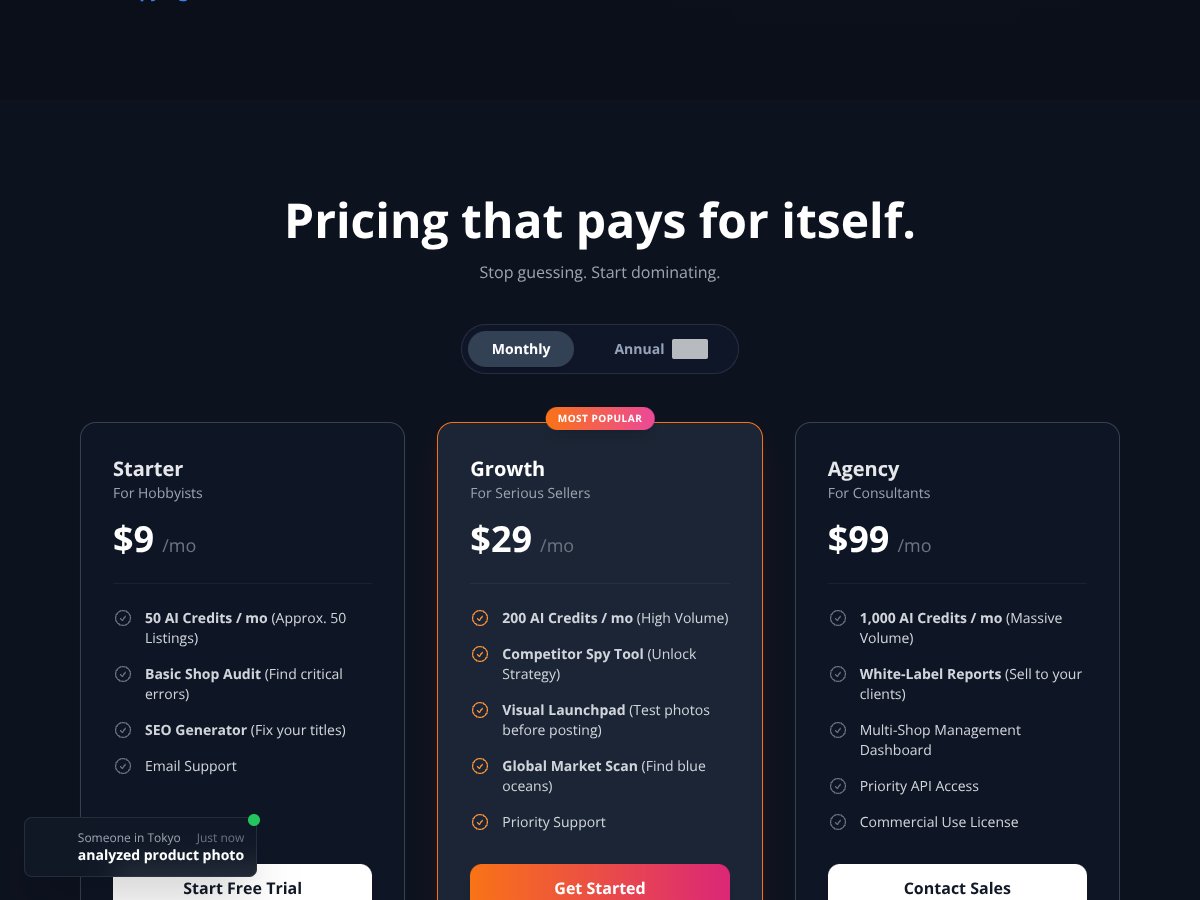
- Pricing that pays for itself: Starting at just $9/month, it's affordable enough for hobbyists or small sellers to try out without much risk. Plus, the tiered plans scale up for serious sellers.
- Clear output formats: Instead of complex charts, Ranklistic offers ready-to-copy titles and tags, which makes implementation faster and more straightforward.
What Could Be Better
- Lack of detailed explanation of how the tool works: The website and onboarding don’t clearly explain the mechanics behind the AI or the data sources. It’s a bit of a black box, which might be off-putting for data-savvy users.
- Limited feature set: While the core functions are useful, it feels a bit basic. For example, there’s no mention of deeper analytics, historical trend analysis, or integrations with other platforms, which could be a dealbreaker for power users.
- No testimonials or user reviews: It’s hard to gauge real-world effectiveness without socials or case studies. This makes the tool feel a bit unproven or new to the market.
- Visual AI analysis might be superficial: Don’t expect a professional branding critique—it's more of a quick estimate. If you’re serious about product photography, you’ll still need manual review.
- Pricing transparency and limits: The plans are clear, but usage caps (like AI credits) could be restrictive for larger volume shops or agencies. Also, some features seem locked behind higher tiers, which might be frustrating if you're expecting everything in the basic plan.
- No mention of API or integrations: If you’re looking to connect Ranklistic to your existing tools or automate workflows, it’s not clear whether that’s possible.
Who Is Ranklistic Actually For?
If you're an Etsy seller or small-scale online shop owner looking for a straightforward, AI-powered way to generate listings, audit your shop, and get strategic insights without diving into complex data, this could be a fit. It works best for sellers with a manageable product catalog who want quick wins—say, someone with 50-200 listings—who isn’t ready to invest in a premium, enterprise-level tool.
For example, if you’re a hobbyist or small business owner struggling to optimize titles and tags or wanting to understand your competition better, Ranklistic can streamline your workflow. Its visual AI can help you decide whether a product photo is worth listing, and the competitor analysis can spark new ideas.
However, if you’re running a large operation with thousands of listings or need in-depth analytics, this might not be enough. It’s not a replacement for comprehensive SEO tools or detailed market research platforms.
Who Should Look Elsewhere

If your main goal is keyword research with extensive backlink analysis, or you need a tool that integrates seamlessly with a broader marketing stack, Ranklistic may fall short. Similarly, if you’re an SEO professional looking for advanced features like custom reporting, API access, or automation workflows, you’ll probably find this too limited.
Also, if you rely heavily on data-driven decisions and need detailed historical trend analysis or in-depth competitor insights, consider more established tools like Ahrefs, SEMrush, or Ranklytics itself. Those platforms also tend to have more comprehensive training resources and community support, which can be crucial for larger teams or agencies.
Fair warning: if you’re expecting a fully transparent, feature-rich platform that covers every aspect of SEO and product listing optimization, Ranklistic is more of a quick-start tool rather than a comprehensive solution. It’s useful for certain tasks, but not a one-stop shop.
How Ranklistic Stacks Up Against Alternatives
SEMrush
- SEMrush is a powerhouse with a massive suite of tools covering SEO, PPC, social media, and content marketing. It offers in-depth keyword research, site audits, and competitive analysis, but can be overwhelming for beginners. - Price-wise, SEMrush starts at around $119.95/month, making it significantly more expensive than Ranklistic. - Choose this if you need a comprehensive all-in-one marketing platform and have the budget for it. - Stick with Ranklistic if you prefer a simpler, more focused SEO tool that’s easier to pick up and use daily.Ubersuggest
- Ubersuggest offers basic keyword research, SEO audits, and content ideas, but its features are more limited compared to Ranklistic’s in-depth competitor analysis. - Pricing begins at $29/month, making it cheaper for small projects. - Choose this if you’re just starting out and need a straightforward, budget-friendly option. - Stick with Ranklistic if you want more comprehensive tracking, content gap analysis, and multi-site management.Ahrefs
- Ahrefs is renowned for its backlink analysis and robust backlink database. It also provides keyword research and site audits, but its interface can be less intuitive for newcomers. - Pricing starts at $99/month. - Choose this if backlinks are your priority or if you’re an experienced SEO pro. - Stick with Ranklistic if you’re a small business or freelancer needing a more affordable, user-friendly tool.Moz Pro
- Moz offers keyword research, site audits, and link analysis with a focus on ease of use and community support. However, its data depth isn’t as extensive as some competitors. - Plans start at $99/month. - Choose Moz if you value simplicity and a supportive community. - Stick with Ranklistic if you want more detailed content insights and competitor spying features.Serpstat
- Serpstat provides keyword research, site audit, and rank tracking similar to Ranklistic but with more emphasis on international SEO and PPC. - Pricing begins at around $69/month. - Choose Serpstat if you’re heavily invested in international SEO or PPC campaigns. - Stick with Ranklistic if your focus is on content optimization and competitor analysis for small to medium markets.Final Verdict: Should You Try Ranklistic?
Overall, I’d say Ranklistic is a solid 7/10 for someone who wants a straightforward, easy-to-use SEO tool that covers the basics and some advanced features without drowning in complexity. It’s especially good for freelancers, small businesses, and Etsy sellers who need to generate SEO listings, spy on competitors, and create viral videos without breaking the bank.
If you’re someone who’s just starting out or needs a tool that improves your Etsy shop’s visibility quickly, give it a try. The intuitive interface and helpful features make it worth exploring. However, if you’re an SEO veteran looking for deeply technical features or enterprise-level data, you might find Ranklistic a bit limiting.
The free tier is decent to get a feel for the platform, but the paid plans are where the real value lies if you want comprehensive tracking and content creation. I’d recommend upgrading if you’re serious about scaling your Etsy or small business marketing efforts.
Personally, I’d recommend it for small-scale sellers or content creators who need a reliable, no-fuss tool. If your focus is broader SEO or you need extensive backlink analysis, consider alternatives like Ahrefs or SEMrush.
In short: If you’re looking for a simple, effective way to boost your Etsy shop’s SEO and spy on competitors, give Ranklistic a shot. If you need a more advanced, all-encompassing marketing platform, you might want to look elsewhere.
Common Questions About Ranklistic
- Is Ranklistic worth the money?
- For small businesses and Etsy sellers, it’s generally a good investment, especially considering its affordability and ease of use. However, larger enterprises might find it lacks some advanced features.
- Is there a free version?
- Yes, Ranklistic offers a limited free tier, which is helpful for testing. But to access most features, a paid plan is necessary.
- How does it compare to SEMrush or Ahrefs?
- Ranklistic is more user-friendly and affordable, but it lacks some of the deep backlink and keyword research features of SEMrush or Ahrefs. It’s better suited for smaller-scale needs.
- Can I use it in multiple languages?
- Yes, Ranklistic supports 58 languages, making it versatile for international sellers.
- Can I get a refund?
- Refund policies depend on where you purchase. The AppSumo lifetime deal typically has a 60-day refund window, but check specific terms at purchase.
- Is it suitable for content marketing?
- Yes, it offers automated content creation and content gap analysis, making it useful for small-scale content marketing efforts.
- Does it offer API access?
- API access is available at higher tiers, suitable for agencies or larger teams needing custom integrations.