Table of Contents
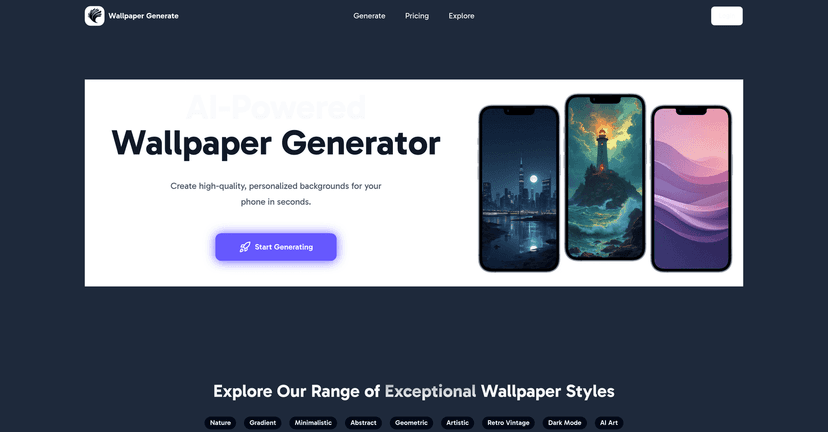
If you’re anything like me, you get bored of the same old lock screen pretty fast. So I went looking for an easy way to generate fresh wallpaper ideas without having to learn Photoshop or spend hours hunting for the “perfect” image. That’s where Wallpaper Generate comes in.
In my experience, it’s a pretty straightforward tool: you tell it what you want (style, vibe, colors, subjects), and it generates wallpaper options for your phone. It’s built for both Android and iOS, so you’re not stuck in one ecosystem. And the best part? You don’t need any design background. You just describe the look you’re going for and see what it produces.
Wallpaper Generate Review
Wallpaper Generate is an AI-driven tool that’s designed specifically for mobile wallpaper creation. You don’t have to wrestle with complicated settings. Instead, it focuses on getting you wallpapers you’ll actually want to use.
What I noticed right away is how fast the “idea to image” loop feels. You describe what you want, generate a result, and then iterate. If the first version isn’t quite there—too bright, wrong vibe, not enough “minimal”—you tweak the description and try again. That back-and-forth is where it shines.
It also supports both Android and iOS, so whether you’re customizing a Samsung home screen or an iPhone lock screen, you’re not dealing with weird compatibility issues. And the style options are broad enough that you’re not forced into one aesthetic. I tried a nature prompt and an abstract prompt, and the results looked meaningfully different instead of feeling like the same wallpaper with different colors.
Key Features
- AI-driven generation that turns your description into wallpaper concepts you can download
- Style variety (Nature, Minimalistic, Retro Vintage, and more) so you can match your mood
- User-friendly interface that makes it easy to get started even if you’ve never used an AI generator before
- Prompt-style customization where you can describe what you want (colors, subject matter, overall vibe)
- Cloud storage integration so your generated wallpapers are easier to find later instead of hunting through downloads
- High-quality outputs that look polished enough to actually set as a background
Pros and Cons
Pros
- Beginner-friendly: I didn’t need tutorials or design skills. The workflow is simple enough to figure out in minutes.
- Good range of styles: You can go from clean minimal looks to more artistic, retro-inspired designs without starting over from scratch.
- Fast iteration: If you don’t love the first result, you can refine your prompt and generate again quickly.
- Pricing is straightforward: Credit-based plans make it feel predictable—no surprise “unlimited” promises.
- Great for quick refreshes: If you want new wallpapers for different occasions (work mode, weekend vibe, travel photos), it’s a handy tool.
Cons
- Credits can add up if you’re the type who likes to generate a bunch of variations before picking one. I can see how someone could burn through credits faster than expected.
- Not a replacement for full design software: if you want precise control like you’d get with Photoshop or Illustrator, this isn’t that. It’s more about “inspiration and generation” than exact editing.
Pricing Plans
Wallpaper Generate uses a credit-based setup with three plans. Here’s the math as I understand it:
- Starter Plan: $3 for 20 credits (about $0.15 per design)
- Pro Plan: $5 for 50 credits (about $0.10 per design)
- All-in Plan: $10 for 150 credits (about $0.07 per design)
One thing I like about this model is that it matches how people actually use generators. You’re not paying for a feature you won’t touch—you’re paying for the number of wallpapers you want to create. If you’re only making a couple new backgrounds, the Starter Plan makes sense. If you’re regularly changing your home screen, the All-in Plan is where the value starts to feel obvious.
Wrap up
Wallpaper Generate is a solid option if you want fresh mobile wallpapers without the headache. The AI generation is quick, the interface is easy, and the style variety means you can usually find something that fits your taste. Just go in knowing it’s credit-based, so if you plan to generate dozens of variations, you’ll want to pick a plan that matches your habits.
If you’re ready to breathe some new life into your lock screen and home screen, I’d say it’s worth testing—especially if you like experimenting with different vibes like minimal, nature, or retro looks.
Promote Wallpaper Generate