Table of Contents

What Is DevPass by LLM Gateway?
If you've ever tried juggling multiple AI models or APIs for your coding projects, you know the hassle of managing different keys, billing setups, and configurations. Honestly, I was curious about DevPass because it claims to simplify this mess—giving developers a single subscription that unlocks access to over 200 models from various providers, all through one API endpoint. Sounds appealing, but I wanted to see if it lives up to that promise in real-world use.
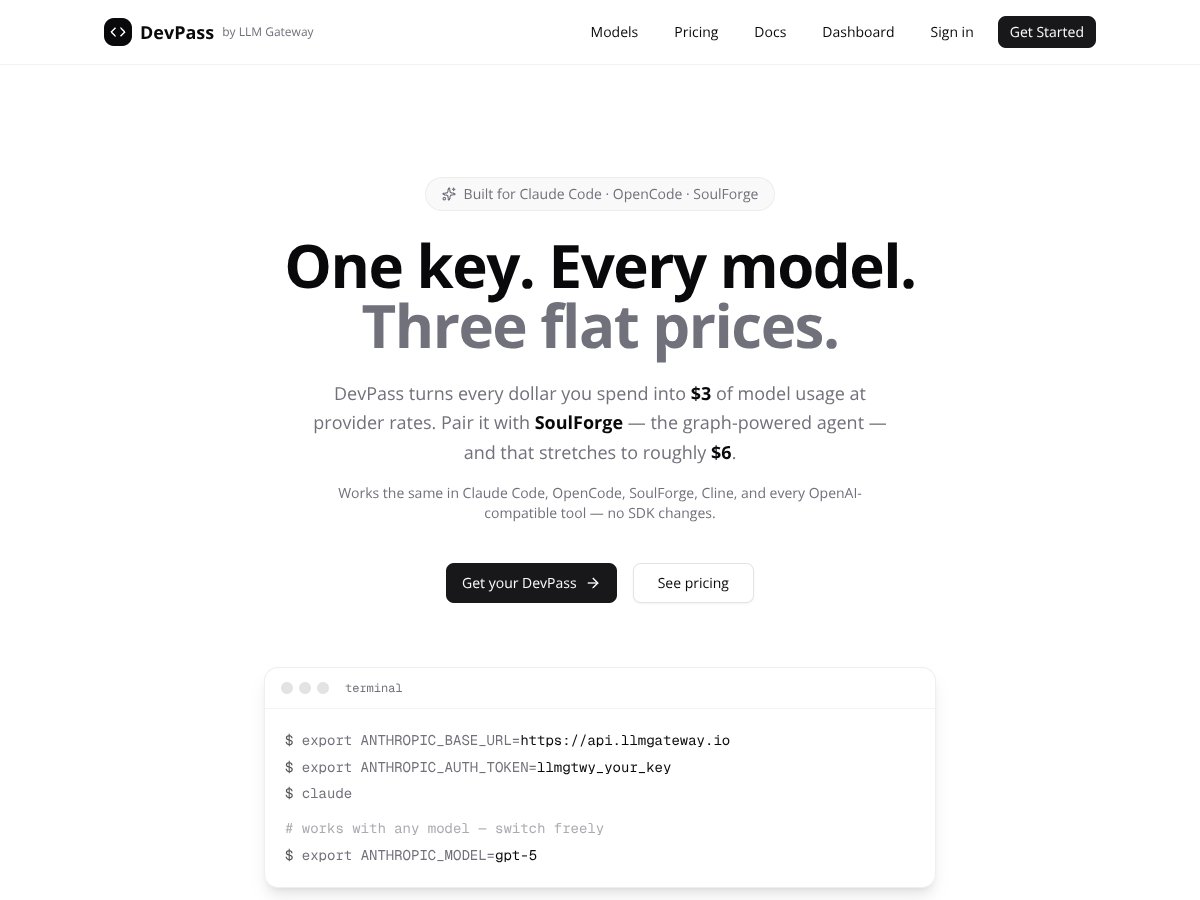
So, what exactly does DevPass do? In plain English, it's a gateway that acts as a middleman between your code or tools and the multitude of AI models out there. Instead of managing separate API keys for OpenAI, Anthropic, Google models, and others, DevPass offers a unified API. You pay a flat subscription fee, and it translates your usage into provider tokens at real provider rates, supposedly giving you more value than paying for individual APIs.
The main problem it tries to solve is fragmentation. Many developers, especially those working on AI-driven coding workflows or autonomous agents, end up with multiple API keys, different billing accounts, and varying rate limits. Managing all that becomes a chore, especially if you want to switch models or providers on the fly. DevPass aims to centralize this, so you only need one key and one interface to access everything.
The company behind it is LLM Gateway. While I couldn't find a ton of info about the team or their background, their website and product focus on developer-centric workflows, which makes me think they're targeting a niche of power users—people who need access to many models without fussing over API management.
My initial impression? It was as advertised—at least on a surface level. The idea of having a single API to access all these models sounds convenient, and the flat-rate pricing tiers seem straightforward. However, I was also cautious because, in my experience, these kinds of gateway services sometimes introduce latency or stability issues, especially when routing requests across multiple providers. So, I went into testing with a healthy dose of skepticism.
One thing to keep in mind: DevPass isn't a full-fledged platform with built-in IDEs or dashboards. It’s more like a backend service you plug into your current setup. Also, it doesn’t seem to offer detailed documentation or usage dashboards—at least not in the initial release—so managing expectations is key. It’s not a drop-in replacement for your existing SDKs; rather, it's a more abstracted API layer.
In summary, DevPass appears to be a tool aimed at simplifying multi-model AI access with a single subscription and API. Whether it’s worth the fuss depends on your workflow—more on that as I tested it. But upfront, it’s positioned as a developer's utility rather than a consumer-facing product or a polished app. Now, let’s dig into what features it offers and how it performs in practice.
The Good and The Bad

What I Liked
- Unified API access to 200+ models: If you’re tired of juggling multiple API keys and provider-specific quirks, DevPass simplifies everything into a single endpoint. That’s a real time-saver and reduces setup headaches.
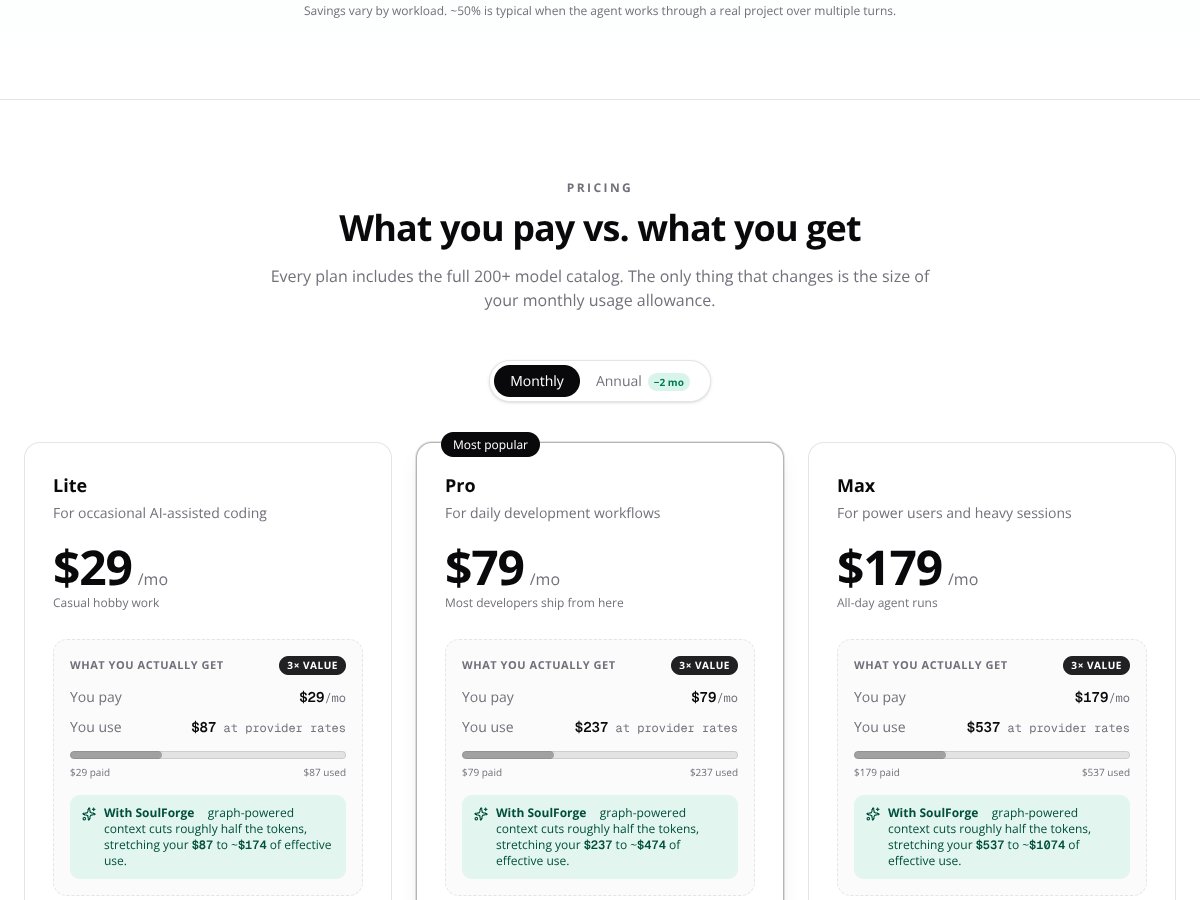
- Potential cost savings for heavy users: The marketing claim that every dollar spent turns into $3 of model usage at provider rates is appealing, especially if you’re running large workloads. Pairing with SoulForge might push that even further, which could really stretch a tight budget.
- Supports a broad model ecosystem: From Claude to GPT-5, Gemini, and more—DevPass gives you access to a wide array of models without needing separate subscriptions or complex configurations. That flexibility can be invaluable for experimentation and choosing the best model for each task.
- Integration with existing developer workflows: For those using agentic tools like Claude Code, OpenCode, or SoulForge, DevPass claims to be a drop-in solution, which means less hassle integrating new infrastructure into your projects.
- Real-time usage metering at provider rates: Instead of traditional markups, you pay provider rates, giving a transparent view of your costs. This can be a big plus for budget-conscious teams monitoring their AI spend.
What Could Be Better
- Marketing claims need validation: The 3x multiplier and the claim that pairing with SoulForge can double your effective usage sound promising but are hard to verify in real-world scenarios. If these aren’t achievable in your workload, the value diminishes.
- Lack of detailed feature documentation and user feedback: The site and materials don’t highlight specific features like usage limits, rate throttling, or how they handle provider outages, leaving some uncertainty about reliability and operational limits.
- Potential latency and added complexity: Introducing a gateway layer always risks increased latency or points of failure, especially if your workflows require ultra-low latency or high availability.
- Limited transparency on free tier and usage caps: The presence of a free tier is mentioned, but details are vague. Without clear usage caps or what’s included, it’s tough to assess whether this is a good entry point or if costs could unexpectedly escalate.
- Focus on developer workflows: If you’re not building coding tools, agentic models, or developer-centric workflows, DevPass might not offer enough value over direct provider access or other management tools.
Who Is DevPass by LLM Gateway Actually For?
If you’re a solo developer or a small team heavily immersed in building AI-powered coding assistants, automation agents, or tools that require frequent switching between multiple models, DevPass could be a fit. Its strength lies in simplifying complex workflows, reducing management overhead, and potentially lowering costs for high-volume use.
For example, if you’re working on a TypeScript project with SoulForge, and you want to minimize token costs while maximizing model variety, DevPass offers a compelling way to streamline your setup. Similarly, if you’re experimenting with different models for code generation or debugging, the unified access can save you time and frustration.
However, if your use case is more general-purpose GPT chatting, or you’re just dabbling with AI for occasional tasks, the value proposition might be overkill. This service seems best suited for those with sustained, high-volume, developer-centric workloads that can leverage the cost and workflow efficiencies.
Who Should Look Elsewhere
If you’re a user who needs reliable, low-latency access for real-time customer support or live chatbots, this gateway might introduce unwanted delays or points of failure. Similarly, if you’re looking for a straightforward API for small-scale projects or testing, paying $29/month for a service that’s optimized for heavy workflows might not be economical or necessary.
Those who require comprehensive feature sets like detailed usage analytics, fine-grained rate controls, or advanced user management might find the current offering lacking. Also, if you’re not comfortable with a setup that involves configuration via environment variables and command-line tools, a more user-friendly platform like OpenAI directly or managed solutions from providers such as Azure or Google Cloud could be better suited.
Finally, if you’re looking for a well-established product with extensive third-party reviews, community feedback, or proven reliability at scale, DevPass is still quite new—early users should proceed with caution and test thoroughly before committing to production workloads.
How DevPass by LLM Gateway Stacks Up Against Alternatives
OpenRouter
- What it does differently: OpenRouter is an open-source project that offers a free, self-hosted gateway to multiple LLMs, giving you more control over deployment and customization. It requires setup and maintenance but is totally free beyond infrastructure costs. - Honest price comparison: Free, but you need to handle your own hosting. Unlike DevPass’s flat-rate plans, OpenRouter’s costs vary based on your infrastructure choices. - Choose this if... you prefer self-hosting, want total control, and have the technical skills to manage it. - Stick with DevPass by LLM Gateway if... you want a managed, plug-and-play solution with broad model support without the hassle of maintenance.Portkey
- What it does differently: Portkey offers a unified API for multiple LLM providers with a focus on enterprise controls, access management, and analytics, mainly aimed at teams needing compliance features. - Honest price comparison: Starts around $50/month for basic plans, with enterprise pricing for larger teams. It’s more expensive but adds team management features. - Choose this if... you need enterprise-grade control, access auditing, or compliance features. - Stick with DevPass by LLM Gateway if... you’re a solo developer or small team prioritizing broad model access at a predictable flat rate.LiteLLM
- What it does differently: LiteLLM provides a lightweight, simplified API gateway focused on cost-effective access to a handful of models, mainly for smaller workloads. - Honest price comparison: Lower starting prices around $20-$30/month, but with fewer models and integrations. - Choose this if... you’re budget-conscious and only need access to a small set of models. - Stick with DevPass by LLM Gateway if... you need a wider array of models and seamless switching between providers.Helicone
- What it does differently: Helicone emphasizes detailed analytics, request logging, and fine-grained monitoring for API usage, making it ideal for teams wanting to optimize costs. - Honest price comparison: Starts at around $20/month, with paid tiers for advanced analytics. - Choose this if... you want in-depth insights and optimization tools. - Stick with DevPass by LLM Gateway if... centralized model access and simplicity matter more than analytics.Together AI
- What it does differently: Together AI offers a multi-model API platform with a focus on collaboration tools and team workflows. - Honest price comparison: Plans from $50/month upwards, with features tailored for team collaboration. - Choose this if... your team needs collaborative features alongside multi-model access. - Stick with DevPass by LLM Gateway if... you’re a developer needing broad model support without the added collaboration tools.Bottom Line: Should You Try DevPass by LLM Gateway?
Overall, I’d rate DevPass around 7/10. It’s a solid choice for developers who want quick, unified access to numerous models without juggling multiple API keys or dealing with provider-specific billing. The promise of a 3x usage multiplier sounds appealing, especially if you’re a heavy user, but I’d recommend verifying that in your actual usage because it’s a marketing claim. If you’re mainly working on complex coding workflows or autonomous agents, this could streamline your setup quite a bit.
On the flip side, it’s less ideal if you need fine-grained analytics, enterprise controls, or if you prefer self-hosting solutions—you might find alternatives like OpenRouter or Helicone better suited. Also, keep in mind that reliability depends heavily on the underlying providers and the gateway’s stability, which isn’t extensively proven yet.
If you’re a developer or team with high-volume needs and want a simple, all-in-one API gateway, give DevPass a shot, especially since the flat-rate plans make budgeting easier. But if your needs are niche, or you’re tech-savvy enough to handle self-hosting, there are cheaper or more customizable options out there.
Personally, I’d recommend it if the pricing and model support match your workflow, but I’d pass if you need more control or analytics. If you’re just testing, the free tier (if available) is worth trying, but the paid plans are where the real value lies for heavy users.
If you’re looking for a straightforward multi-model API access point and don’t mind the dependency on a gateway, this could be a good fit. Otherwise, explore alternatives tailored to your specific technical or organizational needs.