60-second summary
Quick answer
Set a retail price in the paperback panel and read the current example quote. Production, destination, tax and shipping affect the buyer total; royalty is the amount above the applicable print and platform costs.
Before you start
What you need
- Have an eligible published book with paperback setup available.
- Decide the pre-shipping Retail price per copy before evaluating the displayed estimate.
Procedure
Complete the task step by step
- 01
Open the book detail page
Find Paperback price & earnings on the eligible ebook or novel. It is not located in Seller Dashboard.
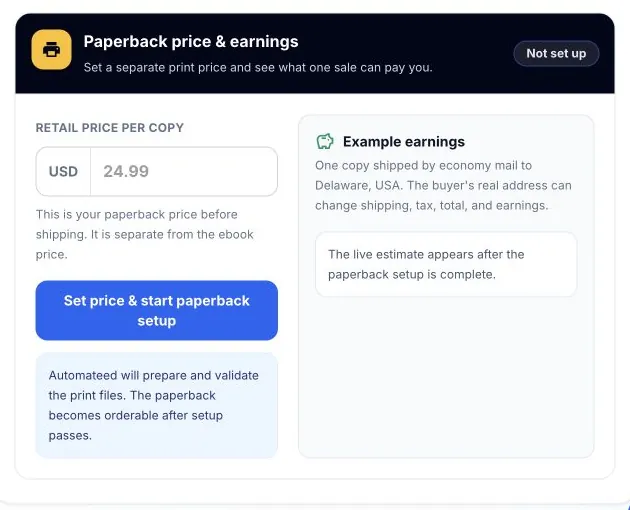
The estimate uses one example destination. The buyer address can change shipping, tax, total and author earnings. - 02
Set the retail price
Enter the price for the printed copy before shipping; it is separate from the ebook price.
- 03
Read the example quote
The current example uses economy mail to Delaware and separates Lulu production and tax, example shipping, the 30% Automateed print-service amount and your estimated royalty.
- 04
Account for the buyer destination
The buyer receives a live destination quote at checkout, so shipping, tax, total and earnings can differ from the Delaware example.
- 05
Save and verify
Save the price, wait for setup to become Live, then test the public paperback option and checkout.
Success check
Confirm that it worked
- The saved Retail price per copy remains visible in Paperback price & earnings.
- The estimate separates production and tax, example shipping, the Automateed print service amount, buyer total and estimated royalty.
Important notes
- The initial economy-shipping quote to Delaware is an example rather than a guaranteed buyer total.
- The quote for the buyer’s actual destination is authoritative because shipping and tax can change the total and royalty.
Troubleshooting
If it still does not work
The estimated royalty is lower than expected
Inspect every displayed cost component and test the buyer destination before changing the retail price; production, tax, shipping and the print-service amount are deducted before the estimate.
The destination quote is temporarily unavailable
Keep the saved retail price, return to Paperback price & earnings later and obtain a live destination quote before treating the example earnings as final.