60-second summary
Quick answer
Download important generated files before cancelling: the current wizard says file availability is not guaranteed beyond seven days after paid access ends. Cancel the book plan and author-website hosting separately when both are active.
Before you start
What you need
- Download every important generated file before the current paid-access period ends.
- Identify the subscription payment provider and check whether Author website hosting is billed and cancelled separately.
Procedure
Complete the task step by step
- 01
Download important files first
The cancellation wizard warns that generated files are not guaranteed for more than seven days after paid access ends.
- 02
Open Subscription Info from the profile menu
Click your profile in the top-right of the app and choose Subscription Info (or open ai.automateed.com/subscriptionInfo directly).
- 03
Find the plan you want to end
The screen lists your book plan (Stripe or PayPal) with its status and renewal date. Hosted author-website subscriptions appear separately on the same screen with their own cancel control.
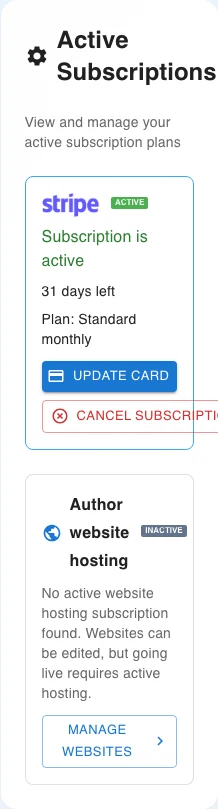
Choose Cancel Subscription on the exact active plan you intend to end. Website hosting, when present, is listed separately. - 04
Click Cancel Subscription
Give a reason and review any optional retention offer. Choosing "No thanks" proceeds with cancellation rather than opening another confirmation stage.
- 05
Verify the result
Stripe plans show the scheduled end date and access period. PayPal plans cancel directly and display their current active or expired status.
- 06
Review separate website hosting
Author website hosting has its own cancellation control and does not end merely because the book subscription was cancelled.
Success check
Confirm that it worked
- For Stripe, the account confirms that cancellation is scheduled for the end of the current billing period.
- The subscription status is updated for the provider, while website hosting changes only if Cancel website hosting is used separately.
Important notes
- The cancellation wizard warns that generated files cannot be guaranteed for more than seven days after paid access ends.
- Do not rely on continued file availability after paid access ends; Stripe and PayPal cancellation timing can also differ.
Troubleshooting
If it still does not work
The subscription cancel control is unavailable
Check whether cancellation is already scheduled, whether the plan is non-recurring and whether the visible control belongs to website hosting instead of the main subscription.
The subscription is cancelled but the author website remains active
Return to Subscription Info and review the separate Author website hosting card; use Cancel website hosting only if that additional service should also end.