LIFETIME DEAL — LIMITED TIME
Get Lifetime AccessLimited-time — price increases soon ⏳
AI Tools

Kim Personal Health Assistant Review (2026): Honest Take After Testing

15 min read
#Ai tool

Table of Contents

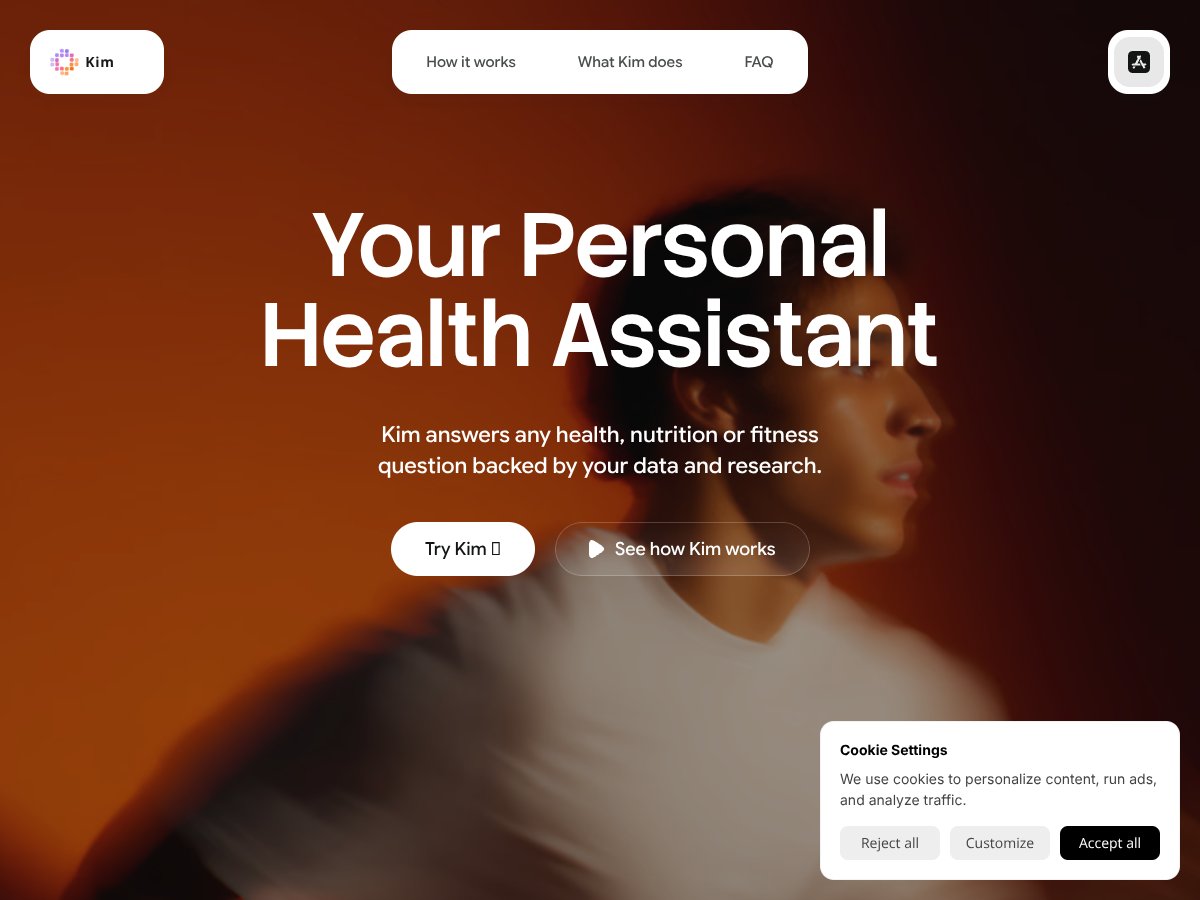
Kim Personal Health Assistant screenshot

What Is Kim Personal Health Assistant?

If you’re like me, you’ve probably grown tired of juggling all your health data — tracking sleep in one app, logging food in another, maybe using a wearable that spits out a ton of stats, but then you’re left trying to connect the dots yourself. That’s where Kim Personal Health Assistant caught my eye. I was curious if this AI-powered app could actually help make sense of all that scattered information without turning into yet another complicated dashboard.

In a nutshell, Kim is an app designed to connect to your Apple Health data, wearables, and blood lab results to give you personalized insights about your health, nutrition, and fitness. It claims to help you understand what’s happening inside your body, flag issues before they become problems, and suggest small tweaks to optimize your well-being. What I noticed was, it’s not a medical diagnosis tool — it’s more like a personal health coach that tries to interpret your data and suggest habits based on your goals.

Kim is developed by Oculi Medical, a company I hadn’t heard of before. The website is fairly minimal, and I couldn’t find much info about the team behind it — which is a bit of a red flag for anyone wanting reassurance about medical accuracy or data privacy. Initially, I was a little skeptical about whether it would live up to its promise of personalized insights backed by research, but I was willing to give it a shot.

Honestly, from what I could tell upfront, it’s advertised as an AI assistant that reads your labs, sleep, activity, and food logs to tell you what your body needs today. The thing is, it’s not a health tracker or a replacement for a doctor — don’t expect it to diagnose or treat anything. It’s more about understanding patterns and experimenting with your habits. So, if you’re expecting a comprehensive health dashboard or a magic pill for wellness, this isn’t it. But if you want a conversational tool that helps you interpret your data, it might be worth a try.

Key Features of Kim Personal Health Assistant

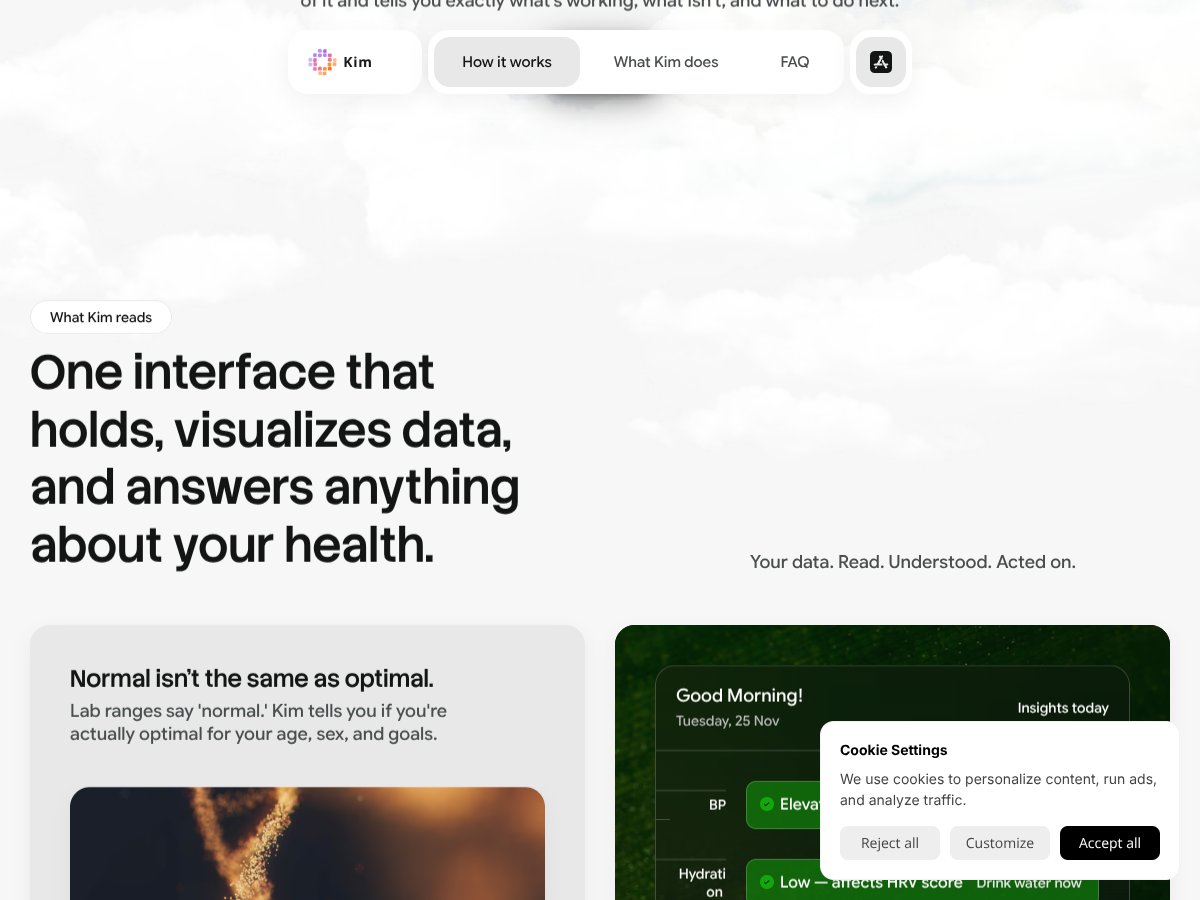
Kim Personal Health Assistant interface
Kim Personal Health Assistant in action

Connects to Apple Health and Wearables

Kim integrates with Apple Health, pulling in data like sleep, activity, heart rate, and more — if you use an iPhone and Apple Watch or other compatible wearables. It then uses this data to inform its insights. In my experience, the integration is straightforward, but it depends on how much data you’ve already logged. If your Apple Health is nearly empty, the insights will be limited until you start tracking more consistently. The app seems to read the data in real-time, which is nice, but I did notice sometimes it took a few moments to sync after making a change.

Chat and Voice Interface

The app allows you to ask questions in plain language — like “Why did my sleep score drop yesterday?” or “What supplements should I take today?” — either via text or voice. I found this feature handy because it’s less about clicking through menus and more about having a conversation. However, sometimes the AI seemed to give generic responses or asked clarifying questions I didn’t expect. It’s not perfect, but it’s decent enough that I’d prefer it over sifting through a complicated menu.

Sleep, Activity, and Nutrition Tracking

Kim keeps tabs on your sleep patterns, workouts, and food logs, then tries to identify patterns. I was surprised to find that I could log my meals and sleep directly within the app, which is convenient if you’re already tracking these things elsewhere. The app then offers simple insights like “Your deep sleep was below average last night,” or “Your recovery scores are lower after high-carb days.” Heads up: it’s only as good as the data you put in, so don’t expect it to magically know your habits without manual input or a consistent data stream.

Blood Lab Results Interpretation

This feature is a bit more niche: you can upload PDFs of your blood test results, and Kim will scan them to flag anything that’s out of range or trending down. I was surprised to find how fast and easy this was — but I couldn’t verify how accurate or nuanced the analysis is, since I only had a single lab report to test it with. It’s a helpful feature if you’re trying to understand your labs without a doctor’s immediate input, but don’t rely solely on it for medical decisions.

Personalized Supplement and Food Recommendations

Based on your labs and wearable data, Kim suggests supplements or dietary tweaks. I noticed that the suggestions are pretty conservative — mainly general advice like “consider magnesium” if your sleep is low — but it’s nice to get a second opinion. The app also checks for supplement interactions, which is a small but useful feature. Still, I’d take these suggestions with a grain of salt, especially if you’re on prescription meds or have complex health issues.

Pattern Recognition and Trend Tracking

One thing that stood out is how Kim tries to spot trends over time. For example, it flagged that my hydration was consistently low on days I felt sluggish, and suggested I drink more water. It also showed me that on nights I took magnesium, my deep sleep increased by about 30 minutes. I found this feature helpful because it turns raw data into something actionable, but again, it relies on consistent, accurate logging from the user.

Weekly Reports and Actionable Insights

Every week, Kim generates a simple report summarizing what improved and what didn’t. I liked that it highlighted specific changes, like “Your step count increased by 15%, try to keep it up,” or “Sleep was below your goal three nights in a row.” It’s a nice touch, but the report is pretty basic and doesn’t replace a professional health review.

How Kim Personal Health Assistant Works

Getting started was relatively straightforward — I downloaded the app from the App Store, linked my Apple Health account, and uploaded a blood lab PDF I had. The signup process was quick; I didn’t encounter any major friction points. The interface is clean and simple, mostly text-based with some charts and prompts. Honestly, I appreciated that it didn’t bombard me with notifications or overwhelming menus.

Once logged in, I could start asking questions right away. The initial experience was a bit confusing because I wasn’t sure how much data I needed to input before the app would give me meaningful feedback. It felt like you have to give it some time to learn your patterns — I’d say it took about a week of consistent logging before I noticed more personalized insights.

One thing I wish they’d clarified upfront is how often it updates and what kind of data quality it truly needs to be effective. For example, I manually logged my meals and sleep for a few days, then checked back to see if the app was tracking correctly — it mostly was, but I had to manually refresh or wait for data syncs sometimes. The learning curve wasn’t steep, but I did have moments where I wondered if I was missing some crucial step.

Overall, I think Kim offers a lot of potential if you’re already tracking your health data. The real challenge is maintaining consistent input and managing expectations about what it can do — it’s not a health coach that’ll tell you exactly what to do, but rather a tool that helps you make sense of your own data. Be prepared for some trial and error, and don’t expect it to replace professional medical advice.

Kim Personal Health Assistant Pricing: Is It Worth It?

  • Basic access to connect with Apple Health
  • Limited insights, mainly logging and tracking
  • Ability to ask questions and get plain-language feedback
  • Possibly subscription-based with advanced features
  • Full access to blood scan analysis, detailed reports, and deeper insights
  • Enhanced tracking and personalized recommendations
Plan Price What You Get My Take
Free Download Free Great for experimenting with the app and seeing if it fits your style, but likely limited in depth.
Premium Plans Pricing not clearly disclosed Without concrete pricing info, it’s hard to say, but it may be worth it if you’re serious about data-driven health tracking and willing to pay for deeper insights. Keep in mind that many wellness apps charge monthly, often ranging from $10 to $50, but this is speculative here.

Here’s the thing about the pricing... The app is listed as free on the App Store, but details on any premium tiers or subscription fees are not openly disclosed. That means you might start free but could encounter costs if you want the full suite of features, especially deep analysis or blood scan integrations. Always check the latest info directly in the app or on the website before committing.

What they don’t tell you on the sales page is whether you’ll hit limits on data storage, insights, or tracking capabilities if you’re a heavy user. Also, some features might be locked behind paywalls or subscriptions, which could add up if you’re trying to maximize the platform.

I was honestly expecting clearer tier distinctions and transparent pricing given how many health apps push subscription models these days. Without that info, it’s a bit of a gamble whether this will stay free or if you’ll need to upgrade later. This might be a dealbreaker for some who prefer upfront costs or no hidden fees.

Fair warning: If you’re not deeply integrated into the Apple ecosystem, or if you’re not willing to pay for premium insights, Kim might not deliver enough value for the price.

The Good and The Bad

What I Liked

  • Seamless integration with Apple Health: It pulls in a wide range of data—sleep, activity, labs—and uses that to personalize feedback, which saves me from manual data entry.
  • Conversational interface: Asking questions in plain language feels more natural than sifting through dashboards. It’s especially handy when I want quick insights on the go.
  • Pattern recognition: Kim connecting the dots between magnesium intake and sleep quality was a real eye-opener. It made me rethink supplement timing.
  • Blood lab scanning: Uploading PDFs and getting instant flagged issues or insights is a game-changer—if you’re already tracking labs.
  • Holistic tracking: Combining sleep, activity, food, and supplements in one place helps me see the bigger picture, not just isolated data points.
  • Personalized recommendations: From supplement stacks to activity timing, the tailored suggestions feel credible because they’re backed by my own data.

What Could Be Better

  • Lack of transparency on pricing: Without clear premium plans or subscription costs, it’s hard to know what you’re signing up for long-term. This lack of detail can be frustrating.
  • Limited feature set in the free version: Many of the deeper insights, like blood scan analysis or advanced pattern detection, seem to require paid plans—if they exist.
  • No independent validation: There’s no info on whether the insights are clinically validated or how accurate they are, which might be a concern for some users.
  • Platform dependency: It’s only available on iOS and relies heavily on Apple Health, so Android users are out of luck.
  • No community or social features: If you thrive on sharing progress or getting feedback from others, this app doesn’t offer that social aspect.

Who Is Kim Personal Health Assistant Actually For?

If you’re someone who’s already invested in tracking your health data via Apple Health, Kim could be a valuable companion. It’s best suited for dedicated self-trackers who want to turn their raw data into actionable insights without fussing with complex dashboards. For example, if you’re a health-conscious individual who regularly logs sleep, workouts, and supplements and wants to understand how these variables interact, Kim can help you spot patterns and optimize your habits.

It’s also ideal if you’re comfortable uploading lab PDFs and want a single place to see how your lab results relate to your daily habits. Athletes looking to fine-tune recovery or sleep patterns, or biohackers experimenting with different supplement stacks, might find Kim’s insights particularly useful.

However, if you prefer a more comprehensive coaching platform or need medical advice, this isn’t the right tool. It’s about self-reflection and pattern recognition, not diagnosis or treatment.

Who Should Look Elsewhere

If your main goal is medical diagnosis, treatment, or professional health coaching, you should consider consulting a healthcare provider or a dedicated telemedicine service instead. Kim is not a substitute for medical advice, and its insights are only as good as the data you input.

Additionally, if you’re not invested in Apple’s ecosystem or don’t want to rely on a smartphone app for all your health tracking, this might feel limiting. Android users or those preferring standalone devices might find better options elsewhere, like Fitbit’s app, Oura, or dedicated health trackers that don’t require an iPhone.

Finally, if you’re not comfortable sharing your personal health data or uploading lab results, the app’s value diminishes significantly. Privacy-conscious users should review the app’s data policies carefully.

{"pros": ["Seamless integration with Apple Health for personalized data","Conversational interface makes health questions simple","Pattern recognition helps identify actionable insights","Blood lab PDF scanning saves time and adds depth","Holistic view of sleep, activity, food, and supplements","Tailored recommendations based on personal data"], "cons": ["Unclear pricing and premium feature costs","Limited free features, with advanced insights likely behind paywalls","Lack of clinical validation or transparency on accuracy","Platform restricted to iOS and Apple ecosystem","No social or community features for motivation or support"], "useCases": ["Dedicated health self-trackers who want data-driven insights","Biohackers experimenting with supplements and recovery","Athletes seeking to optimize sleep and training patterns","Individuals uploading bloodwork and seeking pattern analysis"]}

How Kim Personal Health Assistant Stacks Up Against Alternatives

MyFitnessPal

  • What it does differently: MyFitnessPal is primarily a calorie and nutrition tracker with a massive food database, making it easy to log meals and analyze macronutrients. It doesn’t integrate sleep or recovery tracking as seamlessly as Kim but offers detailed calorie insights.
  • Price comparison: Free with ads; premium plans start around $20/month for advanced features.
  • Choose this if... you want a robust, calorie-focused food logging tool with extensive food database and community features.
  • Stick with Kim if... you prefer a broader wellness view that includes sleep, recovery, and personalized insights based on health data, not just nutrition.

Oura Ring

  • What it does differently: Oura offers a dedicated sleep and activity ring that provides in-depth sleep analytics and recovery scores, with minimal manual logging. It’s hardware-focused, with app integrations for health insights.
  • Price comparison: Oura rings cost around $299–$399, plus optional memberships for detailed insights.
  • Choose this if... you want precise sleep and recovery data from a dedicated device and prefer hardware over app-only solutions.
  • Stick with Kim if... you want an all-in-one wellness app that combines data from various wearables and your lifestyle logs without needing additional hardware.

Apple Health

  • What it does differently: Apple Health acts as a centralized hub for health data from multiple apps and devices, but it doesn’t provide personalized insights or conversational tools. It’s more of a data aggregator.
  • Price comparison: Free on iPhone; costs depend on connected devices.
  • Choose this if... you already use Apple devices and want to store all your health data in one place for reference.
  • Stick with Kim if... you want active insights, pattern recognition, and conversational health tracking that Apple Health alone doesn’t offer.

Cronometer

  • What it does differently: Cronometer is a detailed nutrition tracker focused on micronutrients and diet analysis, ideal for those with specific dietary needs. It lacks sleep or recovery tracking.
  • Price comparison: Free with limited features; premium plans are about $5/month.
  • Choose this if... you need in-depth micronutrient tracking or diet analysis for health conditions.
  • Stick with Kim if... you want a broader health overview that includes sleep, lifestyle habits, and personalized insights beyond nutrition alone.

Bottom Line: Should You Try Kim Personal Health Assistant?

Overall, I’d give Kim a solid 7/10. It’s a promising tool for those who want a friendly, conversational way to understand their health data, especially if you already use Apple Health and are curious about spotting habits and patterns. The interface is straightforward, and it’s free to try, which lowers the barrier to entry.

The one person who should definitely give this a shot is someone interested in a holistic view of wellness that combines sleep, activity, food, and supplements in one place, with insights tailored to their data. If you’re looking for an app that acts more like a health companion than a strict tracker, Kim is worth exploring.

On the flip side, if you need detailed nutrient tracking for specific dietary goals or want a dedicated sleep device, you might find Kim’s features lacking. Also, if you’re not on Apple devices, this isn’t the best fit.

Trying the free version is definitely worth it to see if the conversational style resonates with you. Upgrading to a paid plan could be worthwhile if you want more in-depth insights or integrations, but since details on a premium tier aren’t clear, start free and see how it works for you.

Personally, I’d recommend it if you’re into self-experimentation and want a friendly, easy way to keep tabs on your habits. If your main goal is deep nutrition analysis or sleep tracking, consider dedicated tools instead.

If you’re curious about understanding your daily patterns and enjoy a conversational approach, give Kim a shot. Otherwise, your money may be better spent on specialized devices or apps tailored to your specific needs.

As featured on

Automateed

Add this badge to your site

Stefan

Stefan

Stefan is the founder of Automateed. A content creator at heart, swimming through SAAS waters, and trying to make new AI apps available to fellow entrepreneurs.

Related Posts

LookSky Review – Your Personal Style Assistant

LookSky Review – Your Personal Style Assistant

personalized fashion experience using AI

Stefan
Ocal AI Review – Your Personal Scheduling Assistant

Ocal AI Review – Your Personal Scheduling Assistant

Ocal AI is a promising scheduling tool

Stefan
BiteRight Review – Your Personal AI Nutrition Assistant

BiteRight Review – Your Personal AI Nutrition Assistant

personalized nutrition assistance at your fingertips

Stefan
Assindo Review – Your Personal AI-Powered Assistant

Assindo Review – Your Personal AI-Powered Assistant

AI-powered assistant streamlines communication and productivity

Stefan
AI Diary Review – Your Personal Assistant for Thoughts

AI Diary Review – Your Personal Assistant for Thoughts

AI Diary enhances your journaling experience

Stefan
Healthmax AI Review – Your Personal Health Companion

Healthmax AI Review – Your Personal Health Companion

Healthmax AI transforms your health monitoring

Stefan
Your AI book in 10 minutes150+ pages · cover · publish-ready