AI comic book creator — one striking illustrated page at a time
Automateed is not a panel-and-speech-bubble engine, and this page will not pretend it is. It is an AI storybook studio you can art-direct toward comic and graphic-novel looks: the AI writes your story, illustrates every page in the style you describe, lets you regenerate any single image, and exports a print-ready PDF you can publish.
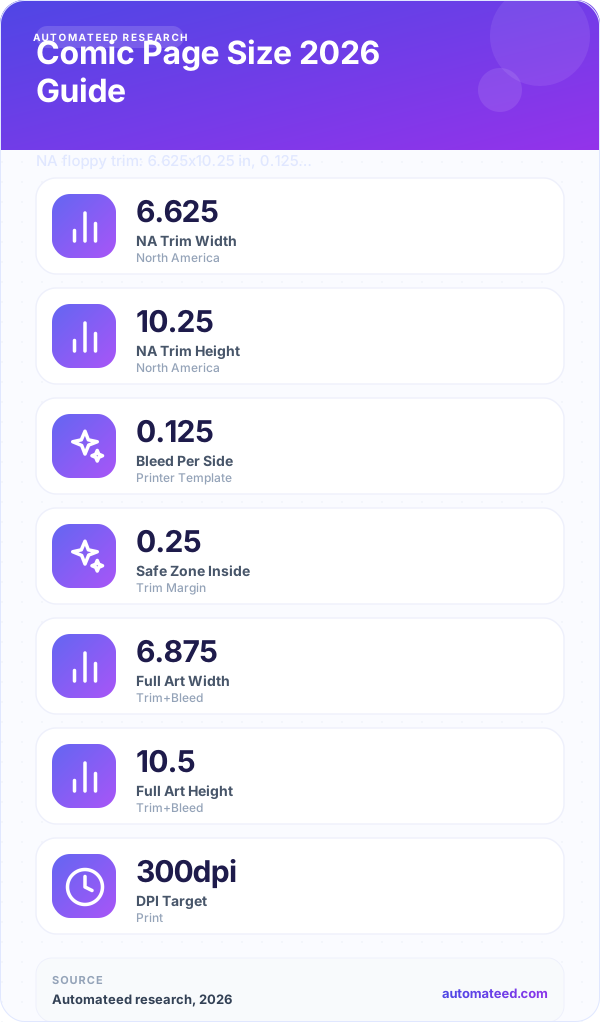
Comic book page sizes
Choose page dimensions before generating artwork so crops, margins and print bleed stay predictable.
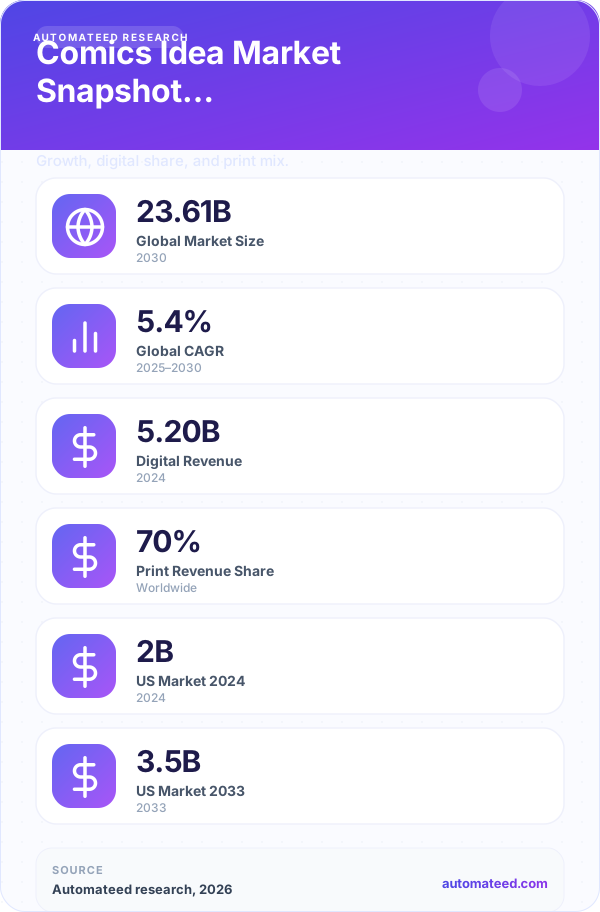
Comic premises and genres
Start with a conflict that can be shown visually, then give each page a distinct dramatic beat.
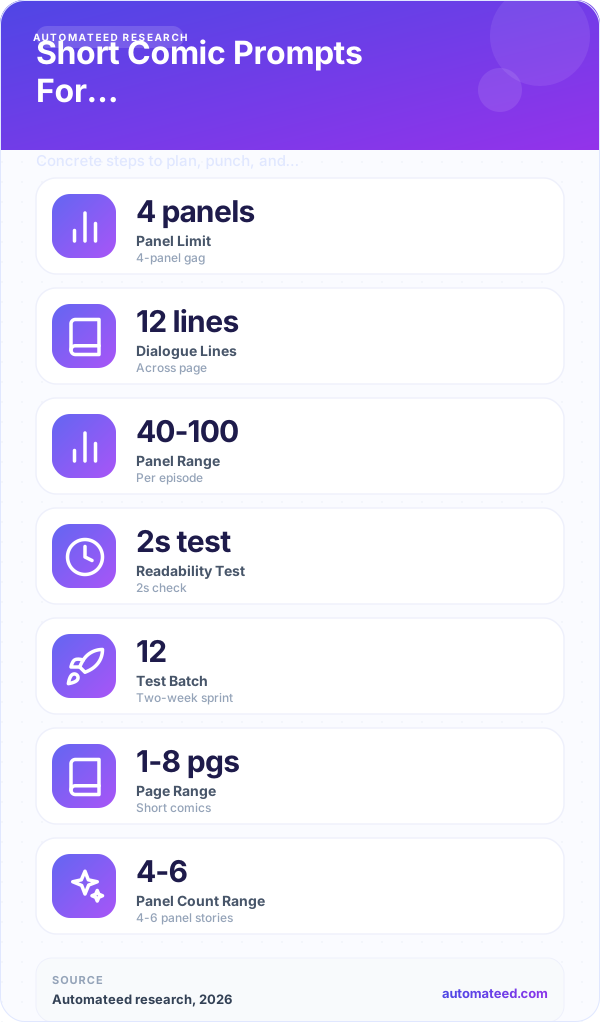
Short comic structures
Use a compact beginning, turn and payoff when the project needs to fit a brief printable format.
Quick answer
Automateed creates comic-style books through its illustrated storybook workflow: you give it a premise, add image instructions like “bold ink outlines, flat comic colors,” and it writes the story and generates a full-page illustration for every page. You can regenerate any single image with a custom prompt, edit the text, and export a print-ready PDF. It does not build multi-panel layouts or speech bubbles — one dramatic illustration per page is the format.
Is there a real AI comic book maker inside Automateed?
Here is the straight answer most AI comic generator pages avoid. Automateed’s engine is a storybook creator: story generation, one AI illustration per page, text layered on the page, and per-page image regeneration. If you art-direct the illustrations toward comic looks, you get something closer to a graphic novel or an illustrated action story than a traditional paneled comic. For many self-publishers — especially anyone making books for Amazon KDP — that single-illustration format is actually easier to sell and print than dense panel grids. If you specifically need panel grammar, gutters and speech balloons, pair Automateed’s generated art and script with a layout tool afterwards.
What you really get
- AI-written story from your premise — or import your own script as a DOCX (up to 400 words) and let the AI expand it
- A full-page AI illustration for every page, steered by your free-text image instructions (ink style, palette, mood, framing)
- Per-page image regeneration with a custom prompt until the page matches your vision
- Editable page text with an AI improve-text tool, rendered over or alongside the artwork
- Short (10-20 pages), medium (20-30) or long (30-40) book lengths
- Print-ready PDF export, a web edition you can sell on the Automateed marketplace, and a cover designer
What it does not do (yet)
- No multi-panel page layouts, gutters or panel grammar — every page is a single illustration
- No speech-bubble or sound-effect placement engine — dialogue lives in the page text
- No CBZ, webtoon-strip or per-panel PNG exports — the output is a book, delivered as PDF and a web edition
- No character-lock guarantee — the art style stays consistent, and you tighten character continuity by regenerating pages with more specific prompts
Why say this out loud? Because you will find out within five minutes of trying the free preview anyway — and because a one-illustration-per-page book is a legitimate, printable, sellable format in its own right.
How to make a comic-style book with AI in five steps
The whole flow runs in the browser — nothing to install, and you see a preview before you pay anything.
Write the premise
One or two sentences: hero, setting, conflict. "A rookie courier races a storm across a floating city" is plenty to start from.
Art-direct the pages
Use the image-instructions field to set the look: bold ink outlines, halftone shading, noir shadows, saturated hero-comic colors — your call.
Pick a length
Short (10-20 pages, 1 generation credit), medium (20-30, 2 credits) or long (30-40, 3 credits). The AI drafts story and art together.
Fix the weak pages
Open any page and regenerate just that illustration with a sharper prompt, or run the AI improve-text tool on the writing. No full re-render.
Export and publish
Download the print-ready PDF for Amazon KDP, publish a web edition to the Automateed marketplace, or give it away as a free lead magnet.
Comic art direction that works in the image-instructions box
There is no fixed style menu — the storybook creator takes free-text image instructions, which is more flexible than a dropdown once you know what to type. These starting points consistently produce comic-flavored pages:
Classic hero comic
"Bold black ink outlines, flat saturated primary colors, dramatic low-angle action framing."
Manga-inspired
"Black-and-white manga illustration style, expressive eyes, speed lines, high-contrast screentone shading."
Noir graphic novel
"Moody noir style, heavy shadows, limited palette of black, cream and one red accent, rain-slick streets."
Saturday-morning cartoon
"Bright cartoon style with thick clean outlines, exaggerated expressions, simple background shapes."
Painted graphic novel
"Painterly digital illustration, cinematic lighting, muted color grading, graphic-novel cover quality."
Retro pulp
"Vintage 1960s comic print look, visible halftone dots, slightly faded colors, pulp adventure framing."
Keep the same instruction on every regeneration and mention your character’s defining features (“short silver hair, red scarf, goggles”) each time — that is how you hold continuity across a 30-page book without any special character-lock feature.
From finished pages to a book people can buy
Print-ready PDF
Storybook-format projects export as a laid-out PDF — upload it to Amazon KDP as a paperback interior, or print it locally for conventions and gifts. PDF export is included on every plan.
Marketplace web edition
Publish a readable web edition to the Automateed marketplace with its own public page — sell it at your price or set it to $0 as a lead magnet for your audience.
Proven at scale
Creators have made 77,000+ books with Automateed across 216 countries — including 2,234 projects through the illustrated storybook workflow this page describes.
What it costs
You can draft and preview free with no credit card. Paid plans start at $25/month for 8 book generations (a short comic-style book uses 1) or $50/month for 30, with top-ups available. A medium book costs 2 credits, a long one 3 — so even the entry plan covers several full projects a month.
AI comic book creator — honest FAQ
Does Automateed generate multi-panel comic pages?+
No. Every page is a single full-page AI illustration with your story text — closer to a graphic novel spread than a six-panel grid. There is no panel layout engine, so if you need traditional paneling you would assemble the generated art in a layout tool afterwards. For print-on-demand books, the one-illustration-per-page format is often the easier product to sell.
Can I add speech bubbles and sound effects?+
Not inside Automateed — there is no bubble or sound-effect placement tool. Dialogue lives in the page text below or over the artwork, and you can ask for spoken lines in the story itself. An optional premium print edition renders the story text directly inside the artwork for a more integrated look.
Can I make manga-style pages?+
Yes, through art direction. Type instructions like "black-and-white manga illustration style, screentone shading, expressive characters" into the image-instructions field and every page follows that look. What you do not get is right-to-left reading order or panel grammar — the output is a left-to-right illustrated book.
Will my main character look the same on every page?+
The storybook workflow keeps the overall art style consistent across the book. Character continuity is good but not guaranteed — when a page drifts, open it and regenerate just that illustration with a tighter description of the character (hair, outfit, colors). Repeating those defining features in your image instructions is the reliable technique.
Can I export CBZ, webtoon strips or per-panel PNGs?+
No. Comic-reader formats like CBZ and vertical webtoon exports are not offered. Storybook-format projects export as a print-ready PDF, and you can also publish a readable web edition to the Automateed marketplace with its own public page.
How many pages can my comic-style book have?+
Three lengths: short (10-20 pages, 1 generation credit), medium (20-30 pages, 2 credits) and long (30-40 pages, 3 credits). Each page gets its own illustration, and you can regenerate any of them individually after the first draft.
Can I write the script myself instead of letting AI invent the story?+
Yes. You can upload your own story as a DOCX file of up to 400 words and the AI builds the illustrated book from it, or you can start from a premise and then rewrite any page by hand. An AI improve-text tool polishes individual pages without touching the rest.
Can I publish my comic-style book on Amazon KDP?+
Yes — export the print-ready PDF and upload it to KDP as a paperback interior, then design the cover in Automateed’s cover editor. Creators have published Automateed-made books across 216 countries, and the platform also runs its own marketplace if you want to sell a web edition directly or give it away free as a lead magnet.
How much does the AI comic book creator cost?+
You can generate a preview free with no credit card. Paid plans are $25/month for 8 book generations or $50/month for 30, with top-ups available. A short comic-style book uses 1 credit, medium 2, long 3 — so one plan covers multiple complete books each month.
What languages can I write my comic-style book in?+
Automateed supports 108 languages for book creation, so you can generate the same illustrated story in English, Spanish, German, Japanese or almost any market you publish into.
Is there a mobile app for making comic-style books?+
Yes. The AI Ebook Creator by Automateed app is on the iOS App Store and Google Play, and projects sync with the web studio — start a premise on your phone and refine the pages on a laptop.
Who owns the comic-style books I create?+
You publish and sell what you make — authors already sell Automateed-created books on Amazon KDP and on the built-in marketplace at their own prices, including free $0 lead magnets. Review KDP’s AI-content disclosure rules when you publish there.
Visual book projects next door
Children’s book creator
The same illustrated engine tuned for ages 3-17 — age bands, story arcs and print-ready picture books.
OpenColoring book creator
Clean black-and-white line art up to 40 pages per book, with per-page regeneration and KDP-friendly PDFs.
OpenBook cover creator
Generate cover art, drag your title and author name into place, and export a cover for your comic-style book.
OpenActivity book creator
Puzzles, prompts and games — a natural companion product if your comic audience is kids.
OpenGuide: writing a children’s book with AI
Deep-dive on structuring visual, page-based stories that survive editorial review.
OpenGuide: images for books
How to plan illustrations with a consistent visual system instead of decorating pages at random.
OpenYour story deserves better than staying a premise
Draft a comic-style illustrated book, regenerate the pages that miss, and hold a print-ready PDF this week. Preview free — no card required.