Book cover creator — art from a prompt, type under your control
Automateed’s cover editor asks the image model for artwork without lettering, then lets you place the real title and author name as separate, draggable text layers with template presets, font, size, color and alignment controls. Inspect generated art for stray marks before adding the editable typography layers.
YOUR TITLE
Author Name
Illustrative typography styles — explore the current presets in the editor
Quick answer
Automateed’s book cover creator asks for text-free artwork from a prompt, or starts from built-in stock image search. Generated art can still contain stray text-like marks, so review or replace it before export. You then add the title and author as separate text layers: apply a typography template (such as Bottom editorial, Bold band, or Clean minimal), drag each layer into position, and fine-tune font, sizes, colors and alignment. The editor saves or downloads the composed front cover as a 1600×2560 JPG. It does not generate a back cover, spine or wraparound print PDF.
What the cover editor actually does
Every capability below exists in the editor today — no roadmap items dressed up as features.
AI artwork without ruined text
The generation prompt asks for a vertical cover background without lettering. Because an image model can still add stray marks, review or regenerate the artwork before placing the real title as an editable text layer.
Stock image search
Not every cover wants generated art. Search stock imagery inside the editor and use a photographic base instead — useful for memoirs, business books and travel titles.
Typography templates
Presets including Bottom editorial, Centered classic, Bold band, Clean minimal, Top focus, Left modern, Cinematic center, and Modern split set the font pairing, title and author sizes, colors, alignment and positions in a coordinated system.
Drag-to-place text
Grab the title or author layer and drag it anywhere on the canvas. Composition changes that would take menu-diving elsewhere are literally a pointer drag here.
Manual overrides for everything
Title font, title size, author size, both colors, text alignment and both positions are individually adjustable after any template — start from a preset, end with your cover.
Front-cover JPG output
Save the composed 1600×2560 front cover to the book or download it as a JPG. A paid KDP package includes that saved image, but print spine and back-cover preparation happen separately.
Design for the thumbnail, deliver for the shelf
Why separate text layers win at 80 pixels wide
Most covers are first seen as a thumbnail in a store grid. Baked-in AI lettering blurs into noise at that size; a real text layer with deliberate hierarchy stays legible. That is the whole argument for this editor’s architecture — the artwork sets the genre mood, the typography does the selling, and you can push the title size up for thumbnail tests without regenerating any art.
What you receive from this editor
The editor renders the background and editable typography into a 1600×2560 JPG front cover. It can save that image to the book project or download it directly. If you publish a paperback, finalize the interior first, then build and validate the separate back-spine-front file with the printer’s current calculator or template.
Real covers from the public Automateed catalog
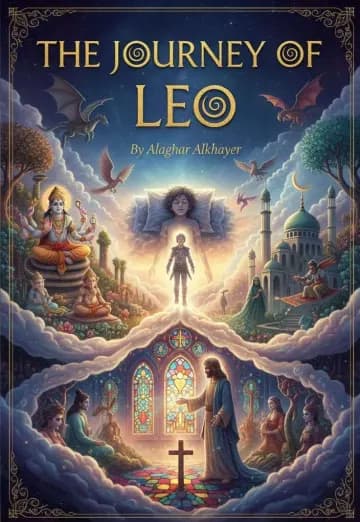
These aren’t concept mock-ups — each cover belongs to a published book with a live reader page you can open. Six different genres, six different jobs for the typography.





Cover quality control
Check the cover in the places where readers will actually see it
A cover can look impressive on a large editor canvas and fail as a store thumbnail. Reduce it to the size used in search results and confirm that the title remains legible, the main visual idea survives and the genre is recognizable without reading the description. Then compare it with several current books from the intended category without copying one competitor's composition.
Inspect the full-resolution export for accidental artifacts, weak edges around people or objects and visual details that contradict the book. AI artwork still needs human review. For nonfiction, avoid charts, credentials or symbols that imply evidence the manuscript does not contain. For fiction, make sure mood and character presentation fit the actual story.
Print requires a separate wraparound file that this editor does not generate. Finalize the interior page count, use the printer’s current cover calculator or template, and verify trim size, bleed, safe areas and spine width in its previewer. Order a physical proof when color, fine typography or full-bleed artwork matters; screens cannot show every shift introduced by paper and ink.
Keep the editable project and original licensed or generated assets. If a title, author name or edition changes, update the cover, interior title page and retailer metadata together. For a print edition, use the binding and spine-size guide after the interior page count is final, then verify the complete wraparound file in the printer's own previewer.
Book cover creator — FAQ
How does the AI book cover generator avoid garbled text in the artwork?+
The artwork request asks the model for a vertical background without lettering, while your title and author name are added later as separate text layers. Image models can still introduce stray symbols or text-like marks, so inspect the artwork and regenerate or replace it when that happens.
Can I move the title and author name around the cover?+
Yes — both are draggable layers. Grab the title or the author name with your pointer and place it anywhere on the canvas. Alignment, position, font, sizes and colors are all individually adjustable too.
What typography styles are available?+
The editor offers presets including Bottom editorial, Centered classic, Bold band, Clean minimal, Top focus, Left modern, Cinematic center, and Modern split. Applying one sets the font, title size, author size, colors, alignment and positions as a coordinated system, which you can then override element by element.
Can I use a photo instead of AI-generated art?+
Yes. The editor has built-in stock image search, so photographic covers — common for memoirs, business books and travel guides — are a search away. You still get the same draggable typography on top.
Does it design the spine and back cover?+
No. The current editor designs and saves a 1600×2560 front cover. It does not calculate a spine or produce a back-and-spine wraparound PDF. For a print edition, use your printer’s current cover calculator or template after the interior page count is final.
What file does the cover editor produce?+
The cover editor composes the selected background and typography into a 1600×2560 JPG front cover. You can save it to the book project or download the JPG. This is not a wraparound print-cover PDF.
Is the book cover creator really an app?+
It runs in the browser as part of Automateed’s Book Studio, and the AI Ebook Creator by Automateed app on the iOS App Store and Google Play uses the same account — so your book projects and covers stay in sync across phone, tablet and desktop.
How much does it cost to make a cover?+
You can open the workflow through the free preview without entering a card. AI artwork uses image credits; current plan allowances, generation cost and any top-up options are shown inside the app before you generate. Check that live total rather than relying on an older plan quote.
Can I make genre-specific covers — fantasy, thriller, romance?+
Yes, through the art prompt: describe the mood and genre signals you want ("misty pine forest at dusk, thriller atmosphere, muted teal palette") and pick typography to match. Always inspect generated details and compare the result with the book’s actual genre and subject.
Can I change the artwork without redoing my typography?+
Yes — that is the point of the layered design. Artwork and text are independent, so regenerating the background or swapping to a stock image leaves your title placement, fonts and colors untouched.
Are the covers shown on this page real?+
Each image is attached to a published book in the public Automateed catalog and links to that book’s reader page. The gallery demonstrates public catalog presentation; it does not claim that every image was created with the current cover editor.
Will the cover work for Amazon KDP uploads?+
The paid KDP package includes the saved front-cover image alongside available manuscript formats, metadata and instructions. It does not create a print wrap or calculate a spine. Check the current KDP image requirements for an ebook cover; for print, create and validate the full wrap separately with KDP’s current cover calculator or template.
Finish the whole package
Binding and spine size
Calculate a planning spine, then use the exact printer template for the final wrap.
OpenBook title generator
The title is half the cover. Generate options that survive the thumbnail test.
OpenBook blurb generator
The back-cover and store-page copy that converts the click your cover earned.
OpenPaperback and hardback compared
Compare construction, production choices, handling, and the cover requirements of each edition.
OpenWhat an ISBN identifies
Learn what the identifier covers and why separate formats can require separate records.
OpenHalf-title page
Keep the front matter, cover title, and edition details consistent before export.
OpenGive your book the cover it gets judged by
Choose the art, add the type, drag it into place, then save or download the finished front-cover JPG. AI artwork uses image credits; the editor also supports stock photos and your own image upload.