Step 1
Describe the book
Add a title, focused topic, audience, language and any non-negotiable instructions.
Choose an age group and topic, then generate a varied sequence of word play, riddles, matching tasks, creative prompts and parent-ready answers.
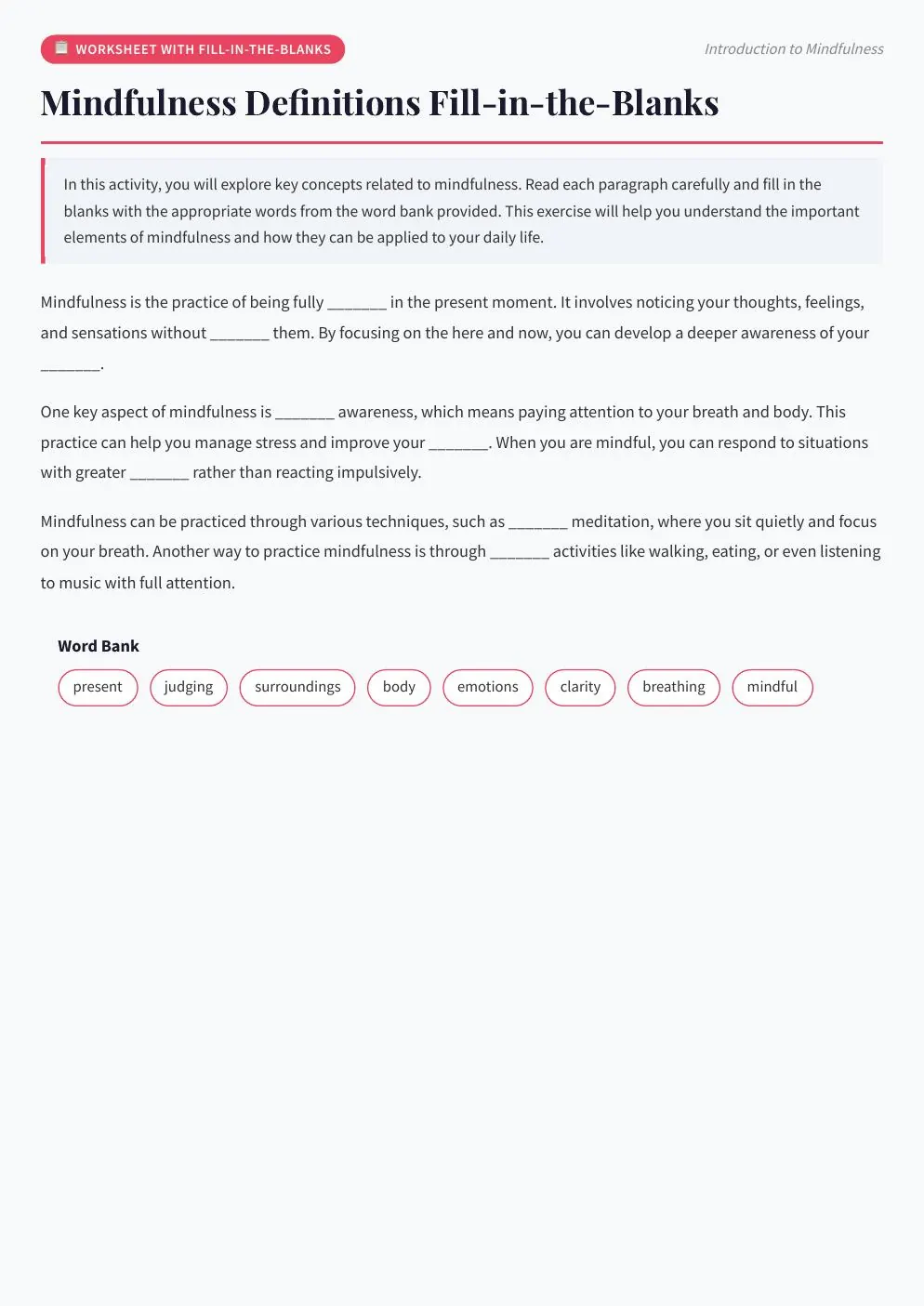
Real Automateed workbook page showing the kind of clear, guided interaction an activity book needs.
The Automateed AI Activity Book Creator generates themed kids activity books of 10 to 60 activities for three age bands — 3–5, 6–8 and 9–12. Activity types rotate through word searches, riddles, matching exercises, fill-in stories and drawing prompts, each with child-facing instructions, and answer data is generated separately for parents and teachers. One credit covers 15 activities, and the project exports with an AI cover as a printable PDF.
For learning exercises with explanations, use the AI Workbook Creator. For illustrated activities aimed at younger readers, review the children's book workflow and test every instruction with the intended age group.
77,000+
books created on Automateed, per our published report
216
countries where those books were created
100+
supported generation languages
11
structured book creators sharing this workflow
How it works
Every structured creator uses the same library, status tracking, preview and export experience. The content schema changes to fit this book type.
Step 1
Add a title, focused topic, audience, language and any non-negotiable instructions.
Step 2
Set the scope and see the required ebook credits before generation starts.
Step 3
Automateed outlines the sequence, creates each activity and generates a matching cover.
Step 4
Edit individual fields, check the complete preview and download the formatted PDF.
Each generated activity is a complete printable unit: child-facing instructions written for the selected age band, then the activity itself — a word search grid, a riddle set, a matching exercise, a fill-in story or a framed drawing prompt. The variety is planned across the book, so ten consecutive pages never collapse into ten word searches.
The theme drives vocabulary and imagery everywhere at once. Pick “dinosaurs and prehistoric adventures” and the word-search terms, riddle subjects, matching pairs and drawing prompts all stay inside that world — which is what makes the result feel like a designed book rather than a stapled worksheet pile.
Puzzles without answers generate support requests from parents. The activity creator flags this format as answer-keyed: riddles, matching, fill-in blanks and word-based exercises produce separated answer data alongside the child-facing pages, ready to place as a keys section at the back of the printed book.
That separation matters for classroom use too — a teacher can photocopy activity pages without handing out solutions. It is also your quality-control surface: reviewing the answer data page by page is the fastest way to catch a word-search term that did not make it into the grid or a riddle whose answer does not land.
Age is the make-or-break variable in this niche, so it is a first-class control: generate for ages 3–5, 6–8 or 9–12 and the instruction language, puzzle difficulty and activity mix shift accordingly. A 3–5 dinosaur book leans on matching and drawing; the 9–12 version earns harder word play and longer fill-in stories.
If you publish for a franchise of ages — the same “Ocean Explorer Club” theme at all three bands — generate three separate projects rather than stretching one. At one credit per 15 activities, a three-book age ladder of 30 activities each costs 6 credits total, and the shared theme keeps the series recognizably one product line.
Activity books are a classic KDP category because print-on-demand suits consumable products — nobody re-reads a completed word search. The export here is a printable PDF interior plus an AI cover kept with the project; check trim size, margins and font sizing for small hands against our KDP formatting guide before upload.
Positioning advice from the category: theme plus age plus occasion beats generic. “Road trip activities for ages 6–8”, “rainy day science fun for 9–12” and seasonal editions each give a parent a reason to pick your book over a thousand-page generic tome.
Children’s material carries the strictest review duty of any structured format. Solve each puzzle yourself: confirm every word-search term is actually present in the grid, that matching pairs are unambiguous, that riddle answers are fair for the age band, and that any factual content — dinosaur names, ocean animals, geography — is correct.
Generation costs one credit per 15 activities (a 30-activity book is 2 credits, the 60-activity maximum 4), which deliberately leaves room in the budget for the part that cannot be automated: an adult working through the book with a pencil before it ever reaches a printer.
Example concepts
Start with a reader, context and outcome. These examples show the level of focus that gives the generator something meaningful to design around.
Age-adjusted word searches, riddles and fossil drawing prompts.
Matching, scavenger prompts and sea-life vocabulary games.
Landmark clues, food matches and travel-themed creative tasks.
Built for the format
Generate for ages 3–5, 6–8 or 9–12.
Word searches, riddles, fill-in stories, drawing, matching and more.
Answer data is stored apart from the child-facing activity where applicable.
Create a short printable pack or a fuller activity book.
Who it helps
Prepare a coherent set of quiet-time or classroom activities.
Prototype a niche activity title and its answer material.
Create a themed companion for an event, topic or learning program.
Test every puzzle before publishing. Confirm that word-search terms are actually present, answers match questions, instructions suit the selected age and any educational facts are correct. Adult review is essential for children’s material.
FAQ
Word searches, riddles, matching exercises, fill-in stories and drawing prompts, each with child-facing instructions. The mix is varied across the book so consecutive pages feel different, and everything stays inside your chosen theme.
Three bands: 3–5, 6–8 and 9–12. The band changes instruction language, difficulty and the activity mix — younger books lean toward matching and drawing, older ones toward word play and longer fill-in stories.
Yes. Answer data is generated separately from the child-facing pages for the formats that need it — riddles, matching, fill-in blanks and word-based exercises — so you can place a keys section at the back. Review every answer before distribution.
From 10 to 60, with 30 as the default. Ten-activity packs suit party favors and classroom handouts; 40–60 activities make a full retail activity book.
One credit per 15 activities, rounded up: a 30-activity book costs 2 credits and the 60-activity maximum costs 4. The create form shows the price before you start, including the AI cover and PDF export.
Yes — instructions, riddle text, matching pairs, story blanks and prompts are all editable fields in the structured editor, and you can regenerate or adjust the book title before export.
The export is a printable PDF interior draft with a matching cover kept in the project. Verify trim size, margins and print-safe font sizes for your age band against KDP requirements before uploading — our KDP formatting guide covers the checklist.
Generate one project per age band with the same theme. A three-band ladder — 3–5, 6–8, 9–12 — at 30 activities each costs 6 credits total and gives you a coherent product line instead of one stretched book.
The activity book creator produces text-and-puzzle activities with answer data; the Coloring Book Creator generates line-art pages for coloring. Many publishers pair them: a themed coloring title and a matching activity title share a cover style and audience.
Solve every puzzle yourself: confirm word-search terms appear in the grid, answers match their questions, instructions suit the age band, and factual content is accurate. Children’s material should never ship on AI trust alone — an adult with a pencil is the final QA step.
Continue the workflow
Use the relevant editorial, design and selling guides before releasing the finished project under your name.
One subscription unlocks every creator below — same login, same library, same export quality.
Themed quiz rounds with answer keys and fun facts — pub-night ready.
Open creatorOriginal poetry collections — free verse, haiku, sonnets — with a real arc.
Open creatorComplete short-story anthologies in any genre, 1,000+ words per story.
Open creatorStep-by-step guides with pro tips, tools lists and common mistakes.
Open creatorDestination guides written like a local — itineraries, food, insider tips.
Open creatorLesson-by-lesson courses: vocabulary, dialogues, grammar and exercises.
Open creatorSet the scope, see the credit cost and keep control of every generated activity before you export.