LIFETIME DEAL — LIMITED TIME
Get Lifetime AccessLimited-time — price increases soon ⏳
AI Tools

AI Portrait Review – Transform Your Photos into Art

Updated: April 20, 2026
5 min read
#Ai tool#Art

Table of Contents

If you’ve ever looked at your photos and thought, “I like this…but I wish it looked more artistic,” the AI Portrait Generator is worth a spin. I tested it with a few different kinds of selfies (good lighting, mixed lighting, and a couple that weren’t as sharp), and the results were honestly pretty consistent: the clearer your input, the better the final portrait.

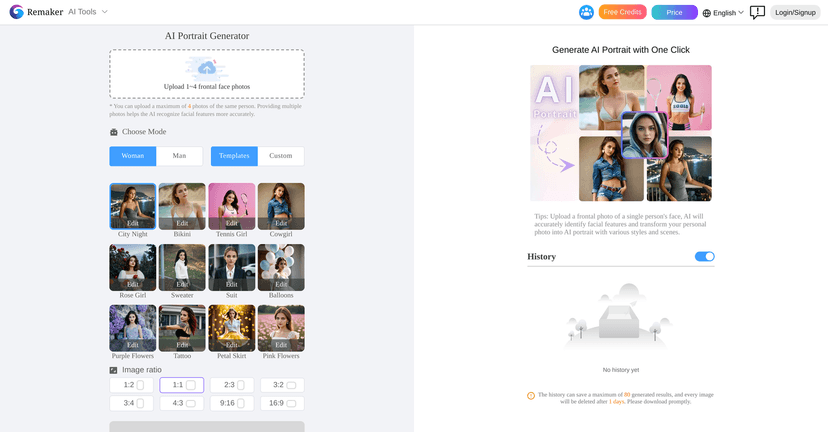
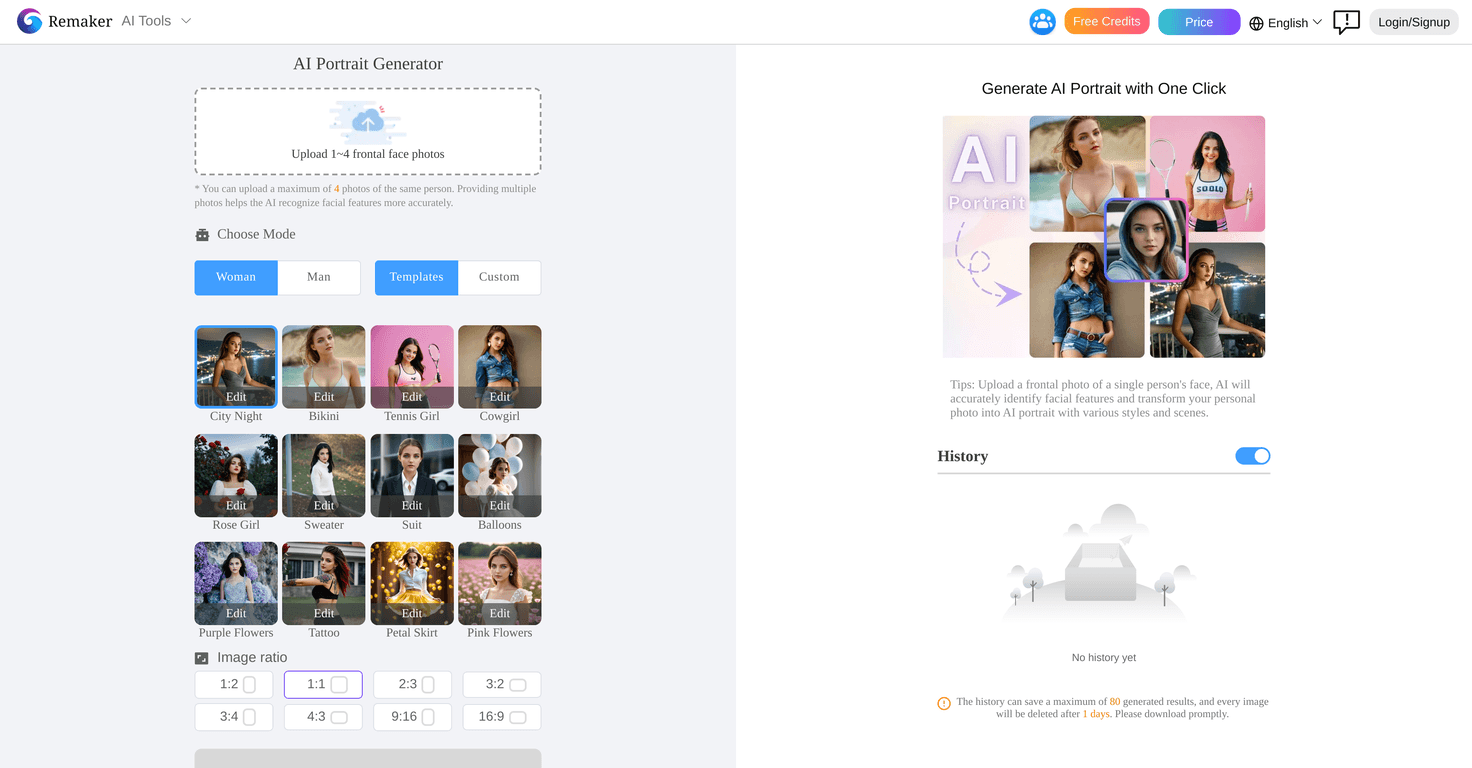
What I liked right away is how straightforward it feels. You upload a front-facing image, pick a gender/character option, and choose a generation mode. Then it spits out two downloadable portrait images. Two. Not one. That’s a small thing, but it matters when you’re trying to pick the “best” version for a profile picture or a post.

It also gives you customization options that go beyond just “style it.” You can tweak things like makeup, clothing, and poses (and yes, facial features too). I’m not saying it’s perfect—sometimes the face details can look a little too smooth—but when it hits, it really does look like a polished artistic portrait instead of a random AI attempt.

Ai Portrait

AI Portrait Review

Let me be straight with you: AI portraits can go either way. Some tools turn your face into something unrecognizable. Others keep it close, but the style looks a bit generic. In my experience, this one lands more on the “stylized but still you” side—especially when your photo is front-facing and in decent lighting.

Here’s how it usually goes when I use it:

  • Upload: You’ll want a clear, front-facing image. I noticed that shadows across the face can confuse the AI, and blurry photos tend to soften facial features too much.
  • Choose options: You select character gender and pick a generation mode. If you’re not sure what to pick, I’d start with the default/template-style approach first, then switch to custom if you want more control.
  • Generate: It creates two portrait outputs. That’s nice because you can compare styles side-by-side without re-running everything immediately.
  • Download: You can download the results right away and use them for profile photos, LinkedIn-style updates, or just for fun.

Customization is where it gets interesting. You can adjust things like makeup, clothing, and pose. I personally like using these tweaks to “match the vibe” I’m going for—professional, artistic, dramatic, etc. One thing I always watch for: if you push too many changes at once, the AI sometimes overcorrects (like changing facial proportions or smoothing skin more than I’d like). Small adjustments usually look more natural.

So yes, the input quality matters. Use a sharp photo with your face well-lit, and you’ll get better results. Skip that, and you’ll likely see more weird artifacts around hairlines, glasses (if you wear them), or the edges of your face.

Key Features

  1. Image Upload: Upload clear, front-facing images for best results.
  2. Gender and Mode Selection: Choose character gender and generation mode based on the style you want.
  3. Template Mode: Generate portraits quickly using pre-made templates—great if you want speed over tinkering.
  4. Custom Mode: Add your own scene prompts and select preferred styles when you want more control over the final look.
  5. Output Generation: Get two generated portrait images to download and compare.
  6. Advanced Generation: Higher detail and stronger effects are available if you opt into the more advanced option.
  7. Customization Options: Adjust makeup, clothing, poses, and facial features to match your vibe.
  8. Privacy and Security: The tool claims strict privacy policies—still, I’d recommend avoiding uploads of anything you wouldn’t want handled by an online system.

Pros and Cons

Pros

  • Easy to use: The interface is simple enough that you don’t need to be “AI savvy” to get good results.
  • Fast turnaround: In my tests, the portraits generate quickly—fast enough that I can iterate styles without getting annoyed.
  • Two outputs per run: I like having two versions to pick from, especially when one comes out slightly more flattering.
  • Works for real use cases: It’s useful for personal profile pics, creative headshots, and even business-friendly updates when you want a stylized look.

Cons

  • Input image quality really matters: If your photo is blurry, dim, or angled, the final portrait can look off.
  • Advanced features may cost extra: Some of the stronger effects and higher-detail generation options appear tied to a subscription.
  • Not always “photoreal”: It’s meant to be art, but if you’re chasing ultra-realistic results, you may find the face smoothing a bit much depending on the photo.

Pricing Plans

Pricing details aren’t clearly listed in the content I reviewed, so you’ll want to check the AI Portrait Generator site directly for the latest free vs. paid options. What I can say from using tools like this: you’ll usually get a basic free experience, while advanced generation (higher detail, stronger effects, more customization depth) typically lives behind a subscription.

If you’re on the fence, my practical suggestion is simple: try a couple of generations with your best photo first. If you like the style, then look at what the paid plan unlocks—especially whether it improves detail, gives more output variations, or removes limits on custom options.

Wrap up

AI Portrait Generator is a solid option if you want quick, stylized portraits without turning it into a whole project. The best part is how easy it is to get usable results: upload a good front-facing photo, choose a mode, and download two portraits right away. Just don’t expect miracles from low-quality images—garbage in, you know the rest.

If you’re curious, I’d say go for it. Try one clean selfie, one slightly different angle, and compare the outputs. Once you see what it does with your photos, you’ll know pretty fast whether it’s your kind of tool.

Promote AI Portrait

Stefan

Stefan

Stefan is the founder of Automateed. A content creator at heart, swimming through SAAS waters, and trying to make new AI apps available to fellow entrepreneurs.

Related Posts

Figure 1

Strategic PPC Management in the Age of Automation: Integrating AI-Driven Optimisation with Human Expertise to Maximise Return on Ad Spend

Title: Human Intelligence and AI Working in Tandem for Smarter PPCDescription: A digital illustration of a human head in side profile,

Stefan

ACX is killing the old royalty math—plan now

Audible’s ACX is moving from a legacy royalty model to a pooling, consumption-based approach. Indie audiobook earnings may swing with listener behavior.

Jordan Reese
AWS adds OpenAI agents—indies should care now

AWS adds OpenAI agents—indies should care now

AWS is rolling out OpenAI model and agent services on AWS. Indie authors using AI workflows for writing, marketing, and production need to reassess tooling.

Jordan Reese

Create Your AI Book in 10 Minutes