Table of Contents
A half title page shows only the main title of your book. It comes before the full title page, where readers find the author’s name, subtitle and publisher’s name. The word “half” does not mean that you use half a sheet of paper or cut the title short.
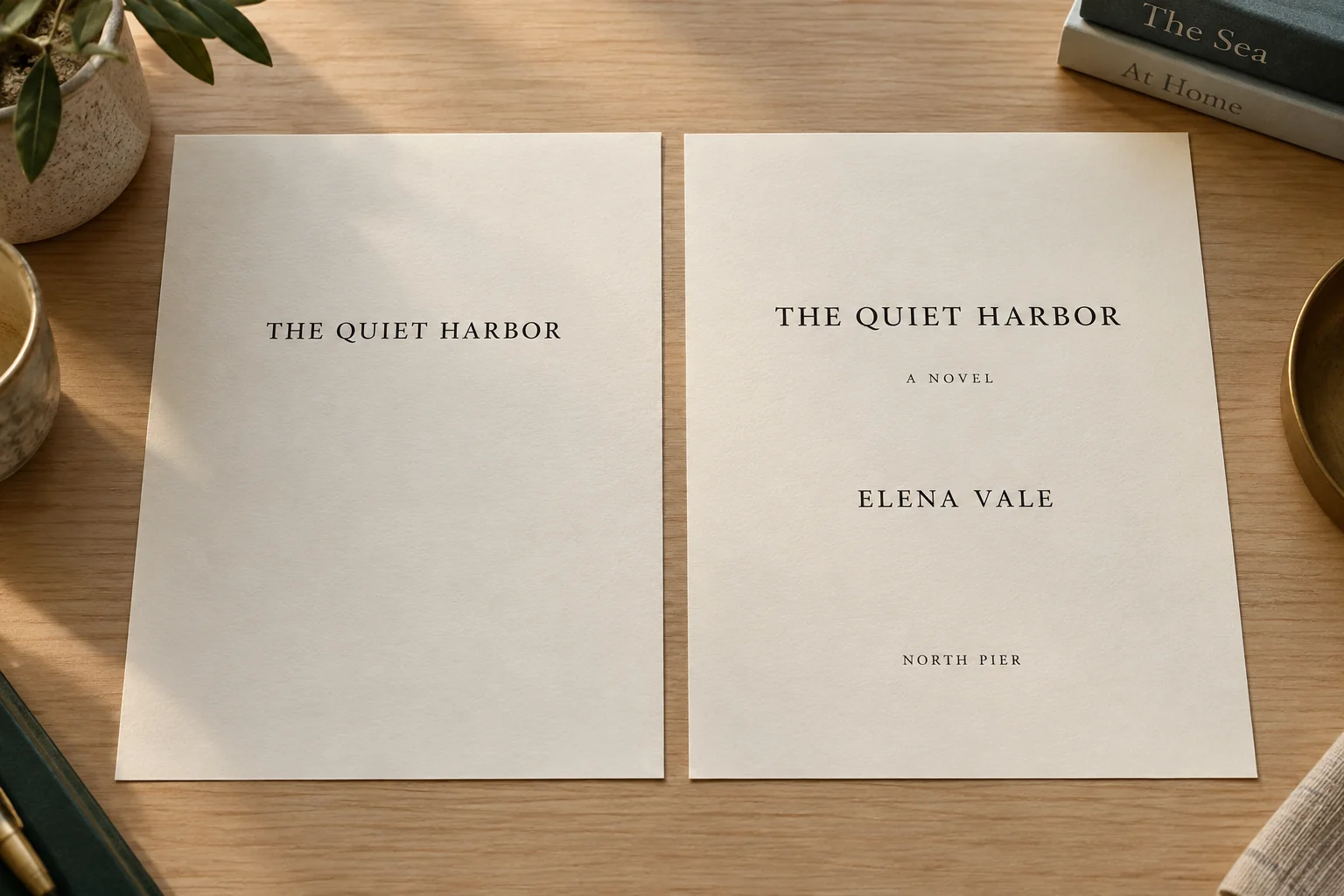
For example, the half title for The Quiet Harbor contains just those three words. The full title page then adds “A Novel,” author Elena Vale and publisher North Pier. We will use this fictional book throughout the guide so you can follow how its opening pages fit together.
Watch: half title pages explained
See the half title and full title page side by side, then follow the opening pages in order in this five-minute video.
Half title page versus title page
The easiest way to see the difference is to compare the two pages. On the left, the half title contains the book’s name alone. On the right, the full title page adds the details that identify the book and its author.
| Element | Half title page | Full title page |
|---|---|---|
| Main title | Included | Included |
| Subtitle | Normally left off | Included when applicable |
| Author or editor | Normally left off | Included |
| Publisher | Normally left off | Often included |
| Position in the simple print sequence | Before the full title page | Before the copyright page |
| Running header and visible page number | Neither | Neither |
What goes on each page?
Put the complete main title on the half title. If the book has a subtitle, save it for the full title page, along with the author’s name and any publisher details. In our example, “A Novel” describes the type of book rather than acting as a subtitle, but it still belongs on the full title page.
Copyright details, edition information and the ISBN belong on the copyright page. Review quotes and sales messages belong elsewhere too. A small decoration is fine on the half title, as long as the main title remains easy to read.
Why do books have a half title page?
The half title originally helped protect the full title page from dirt and damage before the book was bound. Books were often sold as loose printed pages, so the sheet at the front took much of the handling. Printing a short title on that sheet also helped people identify the book. The University of Liverpool’s account of this history explains how the page developed.
Modern books arrive already bound, but the half title remains a familiar way to open a printed book. It can also leave space for an author’s signature or a personal message. You may see it called a bastard title; that is another name for the same kind of page.
Where does the half title page go?
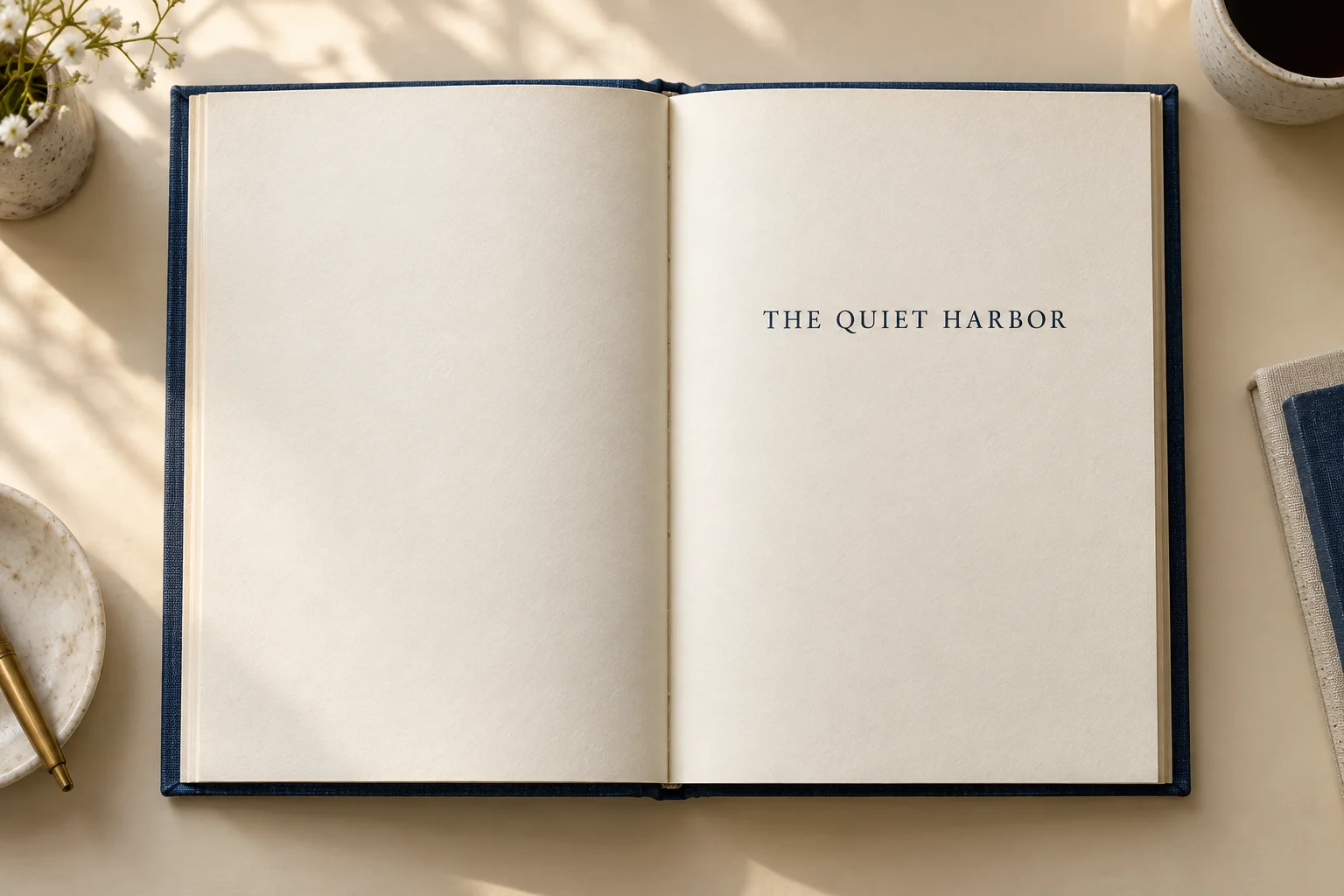
In the simple layout below, the half title is the first page inside the book. It is on the right when you open the cover. Its back is left blank, and the full title page starts on the next right-hand page. The copyright page goes on the back of the full title page.
Leave the page numbers off both title pages. If the rest of your book repeats the author’s name or book title at the top of each page, leave that repeated heading off these two pages as well.
This layout is a starting point. Some books put review quotes before the half title, while others use the back of the half title for an illustration or a list of books in the same series. The important thing is to check the complete opening, including any blank pages, so the title pages end up where you intended.
Example: the first four pages of a book
Here is how the opening would work for The Quiet Harbor. These are the pages inside the book; the cover is not part of this sequence.
First page: the half title
The first page is on the right and shows only The Quiet Harbor. It has no author’s name, subtitle or publisher’s name. Leave off the page number and the repeated heading used on the story pages.
Second page: the blank back of the half title
Turn that page over and you reach its blank back, now on the left. This is page 2 in the interior file, even though nothing is printed on it. Keeping it in place allows the full title page to appear on the right.
You can use this space for a series list or an illustration if your design calls for one. It still occupies the same page position; you are changing what appears there, not removing the page.
Third page: the full title page
The next right-hand page gives readers the complete title information:
The Quiet Harbor
A Novel
Elena Vale
North Pier
For your book, replace those details with your main title, subtitle if you have one, author’s name and publisher’s name if applicable. Leave off the page number and repeated heading here too.
Fourth page: the copyright page
The back of the full title page is on the left. This is where you put the copyright notice, edition information, ISBN and other publication details that apply to your book. Your dedication, contents and other opening material can follow.
Does the half title count as a page?
Yes, and deleting it changes which side the following pages appear on. In our example, the full title page is page 3, on the right. Delete only the half title and the full title moves to page 2, on the left. Delete the half title and its blank back together, and the full title becomes page 1, on the right.
This happens because the printer counts every page in the interior file, including blanks and pages without printed numbers. Hiding a page number does not remove the page. That is why our blank second page still affects the layout.
The numbers shown by your PDF viewer may also differ from the ones printed in the book. For example, the story may start with a printed “1” several pages into the file. Some books use Roman numerals such as i and ii for the opening material. When checking left and right placement, follow the page order in the file rather than the number printed on the page.
Does your book need a half title?
You can leave it out if you are publishing your own book. A novel may use one for a familiar opening, while a short picture book or workbook may use those two pages for its content instead. Keep the full title page in either version so readers can identify the book and its author.
If you sell signed copies, the extra space may be useful. You can write a reader’s name and a personal message without crowding the full title page. ScribeCount’s guide to title pages discusses this use, though you can sign a full title page too.
A second half title before the main text
Some books show the title again after the contents and preface, just before Chapter 1. This is a second half title. The first one opens the book; the later one marks the end of the introductory pages and the start of the main text. Typesetter Raphaël Freeman describes both placements.
You do not need to add this extra page simply because you have included a half title at the front. It is a separate design choice. If you find two half titles in your export, check where they appear: one at the front and one before the main text may be intentional, while two identical pages next to each other may be a template mistake.
What do KDP, Barnes & Noble Press and Draft2Digital say?
These services have different formatting workflows. Before adding pages by hand, check whether you are uploading a finished interior or asking the service to format your manuscript.
Amazon KDP
KDP’s print front-matter guide includes a half title in its suggested opening order. If you include one, it goes on the right before the full title page, with no page number or repeated heading. The guide describes many opening elements as optional, so its example order should not be read as a command to add every listed page.
For Kindle ebooks, KDP’s ebook guide calls for a title page with the book title and author’s name. It does not call for a separate half title. Prepare the print and ebook openings separately rather than carrying blank print pages into the ebook.
Barnes & Noble Press
The B&N Press print formatting guide treats the opening material largely as a matter of preference and recommends at least a full title page before the main text. It places that title page on the right and does not specify a mandatory separate half title.
For a B&N Press print edition, keep the full title page and decide whether the extra half title suits the book. Then check the interior proof to confirm that the pages appear in the order you planned.
Draft2Digital
Draft2Digital can add introductory pages when it formats a print book. Its D2D Print walkthrough tells you to select the pages you want added and warns that selecting a page already in your manuscript will create a duplicate.
If your manuscript already has a title page, do not also ask the formatter to add the same page. If you want a half title, check the generated opening to see what the selected template includes. When uploading your own print interior, put the pages in their final order before upload; D2D notes that a custom PDF has limited layout options.
A traditional publisher may give you a different brief or create these pages during production. In that case, follow its submission instructions rather than adding pages from a self-publishing template.
Check the print and ebook openings separately
Paperback or hardcover
To see the opening as readers will, use a two-page view in your PDF viewer. The first interior page should appear by itself on the right, followed by page 2 on the left and page 3 on the right. If the viewer pairs pages 1 and 2 instead, change its cover-page or first-page display setting before moving pages in your manuscript.
After checking the order, use the final interior page count to prepare the cover. Adding or removing pages can change the spine width, so recheck it with the KDP cover calculator when making a KDP cover. Count all pages in the file, including blanks, rather than using the last printed page number.
Ebooks with adjustable text
When readers change an ebook’s font size, the words move and the screen breaks change. There is no fixed left-hand or right-hand page to preserve, so remove blank pages that existed only to keep the print title on the right.
Your formatting software may do this automatically. The Pressbooks export guide, for example, says many themes add a half title to PDFs but omit it from ebooks. Open the ebook to check its title information, then follow the contents links to the first chapter. Readers should not have to pass through empty screens to get there.
Ebooks with fixed pages
A fixed-layout ebook keeps each page in place, much like a printed book. You can retain the half title when it is part of that design, especially when reproducing an existing book. Check the opening on a small screen as well as a large one: the title should remain readable, and the contents links should take readers to the right sections.
How to create a half title page
Once you have chosen a layout, you can make the page in Word or use a book-formatting tool. First check whether your template already includes a half title. If it does, change the title on that page rather than adding another.
In Microsoft Word
For a centered print layout in desktop Word for Windows, follow these steps:
Add a page before the full title page and type only the main title.
Select the title and choose Home > Center. Choose the font and size for your layout.
Open the Paragraph settings. Set Special to None and use Spacing Before to move the title down, rather than adding empty lines.
Use Layout > Breaks > Next Page section breaks to separate the opening pages. Add a blank back if needed to put the full title on the right.
For title pages that begin their own sections, turn on Different First Page in the header and footer controls. Check that their headers and page numbers are hidden.
Export a PDF and check the opening in page pairs.
KDP’s Word formatting walkthrough covers the section breaks and numbering in more detail. Word on Mac and the web can use different menus.
In a book-formatting tool
A dedicated tool may create the page from the book details you have already entered. In Vellum, choose Chapter > Add Element > Half Title. Its half-title instructions explain that the page uses your title information and is included in the print edition only. With other tools, check both the PDF and ebook export rather than assuming they include the same opening pages.
Three simple half title layouts
Start with a font already used in the book, such as the one in your chapter headings. The examples below use the same title in three positions, so you can compare the layouts without changing the wording.
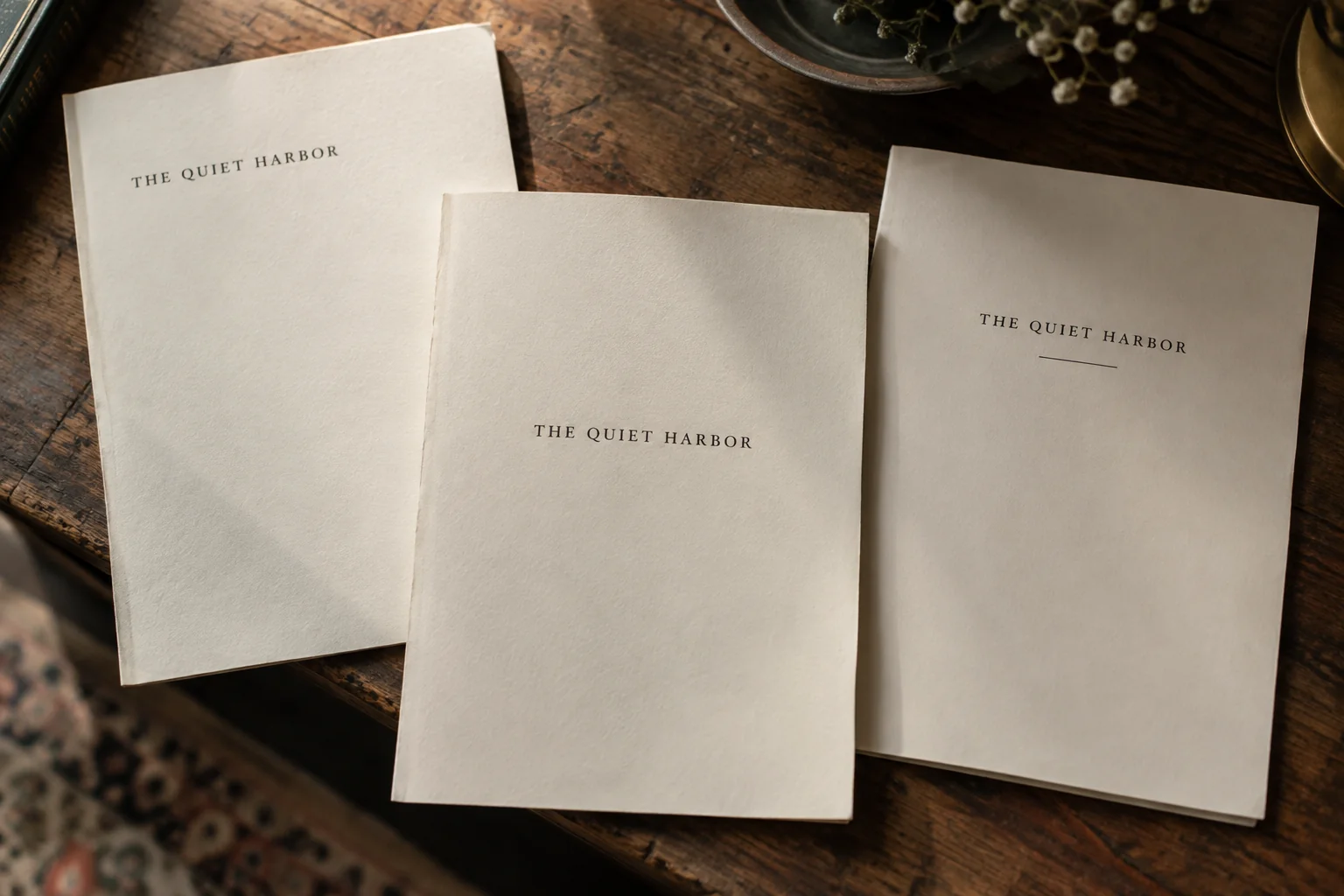
Centered title
The middle sample places the title near the center of the page, with plenty of open space around it. Set the final margins first, then adjust the title’s height. If the title needs two lines, break it between words that naturally form separate phrases.
Title near the top
The left sample moves the title higher up the page. Leave enough space above it that readers will see it as the page’s title rather than a repeated heading. Compare it with the full title page so the two openings feel consistent.
Title with a short line
The right sample adds a short line beneath the title. Draw it with your layout tool rather than typing underscores, which can move during export. Print a sample to check the result: a faint line may disappear, while a thick one may draw attention away from the title.
Whichever layout you choose, review it at the size of the finished book. A title that looks balanced in a large editing window may feel too small or too low on the printed page.
Common half title mistakes
Most problems come from duplicated pages, the wrong page order or formatting carried over from the rest of the book. Fix them in the original editing file so the next export includes the correction.
Too much information: move the author, subtitle and publisher details to the full title page.
Title on the wrong side: count from the first interior page and include blanks. Check the PDF viewer’s page-pair setting before changing the file.
Two copies at the front: check whether the template generated a page you had already added manually.
Missing words or placeholder text: compare the title with the approved wording, then export again after fixing it.
Blank ebook screens: remove pages added only to preserve the printed opening.
Does the half title belong in the contents?
In a printed book, usually not. The contents help readers find chapters and other sections, rather than the title pages they have just passed. Michigan State University’s front-matter guide leaves the half title, full title and copyright page out of the printed contents.
An ebook’s navigation menu is separate. It may include a link to the title page even when the printed contents do not. Check the links in the exported ebook instead of assuming that the print and ebook menus must match.
Check before publishing
Open the files you are about to upload and check the whole opening, not just the half title:
Read the title word for word and check the author’s name and other details on the full title page.
Check the first four page positions in print, including the blank back of the half title if you use one.
Remove page numbers and repeated headings from the title pages.
Confirm that the final page count matches the count used for the cover.
Open the ebook and test its contents links, watching for unwanted blank screens.
In Automateed, use the PDF template guide to choose a layout, then open the exported book to see which title pages it includes. If there is already a half title, change that page rather than adding another.