Table of Contents
If you’ve ever looked at your pet and thought, “Wow… you’d totally rock a royal robe,” you’re definitely not alone. I’ve seen people turn their cats and dogs into everything from movie characters to fantasy heroes, and Chrono Pets goes for a really fun angle: historical portraits.
With Chrono Pets, you upload a photo and the service generates an AI-style version of your pet in different time periods—like ancient Egypt or Victorian-era scenes. It’s the kind of thing that’s easy to start and hard to stop tweaking. In this review, I’ll walk you through what it actually feels like to use, what surprised me (good and bad), and what to watch for with the credit system.
Chrono Pets Review: What You Actually Get
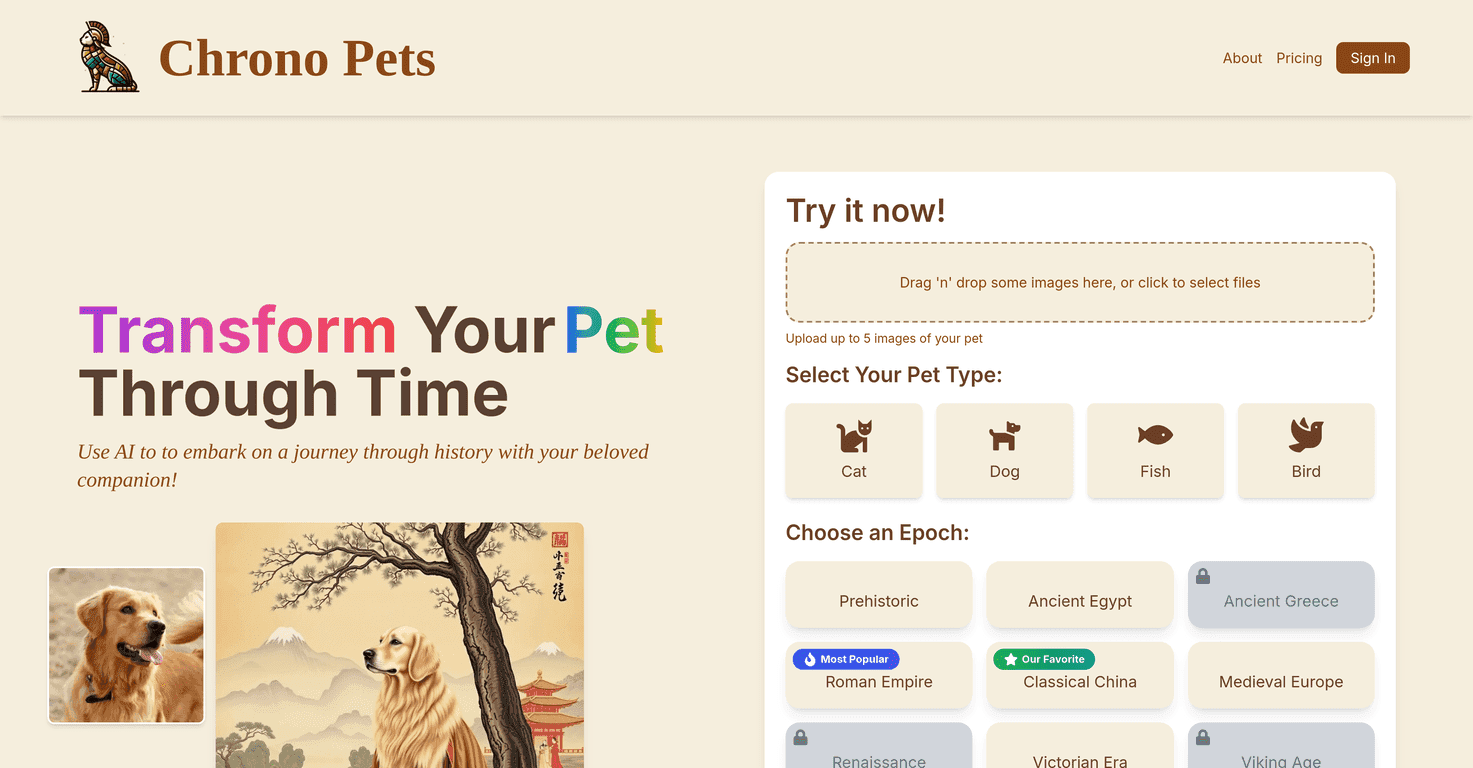
Chrono Pets is basically an AI portrait generator—except instead of “fantasy knight” or “space astronaut,” it leans hard into historical styling. You start by uploading a photo of your pet, then you pick a time period and the tool generates a new image that tries to match that era’s clothing, vibe, and details.
In my experience, the fun part is how quickly you can go from “let’s try one” to “okay, now do Victorian again but with a different pose.” The drag-and-drop upload is straightforward, and you’re not stuck in complicated menus. It feels built for quick creativity, not design work.
One thing I noticed right away: the results are most convincing when your pet’s face is clearly visible. If your photo is super dark or your pet is turned far away, the AI still tries—but the final portrait can look a bit off compared to photos where the eyes are sharp and centered.
Key Features (and What They Look Like in Use)
- AI-powered transformations for unique portraits
- You’re not just adding a filter here. The service attempts to recreate historical styling—clothing, styling cues, and an overall “period portrait” look.
- Diverse time options
- Expect options like Classical China and Medieval Europe, plus other historical vibes. It’s the variety that keeps you coming back.
- Easy drag-and-drop uploads
- Upload your pet photo and move on. No complicated steps or weird formatting requirements.
- Pet type selection
- Chrono Pets supports cats, dogs, birds, and more. In practice, choosing the right pet type helps the AI “aim” better at features and proportions.
- Credit system
- Transformations are accessed via credits, so you’re not generating unlimited images for free. This is one of the biggest things to understand before you start testing multiple eras.
- Before-and-after comparisons
- You can see the original and the transformed result side by side, which makes it easier to judge whether a style actually worked for your specific pet photo.
Pros and Cons (My Honest Take)
Pros
- It’s genuinely entertaining—not just a bland edit. Seeing your pet in a historical setting is weirdly addictive.
- Simple interface. I didn’t have to fight the UI to get results, which matters if you’re doing this for fun with friends or kids.
- Lots of epochs and pet types to experiment with. More variety means more chances of getting that “perfect” portrait.
Cons
- Credits can limit how much you experiment. If you like trying 10 different eras for the same photo, you’ll burn through credits faster than you expect.
- Some epochs may be locked or bundled. You might see “available” options, then later realize certain looks require a series or a specific unlock.
- Some features may be disabled. Depending on your account or plan, you may not get every option shown in marketing screenshots.
Pricing Plans: The Credit System Explained
Chrono Pets uses a credit system, and that’s really the key detail. The original info I found doesn’t spell out exact prices in this article, so I’d treat the credit model as the main “pricing plan” you’ll be dealing with.
What I recommend doing before you go wild with different eras: check the site for the latest credit costs and limits, then start with one photo and try 2–3 time periods. If you get results you love, that’s when it makes sense to upgrade or buy more credits. If not, you’ve saved yourself from wasting credits on styles that just don’t match your photo.
Also, keep your expectations realistic. AI portraits can be impressive, but they’re not magic. The best results usually come from clear, well-lit images where your pet’s face is easy to see.
Wrap up
Chrono Pets is a fun, easy way to turn your pet into a historical portrait, and it’s the kind of thing that makes people stop scrolling. I like that it’s quick to use and that you can compare the before-and-after without guessing.
Just don’t ignore the credit system. If you’re the type who loves testing every era, you’ll want to budget credits or you’ll run out sooner than you think. If you want a creative pet project for sharing, gifting, or just making your own little “timeline of pets,” Chrono Pets is worth trying.
Promote Chrono Pets