Table of Contents
I’ve always liked the idea of giving my kid a story that feels “made just for them.” Not a generic book from the shelf, but something that actually mentions their name, a favorite animal, or the thing they’re obsessed with right now. That’s what drew me to CreateBookAI.
When I tested it, I was surprised by how quickly I could get a complete children’s book concept together. You drop in the details you want, and the AI generates the text and illustrations to match. The whole process felt pretty straightforward—less “designing from scratch” and more “steering the story” until it looks right.

One thing I really liked: if you don’t love a generated result, you can regenerate parts (text and/or images). That matters, because the first draft isn’t always perfect—especially with kids’ books where the characters and vibe have to feel right. Also, CreateBookAI says you maintain full ownership of the books you generate, including selling rights and copyrights. That’s a big deal if you’re making gifts for family or planning to reuse templates for multiple occasions.
It’s not just for birthdays either. I can see using it for holidays, “just because” moments, or even turning a child’s bedtime routine into a story they’ll actually look forward to. And honestly? When a book mentions your child’s interests, it changes how they react to reading. That part felt genuinely promising.
CreateBookAI Review
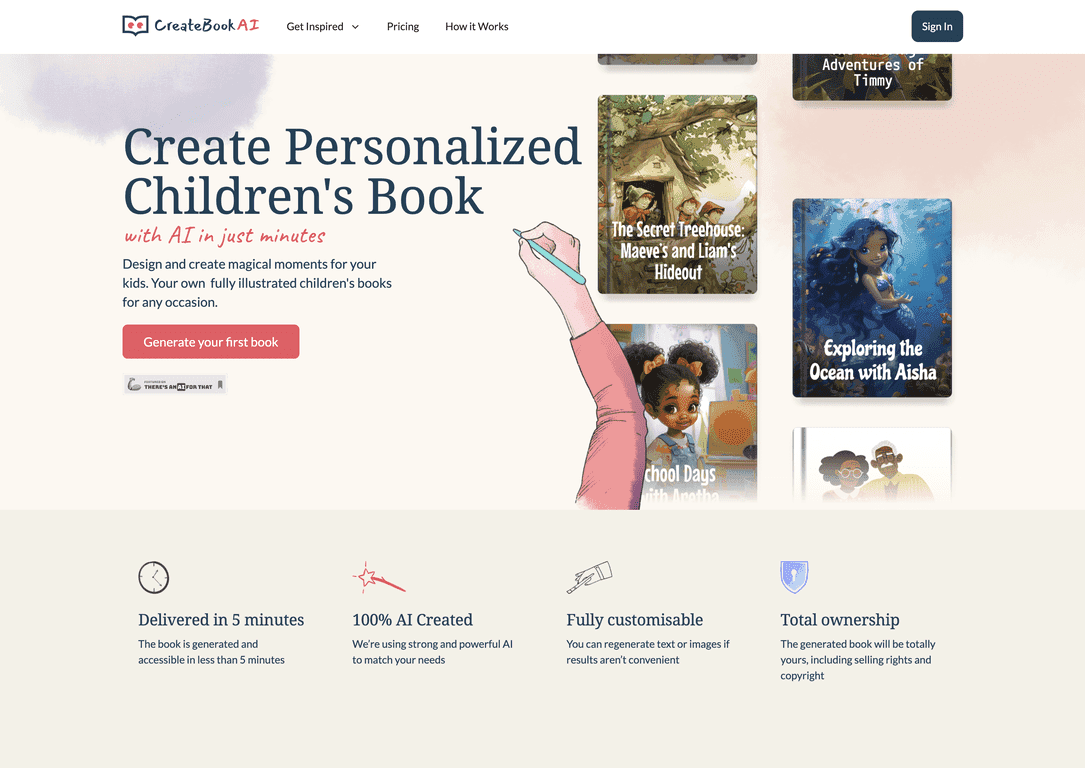
CreateBookAI is basically a fast way to generate illustrated children’s books from prompts and inputs you provide. In my experience, it really does move quickly—under 5 minutes is realistic for getting a finished draft, assuming you already know what you want the story to include.
Here’s what stood out to me while using it:
- Personalization is the whole point. I could add details like the child’s name, their interests, and the overall story vibe. It felt more “for us” than “for everyone.”
- Text + illustrations are generated together. Instead of writing a story and then separately trying to match visuals, CreateBookAI tries to align the illustrations with the narrative you’re building.
- Regeneration helps. I didn’t nail everything on the first try, but being able to regenerate text or images made it easier to correct things I didn’t like.
- Ownership is clearly part of the pitch. If you care about rights (and not just “can I download a PDF?”), it’s reassuring that CreateBookAI claims complete ownership, including selling rights and copyrights.
Now, to be fair: AI-generated books can still have that “AI voice” sometimes. The story might be cute and readable, but if you’re picky about phrasing, you may want to regenerate until it feels natural for your child’s age. Still, for the time savings, I think that trade-off is pretty reasonable.
Also, it’s designed for different occasions and age groups—so you’re not stuck making just one type of story. I can easily imagine using it for a birthday setup (favorite hobby + a simple plot), a holiday version (seasonal characters + a warm message), or even a “first day of school” book that repeats key details your kid will recognize.
Key Features
- Fast generation: CreateBookAI can generate a book in less than 5 minutes.
- AI-powered story creation: It builds the narrative based on your specifications and prompts.
- Illustration customization: You can influence what the visuals look like, and regenerate when needed.
- Ownership rights: The platform states you retain complete ownership, including selling rights and copyrights.
Pros and Cons
Pros
- Speed: Getting a usable draft quickly is a huge win—under 5 minutes is what I saw for initial results.
- Customization actually matters: The book feels more personal when you provide specific inputs (name, interests, setting, tone).
- Regenerate when it’s off: Being able to redo text or images helps you fix the parts that don’t land.
- Ownership rights: If you’re gifting or selling, it’s comforting to know rights are part of the offering.
Cons
- Image generation costs credits: If you regenerate a lot of visuals, costs add up fast. It’s not “free retries.”
- Limited format options: The platform currently supports square format only, which may not match how you want to display or print everything.
- Credit dependency: You’re essentially paying per creation/iteration, so it’s worth planning prompts before you burn through credits.
Pricing Plans
CreateBookAI uses a credit system, and that’s the part you’ll want to understand before you start generating multiple books. For $9, you can buy 800 credits.
According to the pricing details, each image created costs 8 credits. So if you’re imagining a longer book with more illustrations, you’ll want to estimate how many images it will generate.
Here’s a quick example (the math helps): a 16-page book with 9 images could cost 9 images x 8 credits = 72 credits for that book’s image set. The original estimate also suggests you could create 11 books under one $9 purchase depending on how many images each book uses. Your mileage may vary if you regenerate or change the number of images.
My practical tip: before hitting generate, write down your “must-have” details (name, age, 2–3 interests, and the setting). It reduces the number of times you need to regenerate and keeps credit spending under control.
Wrap up
Overall, I think CreateBookAI is a fun, genuinely useful way to make personalized children’s books without spending hours formatting layouts or hunting for the right illustrations. The big appeal for me is the speed and the ability to generate something that feels tailored to your kid—especially for birthdays and holiday gifts.
That said, the credit-based image costs and the square-only format are real limitations. If you’re the type who wants multiple redesigns, you’ll want to budget credits accordingly.
If you want a heartfelt, customized story with minimal effort—and you don’t mind paying for image generations—CreateBookAI is absolutely worth checking out.
Promote CreateBookAI