LIFETIME DEAL — LIMITED TIME
Get Lifetime AccessLimited-time — price increases soon ⏳
AI Tools

Lexicon Review – Elevate Your Vocabulary Effortlessly

Updated: April 20, 2026
5 min read
#Ai tool#Education

Table of Contents

If you’re anything like me, you probably open a vocabulary app with good intentions… and then forget to use it for a week. That’s why I actually like Lexicon —it makes it really easy to keep going without turning it into a whole project.

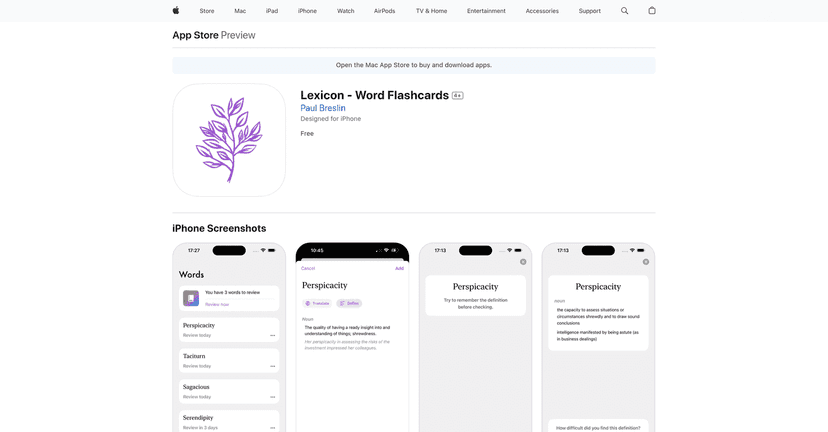
Lexicon – Word Flashcards lets you create flashcards quickly by adding a word, and then it uses GPT technology to generate definitions and translations. The app looks clean, feels responsive, and the whole experience is pretty “tap-and-learn.” After a few sessions, I noticed the spaced repetition part actually does what it’s supposed to: words start showing up right when I’m likely to forget them.

I also appreciate the multi-language angle. It’s not just the usual big names like Spanish or French. You can even pick niche languages, and that’s a big deal if you’re learning something less common or you just like weird-but-fun vocab.

Quick heads-up: the app is great for building vocabulary, but it won’t replace real reading/listening practice. Still, it’s a solid way to make vocabulary feel manageable.

Lexicon

Lexicon Review: Quick Flashcards That Actually Get Used

Lexicon – Word Flashcards is built around one simple idea: when you learn a new word, you should be able to turn it into a flashcard immediately. No complicated setup. No hunting for the “right” deck.

In my testing, I liked how fast it was to add a word, generate a definition, and get a translation. The GPT-powered definitions are the main reason it feels better than basic flashcard apps—sometimes the wording is more helpful than a barebones dictionary entry. That said, it’s still worth paying attention to accuracy. Like any AI-generated content, the meaning can be slightly off depending on context.

The app also uses spaced repetition, and I noticed that it keeps the workload realistic. Instead of dumping 50 new cards on you, it brings back the ones you’re likely to forget. If you stick with it for even 5–10 minutes a day, the review sessions start feeling “automatic.”

What you get when you start

When I opened Lexicon, the flow felt straightforward: you add a word, the app generates the flashcard content, and then you review. It’s the kind of setup that works for beginners, but it’s also handy if you’re intermediate and you want a quick way to capture vocabulary from books, podcasts, or even conversations.

Key features (the stuff you’ll actually notice)

Here’s what stood out to me while using Lexicon:

  • Automatic flashcard creation: type or add a word and get definitions and translations without starting from scratch.
  • Multi-language support: the app supports 30+ languages. You’ll see common ones like Spanish and French, but it also covers options that most vocabulary apps ignore. (Yes, Klingon is in there—if that doesn’t make you smile, I don’t know what will.)
  • Spaced repetition system: the review scheduling helps retention. In practice, it means fewer “random” sessions and more targeted recall.
  • AI-powered definitions: you get context-aware definitions rather than just a single-line meaning.
  • Customizable study: you can personalize your sessions and track progress with stats, so you’re not guessing whether it’s working.
  • User-friendly interface: everything is easy to find and the flashcard workflow stays smooth.

A quick real-world example

Let’s say you’re reading something and you see a word you don’t know. Instead of copying it into notes and forgetting about it, you can add it to Lexicon right away. Later, during review, you’re seeing that word again with a definition and translation—so it sticks faster than “I saw it once.”

That’s the real value here: speed + repetition.

Key Features

  • Instant flashcards: add a word and the app generates the card content quickly.
  • GPT-generated definitions and translations: helps you understand meaning, not just memorize a mapping.
  • 30+ language options: useful if you’re learning multiple languages or want something less mainstream.
  • Spaced repetition: improves recall over time and reduces wasted studying.
  • Progress tracking: you can keep an eye on your learning momentum.
  • Clean, simple UI: it’s not cluttered, so you’re more likely to open it consistently.

Pros and Cons

Pros

  • Strong language coverage: both popular and niche languages are supported.
  • AI definitions are actually useful: they often read like a helpful explanation, not just a direct translation.
  • Spaced repetition works: review sessions feel purposeful, not random.
  • Fast to start: the “add a word, get a card” workflow is smooth.
  • Good for consistency: it’s easy to do short daily sessions.

Cons

  • AI accuracy can vary: for tricky words or specific contexts, you may want to double-check the definition/translation.
  • Not a full learning program: it’s best for vocabulary building, not grammar, speaking, or listening practice.
  • Less-common languages may be limited: even with broad support, the depth of content can be uneven.
  • Some people prefer “classic” studying: if you hate flashcards or want traditional textbook-style learning, this might not feel like your thing.

Pricing Plans

One reason I didn’t hesitate to try Lexicon is that it offers a generous free version. In my experience, that matters because you can test whether the spaced repetition and AI definitions fit your style before committing.

I’d recommend starting with the free plan and adding a few words from something you’re already learning (like a short article or a lesson). If you like the review rhythm after a few days, then you can decide if you want to upgrade.

Wrap up

If you want a simple way to build vocabulary without spending ages setting things up, Lexicon – Word Flashcards is a pretty strong option. The instant flashcards, GPT-powered definitions, and spaced repetition are the combination that makes it feel like it’s actually helping—not just “collecting words.”

Just keep in mind: AI can be great, but it’s not infallible. If a word feels important, I’d still verify it with a dictionary or a real sentence example. Do that, and this app becomes a really practical study companion.

Promote Lexicon

Stefan

Stefan

Stefan is the founder of Automateed. A content creator at heart, swimming through SAAS waters, and trying to make new AI apps available to fellow entrepreneurs.

Related Posts

Ilus AI Review – Elevate Your Illustrations Effortlessly

Ilus AI Review – Elevate Your Illustrations Effortlessly

unique illustrations for your projects

Stefan
Synexa Review – Elevate Your AI Deployment Effortlessly

Synexa Review – Elevate Your AI Deployment Effortlessly

one line of code harness powerful AI capabilities

Stefan
Chatty Review – Elevate Your Writing Skills Effortlessly

Chatty Review – Elevate Your Writing Skills Effortlessly

innovative tool integrating writing assistance learning

Stefan

Create Your AI Book in 10 Minutes