
Liner Write
Liner Write offers source-backed drafting but can be complex for new users. Here's my honest review after testing its pros and cons.
Read review
OMGiftv review: features, pricing, pros, cons, use cases, and alternatives to consider before trying this AI tool.

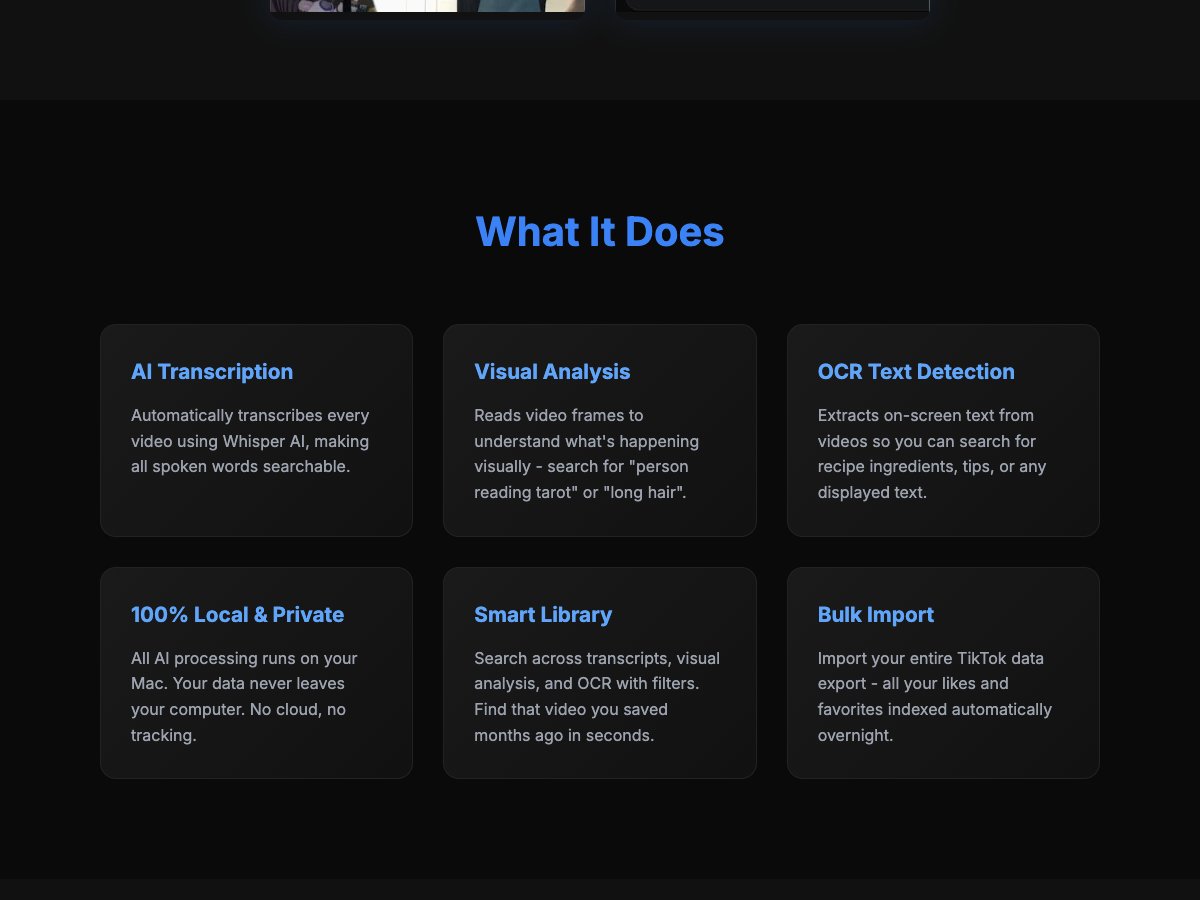
OMGiftv is a Mac-based video search and organization tool designed for creators, researchers, and avid viewers who want to reclaim their video libraries. It combines AI-driven transcription (via Whisper), visual analysis to identify on-screen actions, and OCR to extract displayed text, all processed locally on the user’s Mac. The result is a private, searchable index across transcripts, visuals, and on-screen text, enabling users to locate specific moments—like a recipe step, a tarot-reading scene, or a highlighted tip—without cloud-based data transfer. A Smart Library ties together multiple search modalities with filters, while Bulk Import supports indexing an entire TikTok data export, making it ideal for users who want to consolidate and quickly retrieve forgotten clips. The 100% local processing is a strong differentiator for privacy-conscious users who don’t want their data leaving their device. The product presents a clear value proposition for freelancers, educators, content creators, and social media enthusiasts who accumulate large video libraries and need fast, precise search across multiple data signals.
Automatically transcribes every video using Whisper AI, making all spoken words searchable.
Reads video frames to understand what's happening visually - search for "person reading tarot" or "long hair".
Extracts on-screen text from videos so you can search for recipe ingredients, tips, or any displayed text.
All AI processing runs on your Mac. Your data never leaves your computer. No cloud, no tracking.
Search across transcripts, visual analysis, and OCR with filters. Find that video you saved months ago in seconds.
Import your entire TikTok data export - all your likes and favorites indexed automatically overnight.
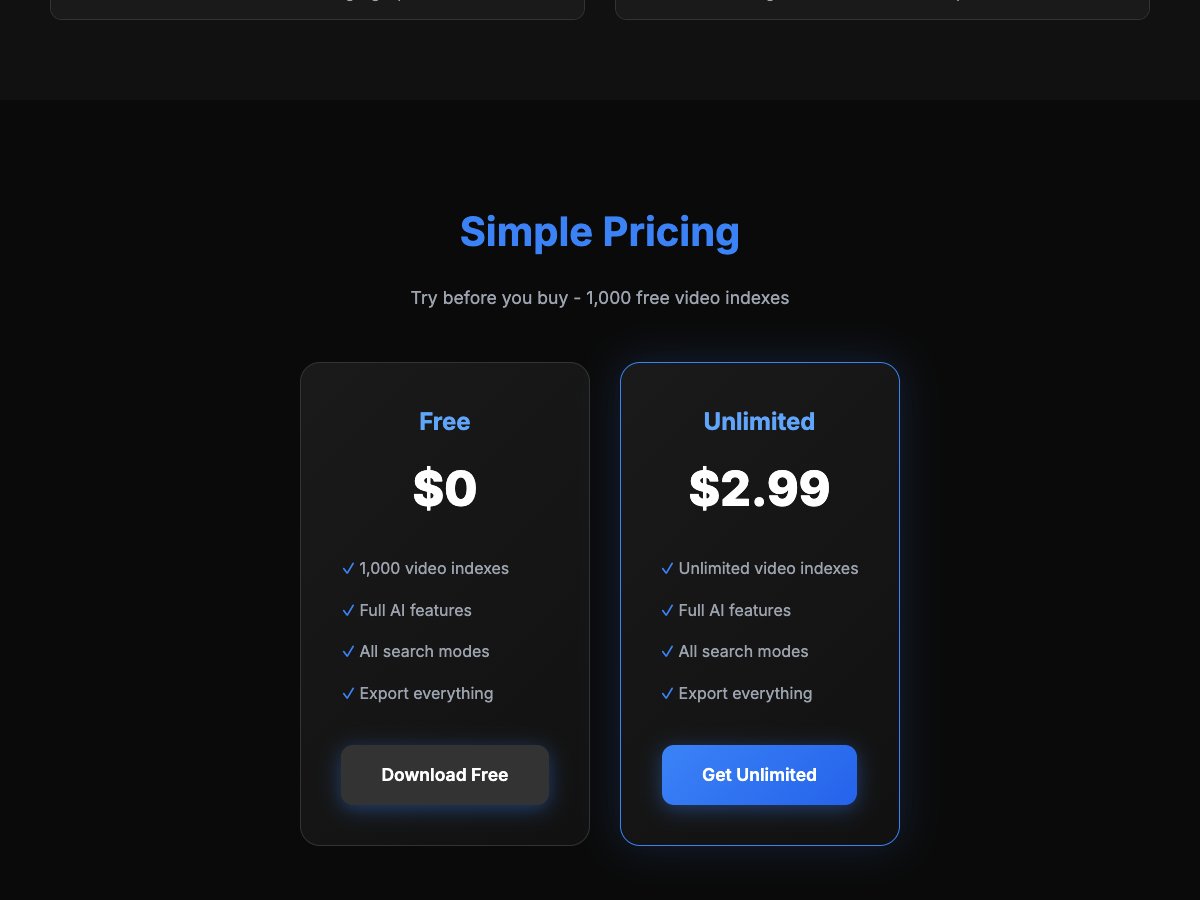
Freemium model with a free tier offering 1,000 video indexes and full AI features; an unlimited indexing option is available at a listed price (pricing may be tiered or time-limited). Expect a transition from free to paid for large libraries.
Local, private AI processing that never leaves the Mac. Multi-signal search: transcripts, visuals, and OCR in one pass. Bulk import support for TikTok data exports. Smart Library with filters speeds up long-term video retrieval. Free tier available with 1,000 video indexes.
Mac-only solution may exclude Windows/Linux users. Pricing clarity for the unlimited plan is limited; potential one-time vs. recurring charges unclear. No cloud-based collaboration or sharing features highlighted.
Retrieving a specific spoken quote or instruction across a large video archive. Finding moments in videos by visual cues (e.g., ‘person reading tarot’ or ‘long hair’). Extracting and searching on-screen text from videos for recipes, tips, or captions. Organizing personal video libraries for educators or content creators. Indexing entire TikTok exports to locate saved videos quickly. Private research or media curation where data privacy is paramount.
Freemium model with a free tier offering 1,000 video indexes and full AI features; an unlimited indexing option is available at a listed price (pricing may be tiered or time-limited). Expect a transition from free to paid for large libraries.
Some alternatives to OMGiftv include: Descript, Otter.ai, Trint, Sonix, Fireflies.ai.
Continue with tools in the same category, including screenshots and published Automateed reviews.
Liner Write offers source-backed drafting but can be complex for new users. Here's my honest review after testing its pros and cons.
Read review
BlocPad offers real-time collaboration and integrated docs, but limited enterprise features. Read my honest review to see if it fits your team.
Read review
Xalvion review: Great for AI model selection but falls short on verified features and pricing. Here's my honest take after testing.
Read review
Auvylo offers personalized AI reflection from charts but lacks clear pricing. Good for astrology enthusiasts wanting deeper insights; limited...
Read review
Astropad Workbench review: Great for monitoring AI agents and headless Macs but limited free tier. Here's my honest assessment after testing.
Read review
Oasis Browser for Mac review: Great for privacy and AI workflows but still in beta. Here's my honest opinion after testing this promising new browser.
Read review
YourToolsKit offers free, privacy-focused browser tools for quick tasks but lacks advanced features. Here's my honest review after testing.
Read review
Praxis by Emergn review: Great for validating product ideas and coaching but expensive for some. Here's my honest take after testing the platform.
Read reviewAs featured on

Add this badge to your site