LIFETIME DEAL — LIMITED TIME
Get Lifetime AccessLimited-time — price increases soon ⏳
AI Tools

BlocPad - Project & Team Workspace Review (2026): Honest Take After Testing

11 min read
#Ai tool

Table of Contents

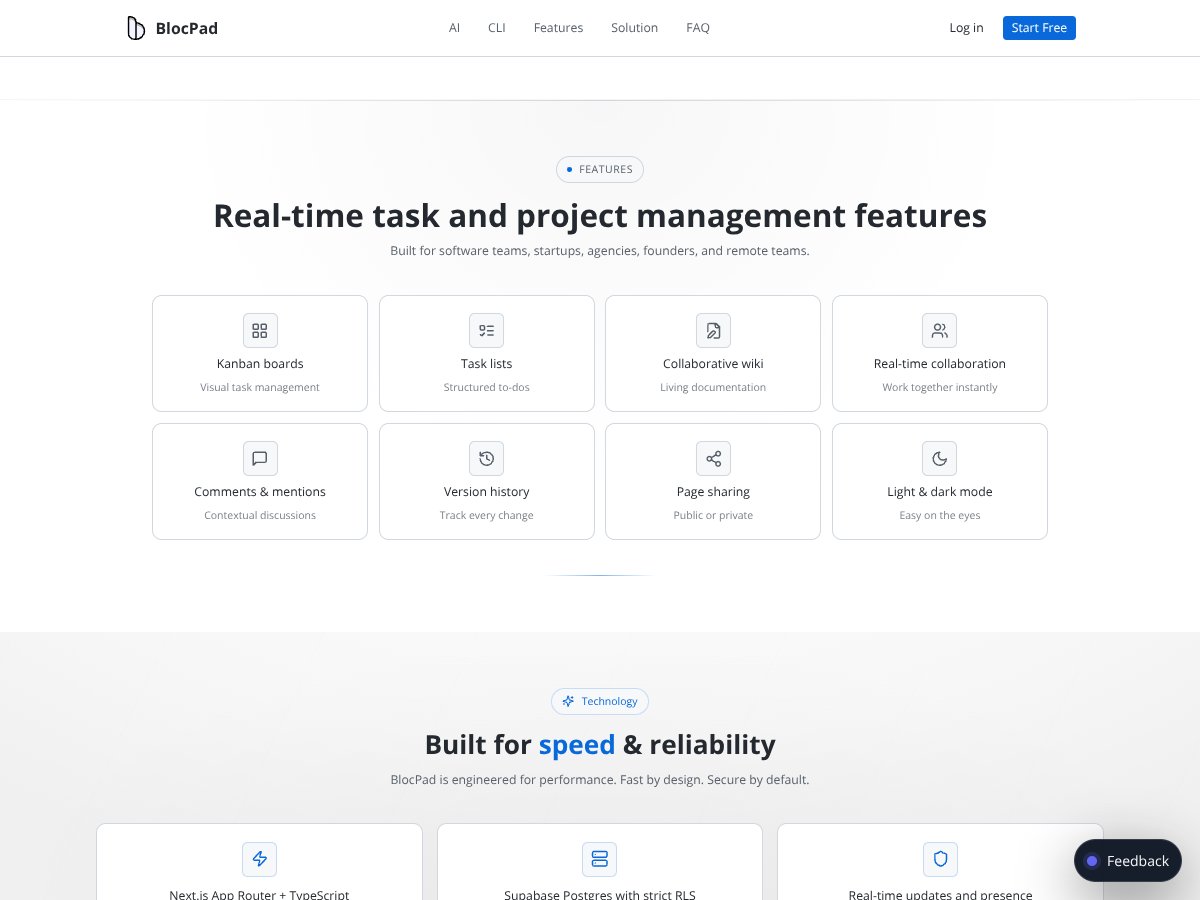
BlocPad - Project & Team Workspace screenshot

What Is BlocPad - Project & Team Workspace?

Honestly, when I first heard about BlocPad, I was a bit skeptical. The idea of having a single workspace that combines tasks, documentation, and collaboration in real-time sounds appealing—especially for teams drowning in a sea of different tools. But I also wondered: does it really deliver on that promise, or is it just another all-in-one that tries to do too much and ends up underwhelming?

In plain English, BlocPad is a digital workspace designed for teams to plan projects, track tasks, write down notes or documents, and chat or collaborate—all within one interface. It’s trying to address the common problem teams face: juggling multiple tools like Jira for tasks, Notion for docs, and Slack for chat, which often leads to context loss, delays, or miscommunication.

From what I could find, BlocPad isn’t backed by a huge known company or a big-name startup; it seems like a smaller team trying to carve out their niche. The founders or team behind it aren’t prominently highlighted, which is a bit of a heads-up that this might still be a work in progress rather than a mature product. Still, the product’s positioning as a fast, integrated workspace is promising.

My initial impression was that it’s as advertised—an attempt to bring together the core aspects of project management in one place with real-time updates. However, I want to be upfront: it’s not a finished, polished platform with all bells and whistles. It feels like it’s still refining its features, and some things are a bit rough around the edges. That said, it’s certainly worth exploring if you’re tired of switching between tools and want a more consolidated space.

What I need to clarify upfront is that BlocPad doesn’t seem to have a comprehensive feature list published yet, and it’s not clear how deep certain features are. There’s no detailed mention of integrations, automation, or enterprise controls, so don’t expect a fully fleshed-out enterprise solution right out of the box. Think of it more as an early-stage workspace that’s promising, but not necessarily ready to replace your existing tools wholesale.

BlocPad - Project & Team Workspace Pricing: Is It Worth It?

BlocPad - Project & Team Workspace interface
BlocPad - Project & Team Workspace in action
Plan Price What You Get My Take
Free Tier Free Unlimited projects, tasks, docs, real-time collaboration, basic notifications Great for small teams or trying out the core features without commitment. However, details on limits—like team size or storage—are unclear, so monitor usage to avoid surprises.
Paid Plans Not publicly specified Potentially more advanced features, increased team size, enterprise controls Since the pricing isn't publicly detailed, it’s hard to say if it’s fair. Expect to contact sales or check the site for custom quotes. Be cautious of possible costs if your team scales or if certain features are paid add-ons.

Here's the thing about the pricing: the product markets itself as free to start and suitable for small teams, but without clear, transparent paid tiers, it's tough to assess value upfront. If they offer tiered plans, I’d expect limits on team members, storage, or advanced controls to be part of the paid options. Fair warning: without concrete numbers, it’s wise to clarify these details before committing long-term or scaling your team.

Overall, compared to competitors like Notion or ClickUp, which have transparent tiered pricing, BlocPad's approach requires some due diligence. If you’re a larger team or need enterprise features, make sure to get a detailed quote and understand exactly what’s included.

The Good and The Bad

What I Liked

  • Unified Workspace: Combining tasks, docs, and collaboration reduces context switching, which can boost productivity—especially for small teams or startups.
  • Real-Time Collaboration: Instant updates with Supabase Realtime means your team sees changes live, avoiding frustrating refreshes or sync delays.
  • Built-in Wiki & Documentation: The Notion-style editor with version history keeps project knowledge organized and accessible without juggling multiple apps.
  • AI Assistant Integration: The project-aware AI that searches workspace data and answers questions can save time and help new team members onboard faster.
  • No Credit Card Needed to Start: Lower barrier to trying out the product, which is a plus for teams hesitant to commit upfront.
  • Flexible Views: Kanban boards and list views are intuitive and can be customized per project, accommodating different workflows.

What Could Be Better

  • Limited Public Documentation: The lack of a detailed feature list, integrations, or pricing makes it hard to evaluate whether it fits your needs, especially for larger teams or complex workflows.
  • Feature Depth & Maturity: As a relatively new product, it might lack the polish, integrations, and controls that more established tools offer—potentially leading to growing pains.
  • No Clear Pricing Tiers: Without transparent plans, you could face unexpected costs or find the product isn't scalable for your team’s size or needs.
  • Limited User Feedback & Reviews: Sparse independent reviews make it hard to gauge reliability or user satisfaction over time.
  • Missing Advanced Integrations: Unlike competitors, it’s unclear if BlocPad easily syncs with other tools like Slack, Google Drive, or Jira, which could be a dealbreaker for some teams.

Who Is BlocPad - Project & Team Workspace Actually For?

Ideal users are small to mid-sized teams or startups that want an all-in-one workspace without the complexity or rigidity of traditional project management tools. If you’re a product team, marketing department, or remote team that needs to keep tasks, documentation, and communication tightly integrated, BlocPad could be a fit. Especially if you value real-time updates and a modern, low-friction interface.

For example, a SaaS startup with 5-20 team members managing product development, marketing campaigns, and customer support might find BlocPad’s combined workspace useful. It streamlines their daily workflows by reducing context switching and keeps everyone aligned on tasks and decisions inside a single platform.

However, if your workflow relies heavily on advanced integrations with existing tools, or you require strict enterprise controls, BlocPad might not yet be mature enough. It’s best suited for teams that prioritize simplicity, speed, and live collaboration over granular permissions or extensive third-party connections.

Who Should Look Elsewhere

If you need a highly customizable, enterprise-grade project management system with extensive integrations, detailed permissions, and proven scalability, consider tools like Jira, Asana, or monday.com instead. BlocPad’s current lack of transparency around plans and integrations could be a problem for larger organizations or those with complex workflows.

Fair warning: if you’re a solo freelancer or a very small team just starting out, BlocPad’s free tier might be enough. But if you grow beyond that, be prepared to evaluate whether the paid options meet your needs or if you’ll need a more established platform.

Additionally, teams that require specific compliance standards, advanced security controls, or extensive API access should probably look elsewhere. The platform’s newness means it might not yet support all enterprise features or integrations required for highly regulated industries.

How BlocPad - Project & Team Workspace Stacks Up Against Alternatives

Notion

  • What it does differently: Notion is a highly customizable all-in-one workspace that emphasizes templates, extensive integrations, and a flexible structure for notes, docs, and task management. It’s more mature with a vast user community and a wide array of third-party plugins.
  • Price comparison: Notion offers a free plan with limited storage and collaboration features; paid plans start around $8/user/month, which unlocks more storage and admin controls.
  • Choose this if... you need a highly adaptable workspace with many integrations and extensive template options, especially if your team values custom workflows.
  • Stick with BlocPad - Project & Team Workspace if... you prefer an integrated, fast workspace focused on real-time updates with built-in wiki and task sync, without the complexity of heavy customization.

ClickUp

  • What it does differently: ClickUp is known for its deep feature set, including goal tracking, time tracking, multiple views (list, Gantt, calendar), and automation. It’s geared towards detailed project control and extensive integrations.
  • Price comparison: Free plan available with core features; paid plans start at around $5/user/month, offering more automation, storage, and advanced features.
  • Choose this if... you need granular project controls, automation, and integrations for complex workflows.
  • Stick with BlocPad - Project & Team Workspace if... you want a simpler, more streamlined workspace that keeps everything in one fast, real-time environment without the learning curve.

Asana

  • What it does differently: Asana emphasizes task workflows with visual project timelines, automation, and team communication features. It’s very task-centric and integrates well with many tools.
  • Price comparison: Free tier available for small teams; paid plans start at about $13.50/user/month for more advanced features.
  • Choose this if... your focus is on task workflows, automation, and a straightforward interface for project tracking.
  • Stick with BlocPad - Project & Team Workspace if... you want all your project context and docs attached directly to tasks, rather than separate task lists.

monday.com

  • What it does differently: monday.com offers highly visual dashboards and automation tailored for various workflows, from sales to software development, with a focus on visual project tracking.
  • Price comparison: Starts at around $8/seat/month on the basic plan; more advanced automation and integrations are in higher tiers.
  • Choose this if... you need customizable dashboards and automation for complex, multi-department workflows.
  • Stick with BlocPad - Project & Team Workspace if... you prefer a faster, integrated workspace that combines tasks, docs, and collaboration without extensive setup.

Final Verdict: Should You Try BlocPad - Project & Team Workspace?

Overall, I’d give BlocPad a solid 7/10. It’s a promising tool for teams looking to ditch the chaos of juggling multiple apps, especially if real-time collaboration and integrated docs matter most. The interface is fast, and the workspace feels modern and responsive, which is a big plus. However, since it’s still relatively new, I’d be cautious about long-term reliability and advanced features, especially for larger teams or complex workflows.

The one person who should definitely give this a shot is a small to mid-sized team that prioritizes quick setup, real-time updates, and keeping project context together. If you’re tired of switching between tools and want everything in one place, BlocPad could be a game-changer.

On the flip side, if you need deep automation, extensive integrations, or enterprise-grade controls, you might find BlocPad lacking. In those cases, platforms like ClickUp or Notion might be better suited.

The free tier is worth exploring, especially since it requires no credit card and offers a good way to test its core features. Upgrading might be worthwhile if you find the collaboration speed and integrated docs boost your team’s productivity. Personally, I’d recommend trying it out before committing to a paid plan, just to see if it fits your workflow.

If your team values simplicity, fast updates, and all-in-one project context, give BlocPad a shot. If you need more advanced project controls or are used to a more mature ecosystem, consider other options first.

Common Questions About BlocPad - Project & Team Workspace

Is BlocPad - Project & Team Workspace worth the money?

Since it’s free to start and still evolving, I’d say it’s worth trying to see if it fits your team’s needs. It’s not a premium enterprise tool yet, so consider it more of a promising beta for small teams.

Is there a free version?

Yes, BlocPad offers a free tier that is suitable for small teams or individual use. The free plan includes core features like real-time collaboration, kanban boards, and wiki docs, but may have limits on storage or team size.

How does it compare to Notion?

BlocPad is more focused on real-time collaboration and integrated task + wiki management, whereas Notion offers broader customization and templates. Notion is more mature, but BlocPad’s live updates and speed are advantages for quick team workflows.

Can I get a refund?

Since BlocPad’s pricing details are limited and it’s free to start, refunds aren’t typically relevant unless you upgrade to a paid plan. Check their terms once paid plans are available.

Is it suitable for enterprise use?

Currently, BlocPad appears more suited for small to mid-sized teams. Enterprise features like advanced permissions and integrations aren’t clearly documented yet, so larger organizations may want more mature options for now.

Does it integrate with other tools?

Based on available info, BlocPad focuses on an all-in-one experience with built-in collaboration, but specific third-party integrations are not widely documented yet. It’s designed to reduce the need for external tools.

Is data security a concern?

As a newer product, detailed security info isn’t readily available. For sensitive projects, review BlocPad’s privacy policy and data handling practices before relying on it for confidential work.

As featured on

Automateed

Add this badge to your site

Stefan

Stefan

Stefan is the founder of Automateed. A content creator at heart, swimming through SAAS waters, and trying to make new AI apps available to fellow entrepreneurs.

Related Posts

best practices for honest affiliate reviews featured image

Best Practices for Honest Affiliate Reviews in 2026

Discover proven strategies for creating honest, transparent affiliate reviews that build trust, boost conversions, and ensure compliance in 2026. Learn more now!

Stefan
Verdent Review – Honest Insights on Verdent

Verdent Review – Honest Insights on Verdent

reliable tool to boost your gardening skills

Stefan
FaceSymmetryTest Review – Honest Look at Free AI Tool

FaceSymmetryTest Review – Honest Look at Free AI Tool

FaceSymmetryTest is a fun online tool

Stefan
Free AI Detector Review – Your Honest Look at AI Detection

Free AI Detector Review – Your Honest Look at AI Detection

free AI detector is a handy tool

Stefan
simple project management systems for creatives featured image

Simple Project Management Systems for Creatives in 2026

Discover the best simple project management tools for creatives in 2026. Learn features, tips, and expert insights to streamline your workflows today.

Stefan
project management tools for creators featured image

Best Production Tracking Tools for Creative Teams (2026)

The 2026 guide to production tracking for creative teams—proofing, Adobe CC integrations, pricing, AI, and picks by use case to ship faster.

Stefan
Your AI book in 10 minutes150+ pages · cover · publish-ready