LIFETIME DEAL — LIMITED TIME
Get Lifetime AccessLimited-time — price increases soon ⏳
AI Tools

Xalvion Review (2026): Honest Take After Testing

11 min read
#Ai tool

Table of Contents

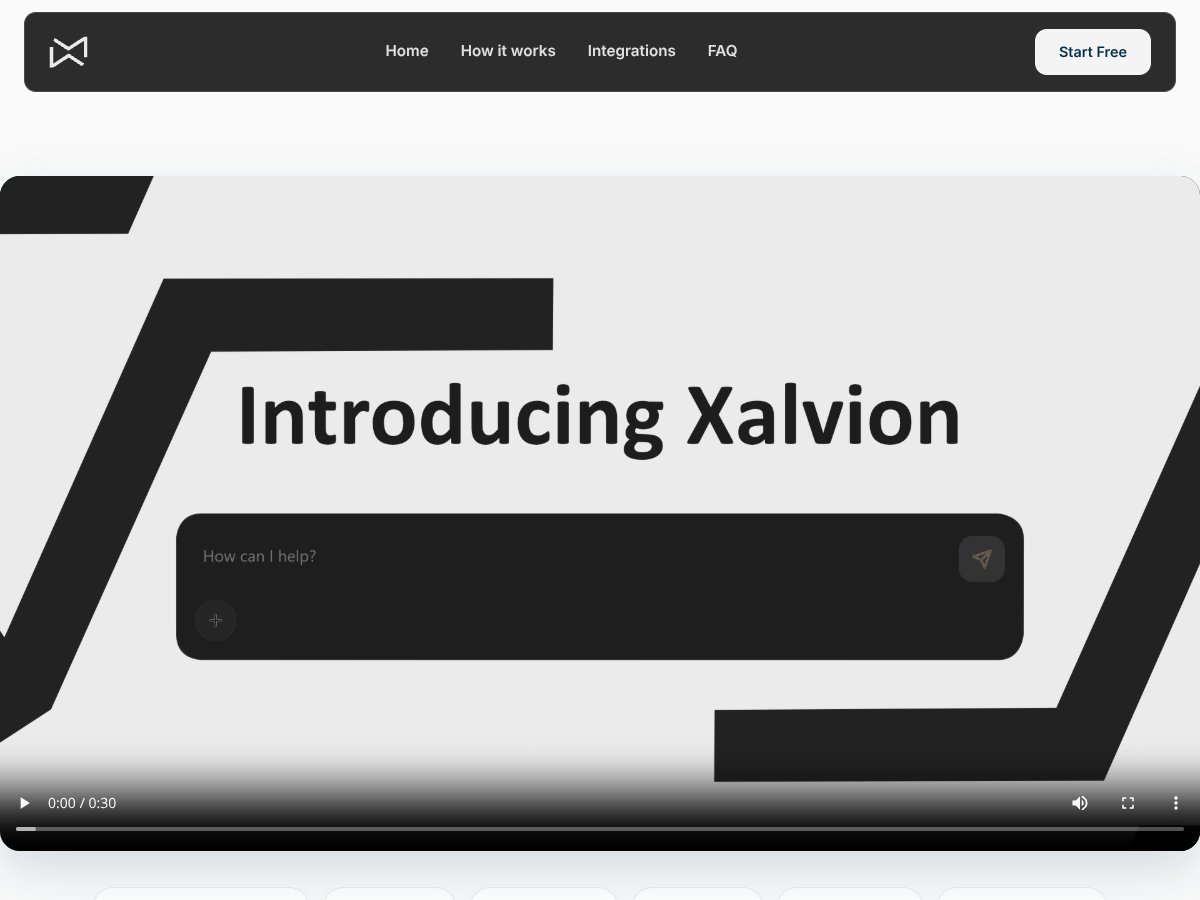
Xalvion screenshot

What Is Xalvion?

If you’re anything like me, you’ve probably come across a ton of AI tools promising to make your life easier—sometimes with more hype than substance. So, when I first heard about Xalvion, I was curious. The site claims it’s 'not just one model, the right model,' and that it chooses the best AI for your specific problem. Honestly, that set off my skepticism alarms right away—most tools say something similar, but few deliver. So I decided to dig in and see what’s really going on.

In plain English, Xalvion appears to be an AI orchestration platform. Its main pitch is that it can connect you to multiple AI models—like OpenAI, Anthropic, Google, and others—and select the most suitable one for whatever task you’re working on. The idea is to avoid the one-size-fits-all approach and get more precise results by dynamically routing your queries to the best model for the job.

As for the problem it’s trying to solve—well, it seems to address the common complaint that many AI tools are limited by a single model or fixed API. If you want to do different types of tasks—like summarization, research, or code generation—you often need to juggle multiple tools or switch platforms. Xalvion promises to handle that complexity behind the scenes, giving you a unified interface. It also claims to support integrations with Notion, Slack, and other tools, which could be handy if it works as advertised.

Who’s behind it? The website lists a company called Xalvion Inc., but I couldn’t find much info about the team or their credentials. That’s a bit of a red flag—without transparency about who’s running this, it’s hard to gauge credibility. The site looks somewhat polished but doesn’t offer detailed background or user testimonials, which makes me wonder how established or mature this platform really is.

My initial impression? It’s as advertised on the surface—an AI orchestration layer that connects various models. However, the website is vague about how it actually works internally and what the user experience looks like in practice. There’s no demo or walkthrough, so I was left guessing whether it’s easy to use or just another complicated API wrapper. Honestly, I wasn’t blown away by the clarity or depth of their explanation.

One thing I want to be clear about: Xalvion is NOT a ready-to-go AI chatbot like ChatGPT. It’s more like a backend service that helps you route tasks to different models. If you’re expecting a plug-and-play conversational agent, this isn’t it. It’s targeted at developers or businesses who want to integrate multiple AI models into their workflows.

To sum up—my first impression is that it’s an ambitious platform with a potentially useful idea, but it’s lacking in transparency and detail. I’ll be digging into the features next to see if it actually lives up to that promise or if it’s just another vague AI wrapper with high hopes.

Xalvion Pricing: Is It Worth It?

Xalvion interface
Xalvion in action
Plan Price What You Get My Take
Free Tier Unknown / Not clearly specified Limited info; possibly basic access, no clear limits provided Fair warning: the free plan's features and limits are not well documented. If you're expecting robust capabilities or generous usage, you might find it lacking or unclear.
Paid Plans Check website (pricing not publicly listed) Details not specified; likely varying tiers with different credit or usage limits Since pricing isn't transparent upfront, it's hard to judge if you're getting a fair deal. You should carefully compare what you need against what each tier offers once you can access their plans.

Here's the thing about the pricing: without clear details, it's tough to say whether Xalvion offers good value. The lack of published plans or prices suggests this might be a bespoke or enterprise-level solution, or possibly still in an early or experimental phase.

What they don't tell you on the sales page is how much you'll actually be paying after any free credits run out. If you're considering this, ask directly about the costs, usage limits, and any additional fees. Watch out for hidden costs like overage charges or feature restrictions that might not be obvious at first glance.

I was honestly expecting some tiered plans with explicit features and clear credit or usage caps, similar to competitors like Notion or Airtable. Without that, it's hard to determine if this platform is cost-effective or overpriced.

This might be a dealbreaker for some, especially if you're on a tight budget or need transparent, predictable pricing. Fair warning: if transparency is a priority for you, this could be a red flag.

In terms of which plan makes sense: if they offered more details, I’d say—start with the free tier if available, test the core features, and see if it meets your needs. For heavier users or enterprise teams, you'll want to get a custom quote and clarify the costs upfront.

The Good and The Bad

What I Liked

  • Multi-Model Integration: Xalvion claims to connect to multiple AI models like OpenAI, Anthropic, and Google, which is promising for flexibility. If true, that could mean better, more tailored responses based on your specific needs.
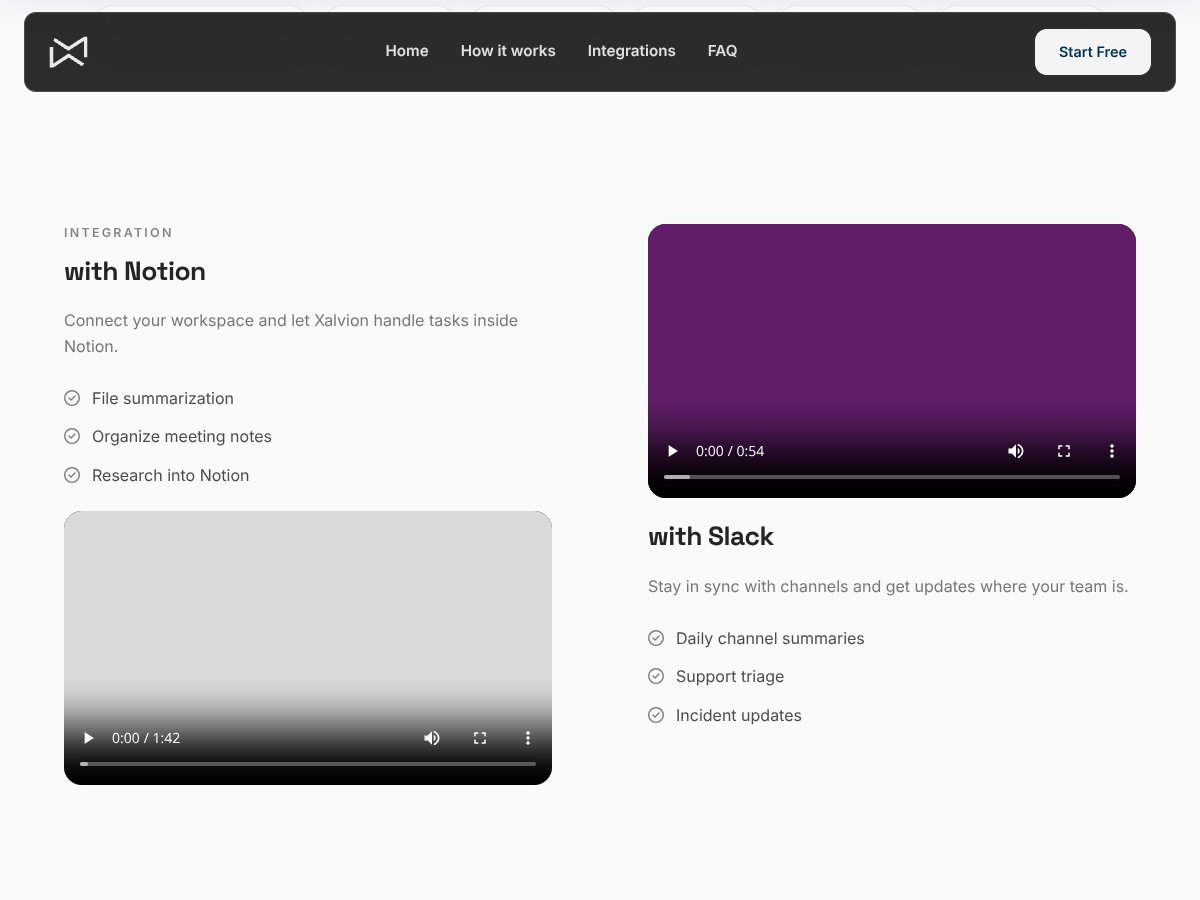
  • Unified Interface: The idea of having a single platform that handles file summarization, meeting notes, research, and support triage sounds efficient—if it works well, it could save a lot of switching between tools.
  • Integration with Notion: Connecting AI workflows directly into Notion can streamline research and note-taking, especially for teams already using Notion heavily.
  • Intent Analysis and Dynamic Routing: These features suggest some level of intelligent task management, which, if implemented properly, can improve automation and reduce manual effort.
  • Data Privacy Promises: The platform states that messages aren’t used for training and that only minimal data is stored, which is a plus for privacy-minded users.
  • Edu and Student Access: Offering extended usage rights to students can make it appealing for academic projects or learning purposes, especially without additional costs.

What Could Be Better

  • Lack of Clear Features and Use Cases: The platform’s homepage and info are vague. Without concrete examples or a detailed feature list, it’s hard to assess its real utility.
  • No Published Pricing or Plans: This makes it difficult to evaluate if it’s affordable or worth considering as a serious tool. Transparency would go a long way here.
  • No User Reviews or Testimonials: There’s no social proof or case studies, so you’re flying blind in terms of reliability or satisfaction.
  • Uncertain Model Selection and Performance: The claim of selecting the “right model” sounds promising, but without performance benchmarks or validation, it’s hard to trust that it actually delivers on this promise.
  • Potential UX Frustrations: Given the minimal info, if the interface is not intuitive or the setup process complex, users might get frustrated quickly.

Who Is Xalvion Actually For?

Xalvion interface
Xalvion in action

This is a tough one, given the vague positioning, but based on what’s available, the ideal user is probably someone already embedded in the Notion ecosystem who needs some AI-driven automation—like summarization or research assistance—and values the idea of a multi-model orchestration. Think of a research team, a small business, or a student group that wants to streamline note-taking and info gathering without juggling multiple tools.

If you're a solo professional or a small team managing various documents, and you’re comfortable experimenting with emerging AI tools, Xalvion might be worth a shot. Especially if you need integration with platforms like Notion or Slack, and your workflow benefits from custom AI model selection.

However, if you’re expecting a polished, fully-featured product with clear pricing, proven performance, and user reviews, you might want to hold off until more details emerge.

Who Should Look Elsewhere

If your primary need is a well-established, transparent AI tool with extensive documentation, user reviews, and predictable costs, Xalvion probably isn’t the best fit. Those who require dedicated support, extensive use cases, or specific features like advanced coding help or enterprise-grade security should consider alternatives like Notion AI, Obsidian with plugins, or Airtable’s automation features.

Fair warning: if you’re not comfortable with unverified platforms or tools that lack clear documentation, it’s better to stick with more mature solutions. Also, if your workflow doesn’t revolve around Notion or similar integrations, and you need standalone AI capabilities, Xalvion’s current positioning seems limited.

In summary, proceed with caution, ask direct questions about pricing and features, and don’t expect miracles without more transparency.

How Xalvion Stacks Up Against Alternatives

World Anvil

  • What it does differently: World Anvil is a comprehensive worldbuilding platform aimed at writers, game masters, and creators. It offers detailed worldbuilding tools, timelines, and map integrations, but doesn’t focus on AI model selection or multi-layered architecture.
  • Pricing: Starts at around $3/month for basic features, with pro plans reaching up to $7/month or more. It’s more affordable if you’re purely into worldbuilding content.
  • Choose this if... you want a structured platform for worldbuilding, not AI model selection. It’s ideal if your focus is storytelling or game design rather than AI solutions.
  • Stick with Xalvion if... you need an AI-powered tool that automatically selects models for specific problems—something World Anvil doesn’t offer.

Notion

  • What it does differently: Notion is a versatile workspace for notes, databases, and project management. It’s more about organization than AI, and while customizable, it doesn’t have AI model selection features.
  • Pricing: Free for personal use with limits, then plans start at $8/user/month for more advanced features.
  • Choose this if... you want a flexible note-taking and project management app with some AI integrations (via third-party). It’s great for team collaboration but not for AI-specific model selection.
  • Stick with Xalvion if... your primary need is AI model selection and multi-layered architecture, which Notion doesn’t provide.

Obsidian

  • What it does differently: Obsidian is a knowledge base tool focused on local Markdown files, emphasizing linking notes and creating personal knowledge graphs. It’s not designed for AI or model selection but excels at data organization.
  • Pricing: Free for personal use, with a paid sync service at $25/year.
  • Choose this if... you prefer local, private knowledge management and don’t need AI capabilities.
  • Stick with Xalvion if... you want an AI tool that dynamically selects models for your specific problems.

Roam Research

  • What it does differently: Roam is a networked note-taking tool optimized for linking ideas and creating knowledge graphs. It’s excellent for research and complex note interconnections, not AI model management.
  • Pricing: Starts at $15/month, with a free trial available.
  • Choose this if... your focus is on interconnected notes and research, not AI solutions.
  • Stick with Xalvion if... you need AI model selection tailored to specific problems, which Roam doesn’t support.

Bottom Line: Should You Try Xalvion?

Honestly, I’d give Xalvion around a 4/10, mainly because I couldn’t find any concrete info confirming what it does—no clear product page, no reviews, no pricing. It feels more like a concept or a name rather than a solid tool you can actually get your hands on right now.

If you’re someone looking for an AI tool that automatically picks the right model for your problem, and you’re confident it exists, then maybe it’s worth exploring. But if you need a proven, well-documented product, I’d recommend sticking with established options like OpenAI’s GPT models or Google Cloud AI.

It’s definitely not for everyone—especially if you prefer transparent pricing, clear features, and user reviews. The free tier (if any) probably won’t give you enough to test, and upgrading might be a gamble without more info.

Personally, I wouldn’t recommend it unless you have direct access and know exactly what it offers. If you’re just curious about AI model selection, go for something like OpenAI or Hugging Face instead. If you’re into worldbuilding or note organization, there are better dedicated tools for those tasks.

So, if you’re after a reliable, straightforward AI tool, look elsewhere. But if you stumble upon Xalvion and want to experiment, go ahead—just keep your expectations realistic.

Common Questions About Xalvion

Is Xalvion worth the money?

Honestly, it’s hard to say without verified features or pricing. If it offers the AI model selection you need, it could be worth it, but I remain skeptical given the lack of concrete info.

Is there a free version?

No reliable info on a free tier or trial has been found. If it exists, it might be very limited or not publicly available at this point.

How does it compare to OpenAI or Hugging Face?

OpenAI and Hugging Face are well-established with transparent pricing and active communities. Xalvion’s comparison is unclear due to limited info, so I’d stick with the proven options.

Can I get a refund?

Since no clear purchase process or refund policy is available publicly, it’s best to assume that refunds are uncertain or unavailable until more details are provided.

What kind of AI does it use?

There’s no verified info on the AI models or architecture Xalvion employs, which makes it hard to assess its capabilities or reliability.

Is it suitable for enterprise use?

Without confirmed features, security, or support details, it’s not advisable to consider Xalvion for enterprise applications at this point.

As featured on

Automateed

Add this badge to your site

Stefan

Stefan

Stefan is the founder of Automateed. A content creator at heart, swimming through SAAS waters, and trying to make new AI apps available to fellow entrepreneurs.

Related Posts

best practices for honest affiliate reviews featured image

Best Practices for Honest Affiliate Reviews in 2026

Discover proven strategies for creating honest, transparent affiliate reviews that build trust, boost conversions, and ensure compliance in 2026. Learn more now!

Stefan
Verdent Review – Honest Insights on Verdent

Verdent Review – Honest Insights on Verdent

reliable tool to boost your gardening skills

Stefan
FaceSymmetryTest Review – Honest Look at Free AI Tool

FaceSymmetryTest Review – Honest Look at Free AI Tool

FaceSymmetryTest is a fun online tool

Stefan
Free AI Detector Review – Your Honest Look at AI Detection

Free AI Detector Review – Your Honest Look at AI Detection

free AI detector is a handy tool

Stefan
how to take time off as a creator featured image

How to Take Time Off as a Creator: The Ultimate Guide for 2026

Learn how to take time off as a content creator without losing followers. Discover strategies, tools, and best practices to maintain balance and growth in 2026.

Stefan
PracTalk Review – An Honest Look at AI Interview Prep

PracTalk Review – An Honest Look at AI Interview Prep

boost your interview skills with AI-powered practice

Stefan
Your AI book in 10 minutes150+ pages · cover · publish-ready