Table of Contents

What Is Luua?
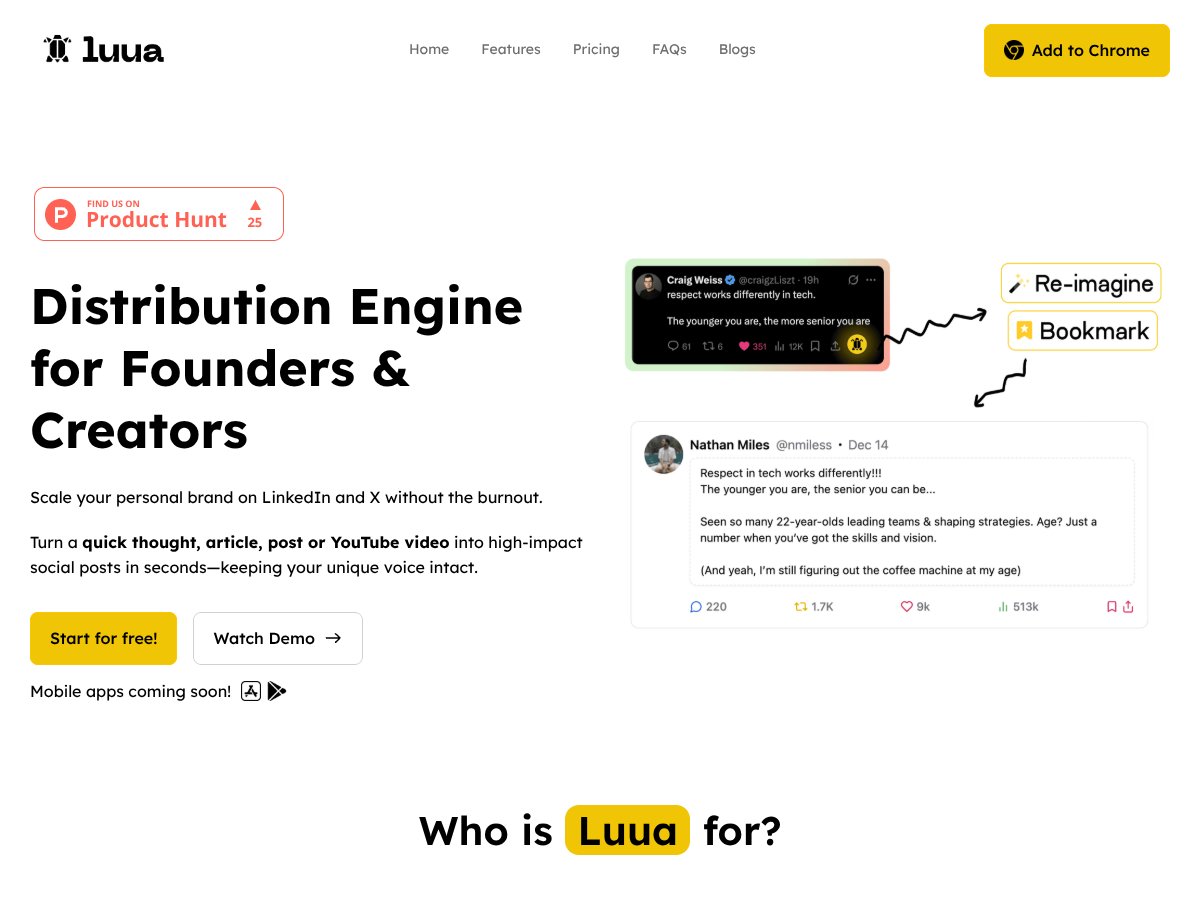
Honestly, when I first heard about Luua, I was a bit skeptical. The idea of turning your bookmarks or notes into social media posts sounds convenient—too convenient, maybe? But I was curious enough to give it a shot, especially since the premise is straightforward: it claims to help busy creators and founders avoid the blank page paralysis by generating posts in your own style, based on content you already have.
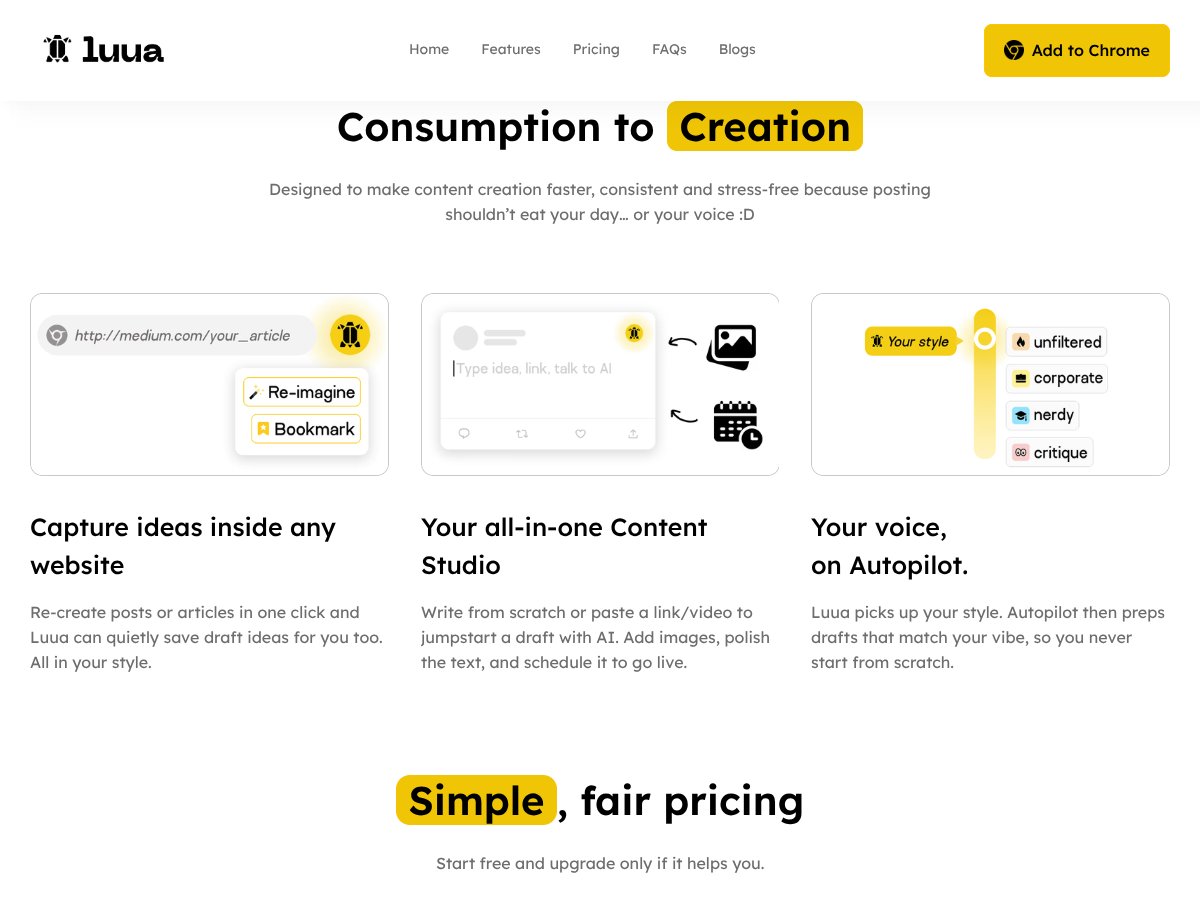
In plain English, Luua is an AI-powered tool that takes links, notes, or snippets from your browser and transforms them into ready-to-publish posts for platforms like LinkedIn and X (Twitter). You can also paste in ideas or existing posts, and it will generate new content, supposedly in your voice. The main problem it’s trying to solve is the time and mental energy it takes to consistently produce social media content—something many creators and founders find draining or just plain hard to keep up with.
As for who’s behind it, Luua seems to be developed by a company called Plurisol Exim Private Limited, but I couldn’t find much more info about the team or the company behind it. That’s not necessarily a red flag, but it does mean I wasn’t able to verify their credentials or track record in AI or content creation. My initial impression was that the tool does exactly what it advertises: it turns your bookmarks and ideas into posts. But I also noticed that the website is pretty sparse on details—no demos, no detailed feature breakdowns, and no testimonials or case studies.
One thing I want to be clear about upfront: Luua isn’t a fully-fledged social media management platform. It’s not going to schedule your posts, analyze engagement, or provide detailed analytics. It’s purely focused on content generation, which is fine if that’s all you want. Also, it’s not claiming to produce perfect, human-like posts every time; it’s more about giving you a good starting point or an idea to work with.
My take? It’s simple but somewhat limited in scope. If you’re looking for an all-in-one social media tool, Luua isn’t it. But if your goal is to quickly convert ideas into posts without spending hours staring at a blank page, it might be worth exploring—just with tempered expectations.
Luua Pricing: Is It Worth It?

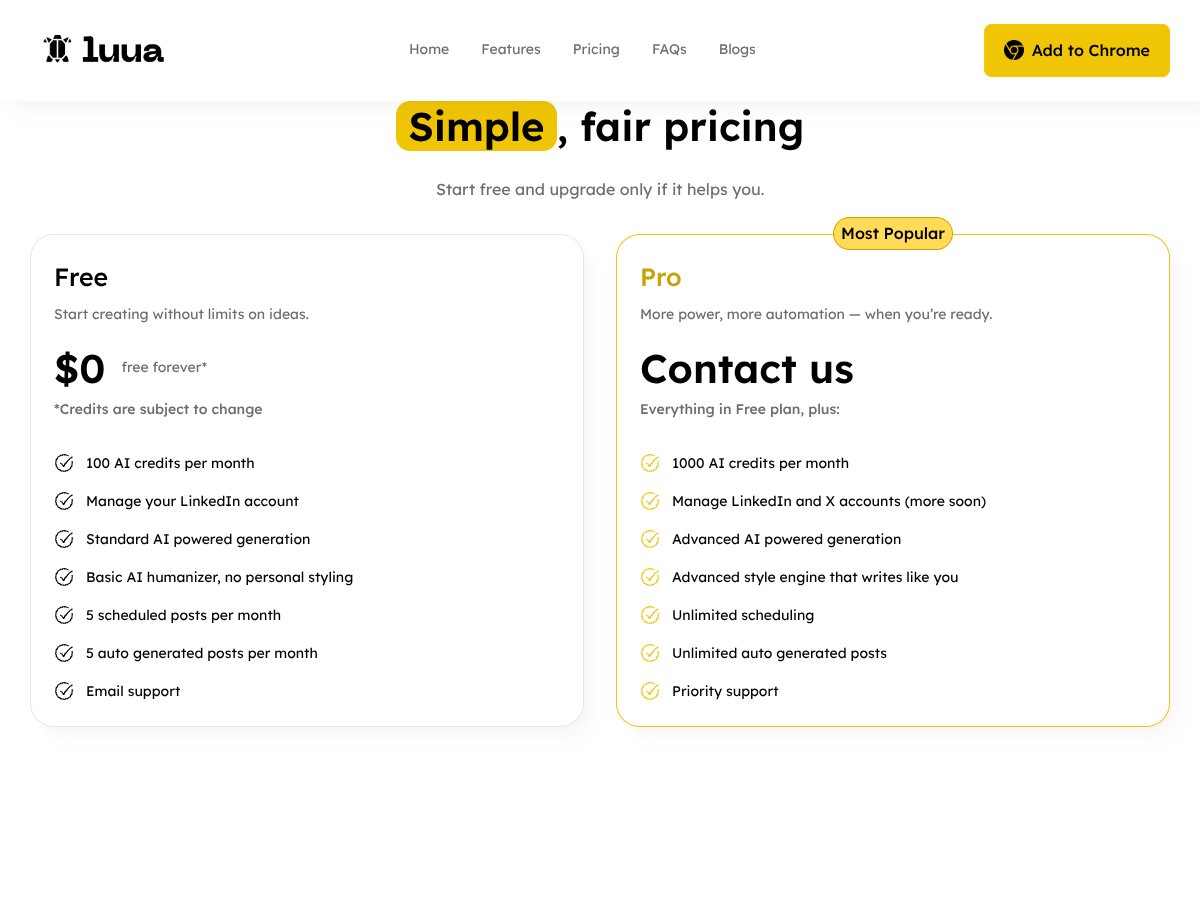
| Plan | Price | What You Get | My Take |
|---|---|---|---|
| Free | $0 forever |
- 100 AI credits/month
- Manage LinkedIn accounts - Basic AI humanizer - 5 scheduled posts/month - 5 auto-generated posts/month - Email support |
Great for testing the waters or trying out basic features without commitment. However, with only 100 credits per month and limited scheduling, it’s best suited for very light users or those just starting out. Think of it as a demo rather than a full-fledged tool. |
| Pro | Pricing on website (likely around $29–$49/month) |
- 1000 AI credits/month
- Manage LinkedIn and X accounts - Advanced AI style engine - Unlimited scheduling - Unlimited auto-generated posts - Priority support |
This plan is geared toward serious creators or small teams who want more automation and flexibility. If you’re regularly posting or managing multiple accounts, the extra credits and features can save you hours each week. Fair warning: the exact price isn’t explicitly listed, so you’ll need to check their site and consider if the value matches your needs. |
Here's the thing about the pricing: while the free tier offers a solid entry point, the jump to the Pro plan is where most users will find the real value—especially if you’re managing multiple platforms or want more automation. What they don't tell you on the sales page is how credits are consumed—if you generate long, detailed posts, you might burn through credits faster than expected. Also, keep in mind that some features, like managing multiple accounts or unlimited scheduling, might be limited or gated behind future updates.
My honest assessment? If you're a casual user or just experimenting, the free plan might suffice. But if content creation is a core part of your workflow, the Pro plan’s extra credits and automation features are probably worth the investment. Fair warning: always double-check the current pricing on their website since details can change, and watch out for any caps or limits on how many posts you can produce per month.
The Good and The Bad
What I Liked
- Seamless Content Sourcing: The browser bookmark integration makes it easy to turn saved links into posts without jumping through hoops. It’s a real time-saver for anyone who collects ideas online.
- Voice Preservation: The AI's ability to mimic your writing style was surprisingly accurate, especially in longer drafts. It helped maintain brand consistency across posts.
- Multi-Platform Support: Managing both LinkedIn and X from one dashboard is convenient, especially for creators trying to diversify their presence.
- Scheduling & Automation: The unlimited scheduling in paid plans means you can batch-create content and keep your channels active without daily manual posting, reducing burnout.
- Basic Free Tier: The free plan is generous enough to test core features without any financial commitment, which is rare in this space.
What Could Be Better
- Lack of Transparency: Pricing details are not fully transparent upfront, which can be frustrating. You need to dig into the website or contact support for exact costs.
- Limited Feature Clarity: The UI and onboarding don’t clearly show what features are available at each tier, making it hard to gauge the full value without trial and error.
- Content Quality Variability: While it generally preserves your style, some generated posts can feel generic or miss nuance, so manual editing is often necessary.
- No Mention of Content Customization: Advanced personalization options, like tone adjustments or topic filters, are not clearly described—potentially limiting control over output.
- No Clear Feedback Loop: It’s unclear how well the AI adapts over time to your style or if you need to retrain it, which could be a dealbreaker for those wanting a truly personalized experience.
Who Is Luua Actually For?

If you're a busy founder, entrepreneur, or content creator juggling multiple social accounts, Luua can be a real time-saver. It’s especially effective if you tend to have lots of ideas but struggle to turn them into consistent posts. For instance, if you’re managing a personal brand on LinkedIn and X and want to keep a steady presence without spending hours writing, Luua’s automation and style preservation are tailored for you. Video creators who want to repurpose long-form content into snackable posts will find it useful, too. Basically, if your workflow involves collecting ideas, links, or notes and transforming them into engaging social content, this tool can streamline your process.
However, it’s not for everyone. If you need highly nuanced, deeply personalized content or have complex branding requirements, the AI might fall short, and manual editing will still be necessary. Also, if you’re not comfortable with some learning curve or want full transparency on pricing and features upfront, you might want to explore other options.
Who Should Look Elsewhere
If your primary goal is to produce highly customized, original content with detailed storytelling or marketing funnels, Luua might not meet those needs. It’s designed more for quick, style-consistent posts rather than long-form, deeply crafted narratives. For marketers or agencies that require granular control, advanced analytics, or integration with broader marketing stacks, tools like Jasper, Copy.ai, or ContentStudio could serve better.
Fair warning: if you’re expecting a fully autonomous content machine that requires zero editing or oversight, Luua’s current capabilities might be disappointing. Its output can sometimes feel a bit generic or superficial, so be prepared to spend time polishing drafts.
In summary, Luua is best for creators who want to save time and keep their voice consistent across platforms, but less ideal if you need high-level customization or enterprise features. Always consider your specific workflow and content needs before committing.
How Luua Stacks Up Against Alternatives
ContentBot
- What it does differently: ContentBot is more of a traditional AI writing assistant that generates content based on prompts you give it, rather than transforming bookmarks into posts. It offers a variety of content types, including blog posts, emails, and social media snippets, but doesn't focus on seamless browser integration.
- Price comparison: ContentBot typically offers plans starting around $19/month, with more advanced features at higher tiers. Luua's pricing isn’t clear, but its value proposition is centered on automation from existing content sources.
- Choose this if... You want a flexible AI writing tool for multiple content formats and don’t mind manually inputting ideas or prompts.
- Stick with Luua if... You prefer transforming your existing bookmarks and notes into social media posts automatically, saving time and maintaining your voice.
Jarvis (Jasper)
- What it does differently: Jasper is a powerhouse for long-form content, with extensive templates and team collaboration features. It’s more suited for larger content projects rather than quick social media posts.
- Price comparison: Starting around $29/month for basic plans, with higher tiers for more words and features. Luua might be cheaper if all you need is quick social posts sourced from bookmarks.
- Choose this if... You want comprehensive content creation tools for blogs, emails, or marketing campaigns and don’t mind setting up templates.
- Stick with Luua if... Your main goal is generating social media posts from existing links and notes quickly without the fluff.
Buffer or Hootsuite
- What it does differently: These are social media scheduling tools, not content generators. They help you plan and publish posts but don’t create content from scratch.
- Price comparison: Plans start around $15/month, mainly for scheduling features. Luua offers content creation and style personalization, which Buffer and Hootsuite lack.
- Choose this if... You already have your content ready and just need a scheduler to automate posting.
- Stick with Luua if... You want a tool that helps you generate content tailored to your style, not just scheduling existing posts.
WriteSonic
- What it does differently: WriteSonic is similar to Jasper, focusing on long-form content and marketing copy, with some social media post options. It doesn’t specifically turn bookmarks into posts in your style.
- Price comparison: Starts at around $15/month, but features vary. Luua’s unique focus on sourcing from bookmarks might make it more efficient for social media content creation.
- Choose this if... You need versatile AI content generation for different formats, especially longer content pieces.
- Stick with Luua if... Your priority is quick, style-consistent social media posts from your saved links and notes.
Bottom Line: Should You Try Luua?
Overall, I’d rate Luua around 7/10. It’s a handy tool if you’re tired of staring at blank screens and want a way to turn your bookmarks into engaging LinkedIn or X posts without much fuss. It’s especially good for those who already have a lot of saved links and want to repurpose them effortlessly. The main downside? The pricing isn’t transparent, and the quality consistency across different post types isn’t crystal clear yet.
If you’re someone who regularly posts on social media and likes the idea of automation that keeps your voice intact, give Luua a shot. The ability to source content directly from your bookmarks is a real time-saver. However, if you need a more comprehensive content creation suite or detailed customization, you might want to look elsewhere.
Personally, I think the free tier (if available) is worth trying to see if it fits your workflow. The paid plans could be worthwhile if you’re committed to streamlining your social media content creation. If you prefer detailed control and customization, you might find Luua a bit limiting, but for straightforward, style-consistent posts, it’s a solid choice.
If you mainly want to automate from your existing content sources and keep your voice consistent, give Luua a shot. If you need more control over content types or advanced features, your money might be better spent on a dedicated content writer or a more flexible AI tool.
Common Questions About Luua
- Is Luua worth the money? It’s worth it if you want to automate social media posts from bookmarks and save time. However, the lack of clear pricing info makes it hard to judge fully.
- Is there a free version? No official free tier info is available, but it’s worth checking if a trial or freemium option exists to test its capabilities.
- How does it compare to competitors? Unlike general AI writers, Luua specializes in turning bookmarks into posts, which can save you time and effort if that’s your main need.
- Can I customize the style? Yes, it claims to adapt to your writing style, but the extent of customization remains to be seen in practice.
- Does it support scheduling? Yes, it offers content scheduling and automation across platforms like LinkedIn and X.
- Is it easy to use? The Chrome extension and bookmark integration suggest a user-friendly experience, especially for quick sourcing.
- Can I get a refund? Refund policies are not explicitly mentioned; check their terms before purchasing.